






Terraform ծրագրակազմ դարձել է ամպային ենթակառուցվածքների կառավարման հիմնական գործիք: Մշակողներն ու գործառնական թիմերը այն օգտագործում են ռեսուրսները որպես կոդ սահմանելու, տեղակայումները ավտոմատացնելու և միջավայրերը համապատասխան պահելու համար: Քանի որ այն բաց կոդով է և ճկուն, Terraform-ը կարևոր դեր է խաղում ինչպես տեռաս iac և տերաֆորմի անվտանգություն.
Սակայն ավտոմատացումը օգնում է միայն այն դեպքում, երբ այն կիրառվում է անվտանգ կերպով: Մեկ սխալը, ինչպիսին է AWS Security Group-ը ամբողջ ինտերնետի համար բացելը, կարող է լուրջ ռիսկեր ստեղծել: Վերջին հետազոտությունները ցույց են տալիս, թե ինչպես են հարձակվողները... թիրախավորել Terraform-ը՝ խախտելու համար IaC աշխատանքի արդյունքումԱհա թե ինչու թիմերը պետք է հետևեն տերաֆորմի լավագույն փորձը սկզբից։ Այս Հաճախակի տրվող հարցերում մենք պատասխանում ենք Terraform-ի վերաբերյալ ամենատարածված հարցերին և ցույց ենք տալիս, թե ինչպես դա անել անվտանգ DevSecOps աշխատանքային հոսքում։
Ի՞նչ է Terraform Software-ը:
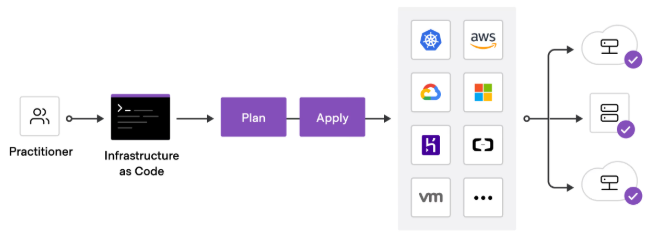
Terraform ծրագրակազմ բաց կոդով ենթակառուցվածք է որպես կոդ (IaC) գործիք, որը ստեղծվել է Hashi CorpԱյն թույլ է տալիս մշակողներին սահմանել ենթակառուցվածքը HCL-ով գրված պարզ կոնֆիգուրացիայի ֆայլերի միջոցով (Hashi Corp Կարգավորման լեզու): Terraform-ի միջոցով դուք կարող եք հայտարարել ռեսուրսների ցանկալի վիճակը, ինչպիսիք են EC2 օրինակները, S3 դույլերը կամ Kubernetes կլաստերները, և գործիքը կարգավորում է դրանք ստեղծելը կամ թարմացնելը՝ համապատասխանեցնելու համար:
Ի տարբերություն ձեռքով ամպային մատակարարման, տեռաս ենթակառուցվածքը որպես ծածկագիր ապահովում է համապատասխանություն տարբեր միջավայրերում: Անվտանգության նկատառումներից ելնելով՝ այն նվազեցնում է մարդկային սխալը՝ կոդավորելով կարգավորումները որպես կոդ: Շատ թիմեր նաև ինտեգրում են տերաֆորմի անվտանգություն սկանավորում է՝ հայտնաբերելու այնպիսի ռիսկեր, ինչպիսիք են չգաղտնագրված պահեստը կամ չափազանց լայն IAM դերերը։
Ինչի՞ համար է օգտագործվում Terraform ծրագիրը:
Թիմերը օգտագործում են տերաֆորմ ծրագրակազմ բազմաամպային միջավայրերում ենթակառուցվածքները կառավարելու համար: Հաճախակի օգտագործման դեպքերը ներառում են՝
- Հաշվողական, պահեստային և ցանցային ռեսուրսների տրամադրում։
- Kubernetes կլաստերների կառավարում։
- Տեղակայումների ավտոմատացում CI/CD pipelines.
- Համապատասխան անվտանգության կանոնների կիրառում ամպային աշխատանքային բեռների համար։
Բացի այդ, տերաֆորմի անվտանգություն հնարավորություն է տալիս սահմանել guardrails որպես կոդ։ Օրինակ, դուք կարող եք կիրառել RDS տվյալների բազաների կոդավորումը կամ սահմանափակել մուտքային երթևեկությունը տեռաս iac ձևանմուշներ: Սա կանխում է ռիսկային լռելյայն վճարումների արտադրություն հասնելը:
Ինչպե՞ս է գործում Terraform-ը IaC Աշխատանք:
Terraform iac աշխատում է պարզ, բայց հզոր հոսքով՝
- Գրել → սահմանել ռեսուրսները
.tfֆայլեր. - Պլան → նախադիտել փոփոխությունները
terraform plan. - Դիմել → պարտադրել ցանկալի վիճակը
terraform apply.
Քանի որ Terraform-ը հետևում է ռեսուրսներին վիճակի ֆայլում, այն ճշգրիտ գիտի, թե ինչ կա և ինչ պետք է փոխվի: Անվտանգության տեսանկյունից սա կարևոր է: Օրինակ, եթե S3 դույլը անցնում է կոդավորվածից չկոդավորվածի, Terraform-ը կարող է հայտնաբերել և շտկել այն: Ինտեգրում տերաֆորմի անվտանգություն Այս գործընթացի ստուգումները ապահովում են, որ անապահով ռեսուրսները երբեք չեն տեղակայվի։
Ինչպես օգտագործել Terraform-ը անվտանգության համար և IaC?
Դուք կարող եք օգտվել տերաֆորմ ծրագրակազմ գրելով ձեր ենթակառուցվածքը նկարագրող կոնֆիգուրացիայի ֆայլեր, այնուհետև կիրառելով դրանք ձեր ամպային մատակարարի միջոցով։ տեռաս iac, այս ֆայլերը գործում են որպես նախագծեր, որոնք հետևողականորեն սահմանում են սերվերները, ցանցերը, պահեստը և թույլտվությունները։
Օրինակ, դուք կարող եք օգտագործել Terraform-ը՝ Linux սերվերներ մատակարարելու, Kubernetes կլաստերները կարգավորելու կամ AWS Security Groups-ը կառավարելու համար: Բացի այդ, շատ թիմեր ապավինում են տերաֆորմի անվտանգություն գաղտնագրումը կիրառելու, IAM քաղաքականությունները սահմանափակելու և գաղտնիքները ավտոմատ կերպով պտտելու գործելակերպեր։
Այնուամենայնիվ, Terraform-ի անվտանգ օգտագործումը պահանջում է ավելին, քան պարզապես կարգապահություն: Միայն ձեռքով վերանայումները չեն կարող մասշտաբավորվել: Ահա թե ինչու թիմերը պետք է IaC security գործիքներ որոնք ավտոմատ կերպով սկանավորում են Terraform ֆայլերը, արգելափակում են անվտանգ լռելյայն կարգավորումները, ինչպիսիք են բաց անվտանգության խմբերը, և կիրառում են guardrails ուղղակիորեն ներս CI/CD pipelineս. Ինչպես CI/CD զարգանում է՝ համընկնելով անվտանգություն standards համար pipelines- ը `2025 թ դառնում է էական։
Այս մեթոդներն ու գործիքները ինտեգրելով՝ տերաֆորմ ծրագրակազմ անցնում է ավտոմատացումից այն կողմ։ Այն վերածվում է պաշտպանության միջոցի, որտեղ ենթակառուցվածքների յուրաքանչյուր փոփոխություն անցնում է անվտանգության ստուգումներ՝ նախքան արտադրության հասնելը։
Ինչպե՞ս տեղադրել Terraform ծրագիրը։
Installing տերաֆորմ ծրագրակազմ պարզ է։ Linux-ում կարող եք օգտագործել apt install terraform (Ubuntu) կամ yum install terraform (Red Hat): macOS-ում կարող եք օգտագործել Homebrew: Windows մշակողները սովորաբար այն գործարկում են WSL-ի կամ կոնտեյներների ներսում:
Անվտանգության համար միշտ ներբեռնեք HashiCorp-ի պաշտոնական աղբյուրներից: Մի վստահեք չստուգված տարբերակներին: Տեղադրումից հետո ստուգեք ձեր տարբերակը հետևյալ կերպ.
terraform version
Terraform ծրագիրը անվճար է՞
Այո: Terraform ծրագրակազմ բաց կոդով է և անվճար օգտագործման համար։ Այնուամենայնիվ, HashiCorp-ը նաև առաջարկում է Terraform Cloud և Terraform ծառայություններ։ Enterprise համագործակցության, քաղաքականության կիրառման և առաջադեմ գործառույթների համար։
Թիմերի մեծ մասի համար անվճար բաց կոդով տարբերակից սկսելը լավ է աշխատում: Աշխատանքային բեռների աճին զուգընթաց, Terraform Cloud-ը ավելացնում է այնպիսի հնարավորություններ, ինչպիսիք են հեռակա վիճակի կառավարումը և դերերի վրա հիմնված մուտքի վերահսկողությունը, որոնք բարելավում են տերաֆորմի անվտանգություն մասշտաբով։
Ի՞նչ է Terraform Cloud-ը և ինչո՞ւ է այն կարևոր անվտանգության համար։
Terraform Cloud-ը SaaS հարթակ է, որը ընդլայնվում է տեռաս iac համագործակցության հնարավորություններով։ Այն հեռակա կերպով պահպանում է վիճակի ֆայլերը, կառավարում է բազմաթիվ թիմերի աշխատանքային տարածքները և ինտեգրում է քաղաքականությունները Sentinel-ի հետ։
Ա տերաֆորմի անվտանգություն տեսանկյունից սա կարևոր է, քանի որ վիճակը տեղական մակարդակում պահելը կարող է leak secretկամ ստեղծել կոնֆլիկտներ: Terraform Cloud-ը պահպանում է վիճակը պաշտպանված, տարբերակված և աուդիտի ենթակա: Մեջ CI/CD pipelines, սա կանխում է սխալ կարգավորումները և տեսանելիություն է ավելացնում յուրաքանչյուր փոփոխության մեջ։
Ի՞նչ է Terraform մոդուլը։
Terraform մոդուլը վերօգտագործելի փաթեթ է IaC կոդ։ Նույն բլոկները տարբեր միջավայրերում կրկնելու փոխարեն, կարող եք ներմուծել մոդուլ և կարգավորել այն փոփոխականներով։
Օրինակ, S3 դույլի համար նախատեսված մոդուլը կարող է լռելյայնորեն կիրառել կոդավորում, գրանցում և մուտքի սահմանափակումներ: Սա ստիպում է տերաֆորմի անվտանգություն ավելի ուժեղ, քանի որ թիմերը վերօգտագործում են կոշտացված ձևանմուշները՝ անապահովները վերստեղծելու փոխարեն։ Հետևյալը տերաֆորմի լավագույն փորձը, մոդուլները միշտ պետք է կիրառեն նվազագույն արտոնություններ և խուսափեն զգայուն լռելյայն կարգավորումների բացահայտումից։
Ինչպե՞ս կառավարել AWS անվտանգության խմբերը Terraform-ի միջոցով։
AWS Security Group-ը գործում է որպես վիրտուալ firewall: Terraform-ում դուք այն սահմանում եք հետևյալ կերպ. aws_security_group ռեսուրս.
Օրինակ, այս կարգավորումը բացում է 22-րդ պորտը ինտերնետի համար.
					ingress {
  from_port   = 22
  to_port     = 22
  protocol    = "tcp"
  cidr_blocks = ["0.0.0.0/0"]
}
Թեև այն աշխատում է, այն մեծ ռիսկ է ստեղծում։ Հարձակվողները անընդհատ սկանավորում են բաց SSH միացքները։ Դրա փոխարեն սահմանափակեք վստահելի IP հասցեների մուտքը և ավտոմատացրեք վերանայումները։ CI/CD: Հետ տեռաս iac, դուք կարող եք կոդավորել անվտանգ լռելյայն արժեքներ և տերաֆորմի անվտանգություն սկանավորումներ, դուք կարող եք արգելափակել կանոններ, ինչպիսիք են 0.0.0.0/0 նախքան դրանք արտադրության մեջ մտնելը։
Որո՞նք են Terraform-ի անվտանգության լավագույն փորձը և IaC?
հաջորդ տեռաս լավագույն փորձ օգնում է թիմերին բարելավել ինչպես հուսալիությունը, այնպես էլ անվտանգությունը: Առանց հստակ կանոնների, ավտոմատացումը կարող է ստեղծել ռիսկեր՝ դրանք լուծելու փոխարեն: Կառուցվածքային աշխատանքային հոսքերի և guardrailsսակայն, յուրաքանչյուր փոփոխություն դառնում է ավելի անվտանգ և կանխատեսելի։
Ամենակարևորներից մի քանիսը տեռաս iac լավագույն փորձը ներառում է.
- Օգտագործեք մոդուլներ՝ կոնֆիգուրացիաները մոդուլային և վերաօգտագործելի պահելու համար → մոդուլայինությունը խուսափում է կրկնությունից և ապահովում է հետևողականություն։
- Գաղտնագրեք զգայուն տվյալները և երբեք մի՛ կոդավորեք գաղտնիքները → գաղտնիքները պետք է պահվեն անվտանգ, այլ ոչ թե պահոցների ներսում։
- Պահպանեք վիճակի ֆայլերը անվտանգ ներքին համակարգերում, ինչպիսին է Terraform Cloud-ը → տեղական պետական ֆայլերը մեծացնում են կոնֆլիկտների կամ արտահոսքերի հավանականությունը։
- Հաստատել ձևանմուշները CI/CD pipelines → գրանցումներ pipelineԿանխեք սխալ կոնֆիգուրացիաները, նախքան դրանք արտադրության հասնեն։
- Կիրառել նվազագույն արտոնությունը IAM քաղաքականությունների նկատմամբ → սահմանափակել թույլտվությունները յուրաքանչյուր ռեսուրսի համար խիստ անհրաժեշտի սահմաններում։
Բացի այդ, միայն ձեռքով արված ակնարկների վրա հույսը դնելը երբեք բավարար չէ։ IaC security գործիքներ ավտոմատ կերպով սկանավորել Terraform ձևանմուշները, հայտնաբերել անվտանգ լռելյայն կարգավորումները, ինչպիսիք են բաց անվտանգության խմբերը կամ չգաղտնագրված պահեստը, և կիրառել guardrails ներսում pipelines.
Արդյունքում, թիմերը, որոնք ընդունում են տերաֆորմ ծրագրակազմ որպես իրենց DevSecOps աշխատանքային հոսքերի մաս, նրանք առավելագույն օգուտ են ստանում, երբ նրանք անվտանգությունը դիտարկում են որպես կոդ։ տերաֆորմի անվտանգություն ստուգումներ, որոնք ինտեգրված են CI/CD, անվտանգ ռեսուրսները անընդհատ արգելափակվում են։ Այսպիսով, տեռաս iac դառնում է ոչ միայն տեղակայումների ավտոմատացման միջոց, այլև երաշխիք, որը նախագծված կերպով պաշտպանում է ենթակառուցվածքները։
Ինչպես է Xygeni-ն օգնում թիմերին կիրառել Terraform անվտանգության լավագույն փորձը
Terraform-ը ապահովում է հետևողականություն, բայց միայն այն դեպքում, եթե թիմերը այն ճիշտ կիրառեն: Ձեռքով գրախոսությունները չեն մասշտաբավորվում: Քսիգենի անմիջապես ինտեգրվում է CI/CD ավտոմատացնել տերաֆորմի անվտանգություն ստուգումներ և կիրառում guardrails on տեռաս iac.
- Վաղաժամ բռնեք ռիսկերը → սկանավորում է Terraform-ի ձևանմուշները՝ բաց անվտանգության խմբերի, չգաղտնագրված ռեսուրսների կամ wildcard IAM դերերի համար։
- Պաշտպանեք գաղտնիքները → ապահովում է, որ զգայուն տվյալները երբեք commitգրված է պարզ տեքստով։
- Անվտանգ աշխատանքային բեռներ → հայտնաբերում է CVE-ներ, վնասակար ծրագրեր և սխալ կարգավորումներ Terraform-ի կողմից սահմանված կոնտեյներային պատկերներում։
- Ավտոմատացնել վերականգնումը → AutoFix-ը ստեղծում է անվտանգ pull requests անապահով ձևանմուշները շտկելու համար։
Արդյունքում, թիմերը դիմում են ներկայացնում տերաֆորմի լավագույն փորձը լռելյայնորեն։ Ձեռքով ստուգումների վրա հույսը դնելու փոխարեն, Xygeni-ն ապահովում է ամեն ինչ commit և pipeline պարտադրում է տերաֆորմ ծրագրակազմ անվտանգությունը մասշտաբով։
Եզրակացություն. Terraform-ի աշխատանքային հոսքերի անվտանգությունը սկզբից
Terraform ծրագրակազմ մշակողներին հնարավորություն է տալիս արագ և հուսալի եղանակով սահմանել ենթակառուցվածքը որպես կոդ: Այնուամենայնիվ, անվտանգության անտեսումը հանգեցնում է այնպիսի խնդիրների, ինչպիսիք են սխալ կարգավորված անվտանգության խմբերը, չգաղտնագրված տվյալների բազաները կամ գաղտնի տեղեկատվության արտահոսքը: Այդ պատճառով, մշակումը տեռաս iac քանի որ թե՛ ավտոմատացումը, թե՛ անվտանգությունը կարևոր են։
Օրինակ, քաղաքականությունների կոդավորումը որպես կոդ կանխում է անվտանգ լռելյայն կարգավորումների տեղակայումը։ Բացի այդ, ավտոմատացված սկանավորումները CI/CD pipelineստեղծում են անվտանգության ցանց, որը հայտնաբերում է սխալ կարգավորումները թողարկումից առաջ։ Ավելին, կիրառելով տերաֆորմի լավագույն փորձը մոդուլայինի նման playbooks, նվազագույն արտոնությունները և գաղտնի պաշտպանությունը յուրաքանչյուր միջավայր պահպանում են կայունությունը։
Արդյունքում, համատեղելով տերաֆորմի անվտանգություն ստուգումներ IaC ավտոմատացումը օգնում է թիմերին արագ շարժվել՝ առանց վերահսկողությունը կորցնելու։ Գործնականում սա նշանակում է, որ մշակողները կարող են նորարարություններ անել, մինչդեռ guardrails համոզվեք, որ յուրաքանչյուր ռեսուրս մնում է անվտանգ։ Հետևաբար, ընդունելով տերաֆորմ ծրագրակազմ ուժեղի հետ տեռաս iac և անվտանգության պրակտիկան ոչ միայն արդյունավետ է, այլև ստեղծում է հուսալի և դիմացկուն ամպային միջավայրեր։

