





Ing postingan sadurunge, kita weruh carane ndeteksi lan nglindhungi saka Keracunan Langsung Pipeline Eksekusi (D-PPE). Kita uga weruh carane ndeteksi kerentanan kasebut nggunakake Pemindai Xygeni, uga sawetara mekanisme perlindungan.
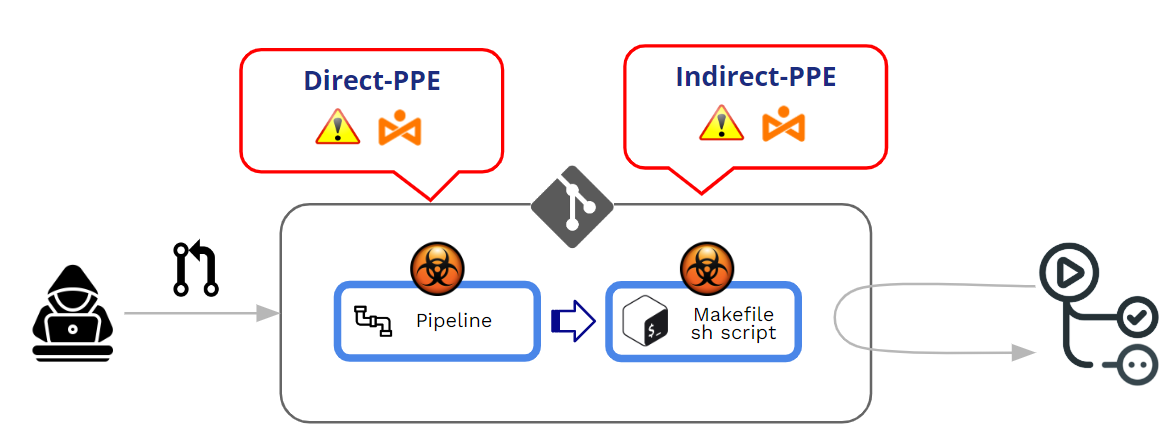
Racun Pipeline Eksekusi (PPE) diprodhuksi nalika penyerang bisa ngowahi pipeline logika kanthi rong cara:
- Kanthi ngowahi file konfigurasi CI (sing pipeline) -> APD Langsung (APD-D)
- Kanthi ngowahi file sing dirujuk dening pipeline (contone: skrip sing dirujuk saka njero pipeline berkas konfigurasi) -> APD Ora Langsung (APD-I)
Ing postingan iki, kita bakal nyinaoni luwih jero babagan PPE Ora Langsung. Nanging, sadurunge kuwi, lan minangka pelengkap postingan sadurunge, ayo dideleng dhisik kepiye GitHub ngatur eksekusi pipelinelan apa mekanisme perlindungan marang D-PPE.
Kepiye carane GitHub nglindhungi eksekusi pipelineasale saka PR?
Kepiye cara kerja GitHub babagan eksekusi sing dimodifikasi pipelines?
dipunéwahi pipelines bisa asale saka Push utawa Pull Requests (PR). Minangka praktik paling apik, disaranake banget kanggo ngindhari "push" langsung menyang cabang sing dilindhungi lan gunakake Pull Requests minangka mekanisme kanggo ngetrapake sawetara tinjauan sadurunge nampa kode kontribusi apa wae.
Pull Requests bisa teka saka rong sumber sing beda:
- PR sing asale saka rempah-rempah
- PR sing asale saka cabang
PR saka rempah-rempah bisa asale saka umum or pribadi repositori.
Nalika kita nangani APD (Poisoned Pipeline Eksekusi), intine dudu "panrima" PR nanging eksekusi saka PR sing wis diowahi pipeline sajrone proses panrima/persetujuan PR. Ing inti saka serangan PPE, ana eksekusi sing ora disengaja saka modifikasi "jahat" pipeline.
Ing sawetara tembung, Keracunan Pipeline Eksekusi (APD) digawe nalika penyerang bisa ngowahi pipeline logika.
Ana loro variasi:
- APD langsung (D-PPE): Ing skenario D-PPE, Penyerang ngowahi file konfigurasi CI ing repositori sing bisa diakses, kanthi meksa pangowahan langsung menyang cabang remot sing ora dilindhungi ing repo, utawa kanthi ngirim PR kanthi pangowahan saka cabang utawa fork. Wiwit CI pipeline Eksekusi ditemtokake dening printah ing file konfigurasi CI sing dimodifikasi, printah jahat penyerang pungkasane mlaku ing simpul build sawise build pipeline dipicu.
- APD ora langsung (I-PPE): Ing kasus tartamtu, kemungkinan D-PPE ora kasedhiya kanggo mungsuh sing duwe akses menyang SCM gudang (contone, yen pipeline dikonfigurasi kanggo narik file konfigurasi CI saka cabang sing dilindhungi lan kapisah ing repositori sing padha). Ing kahanan kaya ngono, tinimbang ngracuni pipeline dhewe, penyerang nyuntikake kode jahat menyang file sing dirujuk dening pipeline (contone: skrip sing dirujuk saka njero pipeline berkas konfigurasi)
Ing loro kasus kasebut, GitHub bakal nglakokake sing diowahi pipeline tanpa perlu review utawa persetujuan sadurunge.
PR saka fork on umum ngaso
GitHub ngidini konfigurasi prilaku nalika ngolah PR asale saka fork ing repo umum.
Nalika PR asale saka fork, GitHub mesthi meksa sawetara tingkat "persetujuan" sadurunge nglakokake pipeline sing ana gandhengane karo PRTingkat persetujuan iki diijolake saka persetujuan sing ringkih dadi persetujuan sing ketat.
At Tingkat organisasi (Org>>Setelan>>Tindakan>>Umum), sampeyan bisa milih saka sawetara pilihan "persetujuan":
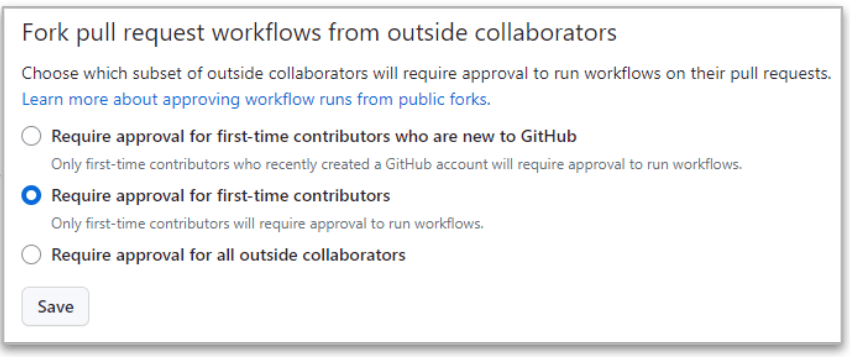
Sing paling ketat iku sing terakhir ("Mbutuhake persetujuan saka kabeh kolaborator njaba"") amarga GitHub mesthi mbutuhake persetujuan nalika PR asale saka fork saka kolaborator njaba.
Nanging sanajan ing kasus sing ketat iki, ana bedane antarane kolaborator kanthi ijin maca lan nulis.
- Nalika PR asale saka maca panganggo, sing eksekusi pipeline wis DIEDHEKKE nganti ana persetujuan kanggo owah-owahan. Yen persetujuan kasebut ora apa-apa, mula sing diowahi pipeline dieksekusi.
- Nalika PR asale saka nulis panganggo, sing persetujuan ora dibutuhake lan sing diowahi pipeline tansah dieksekusi!!
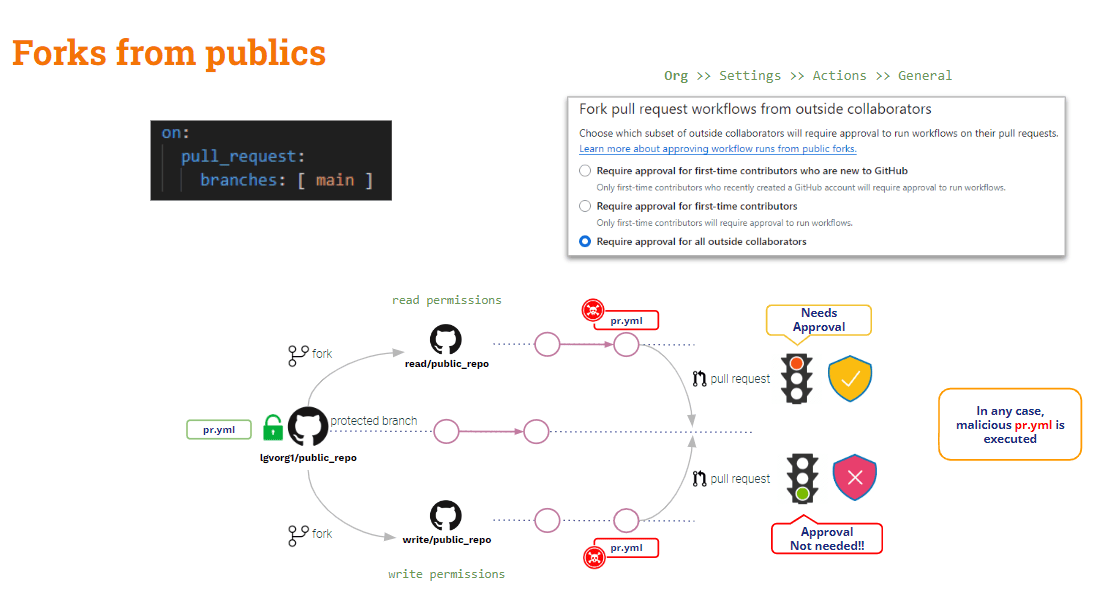
Kesimpulane, PR sing asale saka fork ing repositori umum dilindhungi entheng saka PPE. Ana sawetara perlindungan marang pangguna eksternal (maca), nanging ora ana sing ana gandhengane karo pangguna internal (nulis).
Pripun PR asale saka fork saka repo pribadi?
PR saka fork on pribadi ngaso
Ing skenario iki, GitHub nyedhiyakake sawetara setelan konfigurasi sing migunani.
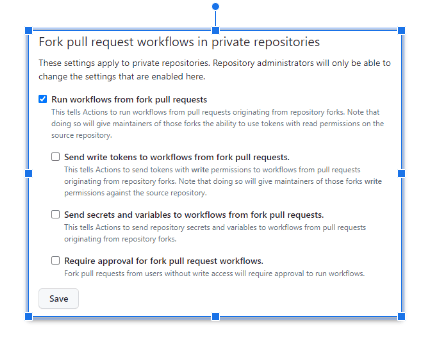
Setelan ing ndhuwur bisa dikonfigurasi ing Organ utawa ing repo tingkat.
Kapan ora ana pilihan sing dicenthang, GitHub bakal njaluk persetujuan lan ora bakal nglakokake sing diowahi pipelineIki konfigurasi sing paling aman!!
The konfigurasi paling ora aman nalika "Jalanake alur kerja saka fork pull request"wis dicenthangIng kasus iki, padha kanggo pangguna maca lan nulis, Github bakal kanthi otomatis nglakokake sing diowahi pipeline!! Lan kahanan iki bisa uga luwih elek yen"Kirim token tulis menyang alur kerja saka fork pull requests"Lan"Kirim rahasia lan variabel menyang alur kerja saka fork pull requests"wis dicenthang. Aja nindakake iki kajaba yen ana alesan sing jelas!!
Yen "Mbutuhake persetujuan kanggo garpu pull request Alangan kerja"dicenthang, kahanan ing ndhuwur rada saya apik: GitHub bakal njaluk persetujuan lan ora nglakokake sing diowahi pipeline kanggo panganggo sing maca, nanging isih bakal nglakokake kanggo panganggo sing nulis.
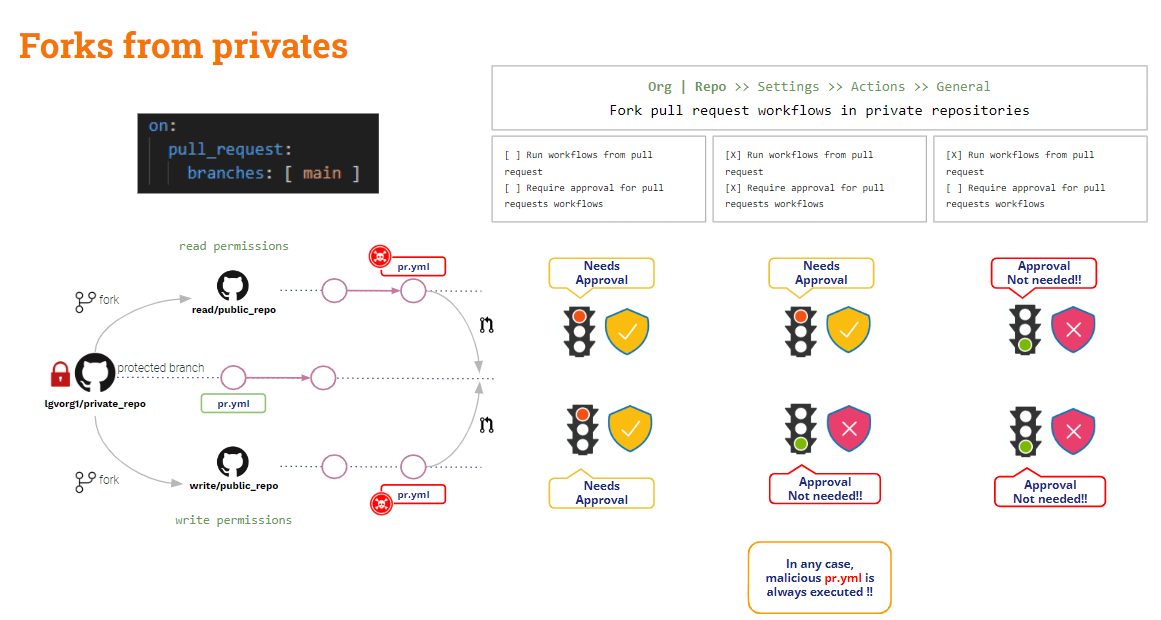
Garpu katon, kepiye PR sing asale saka cabang?
PR saka cabang
Kanggo nglindhungi skenario iki, sampeyan kudu ngandelake Aturan Perlindungan Cabang.
Ing tingkat repo, sampeyan bisa nggawe aturan perlindungan cabang kanggo cabang apa wae. Aturan kasebut nambahake sawetara watesan kanggo modifikasi cabang sing dilindhungi.
Sanajan sampeyan ngonfigurasi aturan dadi "Mbutuhake a pull request sadurunge gabung"Lan"Mbutuhake persetujuan", sing diowahi pipeline bakal dieksekusi kanthi otomatis nalika nggawe PR"Persetujuan" mung bakal ditrapake kanggo tumindak penggabungan.
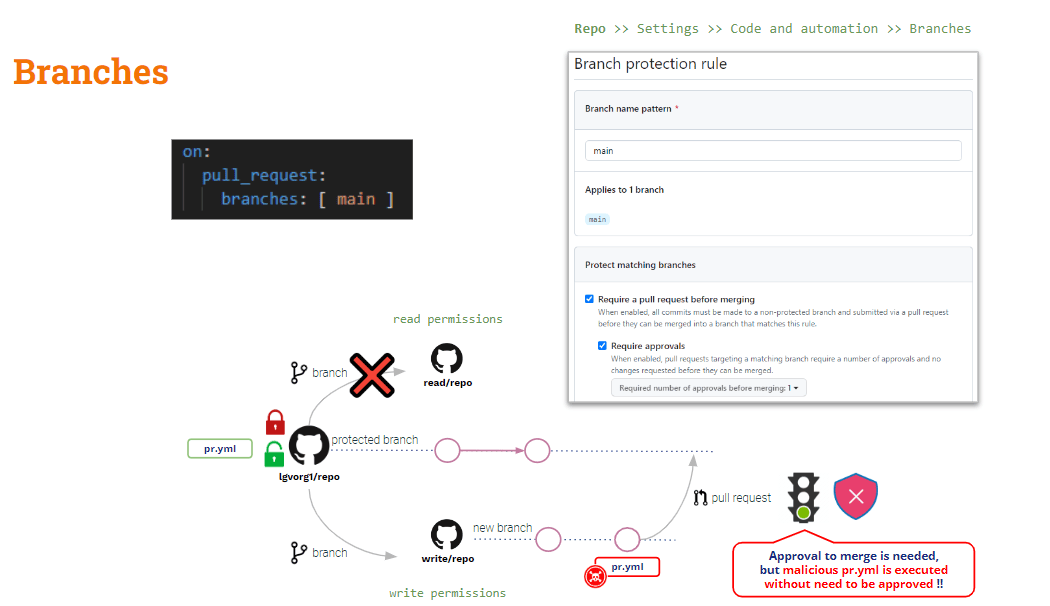
Kepiye babagan Keracunan Ora Langsung Pipeline execution
Kaya sing wis dideleng ing ndhuwur, D-PPE bisa dikurangi kanthi nggunakake target_panjaluk_tarik, nanging iku ora ditrapake kanggo I-PPE.
Yen sampeyan nggunakake pull_request_target, checkout standar bakal dadi kode dhasar. Nanging yen sampeyan pengin validasi sawetara pamriksan ing kode sing disumbangake (kode PR), sampeyan kudu mriksa kode PR kanthi eksplisit. Mulane, yen kode PR wis ngowahi skrip shell apa wae sing digunakake dening pipeline, "pangkalan" (aman) pipeline bakal nimbali skrip shell "dimodifikasi" → PPE ora langsung!!
Solusine rada rumit (ora ana solusi ajaib kaya pull_request_target).
Kita pipeline saiki aman kanggo D-PPE amarga kita nggunakake pull_request_target. Nanging isih rentan kanggo I-PPE.
Ing conto uji coba kita, kita kudu mriksa kode PR kanggo nggawe build, nanging uji coba kasebut dieksekusi ing artefak sing digawe dening build kasebut.
Dadi .. kenapa ora mriksa loro-lorone basis kode?
- Priksa kode PR amarga kode sing disumbangake kuwi sing pengin digawe lan diuji
- Kode dhasar kanggo mbukak versi asli saka pipeline lan skrip mbangun/tes
Iki bisa uga ditindakake dening mriksa basis kode kasebut menyang folder sing beda-bedaKode dhasar bisa uga dicenthang menyang folder oyot, lan PR menyang folder liya. Ing kasus iki, kita bakal nglakokake skrip build lan test saka folder oyot nglawan kode sing diselehake ing folder anyar.
Iki solusi sing gampang, mesthi wae!! Nanging, kanggo tujuan pembelajaran aku pengin ngenalake varian sing cukup menarik (…)
GitHub alur_mlaku kedadeyan pemicu
Kejabi target_panjaluk_tarik, GitHub nyedhiyakake kedadeyan pemicu liyane: alur_mlakuAcara iki ngidini eksekusi saka pipeline dikondisikake menyang liyane pipelineeksekusi.
alur_mlaku lan target_panjaluk_tarik Pemicu padha ing salah sawijining aspek: loro-lorone bakal dieksekusi ing mode istimewa lan, senadyan modifikasi PR, dhasare pipeline bakal dieksekusi!!
Ayo delengen kahanane saiki pipeline:
					name: PR TARGET CI


on:
  pull_request_target:
    branches: [ main ]


env:
  MY_SECRET: ${{ secrets.MY_SECRET }}

jobs:
  prt_build_test_and_merge:
    runs-on: ubuntu-latest


    steps:
      # checkout PR code
      - name: Checkout repository
        uses: actions/checkout@v4
        with:


          # This is to get the PR code instead of the repo code
          ref: ${{ github.event.pull_request.head.sha }}


      # Simulation of a compilation
      - name: Building ...
        run: |
          mkdir ./bin
          touch ./bin/mybin.exe
          ls -lR

      # Simulation of running tests
      - name: Running tests ...
        id : run_tests
        run: |
          echo Running tests..
          chmod +x runtests.sh
          ./runtests.sh
          echo Tests executed.

      #
      # Let’s omit the check conditions at this moment …
      #
      - name: pr_check_conditions_to_merge
        [...]
Bagean bangunan aman kanggo D-PPE, nanging bagean uji isih rentan kanggo I-PPE.
The pipeline dhewe aman kanggo D-PPE amarga target_panjaluk_tarik pemicu. Nanging langkah uji coba isih rentan marang I-PPE amarga ngundang skrip shell eksternal.
Nyingkiri I-PPE
Tujuan saka ing ndhuwur pipeline yaiku kanggo mbangun lan nguji kode sing disumbangake, supaya aman kanggo PPE.
Dadi .. Kenapa ora dibagi pipeline dadi loro? Siji kanggo mbangun lan sijine maneh kanggo nguji..
- Tanggal 1 pipeline (Mbangun CI) bakal priksa kode PR (kanggo mbangun), gawe bangunan lan ngasilake artefak.
- Ing 2nd pipeline (Tes CI) bakal priksa kode Dasar (kanggo nyegah modifikasi skrip shell) lan nglakokake skrip asli nglawan artefak kasebut.
- Kanggo nyelarasake Test CI pipeline kanggo mbukak SAWISE Build CI pipeline, kita bakal nggunakake alur_mlaku pemicu
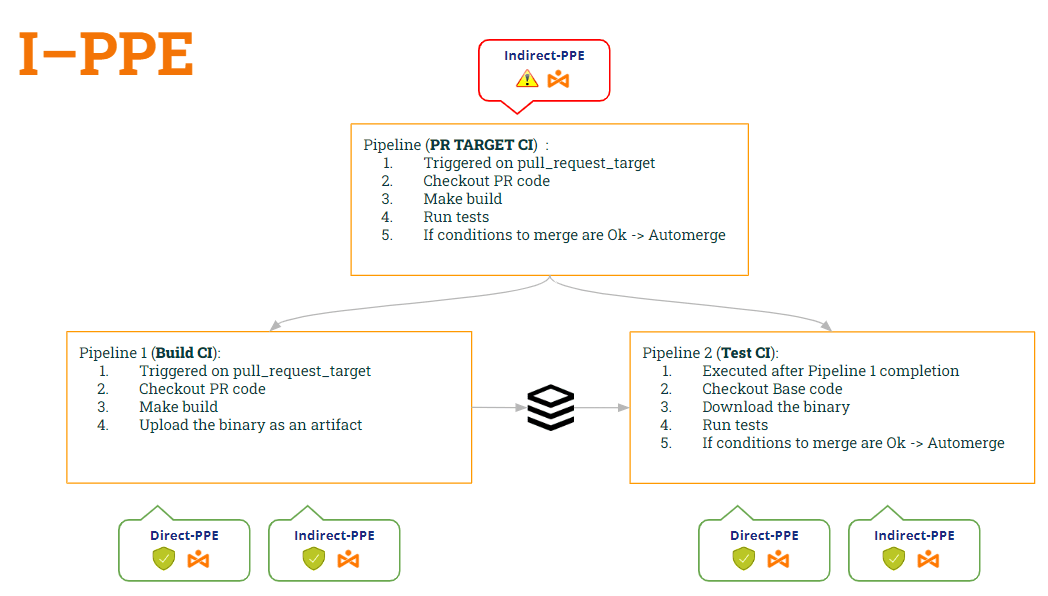
Kanthi cara iki:
- pipeline Mbangun CI is aman kanggo loro D-PPE (amarga target_panjaluk_tarik) lan I-PPE (amarga wis ora nglakokake skrip shell maneh).
- pipeline Tes CI uga aman kanggo loro D-PPE (amarga alur_mlaku) lan I-PPE (amarga mriksa kode dhasar kanggo entuk skrip shell asli)
Ayo dideleng kode loro-lorone pipelinemiturut modifikasi iki…
1st pipeline (Mbangun CI):
					name: Build CI


on:
  pull_request_target:
    branches: [ main ]


env:
  MY_SECRET: ${{ secrets.MY_SECRET }}
  GITHUB_PAT: ${{ secrets.GH_PAT }}

jobs:

  prt_build_and_upload:
    runs-on: ubuntu-latest
    steps:
      - name: Checking out PR code
        uses: actions/checkout@v4
        if: ${{ github.event_name == 'pull_request_target' }}
        with:
          # This is to get the PR code instead of the repo code
          ref: ${{ github.event.pull_request.head.sha }}


      - name: Building ...
        run: |
          mkdir ./bin
          touch ./bin/mybin.exe
	    # Save some PR info for later use by the 2nd pipeline
          echo "${{github.event.pull_request.title}}" > ./bin/PR_TITLE.txt
          echo "${{github.event.number}}" > ./bin/PR_ID.txt

	# Upload the binary as a pipeline artifact
      - name: Archive building artifacts
        uses: actions/upload-artifact@v3
        with:
          name: archive-bin
          path: |
            bin
2nd pipeline (Tes CI):
					ame: Test CI


on:
  workflow_run:
    workflows: [ 'PR TARGET CI' ]
    types: [completed]

env:
  MY_SECRET: ${{ secrets.MY_SECRET }}
  GITHUB_PAT: ${{ secrets.GH_PAT }}


jobs:
  deploy:
    runs-on: ubuntu-latest
    if: ${{ github.event.workflow_run.conclusion == 'success' }}
    steps:


      # By default, checks out base code (not PR code)
      - name: Checkout repository
        uses: actions/checkout@v4


	# Download the artifact
      - name: 'Download artifact'
        uses: actions/github-script@v6
        with:
          script: |
            let allArtifacts = await github.rest.actions.listWorkflowRunArtifacts({
               owner: context.repo.owner,
               repo: context.repo.repo,
               run_id: context.payload.workflow_run.id,
            });
            let matchArtifact = allArtifacts.data.artifacts.filter((artifact) => {
              return artifact.name == "archive-bin"
            })[0];
            let download = await github.rest.actions.downloadArtifact({
               owner: context.repo.owner,
               repo: context.repo.repo,
               artifact_id: matchArtifact.id,
               archive_format: 'zip',
            });
            let fs = require('fs');
            fs.writeFileSync(`${process.env.GITHUB_WORKSPACE}/myartifact.zip`, Buffer.from(download.data));


	# Unzip the artifact
      - name: 'Unzip artifact'
        run: |
          unzip -o myartifact.zip


      # Runs tests
      - name: Running tests ...
        id : run_tests
        run: |
          echo Running tests..
          chmod +x runtests.sh
          ./runtests.sh
          echo Tests executed.


#
      # Let’s omit the check conditions at this moment …
      #
      - name: pr_check_conditions_to_merge
        [...]
Wah… solusi sing apik!! Nanging ….. Apa kita aman? Aku wedi yen ora 😭
Pancen, kita wis ngenalake kerentanan anyar!! Sing endi? Iki bakal dadi subyek postingan sabanjure 🙂 … Terus pantau!!
PS: Nyuwun pangapunten, aku ora bisa meneng 🤐 ..Apa kowe wis tau krungu babagan iki? Keracunan Artefak ? 😂