






Tao amin'ny lahatsoratra teo aloha, nahita ny fomba hamantarana sy hiarovana amin'ny poizina mivantana izahay Pipeline Fampiharana (D-PPE). Nahita ny fomba hamantarana izany fahalemena izany ihany koa izahay tamin'ny fampiasana Mpijery Xygeni, ary koa rafitra fiarovana sasany.
misy poizina Pipeline Famonoana (PPE) dia vokarina rehefa afaka manova ny pipeline lojika amin'ny iray amin'ireto fomba roa ireto:
- Amin'ny fanovana ny rakitra CI config (ny pipeline) -> PPE mivantana (D-PPE)
- Amin'ny fanovana ireo rakitra referansin'ny pipeline (ohatra: scripts referansa avy ao anatin'ny pipeline rakitra fikirakirana) -> PPE tsy mivantana (I-PPE)
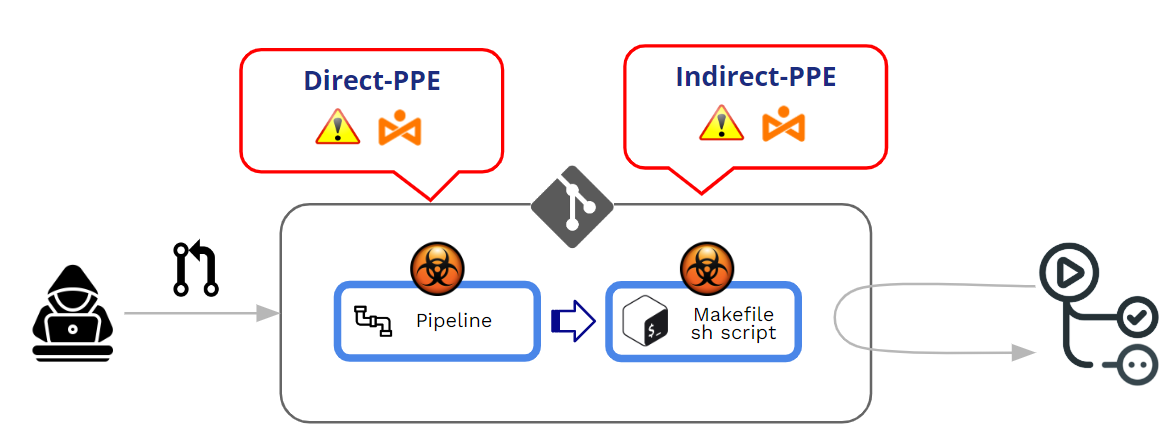
Ato amin'ity lahatsoratra ity, dia handinika lalina ny PPE ankolaka isika. Saingy, alohan'izany, ary ho fanampin'ny lahatsoratro teo aloha, andeha hojerentsika aloha ny fomba fitantanana ny GitHub amin'ny fanatanterahana ny pipelineary inona avy ireo rafitra fiarovana amin'ny D-PPE.
Ahoana no iarovan'ny GitHub ny fanatanterahana ny pipelineavy amin'ny PR ve?
Ahoana ny fiasan'ny GitHub amin'ny fanatanterahana ny fanovana natao pipelines?
Modified pipelinemety ho avy amin'ny Pushes na Pull Requests (PR). Amin'ny maha-fomba fanao tsara indrindra azy, dia tena amporisihina mafy ny tsy hampiasana mivantana ny "fanosehana" mankany amin'ny sampana voaaro ary hampiasa Pull Requests ho toy ny fomba iray hampiharana ny famerenana sasany alohan'ny hanekena izay kaody nomena.
Pull Requests mety ho avy amin'ny loharano roa samy hafa:
- PR avy amin'ny fitrebika
- PR avy amin'ny sampany
PR avy amin'ny fitrebika mety ho avy na avy amin'ny -bahoaka or manokana trano fitahirizana.
Satria miatrika PPE (Poisoned Pipeline (Fampiharana), ny tena tiantsika holazaina dia tsy ny "fanekena" ny PR fa ny fanatanterahana ny novaina pipeline mandritra ny dingana fanekena/fankatoavan'ny PR. Ao amin'ny fototry ny fanafihana PPE, misy ny fampiharana tsy nahy ny fitaovana "ratsy" novaina pipeline.
Raha fintinina, Voapoizina Pipeline Ny fanatanterahana (PPE) dia vokarina rehefa afaka manova ny endrika ny mpanafika pipeline lojika.
Misy roa variants:
- PPE mivantana (D-PPE): Ao anatin'ny toe-javatra D-PPE, manova ny rakitra fikirakirana CI ny mpanafika Ao anaty tahiry iray dia afaka miditra amin'izany izy ireo, na amin'ny alàlan'ny fanosehana mivantana ny fanovana any amin'ny sampana lavitra tsy voaaro ao amin'ny repo, na amin'ny alàlan'ny fandefasana PR miaraka amin'ny fanovana avy amin'ny sampana na fork. Hatramin'ny CI pipeline Ny fanatanterahana dia voafaritry ny baiko ao amin'ny rakitra fikirakirana CI novaina, ny baiko ratsy ataon'ny mpanafika dia miasa amin'ny farany ao amin'ny node build rehefa vita ny build. pipeline dia trigger.
- PPE tsy mivantana (I-PPE): Amin'ny tranga sasany, ny mety hisian'ny D-PPE dia tsy azon'ny fahavalo idirana SCM tahiry (ohatra raha ny pipeline dia voalamina mba hisintona ny rakitra fikirakirana CI avy amin'ny sampana misaraka sy voaaro ao amin'ny tahiry mitovy). Amin'ny toe-javatra toy izany, toy izay hanapoizina ny pipeline ny tenany, ny mpanafika dia mampiditra kaody maloto ao anaty rakitra resahin'ny pipeline (ohatra: scripts referansa avy ao anatin'ny pipeline rakitra fikirakirana)
Amin'ny tranga roa, Hanatanteraka ny novaina ny GitHub pipeline tsy mila famerenana na fankatoavana teo aloha.
PR avy amin'ny forks on -bahoaka fitsaharana
GitHub dia ahafahana manamboatra ny fihetsika rehefa mikirakira PR avy amin'ny forks amin'ny repos ampahibemaso.
Rehefa avy amin'ny fork ny PR, dia manery "fankatoavana" foana ny GitHub alohan'ny hanatanterahana ny pipeline mifandraika amin'ny PRMiovaova avy amin'ny fankatoavana malemy mankany amin'ny fankatoavana hentitra io ambaratongan'ny fankatoavana io.
At Ambaratonga fandaminana (Org>>Fikirana>>Hetsika>>Ankapobeny), azonao atao ny misafidy amin'ireo safidy "fankatoavana" maromaro:
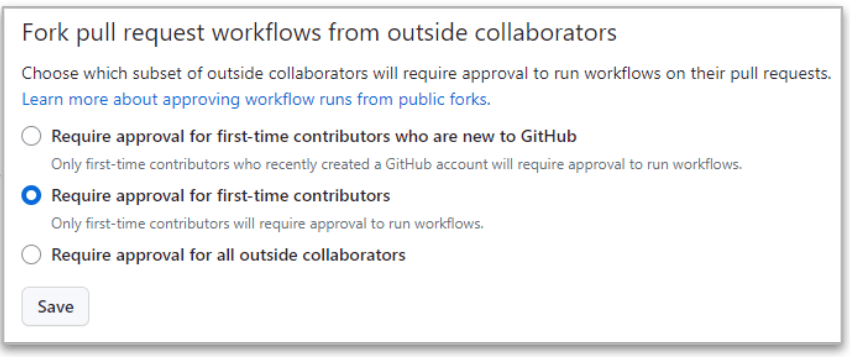
Ny henjana indrindra no farany ("Mitaky ny fankatoavan'ny mpiara-miasa ivelany rehetra"") satria mitaky fankatoavana foana ny GitHub rehefa avy amin'ny fork avy amin'ny mpiara-miasa ivelany ny PR.
Fa na dia amin'ity tranga henjana ity aza, dia misy ny fahasamihafana misy eo amin'ireo mpiara-miasa manana fahazoan-dàlana mamaky sy manoratra.
- Rehefa avy amin'ny PR ny vakio ny mpampiasa, ny fanatanterahana ny pipeline dia MIJANONA mandra-pahazoana fankatoavana ny fanovana. Raha ekena ny fankatoavana, dia ny fanovana no atao pipeline novonoina ho faty.
- Rehefa avy amin'ny PR ny manoratra mpampiasa, ny tsy ilaina ny fankatoavana ary ny novaina pipeline dia tanterahina foana!!
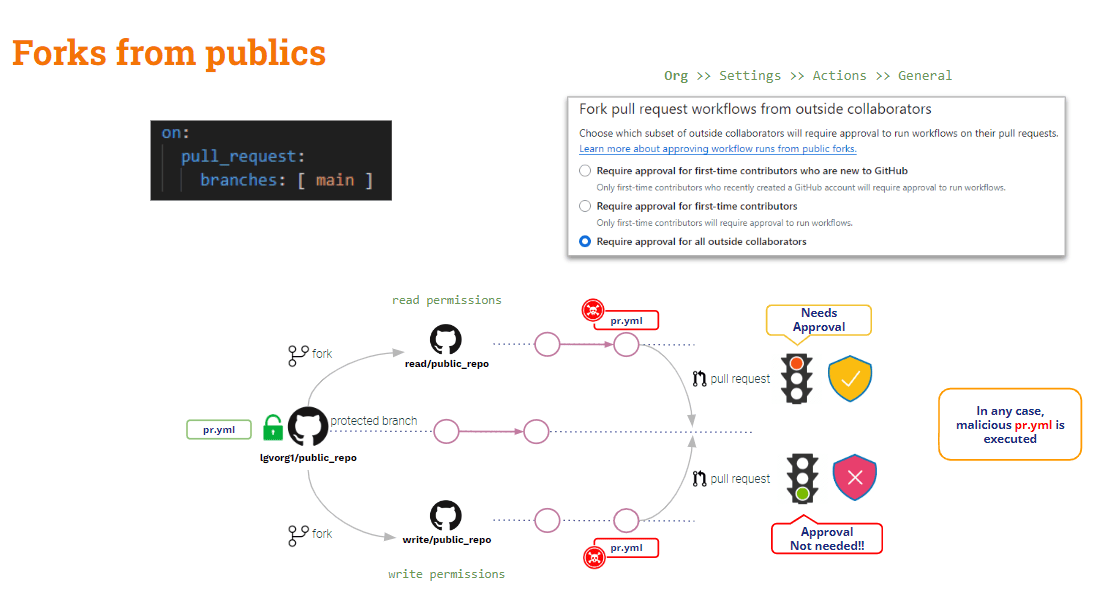
Ho fehiny, ny PR avy amin'ny forks amin'ny tahiry ho an'ny daholobe dia voaaro kely amin'ny PPE. Misy fiarovana amin'ny mpampiasa ivelany (mamaky), fa tsy misy ifandraisany amin'ny mpampiasa anatiny (manoratra).
Ahoana ny PR avy amin'ny forks avy amin'ny repos manokana?
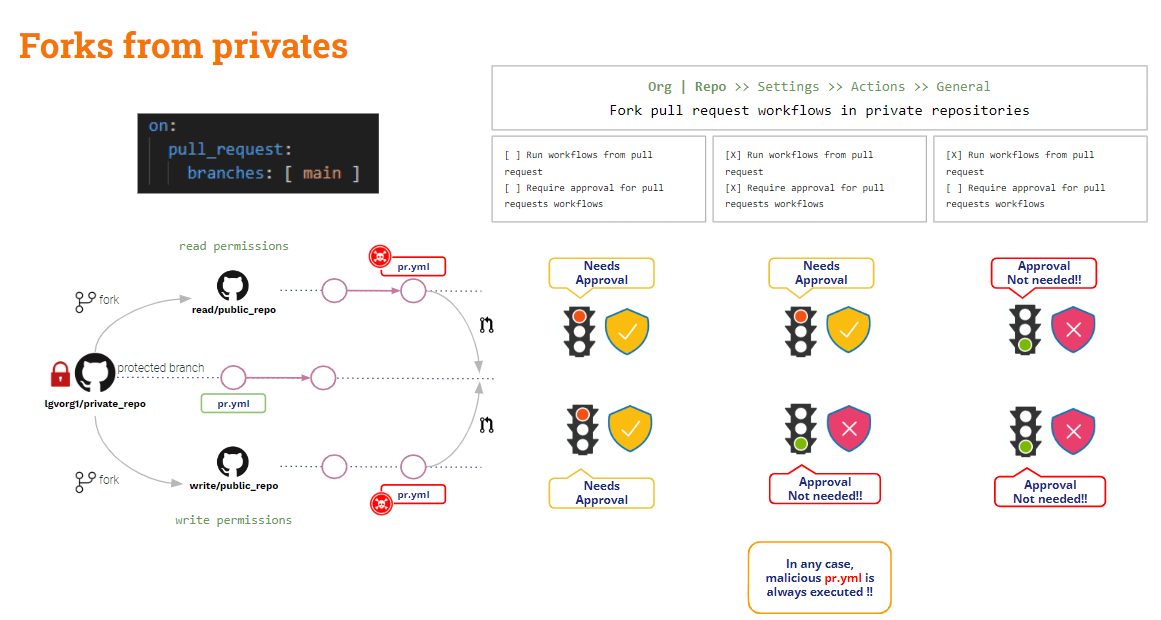
PR avy amin'ny forks on manokana fitsaharana
Amin'ity tranga ity, ny GitHub dia manome fikirana fikirakirana mahasoa.
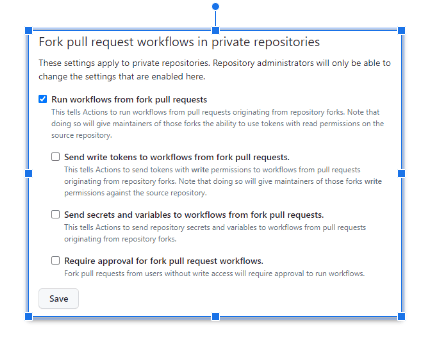
Azo amboarina na amin'ny taova na at repo ambaratonga.
Rehefa tsy misy safidy voamarika, GitHub dia hanao mangataka fankatoavana sy tsy hanatanteraka ny novaina izy pipelineIty no fikirakirana azo antoka indrindra!!
The firafitra tsy azo antoka indrindra dia rehefa "Ampandehano ny workflows avy amin'ny fork pull request"voamarina"Amin'ity tranga ity, mitovy amin'ny mpampiasa mamaky sy manoratra, ny Github dia hanatanteraka ho azy ny novaina pipeline!! Ary mety ho mitovy ihany ity toe-javatra ity ratsy raha"Alefaso any amin'ny workflows avy amin'ny fork ny tokens fanoratana pull requests"Ary"Alefaso any amin'ny workflows avy amin'ny fork ny tsiambaratelo sy ny variables pull requests"dia voamarika. Aza manao izany raha tsy misy antony mazava!!
Raha "Mila fankatoavana ho an'ny fork pull request workflows"Raha voamarika, dia somary mihatsara ny toe-javatra etsy ambony: Hangataka fankatoavana ny GitHub ary tsy hampihatra ny novaina pipeline ho an'ny mpampiasa mamaky, saingy mbola hampihatra izany ho an'ny mpampiasa manoratra ihany izy.
Hita ny fiolahana, ahoana ny amin'izany PR avy amin'ny sampana?
PR avy amin'ny sampany
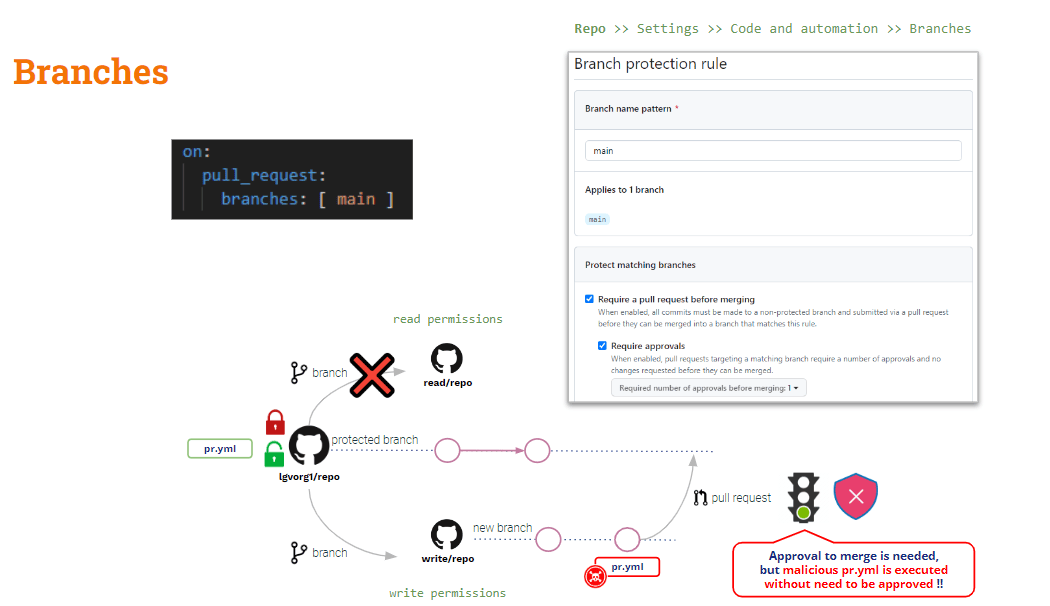
Mba hiarovana ity toe-javatra ity dia tsy maintsy miantehitra amin'ny Fitsipika momba ny fiarovana ny sampana.
Amin'ny ambaratongan'ny repo, azonao atao ny mamorona fitsipika fiarovana sampana ho an'ny sampana rehetra. Ireo fitsipika ireo dia manampy ampahany sasany fameperana amin'ny fanovana ireo sampana voaaro.
Na dia amboarinao ho "Mitaky a pull request alohan'ny hampiarahana"Ary"Mila fankatoavana", ny novaina pipeline hotanterahina ho azy rehefa noforonina ny PRNy "fankatoavana" dia mihatra amin'ny hetsika fampiraisana ihany.
Ahoana ny amin'ny Poizina Ankolaka Pipeline famonoana
Araka ny hitantsika etsy ambony, ny D-PPE dia azo ahena amin'ny alàlan'ny fampiasana pull_request_target, fa io tsy mihatra amin'ny I-PPE.
Raha mampiasa pull_request_target ianao, ny kaody fototra no ho kaody fanamarinana mahazatra. Saingy raha te hanamarina fanamarinana sasany amin'ny kaody nomena (kaody PR) ianao dia mila manamarina mazava tsara ny kaody PR. Noho izany, raha nanova ny script shell izay ampiasain'ny pipeline, ny "toby" (azo antoka) pipeline hiantso ny script shell "novaina" → PPE ankolaka!!
Somary sarotra kokoa ny vahaolana amin'izany (tsy misy vahaolana mahagaga toy ny pull_request_target).
ny pipeline Azo antoka amin'ny D-PPE izao satria mampiasa pull_request_target isika. Saingy mbola marefo amin'ny I-PPE ihany izy.
Ao amin'ny ohatra fitsapana ataontsika, mila mijery ny kaody PR isika mba hanaovana ny build, saingy ny fitsapana dia tanterahina amin'ny artifact novokarin'ny build.
Ka .. maninona raha jerena ireo codebase roa ireo?
- Jereo ny kaody PR satria io kaody io no tiantsika hamboarina sy hosedraina
- Kaody fototra hijerena ny dikan-teny tany am-boalohany pipeline ary ireo script fananganana/fitsapana
Mety ho vitan'ny mijery ireo kaody fototra ireo any amin'ny lahatahiry samihafa: mety hojerena any amin'ny lahatahiry fototra ny kaody fototra, ary ny PR any amin'ny lahatahiry hafa. Amin'ity tranga ity dia hampihatra ny script fananganana sy ny fitsapana avy amin'ny lahatahiry fototra amin'ny alàlan'ny kaody napetraka ao amin'ny lahatahiry vaovao isika.
Vahaolana mora ity, mazava ho azy!! Saingy, ho an'ny fianarana dia te-hampiditra karazany mahaliana aho (...)
GitHub workflow_run hetsika mampihetsika
afa-tsy pull_request_target, GitHub dia manome hetsika trigger hafa: workflow_runIty hetsika ity dia mamela fanatanterahana ny pipeline voafehy amin'ny iray hafa pipelinefamonoana.
workflow_run sy pull_request_target Mitovy amin'ny lafiny iray ireo trigger: samy hotanterahina amin'ny fomba privileged izy roa ary, na dia eo aza ny fanovana ny PR, ny fototra pipeline hovonoina!!
Andeha hojerentsika ny ankehitriny pipeline:
					name: PR TARGET CI


on:
  pull_request_target:
    branches: [ main ]


env:
  MY_SECRET: ${{ secrets.MY_SECRET }}

jobs:
  prt_build_test_and_merge:
    runs-on: ubuntu-latest


    steps:
      # checkout PR code
      - name: Checkout repository
        uses: actions/checkout@v4
        with:


          # This is to get the PR code instead of the repo code
          ref: ${{ github.event.pull_request.head.sha }}


      # Simulation of a compilation
      - name: Building ...
        run: |
          mkdir ./bin
          touch ./bin/mybin.exe
          ls -lR

      # Simulation of running tests
      - name: Running tests ...
        id : run_tests
        run: |
          echo Running tests..
          chmod +x runtests.sh
          ./runtests.sh
          echo Tests executed.

      #
      # Let’s omit the check conditions at this moment …
      #
      - name: pr_check_conditions_to_merge
        [...]
Azo antoka ho an'ny D-PPE ny fizarana fanamboarana, saingy mbola marefo amin'ny I-PPE ihany ny fizarana fitsapana.
The pipeline azo antoka amin'ny D-PPE noho ny pull_request_target trigger. Saingy mbola marefo amin'ny I-PPE ny dingana fitsapana noho ny fiantsoana script shell ivelany.
Fisorohana ny I-PPE
Ny tanjon'ny voalaza etsy ambony pipeline dia ny fananganana sy fitsapana ny kaody nomena, izay azo antoka ho an'ny PPE.
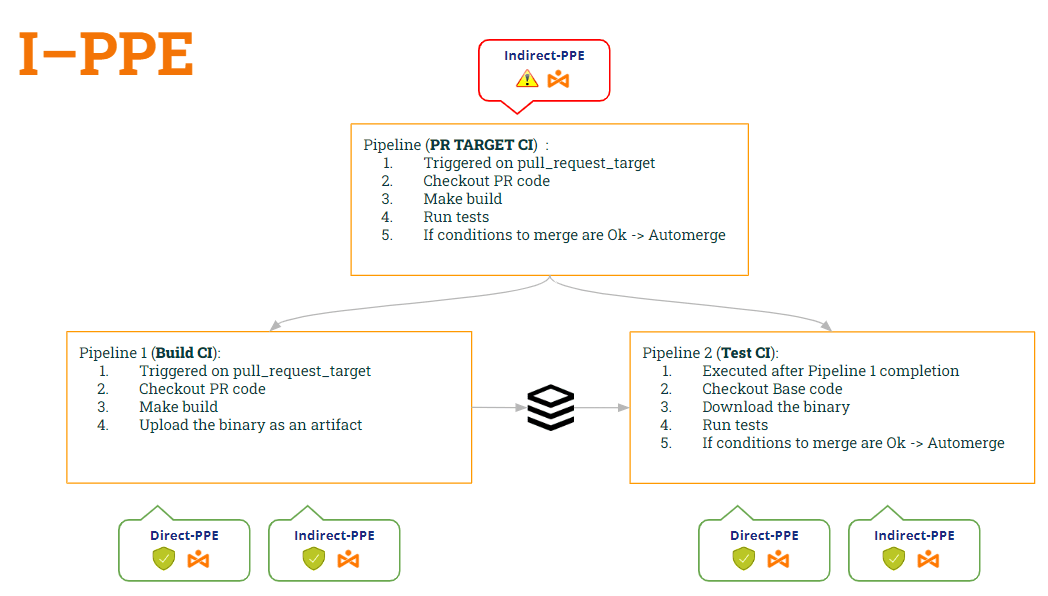
Ka .. Nahoana no tsy zaraina ny pipeline ho roa? Ny iray ho an'ny fanorenana ary ny iray ho an'ny fitsapana..
- Ny 1er pipeline (Manangana CI) hanao jereo ny kaody PR (mba hanamboarana azy), manaova ny fananganana ary mamorona zavatra tranainy.
- Ny faha-2 pipeline (Fitsapana CI) hanao jereo ny kaody fototra (mba hisorohana ny fanovana ny script shell) ary mampihatra ireo script tany am-boalohany manohitra ilay artifact.
- Mba hampifanarahana ny Test CI pipeline hiasa REHEFA vita ny Build CI pipeline, hampiasaintsika ny workflow_run miteraka
Amin'izao fomba izao:
- pipeline Manangana CI is azo antoka izy roa D-PPE (noho ny pull_request_target) ary I-PPE (satria tsy manatanteraka ny script shell intsony izy).
- pipeline Fitsapana CI ihany koa azo antoka izy roa D-PPE (noho ny workflow_run) ary I-PPE (satria manamarina ny kaody fototra izy io mba hahazoana ny script shell tany am-boalohany)
Andeha hojerentsika ny kaody an'izy roa pipelinearaka ireo fanovana ireo…
1st pipeline (Manangana CI):
					name: Build CI


on:
  pull_request_target:
    branches: [ main ]


env:
  MY_SECRET: ${{ secrets.MY_SECRET }}
  GITHUB_PAT: ${{ secrets.GH_PAT }}

jobs:

  prt_build_and_upload:
    runs-on: ubuntu-latest
    steps:
      - name: Checking out PR code
        uses: actions/checkout@v4
        if: ${{ github.event_name == 'pull_request_target' }}
        with:
          # This is to get the PR code instead of the repo code
          ref: ${{ github.event.pull_request.head.sha }}


      - name: Building ...
        run: |
          mkdir ./bin
          touch ./bin/mybin.exe
	    # Save some PR info for later use by the 2nd pipeline
          echo "${{github.event.pull_request.title}}" > ./bin/PR_TITLE.txt
          echo "${{github.event.number}}" > ./bin/PR_ID.txt

	# Upload the binary as a pipeline artifact
      - name: Archive building artifacts
        uses: actions/upload-artifact@v3
        with:
          name: archive-bin
          path: |
            bin
2nd pipeline (Fitsapana CI):
					ame: Test CI


on:
  workflow_run:
    workflows: [ 'PR TARGET CI' ]
    types: [completed]

env:
  MY_SECRET: ${{ secrets.MY_SECRET }}
  GITHUB_PAT: ${{ secrets.GH_PAT }}


jobs:
  deploy:
    runs-on: ubuntu-latest
    if: ${{ github.event.workflow_run.conclusion == 'success' }}
    steps:


      # By default, checks out base code (not PR code)
      - name: Checkout repository
        uses: actions/checkout@v4


	# Download the artifact
      - name: 'Download artifact'
        uses: actions/github-script@v6
        with:
          script: |
            let allArtifacts = await github.rest.actions.listWorkflowRunArtifacts({
               owner: context.repo.owner,
               repo: context.repo.repo,
               run_id: context.payload.workflow_run.id,
            });
            let matchArtifact = allArtifacts.data.artifacts.filter((artifact) => {
              return artifact.name == "archive-bin"
            })[0];
            let download = await github.rest.actions.downloadArtifact({
               owner: context.repo.owner,
               repo: context.repo.repo,
               artifact_id: matchArtifact.id,
               archive_format: 'zip',
            });
            let fs = require('fs');
            fs.writeFileSync(`${process.env.GITHUB_WORKSPACE}/myartifact.zip`, Buffer.from(download.data));


	# Unzip the artifact
      - name: 'Unzip artifact'
        run: |
          unzip -o myartifact.zip


      # Runs tests
      - name: Running tests ...
        id : run_tests
        run: |
          echo Running tests..
          chmod +x runtests.sh
          ./runtests.sh
          echo Tests executed.


#
      # Let’s omit the check conditions at this moment …
      #
      - name: pr_check_conditions_to_merge
        [...]
Tsara be... vahaolana tsara!! Fa... Azo antoka ve isika? Matahotra aho sao dia tsia 😭
Eny tokoa, nampiditra fahalemena vaovao isika!! Iza amin'ireo? Ho lohahevitry ny lahatsoratra manaraka ity 🙂 … Araho hatrany!!
Sal: Miala tsiny fa tsy afaka mangina aho 🤐 ..Efa renao ve ny momba an'io Fanapoizinana amin'ny zavatra artifact ? 😂