





Trong bài viết trước của chúng tôi, Chúng ta đã tìm hiểu cách phát hiện và phòng chống ngộ độc trực tiếp. Pipeline Thực thi (D-PPE). Chúng ta cũng đã xem cách phát hiện lỗ hổng đó bằng cách sử dụng Máy quét Xygenicũng như một số cơ chế bảo vệ.
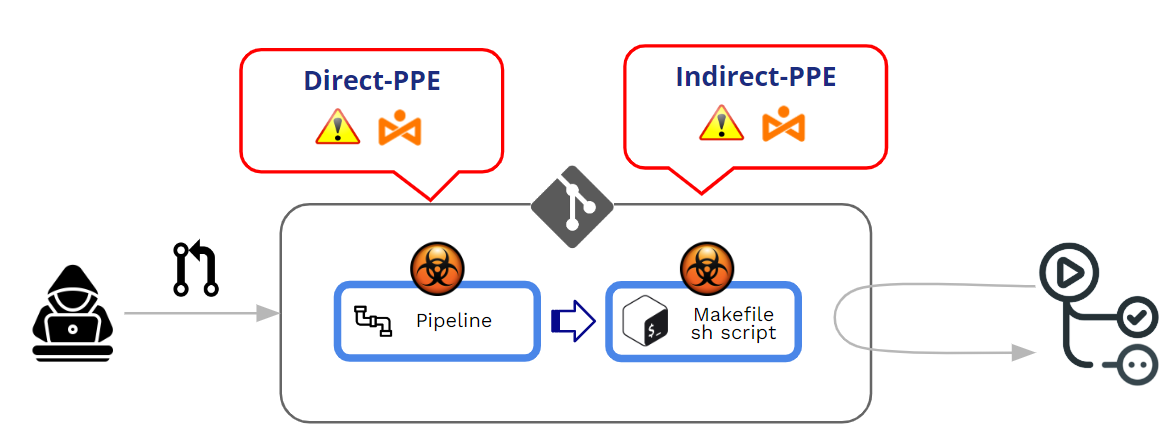
Ngộ độc Pipeline Thực thi (PPELỗi này xảy ra khi kẻ tấn công có thể sửa đổi... pipeline logic theo một trong hai cách:
- Bằng cách sửa đổi tệp cấu hình CI (the pipeline) -> Thiết bị bảo hộ cá nhân trực tiếp (D-PPE)
- Bằng cách sửa đổi các tệp được tham chiếu bởi pipeline (ví dụ: các tập lệnh được tham chiếu từ bên trong...) pipeline tệp cấu hình) -> Thiết bị bảo hộ cá nhân gián tiếp (I-PPE)
Trong bài viết này, chúng ta sẽ đi sâu vào PPE gián tiếp. Nhưng trước đó, và như một phần bổ sung cho bài viết trước của tôi, hãy xem trước cách GitHub quản lý việc thực thi. pipelineVậy D-PPE có những cơ chế bảo vệ nào?
GitHub bảo vệ việc thực thi như thế nào? pipelineNhững thông tin này đến từ các PR phải không?
GitHub hoạt động như thế nào liên quan đến việc thực thi các lệnh đã được sửa đổi? pipelines?
Thay đổi pipelines có thể đến từ Pushes hoặc Pull Requests (PR). Theo nguyên tắc thực hành tốt nhất, nên tránh mọi thao tác "đẩy" trực tiếp vào nhánh được bảo vệ và sử dụng... Pull Requests như một cơ chế để thực thi một số quy trình xem xét trước khi chấp nhận bất kỳ mã nguồn đóng góp nào.
Pull Requests có thể đến từ hai nguồn khác nhau:
- Các yêu cầu kéo đến từ dĩa
- Các yêu cầu kéo đến từ chi nhánh
Yêu cầu kéo từ dĩa có thể đến từ công khai or riêng kho lưu trữ.
Vì chúng ta đang xử lý PPE (chất độc) Pipeline (Thực thi), điểm chính của chúng tôi không phải là "chấp nhận" một yêu cầu kéo (PR) mà là việc thực thi yêu cầu kéo đã được sửa đổi. pipeline trong quá trình chấp nhận/phê duyệt yêu cầu kéo (PR). Cốt lõi của một cuộc tấn công PPE là việc thực thi ngoài ý muốn một mã độc hại đã được sửa đổi. pipeline.
Nói tóm lại, bị đầu độc. Pipeline Việc thực thi (PPE) được thực hiện khi Kẻ tấn công có thể sửa đổi pipeline logic.
Có hai biến thể:
- Thiết bị bảo hộ cá nhân trực tiếp (D-PPE): Trong kịch bản D-PPE, Kẻ tấn công sửa đổi tệp cấu hình CI. trong kho lưu trữ mà họ có quyền truy cập, bằng cách đẩy trực tiếp thay đổi lên một nhánh từ xa không được bảo vệ trên kho lưu trữ, hoặc bằng cách gửi yêu cầu kéo (PR) với thay đổi từ một nhánh hoặc một bản sao (fork). Kể từ CI pipeline Quá trình thực thi được xác định bởi các lệnh trong tệp cấu hình CI đã được sửa đổi, các lệnh độc hại của kẻ tấn công cuối cùng sẽ được chạy trên nút xây dựng sau khi quá trình xây dựng hoàn tất. pipeline được kích hoạt.
- PPE gián tiếp (I-PPETrong một số trường hợp, khả năng sử dụng D-PPE không khả dụng đối với kẻ thù có quyền truy cập vào... SCM kho lưu trữ (ví dụ: nếu pipeline (được cấu hình để lấy tệp cấu hình CI từ một nhánh riêng biệt, được bảo vệ trong cùng kho lưu trữ). Trong trường hợp như vậy, thay vì đầu độc... pipeline Bản thân kẻ tấn công sẽ chèn mã độc vào các tệp được tham chiếu bởi... pipeline (ví dụ: các tập lệnh được tham chiếu từ bên trong...) pipeline tệp cấu hình)
Trong cả hai trường hợp, GitHub sẽ thực thi lệnh đã sửa đổi. pipeline không cần phải xem xét hoặc phê duyệt trước đó.
Các yêu cầu kéo (PR) từ các nhánh (forks) trên công khai còn lại
GitHub cho phép cấu hình hành vi khi xử lý. Các yêu cầu kéo (PR) đến từ các nhánh (fork) trong kho lưu trữ công khai..
Khi một yêu cầu kéo (PR) đến từ một nhánh riêng (fork), GitHub luôn yêu cầu một mức độ "phê duyệt" nhất định trước khi thực thi. pipeline liên quan đến PRMức độ chấp thuận này dao động từ chấp thuận yếu đến chấp thuận nghiêm ngặt.
At Cấp độ tổ chức (Org >> Settings >> Actions >> General), bạn có thể lựa chọn giữa một số tùy chọn "phê duyệt":
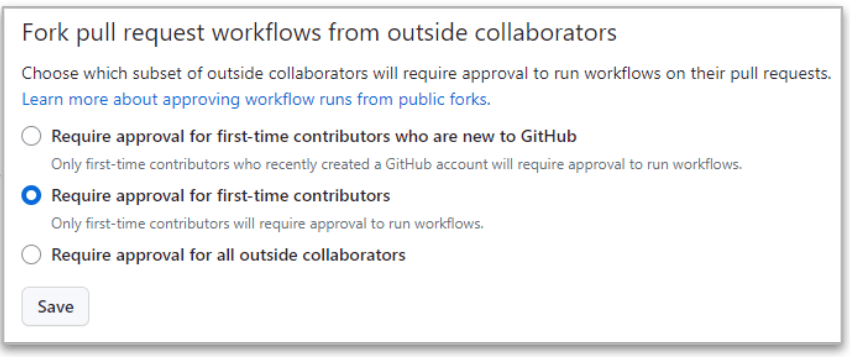
Điều nghiêm ngặt nhất là điều cuối cùng (“Cần có sự chấp thuận từ tất cả các cộng tác viên bên ngoài.”) bởi vì GitHub sẽ luôn yêu cầu phê duyệt khi yêu cầu kéo (PR) đến từ các nhánh (fork) của các cộng tác viên bên ngoài.
Nhưng ngay cả trong trường hợp nghiêm ngặt này, vẫn có sự khác biệt giữa các cộng tác viên có quyền đọc và quyền ghi..
- Khi thông cáo báo chí đến từ một đọc người dùng, thực hiện pipeline đã DỪNG LẠI cho đến khi có sự chấp thuận cho các thay đổi. Nếu được chấp thuận, thì bản sửa đổi sẽ được tiếp tục. pipeline được thực thi.
- Khi thông cáo báo chí đến từ một viết người dùng, Không cần phê duyệt và bản sửa đổi pipeline Luôn luôn được thực thi!!
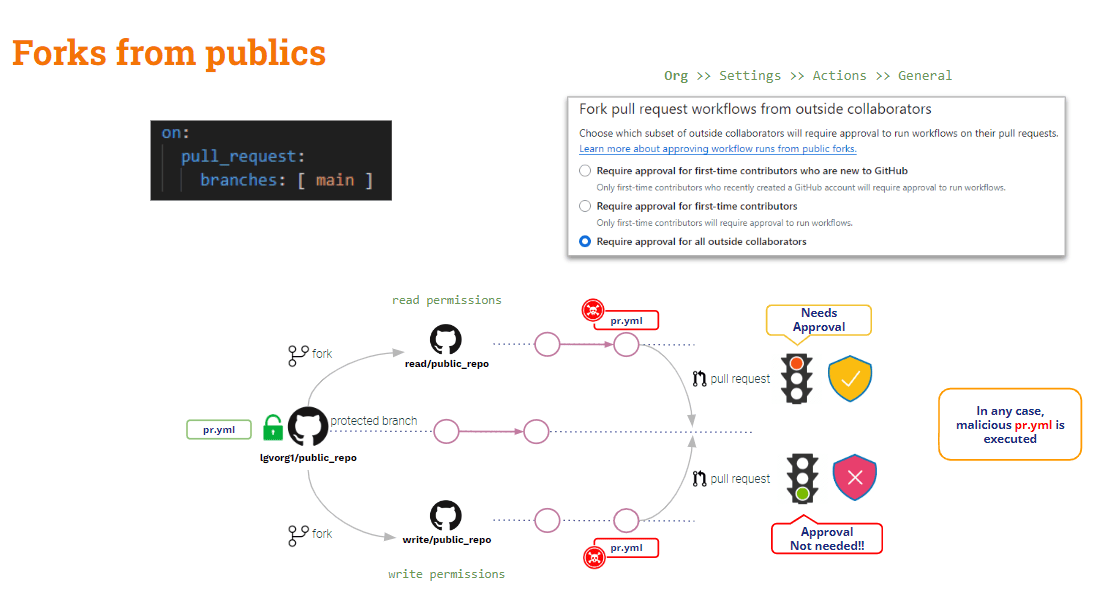
Tóm lại, các yêu cầu kéo (PR) đến từ các nhánh (fork) trên các kho lưu trữ công khai được bảo vệ khá lỏng lẻo trước các lỗ hổng bảo mật riêng tư (PPE). Có một số biện pháp bảo vệ chống lại người dùng bên ngoài (chỉ đọc), nhưng không có gì liên quan đến người dùng nội bộ (ghi).
Thế còn Các yêu cầu kéo (PR) đến từ các nhánh (fork) của kho lưu trữ riêng tư.?
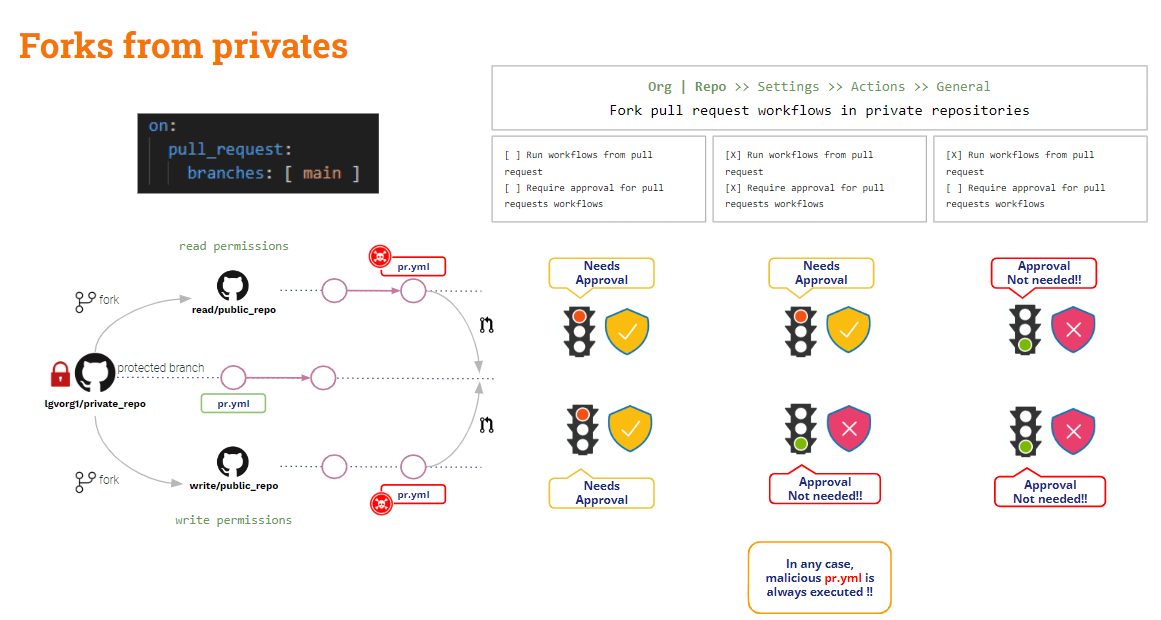
Các yêu cầu kéo (PR) từ các nhánh (forks) trên riêng còn lại
Trong trường hợp này, GitHub cung cấp một số thiết lập cấu hình hữu ích.
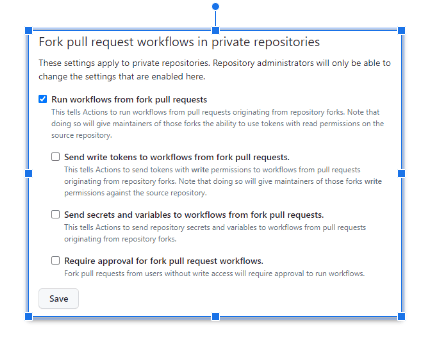
Các cài đặt trên có thể được cấu hình tại cơ quan hoặc tại repo cấp độ.
Thời Gian Không có tùy chọn nào được chọn.GitHub sẽ yêu cầu phê duyệt và Nó sẽ không thực thi bản đã sửa đổi. pipelineĐây là cấu hình an toàn nhất!!
cấu hình không an toàn nhất là khi "Chạy các quy trình công việc từ nhánh con pull request” đã được kiểm traTrong trường hợp này, áp dụng cho cả người dùng đọc và ghi, Github sẽ tự động thực thi bản sửa đổi. pipeline!! Và tình huống này thậm chí còn có thể xảy ra tệ hơn nếu như "Gửi mã thông báo ghi đến các quy trình công việc từ nhánh con. pull requests"Và"Gửi thông tin bí mật và biến đến các quy trình công việc từ nhánh con. pull requests“Đã được kiểm tra. Đừng làm điều này trừ khi có lý do chính đáng!!
Nếu "Cần có sự chấp thuận cho nĩa pull request Luồng công việcNếu tùy chọn "được chọn", tình huống trên sẽ trở nên nghiêm trọng hơn: GitHub sẽ yêu cầu phê duyệt và không thực thi bản sửa đổi. pipeline Đối với người dùng chỉ đọc, lệnh này sẽ được thực thi, nhưng đối với người dùng ghi thì vẫn sẽ được thực thi.
Đã thấy dĩa, còn... Các yêu cầu kéo (PR) đến từ các chi nhánh?
Yêu cầu kéo từ chi nhánh
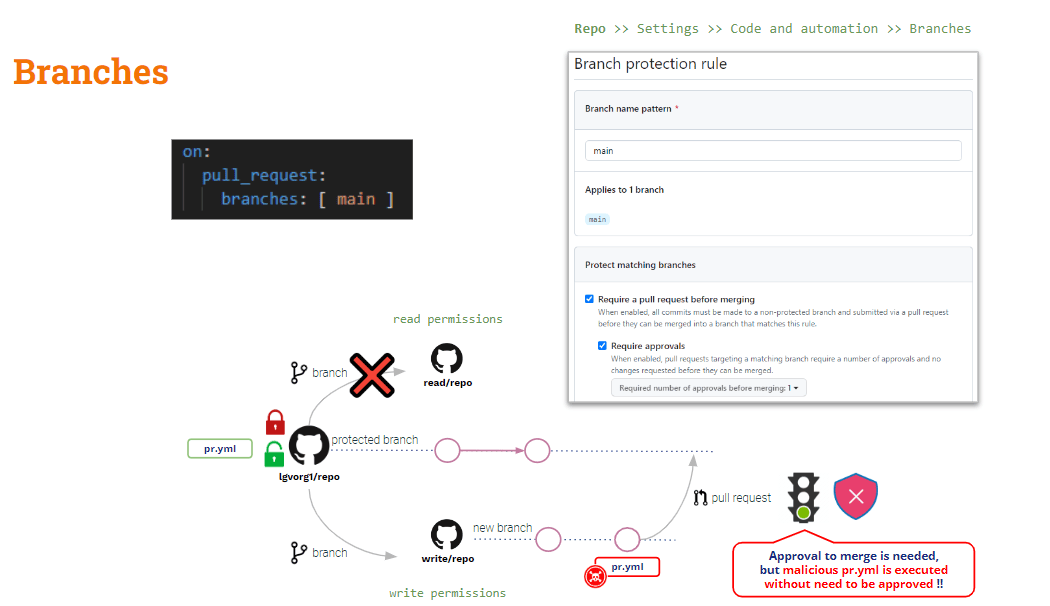
Để bảo vệ mình khỏi tình huống này, bạn phải dựa vào... Quy tắc bảo vệ chi nhánh.
Ở cấp độ kho lưu trữ, bạn có thể tạo các quy tắc bảo vệ nhánh cho bất kỳ nhánh nào. Các quy tắc này bổ sung thêm một số tính năng. các hạn chế đối với việc sửa đổi các nhánh được bảo vệ.
Mặc dù bạn thiết lập một quy tắc để “Yêu cầu một pull request trước khi hợp nhất"Và"Cần có sự phê duyệt", đã sửa đổi pipeline sẽ tự động được thực thi khi tạo yêu cầu kéo (PR).Việc "phê duyệt" chỉ áp dụng cho thao tác hợp nhất.
Còn về ngộ độc gián tiếp thì sao? Pipeline Thực hiện
Như đã thấy ở trên, D-PPE có thể được giảm thiểu bằng cách sử dụng mục tiêu yêu cầu kéo, Nhưng nó Điều này không áp dụng cho I-PPE..
Nếu bạn sử dụng `pull_request_target`, bản sao mặc định sẽ là mã nguồn gốc. Nhưng nếu bạn muốn xác thực một số kiểm tra trên mã nguồn đóng góp (mã PR), bạn cần phải sao chép mã PR một cách rõ ràng. Do đó, nếu mã PR đã sửa đổi bất kỳ tập lệnh shell nào được gọi bởi... pipeline, “căn cứ” (an toàn) pipeline sẽ gọi tập lệnh shell "đã sửa đổi" → Bảo vệ PPE gián tiếp!!
Giải pháp cho vấn đề này phức tạp hơn một chút (không có giải pháp thần kỳ nào như pull_request_target).
Của chúng tôi pipeline Hiện tại nó đã an toàn với D-PPE vì chúng ta đang sử dụng pull_request_target. Nhưng nó vẫn dễ bị tấn công bởi I-PPE.
Trong ví dụ thử nghiệm của chúng tôi, về cơ bản chúng ta cần kiểm tra mã PR để thực hiện bản dựng, nhưng các bài kiểm tra được thực hiện trên sản phẩm được tạo ra từ bản dựng đó.
Vậy .. Sao bạn không thử xem cả hai mã nguồn?
- Hãy xem mã nguồn từ yêu cầu đóng góp (PR) vì đó là mã nguồn chúng ta muốn xây dựng và kiểm thử.
- Kiểm tra mã nguồn cơ bản để chạy phiên bản gốc của... pipeline và các kịch bản xây dựng/kiểm thử
Việc này có thể được thực hiện bằng cách sao chép các cơ sở mã đó vào các thư mục khác nhau.Mã nguồn gốc có thể được sao chép vào thư mục gốc, còn mã nguồn cần sao chép (PR) thì vào một thư mục khác. Trong trường hợp này, chúng ta sẽ thực thi quá trình biên dịch và chạy tập lệnh kiểm thử từ thư mục gốc đối với mã nguồn được đặt trong thư mục mới.
Đây là một giải pháp dễ dàng, dĩ nhiên rồi!! Nhưng, vì mục đích học tập, tôi muốn giới thiệu một biến thể khá thú vị (...)
GitHub workflow_run sự kiện kích hoạt
Bên cạnh đó mục tiêu yêu cầu kéoGitHub cung cấp một sự kiện kích hoạt khác: workflow_runSự kiện này cho phép việc thực thi một pipeline được điều kiện hóa thành một cái khác pipelineviệc hành quyết của.
workflow_run và mục tiêu yêu cầu kéo Hai trình kích hoạt này tương tự nhau ở một khía cạnh: cả hai đều sẽ được thực thi ở chế độ đặc quyền và, Bất chấp những sửa đổi về PR, cơ sở pipeline Sẽ bị hành quyết!!
Hãy xem tình hình hiện tại của chúng ta. pipeline:
					name: PR TARGET CI


on:
  pull_request_target:
    branches: [ main ]


env:
  MY_SECRET: ${{ secrets.MY_SECRET }}

jobs:
  prt_build_test_and_merge:
    runs-on: ubuntu-latest


    steps:
      # checkout PR code
      - name: Checkout repository
        uses: actions/checkout@v4
        with:


          # This is to get the PR code instead of the repo code
          ref: ${{ github.event.pull_request.head.sha }}


      # Simulation of a compilation
      - name: Building ...
        run: |
          mkdir ./bin
          touch ./bin/mybin.exe
          ls -lR

      # Simulation of running tests
      - name: Running tests ...
        id : run_tests
        run: |
          echo Running tests..
          chmod +x runtests.sh
          ./runtests.sh
          echo Tests executed.

      #
      # Let’s omit the check conditions at this moment …
      #
      - name: pr_check_conditions_to_merge
        [...]
Khu vực lắp ráp an toàn với D-PPE, nhưng khu vực thử nghiệm vẫn dễ bị tổn thương bởi I-PPE.
pipeline Bản thân nó an toàn với D-PPE do... mục tiêu yêu cầu kéo kích hoạt. Nhưng bước kiểm thử vẫn dễ bị tổn thương bởi I-PPE do gọi một tập lệnh shell bên ngoài.
Tránh sử dụng I-PPE
Mục đích của những điều nêu trên pipeline Mục tiêu là xây dựng và kiểm thử mã nguồn đóng góp, đảm bảo an toàn khi sử dụng thiết bị bảo hộ cá nhân (PPE).
Vậy .. Sao không chia nhỏ ra? pipeline chia thành hai phần? Một cái để xây dựng và một cái để thử nghiệm...
- Ngày 1 pipeline (Xây dựng CI) sẽ Hãy xem mã PR (để biên dịch), tiến hành xây dựng và tạo ra sản phẩm.
- 2nd pipeline (Kiểm tra CI) sẽ Kiểm tra mã nguồn gốc (để tránh chỉnh sửa tập lệnh shell) và thực thi các kịch bản gốc đối với hiện vật.
- Để đồng bộ hóa Kiểm thử CI pipeline chạy SAU khi Build CI pipeline, chúng tôi sẽ sử dụng workflow_run Kích hoạt.
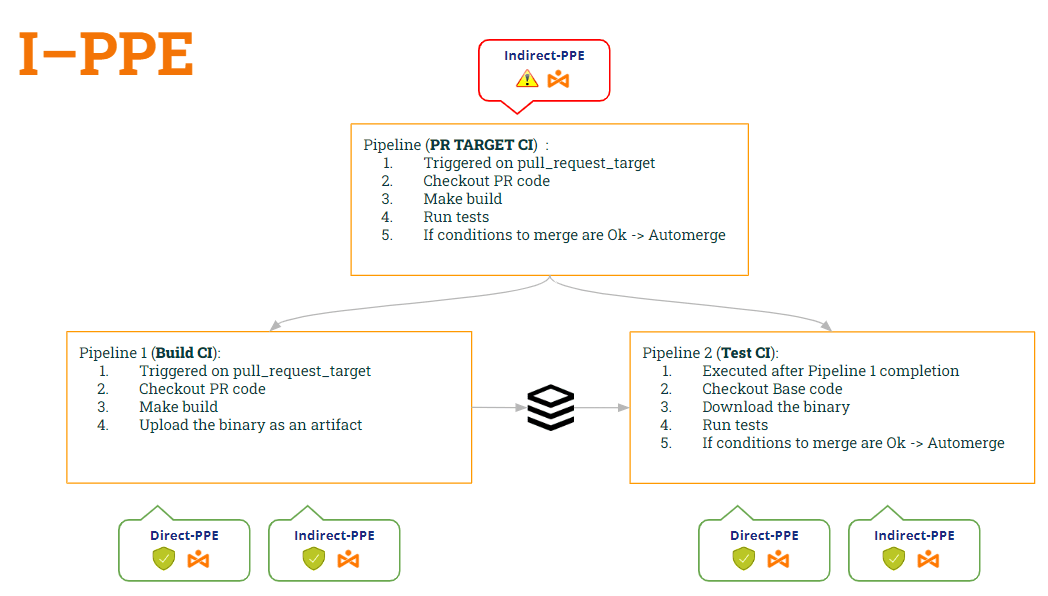
Theo cách này:
- pipeline Xây dựng CI is an toàn cho cả hai D-PPE (do mục tiêu yêu cầu kéo) Và I-PPE (vì nó không còn thực thi tập lệnh shell nữa).
- pipeline Kiểm tra CI cũng là an toàn cho cả hai D-PPE (do workflow_run) Và I-PPE (vì nó kiểm tra mã nguồn cơ bản để lấy được kịch bản shell gốc)
Hãy xem mã của cả hai. pipelinetheo những sửa đổi này…
1st pipeline (Xây dựng CI):
					name: Build CI


on:
  pull_request_target:
    branches: [ main ]


env:
  MY_SECRET: ${{ secrets.MY_SECRET }}
  GITHUB_PAT: ${{ secrets.GH_PAT }}

jobs:

  prt_build_and_upload:
    runs-on: ubuntu-latest
    steps:
      - name: Checking out PR code
        uses: actions/checkout@v4
        if: ${{ github.event_name == 'pull_request_target' }}
        with:
          # This is to get the PR code instead of the repo code
          ref: ${{ github.event.pull_request.head.sha }}


      - name: Building ...
        run: |
          mkdir ./bin
          touch ./bin/mybin.exe
	    # Save some PR info for later use by the 2nd pipeline
          echo "${{github.event.pull_request.title}}" > ./bin/PR_TITLE.txt
          echo "${{github.event.number}}" > ./bin/PR_ID.txt

	# Upload the binary as a pipeline artifact
      - name: Archive building artifacts
        uses: actions/upload-artifact@v3
        with:
          name: archive-bin
          path: |
            bin
2nd pipeline (Kiểm tra CI):
					ame: Test CI


on:
  workflow_run:
    workflows: [ 'PR TARGET CI' ]
    types: [completed]

env:
  MY_SECRET: ${{ secrets.MY_SECRET }}
  GITHUB_PAT: ${{ secrets.GH_PAT }}


jobs:
  deploy:
    runs-on: ubuntu-latest
    if: ${{ github.event.workflow_run.conclusion == 'success' }}
    steps:


      # By default, checks out base code (not PR code)
      - name: Checkout repository
        uses: actions/checkout@v4


	# Download the artifact
      - name: 'Download artifact'
        uses: actions/github-script@v6
        with:
          script: |
            let allArtifacts = await github.rest.actions.listWorkflowRunArtifacts({
               owner: context.repo.owner,
               repo: context.repo.repo,
               run_id: context.payload.workflow_run.id,
            });
            let matchArtifact = allArtifacts.data.artifacts.filter((artifact) => {
              return artifact.name == "archive-bin"
            })[0];
            let download = await github.rest.actions.downloadArtifact({
               owner: context.repo.owner,
               repo: context.repo.repo,
               artifact_id: matchArtifact.id,
               archive_format: 'zip',
            });
            let fs = require('fs');
            fs.writeFileSync(`${process.env.GITHUB_WORKSPACE}/myartifact.zip`, Buffer.from(download.data));


	# Unzip the artifact
      - name: 'Unzip artifact'
        run: |
          unzip -o myartifact.zip


      # Runs tests
      - name: Running tests ...
        id : run_tests
        run: |
          echo Running tests..
          chmod +x runtests.sh
          ./runtests.sh
          echo Tests executed.


#
      # Let’s omit the check conditions at this moment …
      #
      - name: pr_check_conditions_to_merge
        [...]
Tuyệt vời… giải pháp hay quá!! Nhưng… Chúng ta có an toàn không? Tôi e là không 😭
Thật vậy, chúng tôi đã vô tình tạo ra một lỗ hổng bảo mật mới!! Đó là lỗ hổng nào? Đây sẽ là chủ đề của bài viết tiếp theo của chúng tôi 🙂 … Hãy đón chờ nhé!!
PS: Xin lỗi, tôi không thể im lặng được 🤐 ..Bạn đã nghe về Nhiễm độc cổ vật ? 😂