






Əvvəlki paylaşımımızda, Birbaşa Zəhərlənməni necə aşkar edəcəyimizi və ondan necə qorunacağımızı gördük Pipeline İcra (D-FPE). Həmçinin, bu zəifliyi necə aşkar edəcəyimizi də gördük Xygeni Skaneri, eləcə də bəzi qoruma mexanizmləri.
Zəhərli Pipeline İcra (PPE) təcavüzkar dəyişdirə bildikdə istehsal olunur pipeline məntiqi iki şəkildən biri ilə:
- CI konfiqurasiya faylını dəyişdirərək (the pipeline) -> Birbaşa Fərdi Mühafizə Vasitəsi (D-Fərdi Mühafizə Vasitəsi)
- İstinad etdiyi faylları dəyişdirərək pipeline (məsələn: içəridən istinad edilən skriptlər pipeline konfiqurasiya faylı) -> Dolayı Fərdi Mühafizə Vasitələri (FMV)
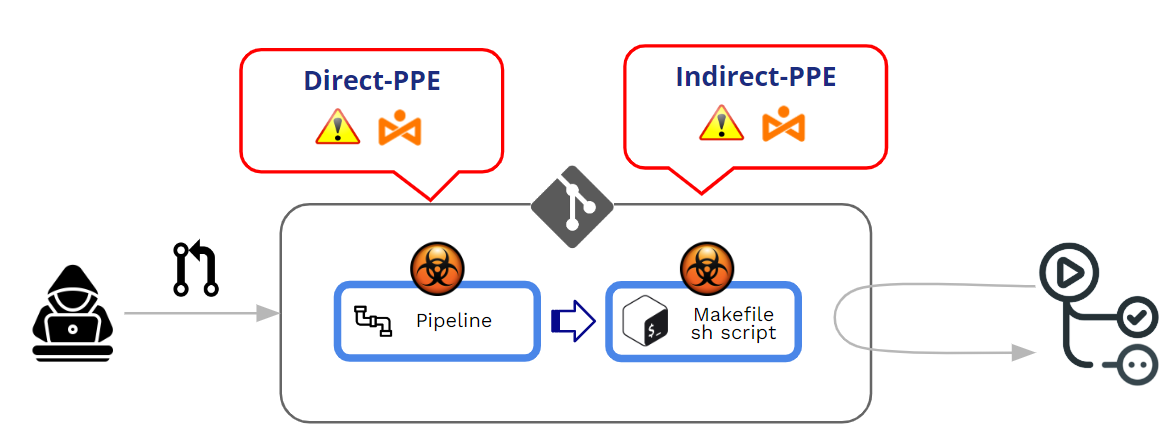
Bu yazıda Dolayı Fərdi Mühafizə Vasitələrinə (FMV) dərindən nəzər salacağıq. Lakin bundan əvvəl və əvvəlki yazıma əlavə olaraq, əvvəlcə GitHub-un icrasını necə idarə etdiyinə baxaq. pipelinevə D-Fərdi Mühafizə Vasitələrinə qarşı qorunma mexanizmləri hansılardır.
GitHub icrasını necə qoruyur? pipelinePR-lardan gəlir?
GitHub dəyişdirilmiş faylların icrası ilə bağlı necə işləyir? pipelines?
Dəyişdirilən pipelines Pushes-dən gələ bilər və ya Pull Requests (PR). Ən yaxşı təcrübə olaraq, qorunan bir budağa birbaşa "təkan" verməkdən və istifadə etməkdən çəkinmək tövsiyə olunur. Pull Requests hər hansı bir töhfə kodu qəbul etməzdən əvvəl bəzi yoxlamaları tətbiq etmək mexanizmi kimi.
Pull Requests iki fərqli mənbədən gələ bilər:
- PR-lar gəlir çəngəllər
- PR-lar gəlir filialları
PR-lar çəngəllər ya da gələ bilər ictimai or xüsusi depolar.
Fərdi Mühafizə Vasitələri ilə məşğul olduğumuz üçün (Zəhərlənmiş) Pipeline (İcra), əsas məqamımız PR-ın "qəbul edilməsi" deyil, dəyişdirilmiş bir PR-ın icrasıdır. pipeline PR-ın qəbul/təsdiq prosesi zamanı. Fərdi Mühafizə Vasitələri hücumunun əsasında, “zərərli” modifikasiya edilmiş bir hücumun qəsdən həyata keçirilməsi dayanır. pipeline.
Bir neçə sözlə, Zəhərlənmiş Pipeline İcra (FQV) nə vaxt istehsal olunur təcavüzkar dəyişdirə bilər pipeline məntiq.
İki var variantlar:
- Birbaşa Fərdi Mühafizə Vasitəsi (D-Fərdi Mühafizə Vasitəsi): D-Fərdi Mühafizə Vasitələri ssenarisində, Təcavüzkar CI konfiqurasiya faylını dəyişdirir depoda, ya dəyişikliyi birbaşa repodakı qorunmayan uzaq bir filiala göndərməklə, ya da bir filialdan və ya çəngəldən dəyişikliklə birlikdə PR təqdim etməklə daxil ola bilərlər. CI-dən bəri pipeline İcra dəyişdirilmiş CI konfiqurasiya faylındakı əmrlərlə müəyyən edilir, təcavüzkarın zərərli əmrləri qurulduqdan sonra nəticədə build qovşağında işləyir. pipeline tetiklenir.
- Dolayı Fərdi Mühafizə Vasitələri (Fərdi Mühafizə Vasitələri): Müəyyən hallarda, D-Fərdi Mühafizə Vasitələrinə çıxışı olan düşmən üçün D-Fərdi Mühafizə Vasitələrinə (FMV) çıxış imkanı mövcud deyil. SCM depo (məsələn, əgər pipeline CI konfiqurasiya faylını eyni depodakı ayrı, qorunan bir filialdan çəkmək üçün konfiqurasiya edilmişdir). Belə bir ssenaridə zəhərləmək əvəzinə, pipeline özü, təcavüzkar tərəfindən istinad edilən fayllara zərərli kod daxil edir pipeline (məsələn: içəridən istinad edilən skriptlər pipeline konfiqurasiya faylı)
Hər iki halda, GitHub dəyişdirilmiş faylı icra edəcək pipeline əvvəlcədən yoxlamaya və ya təsdiqə ehtiyac olmadan.
Çəngəllərdən PR-lar ictimai repo
GitHub, emal zamanı davranışı konfiqurasiya etməyə imkan verir İctimai depolardakı çəngəllərdən gələn PR-lar.
Bir PR bir çəngəldən gəldikdə, GitHub həmişə icra etməzdən əvvəl müəyyən səviyyədə "təsdiq" tələb edir. pipeline PR ilə əlaqəliBu təsdiq səviyyəsi zəifdən sərt təsdiqə dəyişir.
At Təşkilati səviyyə (Təşkilat>>Parametrlər>>Fəaliyyətlər>>Ümumi) bölməsində bir neçə "təsdiq" seçimindən birini seçə bilərsiniz:
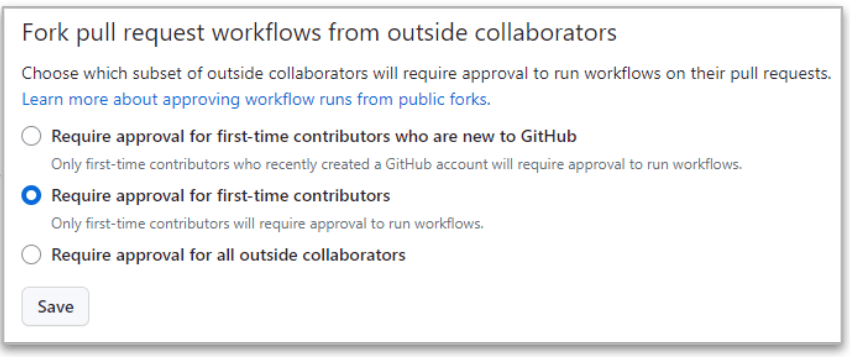
Ən sərti sonuncudur ("Bütün kənar əməkdaşlardan təsdiq tələb olunur”) çünki GitHub həmişə xarici əməkdaşlardan PR gəldikdə təsdiq tələb edəcək.
Amma hətta bu ciddi vəziyyətdə belə, Oxu və yazma icazələri olan əməkdaşlar arasındakı fərqlər.
- PR bir tərəfdən gələndə oxumaq istifadəçi, icrası pipeline DAYANDIRILMIŞDIR dəyişikliklər təsdiqlənənə qədər. Təsdiq müsbətdirsə, dəyişdirilmiş pipeline edam olunur.
- PR bir tərəfdən gələndə yazmaq istifadəçi, təsdiq tələb olunmur və dəyişdirilmiş pipeline həmişə icra olunur!!
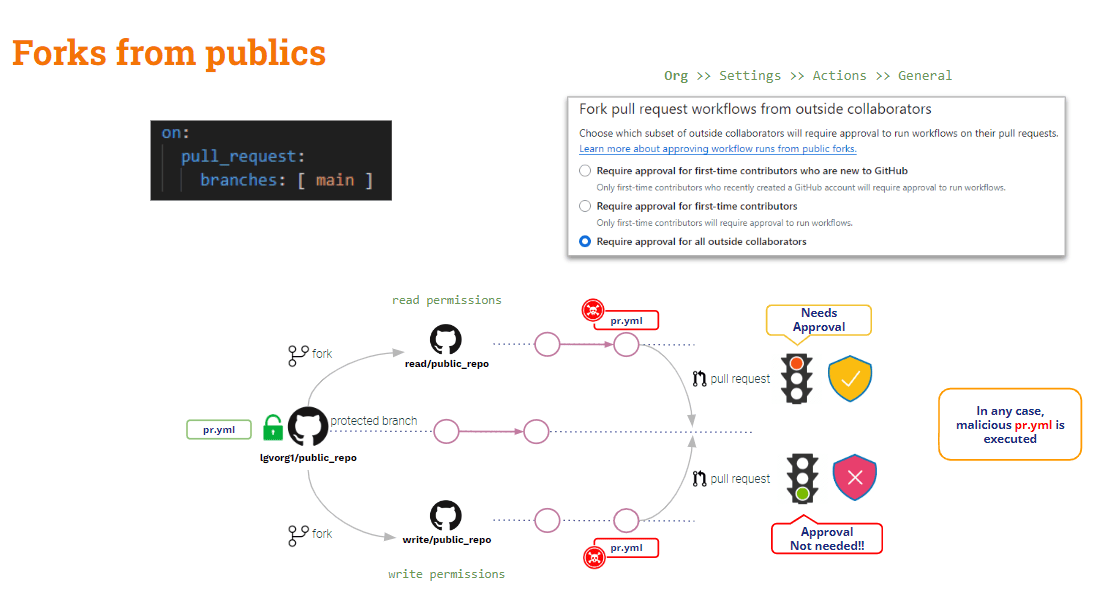
Nəticə olaraq, ictimai depolardakı forklardan gələn PR-lar Fərdi Mühafizə Vasitələrinə qarşı zəif qorunur. Xarici (oxuyan) istifadəçilərə qarşı müəyyən qorunma mövcuddur, lakin daxili (yazıyan) istifadəçilərlə əlaqəli heç bir şey yoxdur.
Nə haqqında Şəxsi depolardan gələn PR-lar?
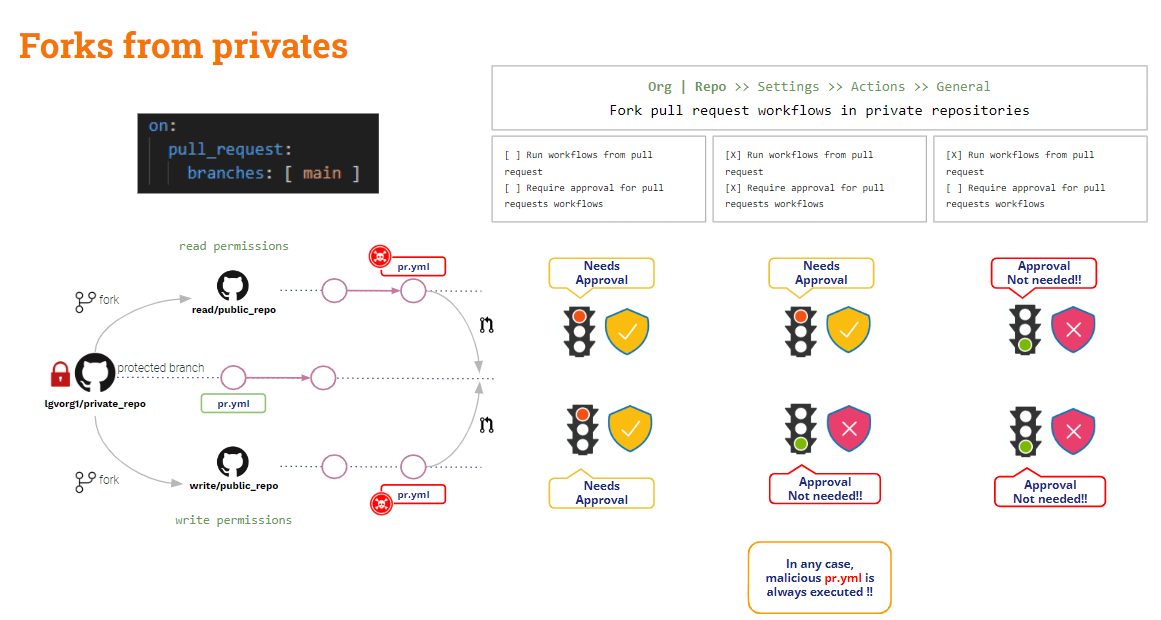
Çəngəllərdən PR-lar xüsusi repo
Bu ssenaridə GitHub bəzi faydalı konfiqurasiya parametrləri təqdim edir.
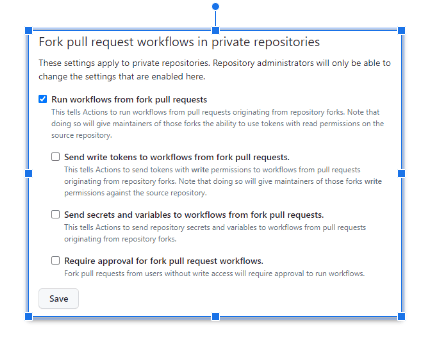
Yuxarıdakı parametrlər ya konfiqurasiya edilə bilər org və ya repo səviyyə.
Zaman heç bir seçim işarələnməyib, GitHub edəcək təsdiq istəmək və dəyişdirilmiş faylı icra etməyəcək pipelineBu, ən təhlükəsiz konfiqurasiyadır!!
The ən təhlükəli konfiqurasiya nə vaxtdır "İş axınlarını çəngəldən işə salın pull request"yoxlanılırBu halda, həm oxuyan, həm də yazan istifadəçilər üçün eynidir, Github avtomatik olaraq dəyişdirilmiş faylı icra edəcək pipelineVə bu vəziyyət hətta ola bilər pis əgər “Fork-dan iş axınlarına yazma tokenləri göndərin pull requests"Və"Sirrləri və dəyişənləri çəngəldən iş axınlarına göndərin pull requests"yoxlanılır. Aydın şəkildə əsaslandırılmadığı təqdirdə bunu etməyin!!
Əgər “Çəngəl üçün təsdiq tələb olunur pull request Iş axınları" işarələndikdə, yuxarıdakı vəziyyət bir qədər yaxşılaşır: GitHub təsdiq istəyəcək və dəyişdirilmiş faylı icra etməyəcək pipeline oxu istifadəçisi üçün, lakin yenə də yazan istifadəçi üçün icra edəcək.
Çəngəllər görüldü, bəs nədir Filiallardan gələn PR-lar?
PR-lar filialları
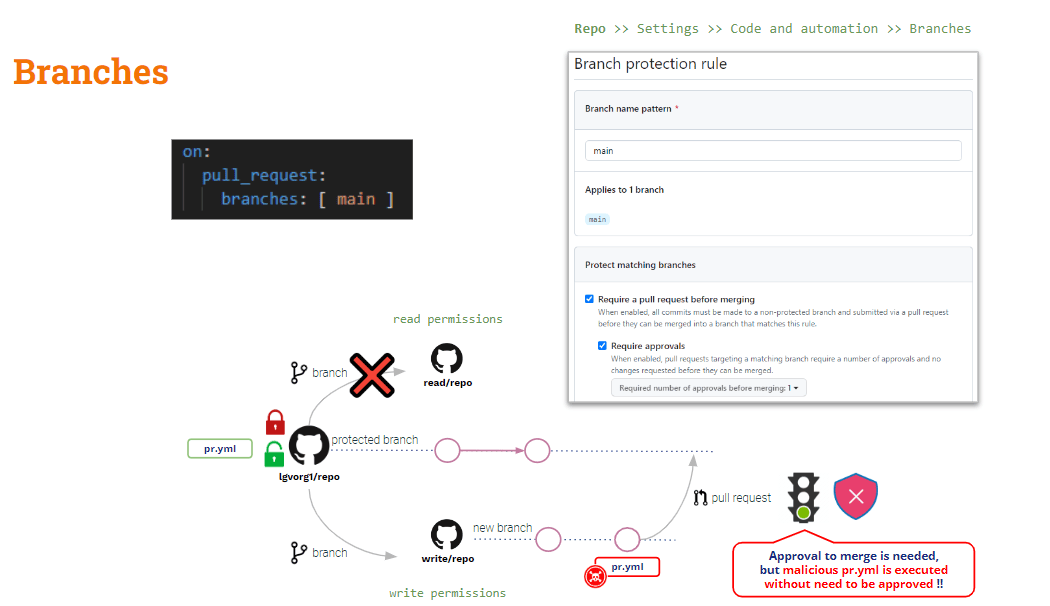
Bu ssenarini qorumaq üçün etibar etməlisiniz Filialın Mühafizəsi Qaydaları.
Repo səviyyəsində istənilən filial üçün filialın qorunması qaydaları yarada bilərsiniz. Bu qaydalar bəzi əlavələr edir qorunan filialların dəyişdirilməsinə qoyulan məhdudiyyətlər.
Bir qaydanı "tələb a pull request birləşmədən əvvəl"Və"Təsdiq tələb edin" modifikasiya olunmuş pipeline PR yaradıldıqda avtomatik olaraq icra ediləcək"Təsdiq" yalnız birləşmə əməliyyatına şamil ediləcək.
Dolayı zəhərlənmə haqqında nə demək olar? Pipeline Icra
Yuxarıda gördüyümüz kimi, D-Fərdi Mühafizə Vasitələri istifadə etməklə azaldıla bilər çəkmə_sorğusu_hədəf, lakin o I-Fərdi Mühafizə Vasitələrinə şamil edilmir.
Əgər pull_request_target istifadə etsəniz, standart yoxlama əsas kod olacaq. Lakin töhfə verilən kodda (PR kodu) bəzi yoxlamaları təsdiqləmək istəyirsinizsə, PR kodunu açıq şəkildə yoxlamalısınız. Buna görə də, əgər PR kodu tərəfindən çağırılan hər hansı bir shell skriptini dəyişdiribsə, pipeline, "əsas" (təhlükəsiz) pipeline "dəyişdirilmiş" shell skriptini işə salacaq → Dolayı Fərdi Mühafizə Vasitələri!!
Bunun həlli bir az daha mürəkkəbdir (pull_request_target kimi sehrli bir güllə yoxdur).
Bizim pipeline pull_request_target istifadə etdiyimiz üçün indi D-PPE üçün təhlükəsizdir. Lakin o, hələ də I-PPE-yə qarşı həssasdır.
Test nümunəmizdə, quruluşu yaratmaq üçün əsasən PR kodunu yoxlamalıyıq, lakin testlər quruluş tərəfindən yaradılan artefakt üzərində aparılır.
Belə ki .. Niyə hər iki kod bazasını yoxlamırsınız?
- PR kodunu yoxlayın, çünki qurmaq və sınaqdan keçirmək istədiyimiz töhfə verilən koddur
- Orijinal versiyasını işlətmək üçün əsas kodunu yoxlayın pipeline və qurma/test skriptləri
Bu, tərəfindən edilə bilər həmin kod bazalarını fərqli qovluqlara yoxlamaq: əsas kod kök qovluğa, PR isə başqa bir qovluğa yoxlanıla bilər. Bu halda, yeni qovluğa yerləşdirilmiş koda əsasən kök qovluqdan quruluşu və test skriptini icra edəcəyik.
Əlbəttə ki, bu asan bir həlldir!! Amma öyrənmə məqsədləri üçün olduqca maraqlı bir variant təqdim etmək istərdim (...)
Github iş axını_qaçması tetikleyici hadisə
Əlavə çəkmə_sorğusu_hədəf, GitHub başqa bir tetikleyici hadisə təqdim edir: iş axını_qaçmasıBu tədbir imkan verir icrası pipeline başqasına şərtləndirilmiş pipeline'nin edamı.
iş axını_qaçması və çəkmə_sorğusu_hədəf tetikleyicilər bir cəhətdən oxşardır: hər ikisi imtiyazlı rejimdə icra ediləcək və PR dəyişikliklərinə baxmayaraq, baza pipeline edam ediləcək!!
Gəlin hazırkı vəziyyətimizə baxaq pipeline:
					name: PR TARGET CI


on:
  pull_request_target:
    branches: [ main ]


env:
  MY_SECRET: ${{ secrets.MY_SECRET }}

jobs:
  prt_build_test_and_merge:
    runs-on: ubuntu-latest


    steps:
      # checkout PR code
      - name: Checkout repository
        uses: actions/checkout@v4
        with:


          # This is to get the PR code instead of the repo code
          ref: ${{ github.event.pull_request.head.sha }}


      # Simulation of a compilation
      - name: Building ...
        run: |
          mkdir ./bin
          touch ./bin/mybin.exe
          ls -lR

      # Simulation of running tests
      - name: Running tests ...
        id : run_tests
        run: |
          echo Running tests..
          chmod +x runtests.sh
          ./runtests.sh
          echo Tests executed.

      #
      # Let’s omit the check conditions at this moment …
      #
      - name: pr_check_conditions_to_merge
        [...]
Quruluş hissəsi D-PPE üçün təhlükəsizdir, lakin test hissəsi hələ də I-PPE-yə qarşı həssasdır.
The pipeline özü D-Fərdi Mühafizə Vasitələri üçün təhlükəsizdir, çünki çəkmə_sorğusu_hədəf tetikleyici. Lakin test mərhələsi xarici shell skriptinin işə salınması səbəbindən hələ də I-PPE-yə qarşı həssasdır.
Fərdi Fərdi Mühafizə Vasitələrindən (FMV) qaçınmaq
Yuxarıda göstərilənlərin məqsədi pipeline Fərdi Mühafizə Vasitələri üçün təhlükəsiz olmaqla, töhfə verilən kodu yaratmaq və sınaqdan keçirməkdir.
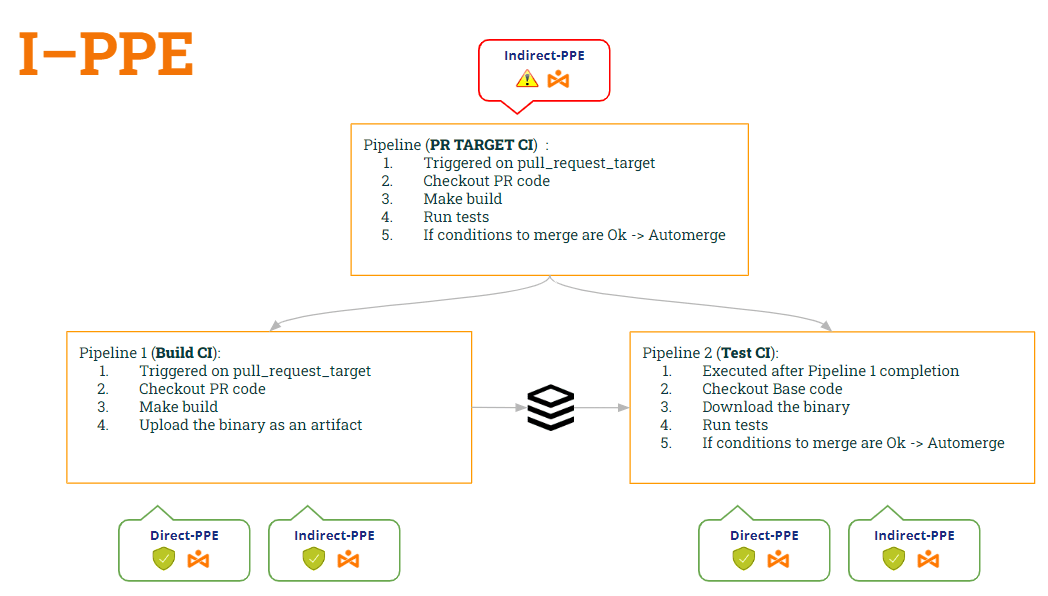
Belə ki .. Niyə bölmək olmaz ki, pipeline ikiyə? Biri tikinti üçün, digəri isə sınaq üçün..
- 1st pipeline (CI qurun) olardı PR kodunu yoxlayın (onu qurmaq üçün), quruluşu yaradın və artefakt yaradın.
- 2nd pipeline (Test CI) olardı Əsas kodunu yoxlayın (shell skriptinin dəyişdirilməsinin qarşısını almaq üçün) və orijinal skriptləri artefakt əleyhinə icra edin.
- Test CI-ni sinxronlaşdırmaq üçün pipeline Build CI-dən sonra işə salmaq pipeline, biz istifadə edəcəyik iş axını_qaçması tetikleyici.
Bu şəkildə:
- pipeline CI qurun is təhlükəsiz hər ikisinə D-Fərdi Mühafizə Vasitəsi (görə çəkmə_sorğusu_hədəf) Və Fərdi Mühafizə Vasitələri (çünki artıq shell skriptini icra etmir).
- pipeline Test CI da təhlükəsiz hər ikisinə D-Fərdi Mühafizə Vasitəsi (görə iş axını_qaçması) Və Fərdi Mühafizə Vasitələri (çünki orijinal shell skriptini əldə etmək üçün əsas kodu yoxlayır)
Hər ikisinin koduna baxaq pipelinebu dəyişikliklərə görə...
1st pipeline (CI qurun):
					name: Build CI


on:
  pull_request_target:
    branches: [ main ]


env:
  MY_SECRET: ${{ secrets.MY_SECRET }}
  GITHUB_PAT: ${{ secrets.GH_PAT }}

jobs:

  prt_build_and_upload:
    runs-on: ubuntu-latest
    steps:
      - name: Checking out PR code
        uses: actions/checkout@v4
        if: ${{ github.event_name == 'pull_request_target' }}
        with:
          # This is to get the PR code instead of the repo code
          ref: ${{ github.event.pull_request.head.sha }}


      - name: Building ...
        run: |
          mkdir ./bin
          touch ./bin/mybin.exe
	    # Save some PR info for later use by the 2nd pipeline
          echo "${{github.event.pull_request.title}}" > ./bin/PR_TITLE.txt
          echo "${{github.event.number}}" > ./bin/PR_ID.txt

	# Upload the binary as a pipeline artifact
      - name: Archive building artifacts
        uses: actions/upload-artifact@v3
        with:
          name: archive-bin
          path: |
            bin
2nd pipeline (Test CI):
					ame: Test CI


on:
  workflow_run:
    workflows: [ 'PR TARGET CI' ]
    types: [completed]

env:
  MY_SECRET: ${{ secrets.MY_SECRET }}
  GITHUB_PAT: ${{ secrets.GH_PAT }}


jobs:
  deploy:
    runs-on: ubuntu-latest
    if: ${{ github.event.workflow_run.conclusion == 'success' }}
    steps:


      # By default, checks out base code (not PR code)
      - name: Checkout repository
        uses: actions/checkout@v4


	# Download the artifact
      - name: 'Download artifact'
        uses: actions/github-script@v6
        with:
          script: |
            let allArtifacts = await github.rest.actions.listWorkflowRunArtifacts({
               owner: context.repo.owner,
               repo: context.repo.repo,
               run_id: context.payload.workflow_run.id,
            });
            let matchArtifact = allArtifacts.data.artifacts.filter((artifact) => {
              return artifact.name == "archive-bin"
            })[0];
            let download = await github.rest.actions.downloadArtifact({
               owner: context.repo.owner,
               repo: context.repo.repo,
               artifact_id: matchArtifact.id,
               archive_format: 'zip',
            });
            let fs = require('fs');
            fs.writeFileSync(`${process.env.GITHUB_WORKSPACE}/myartifact.zip`, Buffer.from(download.data));


	# Unzip the artifact
      - name: 'Unzip artifact'
        run: |
          unzip -o myartifact.zip


      # Runs tests
      - name: Running tests ...
        id : run_tests
        run: |
          echo Running tests..
          chmod +x runtests.sh
          ./runtests.sh
          echo Tests executed.


#
      # Let’s omit the check conditions at this moment …
      #
      - name: pr_check_conditions_to_merge
        [...]
Vay... gözəl həll!! Amma... təhlükəsizikmi? Qorxuram ki, yox 😭
Həqiqətən də, yeni bir boşluq təqdim etdik!! Hansı? Bu, növbəti paylaşımımızın mövzusu olacaq 🙂 … Bizi izləməyə davam edin!!
PS: Bağışlayın, susa bilmirəm 🤐 ..Eşitmisinizmi? Artefakt Zəhərlənməsi ? 😂