
Git er et kraftfuldt værktøj. Alligevel lærer mange udviklere kun lige nok til at klare sig. I starten kan det virke fint. Men når hemmeligheder lækker, hober der sig fusionskonflikter op, eller nogen presser direkte på main, tingene kan hurtigt gå galt. Derfor er det vigtigt at gå ud over det grundlæggende og implementere en sikker, hurtig og ensartet arbejdsgang. Denne FAQ besvarer de mest almindelige spørgsmål, som udviklere stiller om Git. Undervejs fremhæver den vigtige bedste praksis for git, forklarer nøglebegreberne bag git hurtig versionskontrolog tilbyder rådgivning fra den virkelige verden om git-sikkerhedHver sektion er designet til at hjælpe dig med at stoppe med at gætte og begynde at sende kode med selvtillid.
Hvad er Git?
Hvorfor Git Fast Version Control har brug for smarte standardindstillinger
Git er et distribueret versionskontrolsystem. I praksis giver det dig mulighed for at spore ændringer i din kodebase, samarbejde med teammedlemmer og rulle tilbage, når noget går i stykker. I modsætning til centraliserede systemer fungerer Git lokalt, du kan køre kommandoer som git commit or git branch selv uden internetadgang.
Ved første øjekast kan Git virke som et værktøj udelukkende til at spore historik. Det er dog essentielt for moderne udviklingsworkflows. Git-kræfter git hurtig versionskontrol, hvilket gør det muligt for teams at iterere hurtigt, samtidig med at sporbarheden bevares. Derudover understøtter Git automatisering, CI/CD pipelines og DevOps bedste praksis på tværs af næsten alle softwareprojekter.
Når det er sagt, er Git ikke bare et produktivitetsværktøj. Det er også en sikkerhedsgrænseFor eksempel, hvis nogen ved et uheld løber git add . og commiter en .env fil, hemmeligheder som API-tokens kan blive sendt til et fjerntliggende repo. Angribere scanner ofte offentlige repositories og leder efter eksponerede legitimationsoplysninger og følsomme konfigurationsfiler.
For at være sikker, når du bruger Git, skal du huske disse vigtige ting:
- Brug
.gitignorefil for at udelade følsomme eller lokale filer. - Kræv 2FA for alle Git-konti (især på platforme som GitHub eller GitLab).
- Aldrig commit hemmeligheder eller legitimationsoplysninger, scan dem pre-commit når det er muligt.
For avanceret beskyttelse, værktøjer som Xygeni scanner dine lagre løbende. De fanger hardcodede hemmeligheder, registrerer sårbar kode, før den flettes sammen, og blokerer endda usikre arbejdsgange i dine CI/CD pipeline, alt sammen uden at være i vejen.
Hvem ejer Git?
Git ejes ikke af et enkelt firma. Det er et open source-projekt, der vedligeholdes af et fællesskab af bidragydere, med udvikling koordineret via Git-mailingliste og hostet på gå-scm.com Git, oprindeligt skabt af Linus Torvalds i 2005, var designet som et hurtigt, distribueret versionskontrolsystem, som udviklere kunne stole på, især til administration af Linux-kernen.
Selvom ingen ejer I traditionel forstand støtter adskillige organisationer den løbende udvikling af Git, herunder GitHub, GitLab og Bitbucket. De bygger deres egne platforme oven på Git, mens de bidrager tilbage til kernen.
Hvad står Git for?
Teknisk set, Git står ikke for noget. Det er ikke et akronym. Ifølge Linus Torvalds, der skabte Git i 2005, blev navnet valgt dels som et stykke britisk slang, "git" kan betyde en fjollet eller ubehagelig person, og dels fordi det var kort, mindeværdigt og ikke allerede eksisterede som en Unix-kommando.
Med hans egne ord: "Jeg er en egoistisk stodder, og jeg opkalder alle mine projekter efter mig selv. Først 'Linux', nu 'Git'." Linus Torvalds
Bortset fra den sjove oprindelse, blev Git et af de mest essentielle værktøjer inden for softwareudvikling. Det driver alt fra open source-projekter til enterprise CI/CD pipelines. Med Git vinder teams hurtig versionskontrol, decentraliseret samarbejde og muligheden for at spore og fortryde ændringer forudcisEly.
Men i takt med at Git-adoptionen er eksploderet, er risiciene også steget. Malware, hemmeligheder og sårbarheder i forsyningskæden kan komme ubemærket ind i dine repositories. Derfor bør du sikre din Git-opsætning med værktøjer som Xygeni, som analyserer commits, scanner afhængigheder og håndhæver politikker, er afgørende for moderne DevSecOps arbejdsgange.
Hvordan bruger man Git?
Git Best Practices til sikker og effektiv brug af Git
Effektiv brug af Git betyder mere end blot at huske et par kommandoer. Det involverer at følge bedste praksis for git, forstå hvordan dine ændringer flyder gennem grene og fjernbetjeninger, og undgå almindelige fejl, der kan føre til fejl eller endda sikkerhedsrisici.
Den grundlæggende Git-arbejdsgang
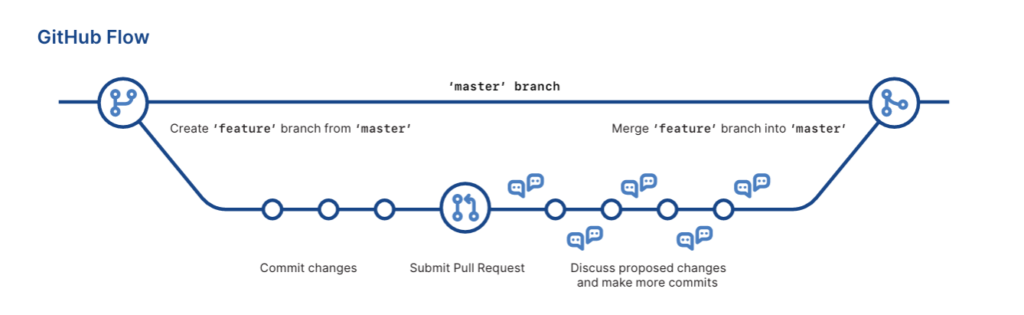
For at komme i gang inkluderer den grundlæggende Git-arbejdsgang typisk:
1. Kloning af et arkiv:
2. Oprettelse af en funktionsgren:
3. Foretage ændringer og committing sikkert:
4. Tryk på fjernbetjeningen:
5. Åbning af en pull request (PR) for at flette dine ændringer ind i hovedgrenen.
Anvend Git-sikkerhed i hvert trin
Selvom disse trin er standard, introducerer mange udviklere ubevidst risici. For eksempel, commitat afsløre en hemmelighed ved et uheld eller at pushe ureviewet kode, der afbryder produktionen.
Derfor er her nogle sikkerhedsfokuserede forbedringer, der skal implementeres med det samme:
- Undgå
git add .medmindre du er sikker på, hvad du commitBrug.git statusførst og tilføj filer selektivt medgit add <file>. - Skriv meningsfuldt commit Beskeder. De forbedrer sporbarheden og hjælper kontrollanter med at opdage uregelmæssigheder.
- Scan din commits før du skubber. Brug værktøjer som Xygenis Git Guardrails til at fange hemmeligheder, malware og fejlkonfigurationer før sammenfletning.
- Gennemtving PR-gennemgange før fusion. Det er en af de enkleste måder at forhindre risikabel kode i at komme ind i din hovedbranch.
Vigtigt er det, at Xygeni integreres direkte i din Git-arbejdsgang. Den scanner alle commit og PR for at håndhæve dine sikkerhedspolitikker uden at bremse dig. Dette holder dit lager sikkert, samtidig med at det bevarer git hurtig versionskontrol, hurtigt, men sikkert.
Hvad er et Git-arkiv?
Kernen er en Git-arkiv er en versionsbaseret mappe over dit projekt, der sporer alle ændringer over tid. Den indeholder al din kildekode, branches, tags og commit historie, og potentielt meget mere end du forventer.
Så hvorfor er dette vigtigt for git-sikkerhed?
Fordi et Git-repo ikke bare er en historik over din kode. Det kan også indeholde:
- Følsomme konfigurationsfiler som
.envorconfig.yml - Hårdkodede hemmeligheder ved et uheld tilføjet under udvikling
- Malware eller typosquattede afhængigheder introduceret via
package.json,requirements.txteller andre manifester
Derfor er det afgørende at forstå, hvad der findes i dit repo. Det handler ikke kun om at holde koden ren, det handler om at beskytte hele dit repository. pipeline.
Eksempel:
En almindelig fejl er at presse en lokal .env fil med hemmeligheder:
Selv hvis depotet er privat, kan disse hemmeligheder lække via forks eller tredjepartsintegrationer.
For at undgå dette:
- Opsætning pre-commit hooks eller CI-scannere som f.eks. Xygeni at opdage hemmeligheder, før de når din fjernbetjening.
- Ryd din historik med
git filter-repoorBFGhvis noget følsomt allerede er blevet committed.
Når du indtaster kode, scanner Xygeni commit og dine afhængighedsfiler (som f.eks. package.json or requirements.txt) for lækkede hemmeligheder, malware og kendte exploits, alt sammen før det når PR-stadiet.
Dette sikrer, at din bedste praksis for git og sikkerhedshygiejne opretholdes, selv efterhånden som projektet vokser. Derudover understøtter Xygeni scanning på tværs af GitHub, GitLab, Bitbucket og andre større platforme.
I sidste ende hjælper det teams med at bevæge sig hurtigere uden at efterlade kritiske huller, hvis du behandler dit Git-repo som en sikkerhedsgrænse, ikke blot et kodelager.
Hvad er kildekontrol?
Kildekontrol, også kendt som version kontrol, er praksissen med at spore og administrere ændringer i din kodebase. Værktøjer som Git gør dette muligt ved at registrere, hvem der ændrede hvad, hvornår og hvorfor. Men det handler ikke kun om samarbejde. I dagens DevOps pipelines, kildekontrol er også din første sikkerhedskontrolpunkt.
Endnu vigtigere er det, at udviklere er afhængige af git hurtig versionskontrol at bevæge sig hurtigt, forgrene sig, commitog sammenlægning uden forsinkelser. Men når sikkerheden overses, kan den hastighed give bagslag.
Almindelige Git-sikkerhedsrisici i kildekontrol
Angribere går i stigende grad efter kildekontrolsystemer som GitHub, GitLab og Bitbucket. En enkelt lækket token eller en forkert konfigureret arbejdsgang kan give adgang til hele din softwareforsyningskæde. Derfor... git-sikkerhed er ikke længere valgfrit, det er essentielt.
Her er nogle af de almindelige risici:
- Stjålne GitHub-tokens bruges til at klone eller manipulere med private arkiver
- Ubeskyttede hovedgrene der tillader direkte risikable commits
- Ondsindede bidragydere indsendelse pull requests med skjulte nyttelaster
- Arbejdsgange med skrivetilladelser udnyttet til at injicere malware
Sådan anvender du Git Best Practices i kildekontrol
Sådan holder du kildekontrollen sikker uden at forsinke dit arbejde:
- Brug tofaktor godkendelse (2FA) på tværs af alle udviklerkonti
- Sæt strengt regler for filialbeskyttelse og kræver PR-vurderinger
- Revision arbejdsgangstilladelser, undgå at give unødvendig skriveadgang
- Kør scanninger for sårbarheder, hemmeligheder og fejlkonfigurationer før sammenlægning
Hvorfor bruge Xygeni?
Xygeni styrker Gits muligheder ved at tilføje:
- CI/CD guardrails
- Detektion af fejlkonfiguration af arbejdsgange
- Hemmelig scanning før sammenlægning
- Håndhævelse af politikker for PR'er og fusioner
Som følge heraf kan du opretholde git hurtig versionskontrol uden at gå på kompromis med synlighed eller sikkerhed. Udviklere arbejder lige så hurtigt, men nu er hver ændring sikret af automatiserede kontroller.
Når kildekontrollen er styrket, beskytter den hele din pipelinefra commit at udrulle.
Hvordan trækker man fra Git?
git pull `command` er nok en af de mest brugte og mindst forståede Git-operationer. Den henter ændringer fra et fjerntliggende repository og fletter dem ind i din nuværende branch. Simpelt nok, ikke? Men bag denne enkelhed ligger en potentiel kilde til fejl, ødelagte builds og endda sikkerhedsproblemer.
Sådan kører du det:
Denne kommando henter de seneste ændringer fra main grenen af din fjernbetjening (normalt GitHub, GitLab osv.) og forsøger at flette dem sammen med din lokale kode.
Sådan trækker du fra Git uden at ødelægge Git-sikkerheden eller -hastigheden
Fra et sikkerhedsmæssigt synspunkt kan det være risikabelt at trække kode blindt. Ondsindede aktører kan snige skadelig kode, afhængigheder med typografiske fejl eller forgifte koder. commits ind i offentlige reposer. I delte projekter kan selv velmenende teammedlemmer ved en fejltagelse fremskynde usikre ændringer. Det er her bedste praksis for git blive kritisk.
Når dit team trækker ofte, understøtter det også git hurtig versionskontrol, hjælper udviklere med at holde synkronisering, reducere flettekonflikter og levere hurtigere. Men hvis du bruger usikker kode, bliver hastighed din fjende.
Best Practices
At bruge git pull sikkert og effektivt:
- Anmeldelse pull request adskiller sig før sammenlægning eller udtrækning, især fra eksterne bidragydere
- Foretrække
git fetch+git mergefor mere kontrol over, hvad du integrerer - Kør test lokalt, før du overfører pulled changes upstream
- Brug underskrevet commitog valider forfatterskab, hvis du arbejder på følsomme projekter
- Overvåg din forsyningskæde, pakker der hentes via automatisering (f.eks. postinstallationsscripts) kan være farlige
Hvordan Xygeni hjælper
Xygeni tilføjer guardrails der scanner din kode før den når produktion. For eksempel:
- Registrerer automatisk malware, hemmeligheder og sårbar kode i fjerne ændringer
- Markerer enhver manipulation eller uoverensstemmelser i din arkivhistorik
- gælder politikkontroller on pull requests og fusionerer, hvilket blokerer introduktionen af usikker kode
- Overvåger løbende din CI/CD arbejdsgange for at sikre, at angribere ikke kan udnytte pull-baseret logik
Med Xygeni kan du trygt omfavne git hurtig versionskontrol, udtrækning, flette og implementere med tillid til, at alle ændringer har bestået sikkerhedstjek.
Hvordan man Commit til Git?
CommitAt skrive i Git er mere end bare at skrive git commit -m "fix stuff" og fortsætter. Hvis du vil git hurtig versionskontrol der skalerer med dit team og undgår fremtidige hovedpiner, din commitskal være klare, meningsfulde og sikre.
Hvordan man Commit Sådan bruger du Git sikkert ved hjælp af Git Best Practices
At oprette en commit, kører du typisk:
git add Stage fortæller Git, hvilke ændringer der skal inkluderes. git commit Kommandoen gemmer disse ændringer i din projekthistorik. Simpelt, ikke? Men følgende bedste praksis for git betyder at gå videre:
- Skriv beskrivende commit Beskeder.
- Commit logisk grupperede ændringer.
- Undgå store, oppustede commitder berører irrelevante filer.
god commits gør versionskontrol hurtigere, renere og nemmere at fejlfinde.
Git Fast versionskontrol starter med godt Commit Hygiejne
Her er hvor git-sikkerhed kommer i spil. En uforsigtig commit kan ved et uheld leak secrets, introducere sårbarheder eller trække ondsindede pakker ind. Før committing:
- Dobbelttjek for
.envfiler, hardcodede tokens eller eksponerede legitimationsoplysninger. - Valider dine afhængigheder – er de sikre, verificerede og opdaterede?
- Udeluk unødvendige filer ved hjælp af
.gitignore(som logfiler, build-artefakter eller legitimationsoplysninger).
Tip: Integrere commit scanner ind i din arbejdsgang med et værktøj som Xygeni. Det tjekker for hemmeligheder, pakker med typografiske fejl og fejlkonfigurationer, før koden når din hovedgren, alt sammen uden at afbryde dit flow.
Is git clone Lige med en Pull Request?
Ikke engang tæt på. Selvom begge handlinger involverer fjernlagre, tjener de helt forskellige formål:
git cloneer en kommando, der bruges til at kopier et helt fjernlager til din lokale maskineDet er normalt det første, du gør, når du starter med et nyt projekt.
A pull request (PR) er en samarbejdsmekanisme typisk brugt på platforme som GitHub eller GitLab. Når du har foretaget ændringer i dit lokale eller forkede repo, åbner du en PR for at anmode om at flette disse ændringer ind i en delt branch (som f.eks. main).
Tænk på det på denne måde:
git clone= "Lad mig hente en kopi, så jeg kan begynde at kode."- Pull Request = "Her er hvad jeg har ændret. Gennemgå og godkend det venligst, før vi fletter."
Git-sikkerhedsmæssige implikationer ved kloning af arkiver
Hvis du bare kloner reposer uden at verificere, hvad der er indeni, importerer du muligvis:
- Ondsindede scripts
- Forkert konfigurerede arbejdsgange
- Forgiftede afhængigheder
Ligeledes pull requests kan være en vektor for injicerede sårbarheder hvis den ikke scannes korrekt.
Derfor handler hurtig versionskontrol ikke kun om hastighed, det betyder også sikker decisionfremstilling. Værktøjer som Xygeni:
- Analyser PR'er for hemmeligheder, sårbar kode og fejlkonfigurationer
- Håndhæv politikkontroller før fusioner
- Advarsel om usikre bidrag, selv i klonede forks
Bundlinie: Kloning er måden du starter på; PR'er er måden du bidrager på. Sikring af begge dele er en del af de bedste praksisser i Git, som alle DevOps-teams bør følge.
Hvordan kloner man et Git-arkiv i Visual Studio-kode?
Kloning af et Git-repository kan virke simpelt, men det er ofte der, sikkerhedsproblemer stille og roligt sniger sig ind. Hvis du er interesseret i git hurtig versionskontrol og rene arbejdsgange, fortjener kloningstrinnet mere opmærksomhed end blot at klikke på "Klon".
Bedste praksis i Git ved kloning af arkiver i Visual Studio-kode
Sådan gør du det sikkert:
- Kopiér URL'en til arkivet fra GitHub, GitLab eller Bitbucket. Sørg for, at det er fra en pålidelig kilde, ja, selv interne repos kan være risikable.
- Åbn Visual Studio Code.
- Gå til Kildekontrolpanel (ikon i venstre sidebjælke) eller tryk på
Ctrl+Shift+G. - Klik "Klonlager", indsæt URL'en, og tryk på Enter.
- Vælg en lokal mappe til at gemme lageret.
- VS Code vil bede dig om at åbne den klonede mappe. Klik "Åben".
- Før du begynder at arbejde, scan repoet for tegn på problemer, såsom eksponerede hemmeligheder, typografiske afhængigheder eller uoverskuelige
.githistorie. Selv projekter, der ser legitime ud, kan indeholde risikable scripts eller fejlkonfigurationer.
Teams, der bruger automatiserede scannere på dette stadie, opdager problemer tidligt og holder sig på linje med bedste praksis for gitDet er et lille skridt, der kan spare dig flere timer senere.
Ved at indbygge denne vane i din arbejdsgang forbedrer du både din projekthygiejne og din sikkerhedstilstand, alt sammen uden at sætte farten ned. Det er, hvad moderne git-sikkerhed skal se ud.
Hvordan tjekker man den nuværende gren i Git?
Det burde være en selvfølge at vide, hvilken branch man er på, især når man jonglerer med flere funktioner, hotfixes eller releaselinjer. Fejl sker hurtigt, hvis man pusher eller trækker fra den forkerte branch. For teams med fokus på git hurtig versionskontrol, klarhed vinder over kaos.
Sådan tjekker du din nuværende filial:
I din terminal skal du køre:
Den nuværende gren vil blive fremhævet med en stjerne (*), sådan her:
Alternativt kan du bruge:
Det viser noget i retning af:
Undgå Git-sikkerhedsfejl ved at verificere grene
Fejl i grene er mere end bare irriterende, de er en sikkerhedsrisiko. Utilsigtet fusionering eller commitat gå til den forkerte gren kan omgå anmeldelser eller indsætte uscannet kode i produktionen. Dette afbryder flowet af bedste praksis for git og åbner døren for risikable forandringer, der slipper igennem.
Teams, der håndhæver klare forgreningsstrategier og integrerer scanning i pull requests kan stoppe de fleste problemer, før de eskalerer. Sikker udvikling betyder ikke langsom udvikling, det betyder at gøre din Git-arbejdsgang smartere og mere sikker fra starten.
Er Git sikkert?
Bedste praksisser for Git-sikkerhed, som alle teams bør kende
Git er i sig selv blot et versionskontrolsystem; det sikrer ikke din kode magisk. Det er hurtigt, fleksibelt og kraftfuldt, hvilket gør det til en favorit for udviklere. Men den kraft følger med ansvar.
Selvom Git understøtter funktioner som signed commits og grenbeskyttelse, vil det ikke forhindre dig i at pushe en hemmelig nøgle, konfigurere adgang forkert eller trække en sårbar afhængighed ind. Så, Er Git sikkert? Det korte svar: det kan det, hvis man bruger det rigtigt.
Gør Git sikkert i praksis
For rent faktisk at sikre din Git-arbejdsgang, følg disse bedste praksis for git:
- Opsæt regler for grenbeskyttelse og kræve pull request vurderinger.
- Aldrig commit hemmeligheder eller tokens. Brug
.gitignoreog scanne din commits. - Gennemgå din adgang til arkivet regelmæssigt, giv ikke alle administratorrettigheder.
- Underskriv din commits med GPG for integritet.
- Kør pre-commit hooks eller CI-scanninger for at fange risikable ændringer, før de lander.
Sikkerhed i Git er ikke en knap, man trykker på, det er en vane. Når du behandler Git som en del af din angrebsflade, ikke bare et værktøj, begynder du at bygge ægte git-sikkerhed i hvert trin. Og det bedste af det hele? Disse vaner sinker dig ikke. Faktisk gør de dit team hurtigere og mere selvsikkert og leverer resultater git hurtig versionskontrol uden at risikere det, der betyder noget.
Git Best Practices for sikker og hurtig versionskontrol
For at opretholde en sund og sikker kodebase har din Git-arbejdsgang brug for mere end blot bekvemme genveje. bedste praksis for git er designet til at forbedre teamsamarbejdet, håndhæve git-sikkerhed, og støtte git hurtig versionskontrol uden at bremse dig.
Brug Clear og Atomic Commits
Hver commit bør afspejle én logisk ændring. Dette forenkler kodegennemgange, rollbacks og ændringssporing. Undgå commitstore mængder af irrelevante opdateringer.
Aldrig Commit hemmeligheder
Tjek altid efter .env filer, adgangstokens eller legitimationsoplysninger før du pusher. Brug .gitignore at udelukke følsomme filer og anvende automatiserede scanningsværktøjer til at opdage eksponerede hemmeligheder tidligt.
Håndhæv reglerne for filialbeskyttelse
Beskyt hovedgrene ved at kræve pull requests, godkendelser og statustjek. Dette sikrer, at urevideret eller risikabel kode aldrig når produktion.
Gennemgå afhængigheder og scan for sårbarheder
Fastgør dine afhængigheder, og undgå pakker, du ikke har tillid til. Brug automatiserede værktøjer til at scanne dit lager for sårbare eller skadelige biblioteker, før de flettes sammen.
Tilmeld Commits
Aktivér GPG commit underskrivelse for at bekræfte bidragydernes identitet. Dette trin tilføjer et ekstra lag af git-sikkerhed og forhindrer manipulation commit historier.
Overvåg adgang og tilladelser
Gennemgå, hvem der har adgang til dine arkiver, og hvilket kontrolniveau de har. Begræns skriveadgang, hvor det er muligt, og fjern regelmæssigt inaktive samarbejdspartnere.
Automatiser scanninger før sammenlægning og politikkontroller
Brug CI/CD værktøjer til at validere hver eneste pull request for hemmeligheder, fejlkonfigurationer og risikable mønstre. Automatisering af disse kontroller er afgørende for at vedligeholde git hurtig versionskontrol i skala.
Oprydning og ombasering
Før du skubber, skal du squashe, fikse commiteller oprydning af ændringer. Dette holder din historik læsbar og reducerer støj under samarbejde.
Hvordan Xygeni hjælper med at håndhæve Git-sikkerhed
Sikkerhed behøver ikke at bremse dig, især ikke i Git. Xygeni tilføjer usynlig beskyttelse til din arbejdsgang, så du kan commit, forgrene og flet uden at bekymre dig om, hvad der kan slippe igennem.
Fanger hemmeligheder, før de spredes
Ved en fejltagelse commit a .env fil? Det sker. Xygeni markerer hemmeligheder som API-tokens eller cloud-legitimationsoplysninger i realtid, uanset om de er i en frisk commit, en skjult konfiguration eller et Docker-lag. Du får besked, før de går i produktion, med valgfri arbejdsgang til automatisk tilbagekaldelse og afhjælpning.
Blokerer risikable afhængigheder ved Commit Tid
Du burde ikke behøve at lave reverse engineering package.json efter at en build mislykkes. Xygeni scanner dine afhængigheder i løbet af commit og markerer malware-fyldte pakker, typosquats eller forældede biblioteker og fortæller dig, hvilke der rent faktisk kan udnyttes, ikke kun er sårbare.
Markerer automatisk farlige CI-konfigurationer
CI/CD er hvor små fejlkonfigurationer bliver til store hændelser. Uanset om du justerer .github/workflows eller opdatering af et Jenkins-job, Xygeni anmeldelser af dine pipeline konfigurerer for risikable mønstre, såsom tilladte tokens, usikre scripts eller shell-injektion, og stopper usikker kode, før den kører.
Giver dig besked om mistænkelig aktivitet i arkivet
Xygeni overvåger din SCM aktivitet kontinuerligt. Den markerer tvangspush til beskyttede grene, fjernede adgangskontroller eller usædvanlige commit mønstre, og viser dig derefter præcis, hvad der ændrede sig, hvem der ændrede det, og hvornår.
Anvender Smart Guardrails om PR'er og fusioner
Du definerer, hvad der er acceptabelt, og Xygeni håndhæver det. Uanset om det drejer sig om at blokere PR'er med hemmeligheder, fejle builds med udnyttelige afhængigheder eller anvende sikkerhedspolitikker på tværs af repo'et, anvender Xygeni disse. guardrails konsekvent og lydløst på tværs af teams.
Med Xygeni behøver du ikke huske sikkerhedsregler, de er som standard integreret i din Git-arbejdsgang.
Ingen kontekstskift. Ingen afbrydelser. Bare hurtigt og sikkert commitder er klar til afsendelse. Vil du se, hvordan det ser ud i din egen arbejdsgang? Prøv Xygeni på dit Git-repo, du behøver ikke et kreditkort.

