






Edellisessä viestissämme Näimme, miten suora myrkytys havaitaan ja miten siltä suojaudutaan. Pipeline Toteutus (D-PPE). Näimme myös, miten tämä haavoittuvuus havaitaan käyttämällä Xygeni-skannerisekä joitakin suojamekanismeja.
Myrkytetty Pipeline Toteutus (PPE) syntyy, kun hyökkääjä voi muokata pipeline logiikka kahdella tavalla:
- Muokkaamalla CI-määritystiedostoa ( pipeline) -> Suora henkilönsuojain (D-PPE)
- Muokkaamalla tiedostoja, joihin viittaa pipeline (esimerkiksi: skriptit, joihin viitataan pipeline määritystiedosto) -> Epäsuorat henkilönsuojaimet (I-PPE)
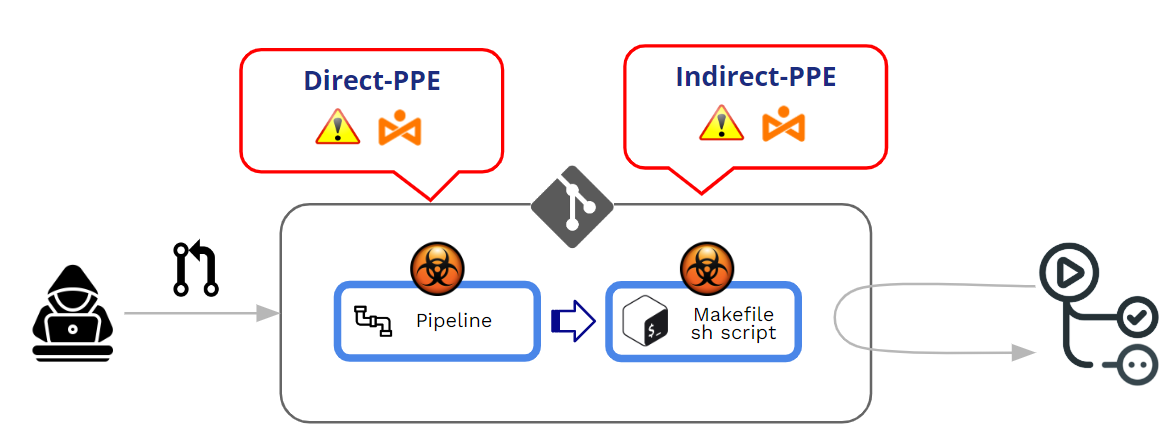
Tässä postauksessa syvennymme epäsuoriin henkilönsuojauksiin. Mutta ennen sitä, ja täydennyksenä edelliseen postaukseeni, katsotaanpa ensin, miten GitHub hallitsee seuraavien suoritusta: pipelineja mitkä ovat suojamekanismit D-PPE:tä vastaan?
Miten GitHub suojaa suoritusta pipelinetuleeko se PR:ltä?
Miten GitHub toimii muokatun suorittamisen suhteen? pipelines?
Muokattu pipelinevoi tulla työntöistä tai Pull Requests (PR). Tärkeimpänä parhaana käytäntönä on vahvasti suositeltavaa välttää kaikkea suoraa "työntöä" suojattuun haaraan ja käyttää Pull Requests mekanismina, jolla varmistetaan jonkinlainen tarkistus ennen minkä tahansa muun koodin hyväksymistä.
Pull Requests voi tulla kahdesta eri lähteestä:
- PR:t tulevat haarukat
- PR:t tulevat oksat
PR:t alkaen haarukat voi tulla kummastakin julkinen or yksityinen arkistot.
Koska kyseessä ovat myrkytetyt henkilönsuojaimet Pipeline Suoritus), pääasiamme ei ole PR:n "hyväksyminen", vaan muokatun pipeline PR:n hyväksymis-/hyväksyntäprosessin aikana. PPE-hyökkäyksen ytimessä on tahaton "haitallisen" muokatun toiminnon suorittaminen pipeline.
Muutamalla sanalla, myrkytetty Pipeline Toteutus (PPE) tuotetaan, kun hyökkääjä voi muokata pipeline logiikka.
On kaksi variantit:
- Suora henkilönsuojain (D-PPE): D-PPE-skenaariossa hyökkääjä muokkaa CI-määritystiedostoa repositoriossa, johon heillä on pääsy, joko lähettämällä muutoksen suoraan repositorion suojaamattomaan etähaaraan tai lähettämällä muutoksen sisältävän PR:n haarasta tai haaraumasta. Koska CI pipeline Vaikka suoritus määritellään muokatun CI-määritystiedoston komennoilla, hyökkääjän haitalliset komennot suoritetaan lopulta rakennussolmussa, kun rakennus on valmis. pipeline käynnistyy.
- Epäsuorat henkilönsuojaimet (I-PPE): Tietyissä tapauksissa D-PPE:n käyttö ei ole mahdollista vastustajalle, jolla on pääsy SCM arkisto (esim. jos pipeline on määritetty hakemaan CI-määritystiedosto erillisestä, suojatusta haarasta samassa tietovarastossa). Tällaisessa tilanteessa myrkyttämisen sijaan pipeline itse hyökkääjä lisää haitallista koodia tiedostoihin, joihin viittaa pipeline (esimerkiksi: skriptit, joihin viitataan pipeline määritystiedosto)
Kummassakin tapauksessa, GitHub suorittaa muokatun pipeline ilman aiempaa arviointia tai hyväksyntää.
PR:t haarukoista julkinen repomyynnit
GitHub mahdollistaa toiminnan konfiguroinnin prosessoinnin aikana Julkisten repojen haarukoista tulevat PR:t.
Kun PR tulee haarautumasta, GitHub pakottaa aina jonkinasteisen "hyväksynnän" ennen sen suorittamista. pipeline liittyy PR:äänTämä hyväksynnän taso vaihtelee heikosta tiukkaan hyväksyntään.
At Organisaatiotaso (Organisaatio>>Asetukset>>Toiminnot>>Yleiset), voit valita useista hyväksymisvaihtoehdoista:
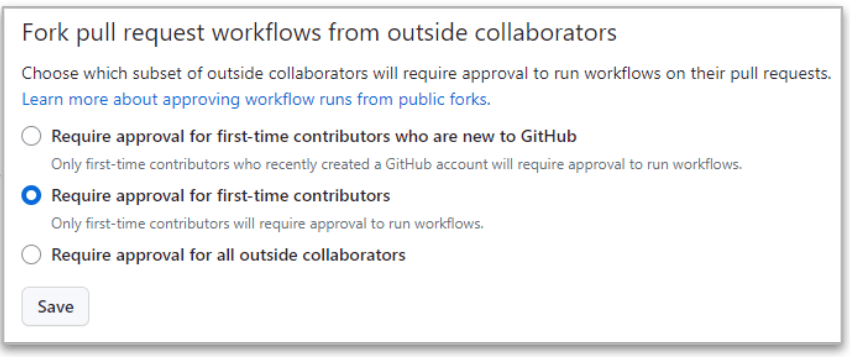
Tiukin on viimeinen ("Vaadi kaikkien ulkopuolisten yhteistyökumppaneiden hyväksyntä”) koska GitHub vaatii aina hyväksynnän, kun PR tulee ulkopuolisten yhteistyökumppaneiden forkeista.
Mutta jopa tässä tiukassa tapauksessa on olemassa eroja luku- ja kirjoitusoikeuksilla varustettujen yhteistyökumppaneiden välillä.
- Kun PR tulee jostakin luettu käyttäjä, täytäntöönpano pipeline on PYSÄYTETTY kunnes muutokset on hyväksytty. Jos hyväksyntä on ok, niin muokattu pipeline suoritetaan.
- Kun PR tulee jostakin kirjoittaa käyttäjä, hyväksyntää ei tarvita ja muokattu pipeline toteutetaan aina!!
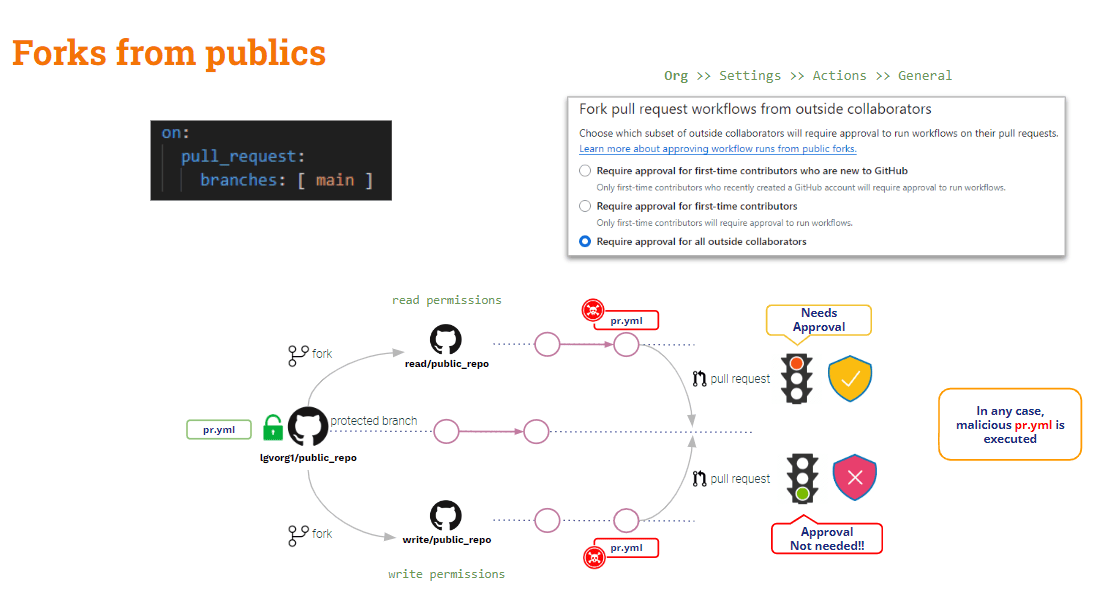
Yhteenvetona voidaan todeta, että julkisten repositorioiden haarukoista tulevat PR:t ovat kevyesti suojattuja henkilökohtaisia suojauksia (PPE) vastaan. Ulkoisia (luku)käyttäjiä vastaan on jonkin verran suojausta, mutta sisäisiä (kirjoitus)käyttäjiä vastaan ei ole mitään.
Entä Yksityisten repojen haarautumisista tulevat PR:t?
PR:t haarukoista yksityinen repomyynnit
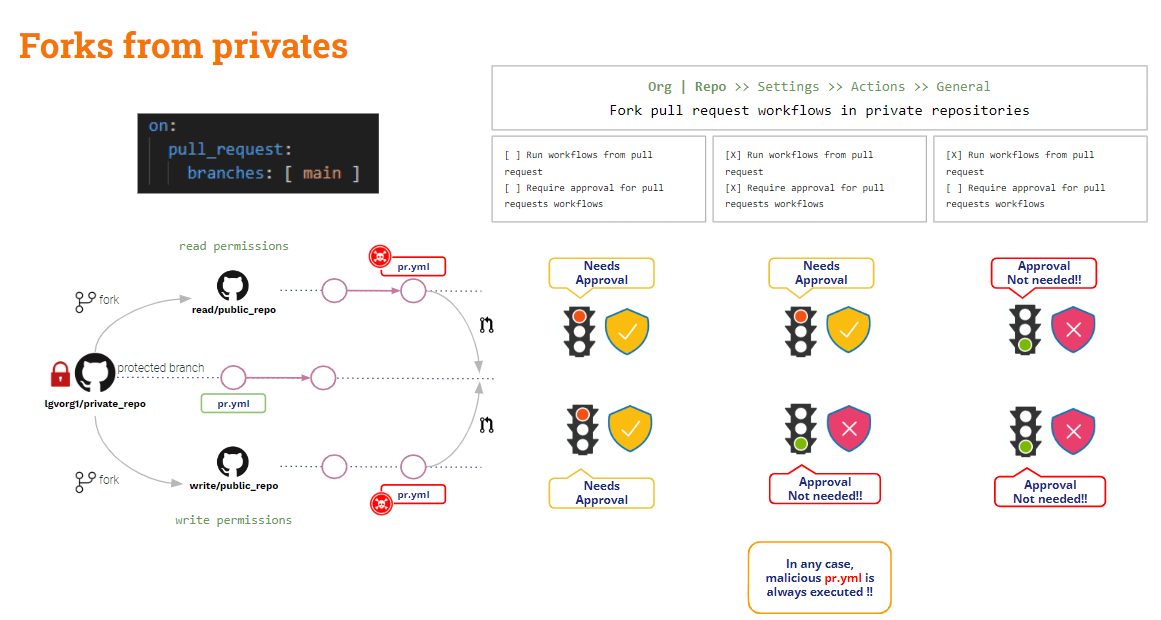
Tässä tilanteessa GitHub tarjoaa joitakin hyödyllisiä määritysasetuksia.
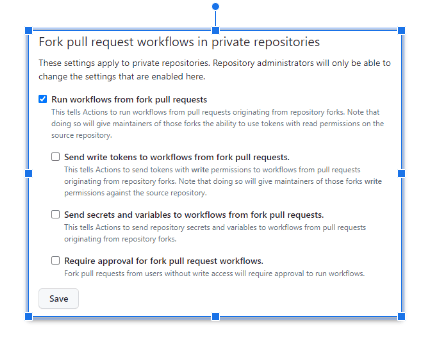
Yllä olevat asetukset voidaan määrittää joko kohdassa urut tai repo tasolla.
Kun mitään vaihtoehtoa ei ole valittuGitHub tulee pyytää hyväksyntää ja se ei suorita muokattua pipelineTämä on turvallisin kokoonpano!!
turvattomin kokoonpano on milloin "Suorita työnkulut haarautumasta pull request” on valittunaTässä tapauksessa, sekä luku- että kirjoitusoikeuksin varustetuille käyttäjille, Github suorittaa muokatun automaattisesti. pipelineJa tämä tilanne voi olla jopa huonompi jos "Lähetä kirjoitustokenit työnkulkuihin haarautumisesta pull requests"Ja"Lähetä salaisuuksia ja muuttujia työnkulkuihin haarautumisesta pull requests” on valittu. Älä tee tätä, ellei se ole selvästi perusteltua!!
Jos “Vaaditaan hyväksyntä haarautumiselle pull request työnkulkuja” on valittuna, yllä oleva tilanne paranee jonkin verran: GitHub pyytää hyväksyntää eikä suorita muokattua pipeline lukukäyttäjälle, mutta se suorittaa sen silti kirjoituskäyttäjälle.
Haarukat nähty, entä sitten sivukonttoreista tulevat PR:t?
PR:t alkaen oksat
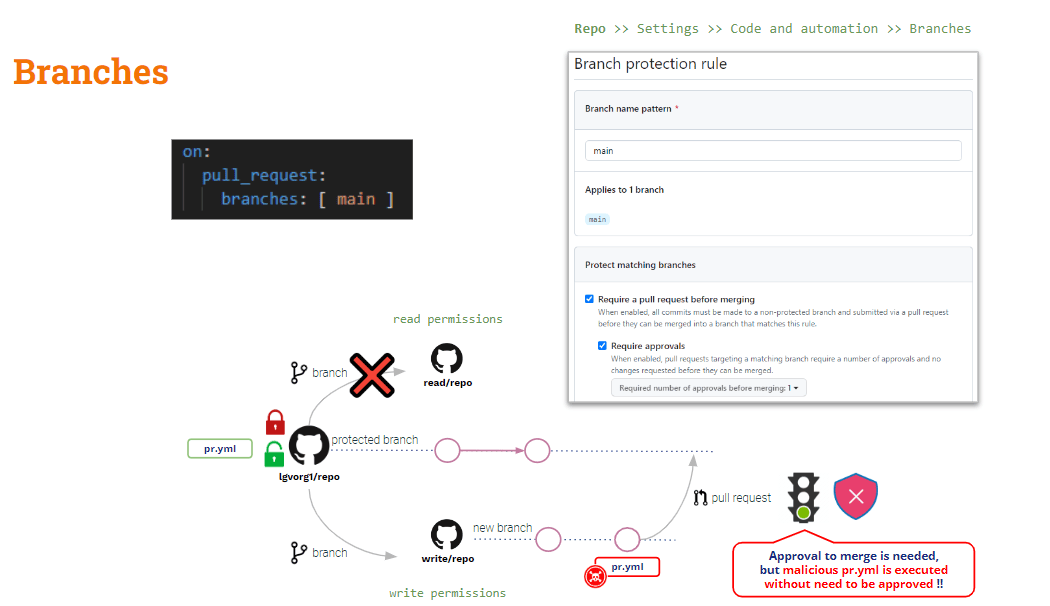
Suojautuaksesi tässä tilanteessa sinun on luotettava Sivukonttorin suojaussäännöt.
Repotasolla voit luoda haaran suojaussääntöjä mille tahansa haaralle. Nämä säännöt lisäävät joitakin suojattujen haarojen muokkaamisen rajoitukset.
Vaikka määrität säännön arvoon ”Vaadi a pull request ennen yhdistämistä"Ja"Vaaditaan hyväksynnät" muokattu pipeline suoritetaan automaattisesti PR:n luomisen yhteydessä”Hyväksyntä” koskee vain yhdistämistoimintoa.
Entä epäsuora myrkytys Pipeline Teloitus
Kuten yllä näimme, D-PPE:tä voidaan lieventää käyttämällä pull_request_kohde, mutta se Ei koske henkilönsuojaimia.
Jos käytät pull_request_target-metodia, oletusarvoinen uloskirjaus tehdään peruskoodista. Mutta jos haluat validoida joitakin tarkistuksia lisätylle koodille (PR-koodi), sinun on erikseen uloskirjattava PR-koodi. Jos PR-koodi on muokannut jotakin komentosarjaa, jonka on kutsunut... pipeline, "tukikohta" (turvallinen) pipeline käynnistää "muokatun" komentosarjan → Epäsuora PPE!!
Ratkaisu tähän on hieman monimutkaisempi (ei ole olemassa mitään ihmelääkettä kuten pull_request_target).
Yhtiömme pipeline on nyt turvallinen D-PPE:lle, koska käytämme pull_request_target-metodia. Mutta se on edelleen haavoittuvainen I-PPE:lle.
Testiesimerkissämme meidän täytyy pohjimmiltaan tarkistaa PR-koodi koontiversion tekemiseksi, mutta testit suoritetaan koonnin luomalle artefaktille.
Joten .. Miksi et tarkista molempia koodikantoja?
- Tarkista PR-koodi, koska on se koodi, jota haluamme rakentaa ja testata.
- Checkout Base -koodi alkuperäisen version suorittamiseksi pipeline ja rakennus-/testausskriptit
Tämä voidaan tehdä noiden koodikantojen siirtäminen eri kansioihinPeruskoodi voidaan siirtää juurikansioon ja testiversio eri kansioon. Tässä tapauksessa suorittaisimme koonti- ja testiskriptin juurikansiosta uuteen kansioon sijoitetulle koodille.
Tämä on helppo ratkaisu, tietenkin!! Mutta oppimistarkoituksessa haluaisin esitellä varsin mielenkiintoisen muunnelman (…)
GitHub työnkulun_ajo laukaiseva tapahtuma
Lisäksi pull_request_kohdeGitHub tarjoaa toisen laukaisutapahtuman: työnkulun_ajoTämä tapahtuma mahdollistaa suoritus pipeline ehdollistunut toiseen pipelinesuoritus.
työnkulun_ajo ja pull_request_kohde liipaisimet ovat samankaltaisia yhdessä suhteessa: molemmat suoritetaan etuoikeutetussa tilassa ja PR-muutoksista huolimatta pohja pipeline teloitetaan!!
Katsotaanpa nykyistä tilannettamme pipeline:
					name: PR TARGET CI


on:
  pull_request_target:
    branches: [ main ]


env:
  MY_SECRET: ${{ secrets.MY_SECRET }}

jobs:
  prt_build_test_and_merge:
    runs-on: ubuntu-latest


    steps:
      # checkout PR code
      - name: Checkout repository
        uses: actions/checkout@v4
        with:


          # This is to get the PR code instead of the repo code
          ref: ${{ github.event.pull_request.head.sha }}


      # Simulation of a compilation
      - name: Building ...
        run: |
          mkdir ./bin
          touch ./bin/mybin.exe
          ls -lR

      # Simulation of running tests
      - name: Running tests ...
        id : run_tests
        run: |
          echo Running tests..
          chmod +x runtests.sh
          ./runtests.sh
          echo Tests executed.

      #
      # Let’s omit the check conditions at this moment …
      #
      - name: pr_check_conditions_to_merge
        [...]
Rakennusosa on turvallinen D-PPE:lle, mutta testausosa on edelleen altis I-PPE:lle.
pipeline itsessään on turvallinen D-PPE:lle johtuen pull_request_kohde liipaisin. Mutta testivaihe on edelleen haavoittuvainen I-PPE:lle ulkoisen komentosarjan kutsumisen vuoksi.
Henkilönsuojainten välttäminen
Yllä olevan tarkoitus pipeline on rakentaa ja testata luotua koodia henkilönsuojainten turvallisuuden varmistamiseksi.
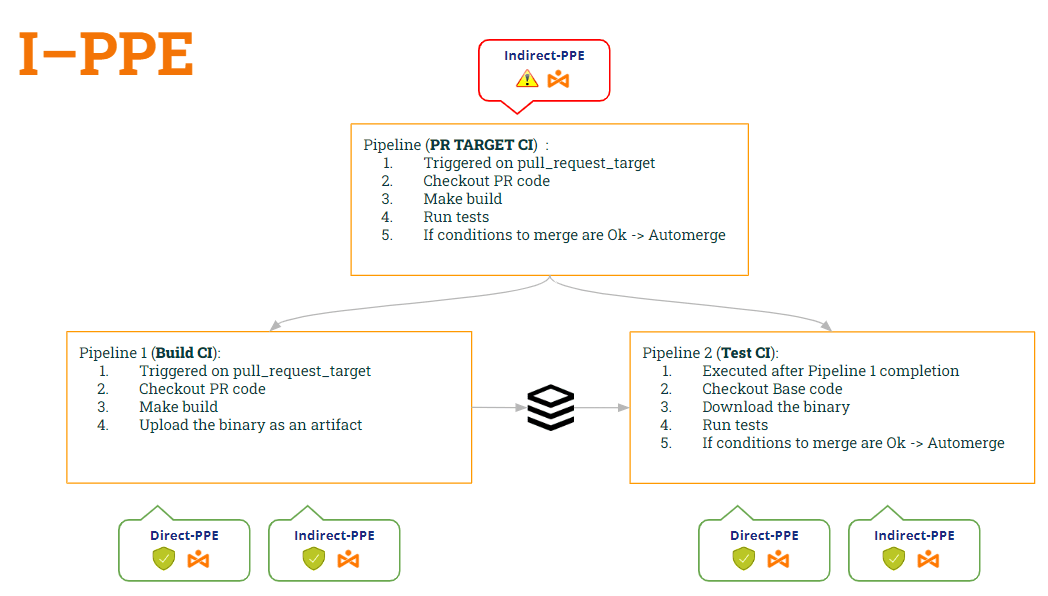
Joten .. Miksi ei jaeta pipeline kahteen? Yksi rakentamiseen ja toinen testaamiseen..
- Ensimmäinen pipeline (Rakenna CI) olisi tarkista PR-koodi (sen rakentamiseksi), tee koonti ja luo artefakti.
- 2nd pipeline (Testaa CI) olisi tarkista peruskoodi (jotta vältät komentosarjan muokkaamisen) ja suorita alkuperäiset skriptit artefaktia vastaan.
- Testi-CI:n synkronointi pipeline suoritettavaksi Build CI:n JÄLKEEN pipeline, käytämme työnkulun_ajo laukaista.
Tällä tavalla:
- pipeline Rakenna CI is turvallista molemmille D-PPE (johdosta pull_request_kohde) Ja I-PPE (koska se ei enää suorita komentosarjaa).
- pipeline Testaa CI On myös turvallista molemmille D-PPE (johdosta työnkulun_ajo) Ja I-PPE (koska se tarkistaa peruskoodin saadakseen alkuperäisen komentosarjan)
Katsotaanpa molempien koodia pipelinenäiden muutosten mukaan…
1st pipeline (Rakenna CI):
					name: Build CI


on:
  pull_request_target:
    branches: [ main ]


env:
  MY_SECRET: ${{ secrets.MY_SECRET }}
  GITHUB_PAT: ${{ secrets.GH_PAT }}

jobs:

  prt_build_and_upload:
    runs-on: ubuntu-latest
    steps:
      - name: Checking out PR code
        uses: actions/checkout@v4
        if: ${{ github.event_name == 'pull_request_target' }}
        with:
          # This is to get the PR code instead of the repo code
          ref: ${{ github.event.pull_request.head.sha }}


      - name: Building ...
        run: |
          mkdir ./bin
          touch ./bin/mybin.exe
	    # Save some PR info for later use by the 2nd pipeline
          echo "${{github.event.pull_request.title}}" > ./bin/PR_TITLE.txt
          echo "${{github.event.number}}" > ./bin/PR_ID.txt

	# Upload the binary as a pipeline artifact
      - name: Archive building artifacts
        uses: actions/upload-artifact@v3
        with:
          name: archive-bin
          path: |
            bin
2. pipeline (Testin luottamusväli):
					ame: Test CI


on:
  workflow_run:
    workflows: [ 'PR TARGET CI' ]
    types: [completed]

env:
  MY_SECRET: ${{ secrets.MY_SECRET }}
  GITHUB_PAT: ${{ secrets.GH_PAT }}


jobs:
  deploy:
    runs-on: ubuntu-latest
    if: ${{ github.event.workflow_run.conclusion == 'success' }}
    steps:


      # By default, checks out base code (not PR code)
      - name: Checkout repository
        uses: actions/checkout@v4


	# Download the artifact
      - name: 'Download artifact'
        uses: actions/github-script@v6
        with:
          script: |
            let allArtifacts = await github.rest.actions.listWorkflowRunArtifacts({
               owner: context.repo.owner,
               repo: context.repo.repo,
               run_id: context.payload.workflow_run.id,
            });
            let matchArtifact = allArtifacts.data.artifacts.filter((artifact) => {
              return artifact.name == "archive-bin"
            })[0];
            let download = await github.rest.actions.downloadArtifact({
               owner: context.repo.owner,
               repo: context.repo.repo,
               artifact_id: matchArtifact.id,
               archive_format: 'zip',
            });
            let fs = require('fs');
            fs.writeFileSync(`${process.env.GITHUB_WORKSPACE}/myartifact.zip`, Buffer.from(download.data));


	# Unzip the artifact
      - name: 'Unzip artifact'
        run: |
          unzip -o myartifact.zip


      # Runs tests
      - name: Running tests ...
        id : run_tests
        run: |
          echo Running tests..
          chmod +x runtests.sh
          ./runtests.sh
          echo Tests executed.


#
      # Let’s omit the check conditions at this moment …
      #
      - name: pr_check_conditions_to_merge
        [...]
Vau… hieno ratkaisu!! Mutta… Olemmeko turvassa? Pelkäänpä ettemme 😭
Olemme tosiaankin esitelleet uuden haavoittuvuuden!! Minkä? Tästä kerromme seuraavassa postauksessamme 🙂 … Pysy kuulolla!!
PS: Anteeksi, en voi olla hiljaa 🤐 ..Oletko kuullut tästä Artefaktien myrkytys ? 😂