






בפוסט הקודם שלנו, ראינו כיצד לזהות ולהגן מפני הרעלה ישירה Pipeline ביצוע (D-PPE). ראינו גם כיצד לזהות את הפגיעות הזו באמצעות סורק Xygeni, כמו גם כמה מנגנוני הגנה.
מורעלים Pipeline ביצוע (PPE) נוצר כאשר התוקף יכול לשנות את pipeline היגיון באחת משתי דרכים:
- על ידי שינוי קובץ התצורה של CI (ה- pipeline) -> ציוד מגן אישי ישיר (D-PPE)
- על ידי שינוי קבצים אליהם מפנה ה- pipeline (לדוגמה: סקריפטים שאליהם מפנה מתוך pipeline קובץ תצורה) -> ציוד מגן אישי עקיף (I-PPE)
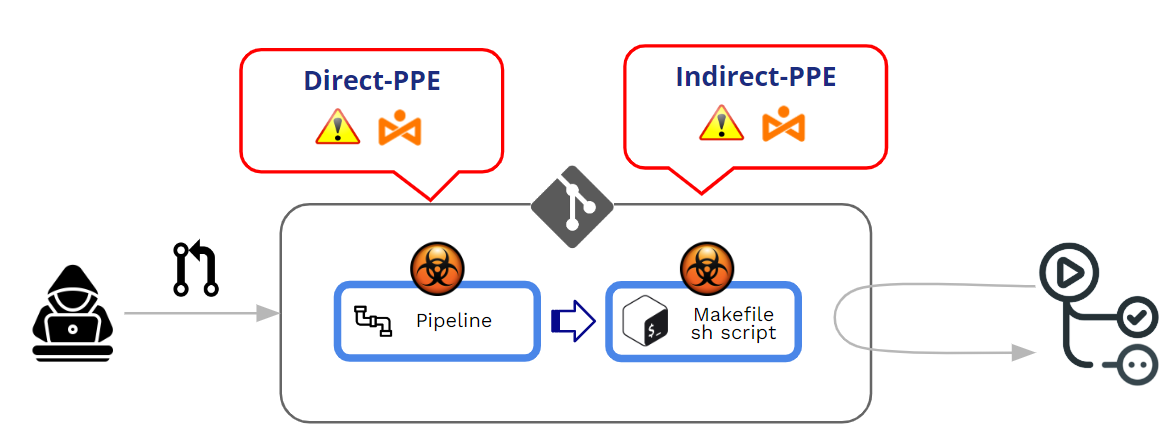
בפוסט הזה נצלול לעומק אל תוך נושא ציוד מגן אישי עקיף. אבל, לפני כן, וכשלמה לפוסט הקודם שלי, בואו נראה תחילה כיצד GitHub מנהל את הביצוע של... pipelineומהם מנגנוני ההגנה מפני D-PPE.
כיצד GitHub מגן על ביצוע pipelineזה מגיע מיחסי ציבור?
כיצד GitHub עובד בנוגע לביצוע של שינויים pipelines?
שונים pipelineיכולים להגיע מדחיפות או Pull Requests (יח"צ). כנוהג מומלץ, מומלץ מאוד להימנע מכל "דחיפה" ישירה לענף מוגן ולהשתמש Pull Requests כמנגנון לאכיפת סקירה מסוימת לפני קבלת כל קוד שנתרם.
Pull Requests יכול להגיע משני מקורות שונים:
- יחסי ציבור שמגיעים מ מזלגות
- יחסי ציבור שמגיעים מ ענפים
יחסי ציבור מ מזלגות יכול לבוא גם מ ציבורי or פְּרָטִי מאגרים.
מכיוון שאנו עוסקים בציוד מגן אישי (ציוד מורעל) Pipeline ביצוע), הנקודה העיקרית שלנו אינה "קבלה" של יחסי ציבור אלא ביצוע של שינוי pipeline במהלך תהליך הקבלה/אישור של ה-PR. בלב מתקפת ציוד מגן אישי, ישנה ביצוע לא מכוון של שינוי "זדוני" pipeline.
בכמה מילים, מורעל Pipeline ביצוע (PPE) מיוצר כאשר התוקף יכול לשנות את pipeline הגיון.
יש שני גרסאות:
- ציוד מגן אישי ישיר (ציוד מגן אישי (D-PPE)): בתרחיש של D-PPE, התוקף משנה את קובץ ההגדרות של CI במאגר שאליו יש להם גישה, בין אם על ידי דחיפת השינוי ישירות לענף מרוחק לא מוגן במאגר, או על ידי הגשת PR עם השינוי מענף או מענף פורק. מאז ה-CI pipeline הביצוע מוגדר על ידי הפקודות בקובץ התצורה של CI שעבר שינוי, הפקודות הזדוניות של התוקף רצות בסופו של דבר בצומת הבנייה לאחר שהבנייה pipeline מופעלת.
- ציוד מגן אישי עקיף (ציוד מגן אישי): במקרים מסוימים, האפשרות של ציוד מגן אישי (D-PPE) אינה זמינה ליריב בעל גישה ל... SCM מאגר (למשל, אם ה- pipeline מוגדר למשוך את קובץ התצורה של CI מענף נפרד ומוגן באותו מאגר). בתרחיש כזה, במקום להרעיל את pipeline עצמו, תוקף מזריק קוד זדוני לקבצים אליהם מפנה ה- pipeline (לדוגמה: סקריפטים שאליהם מפנה מתוך pipeline קובץ תצורה)
בשני המקרים, GitHub יבצע את השינויים pipeline ללא צורך בבדיקה או אישור מראש.
יחסי ציבור מהמזלגות והלאה ציבורי שאר
GitHub מאפשר הגדרת ההתנהגות בעת העיבוד יחסי ציבור המגיעים ממזלגות במאגרים ציבוריים.
כאשר PR מגיע מפורק, GitHub תמיד כופה רמה מסוימת של "אישור" לפני ביצוע הפעולה. pipeline קשור ליחסי הציבוררמת אישור זו עוברת בין אישור חלש לאישור מחמיר.
At רמת הארגון (ארגון>>הגדרות>>פעולות>>כללי), באפשרותך לבחור מבין מספר אפשרויות "אישור":
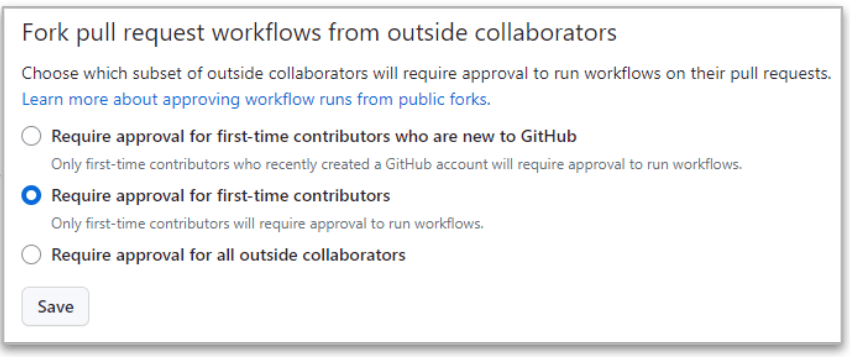
המחמיר ביותר הוא האחרון ("נדרש אישור מכל משתפי הפעולה החיצוניים”) מכיוון ש-GitHub תמיד ידרוש אישור כאשר יחסי הציבור מגיעים ממפגשים של משתפי פעולה חיצוניים.
אבל אפילו במקרה המחמיר הזה, יש הבדלים בין משתפי פעולה עם הרשאות קריאה וכתיבה.
- כאשר יחסי הציבור מגיעים מ- לקרוא המשתמש, ה ביצוע של pipeline נעצר עד לקבלת אישור לשינויים. אם האישור תקין, אז השינויים pipeline מוציא להורג.
- כאשר יחסי הציבור מגיעים מ- לכתוב המשתמש, ה אין צורך באישור והשינויים pipeline תמיד מבוצע!!
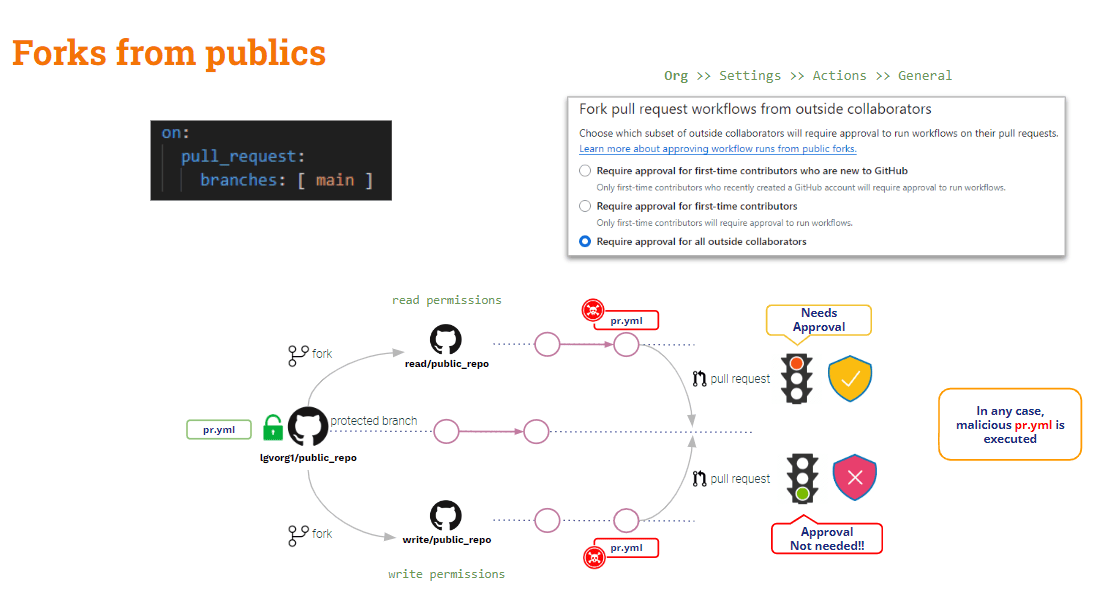
לסיכום, הודעות פרטיות המגיעות מפורקים במאגרים ציבוריים מוגנות במידה מסוימת מפני הגנה מפני נזקי פרט (PPE). ישנה הגנה מסוימת מפני משתמשים חיצוניים (קוראים), אך אין שום הגנה הקשורה למשתמשים פנימיים (כותבים).
מה לגבי יחסי ציבור המגיעים ממזלגות ממאגרים פרטיים?
יחסי ציבור מהמזלגות והלאה פְּרָטִי שאר
בתרחיש זה, GitHub מספק כמה הגדרות תצורה שימושיות.
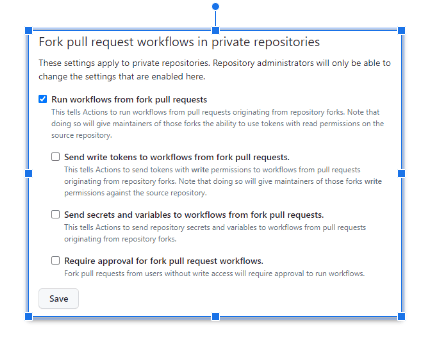
ניתן להגדיר את ההגדרות הנ"ל או ב אורג או ריפו רָמָה.
מתי אף אפשרות לא מסומנתגיטהאב יעשה זאת לבקש אישור ו זה לא יבצע את השינויים pipelineזוהי התצורה הבטוחה ביותר!!
השמיים התצורה הכי לא בטוחה זה מתי "הפעלת זרימות עבודה מהמזלג pull request"מסומןבמקרה זה, זהה עבור משתמשי קריאה וכתיבה כאחד, גיטהאב יבצע אוטומטית את השינויים. pipelineוהמצב הזה יכול להיות אפילו יותר גרוע יותר אם "שלח אסימוני כתיבה לזרימות עבודה מהפורק pull requests"וגם"שלח סודות ומשתנים לזרימות עבודה מהמזלג pull requests"מסומנים. אין לעשות זאת אלא אם כן יש הצדקה ברורה לכך!!"
אם "נדרש אישור עבור מזלג pull request זרימות עבודה"מסומן, המצב הנ"ל משופר במידה מסוימת: GitHub יבקש אישור ולא יבצע את השינויים. pipeline עבור המשתמש הקורא, אבל זה עדיין יבצע אותו עבור משתמש כותב.
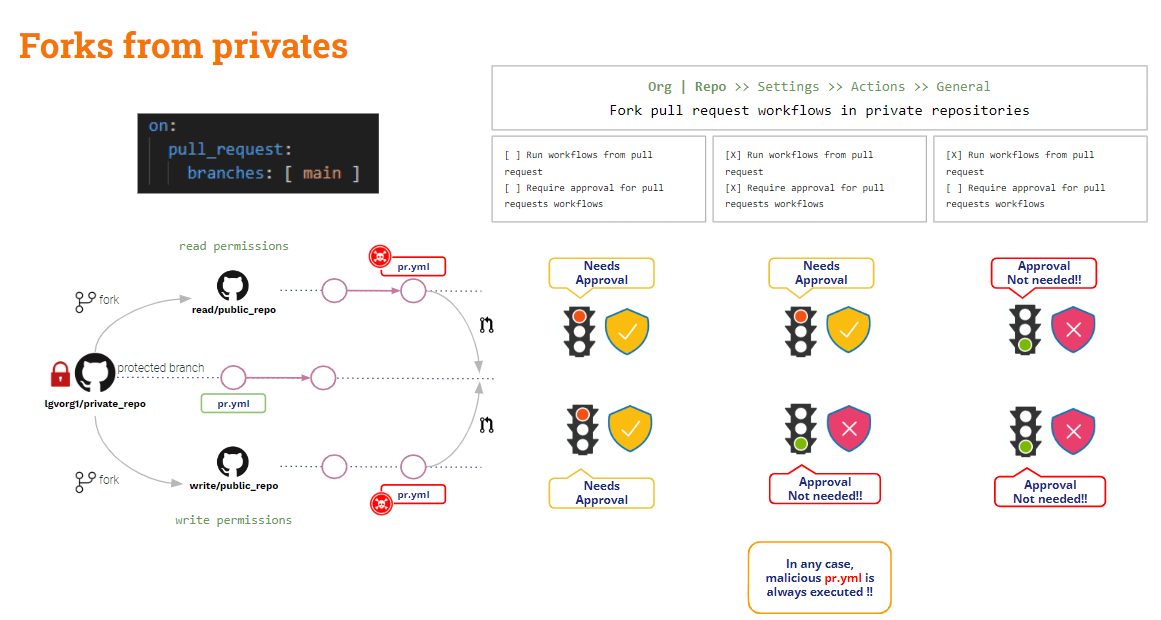
מזלגות נראים, מה לגבי יח"צ המגיעים מסניפים?
יחסי ציבור מ ענפים
כדי להגן על תרחיש זה עליך להסתמך על כללי הגנת הסניף.
ברמת המאגר, ניתן ליצור כללי הגנה על ענפים עבור כל ענף. כללים אלה מוסיפים כמה אילוצים על שינוי ענפים מוגנים.
למרות שאתה מגדיר כלל ל-"דורש א pull request לפני המיזוג"וגם"דרוש אישורים", השינוי pipeline יבוצע אוטומטית עם יצירת יחסי ציבורה"אישור" יחול רק על פעולת המיזוג.
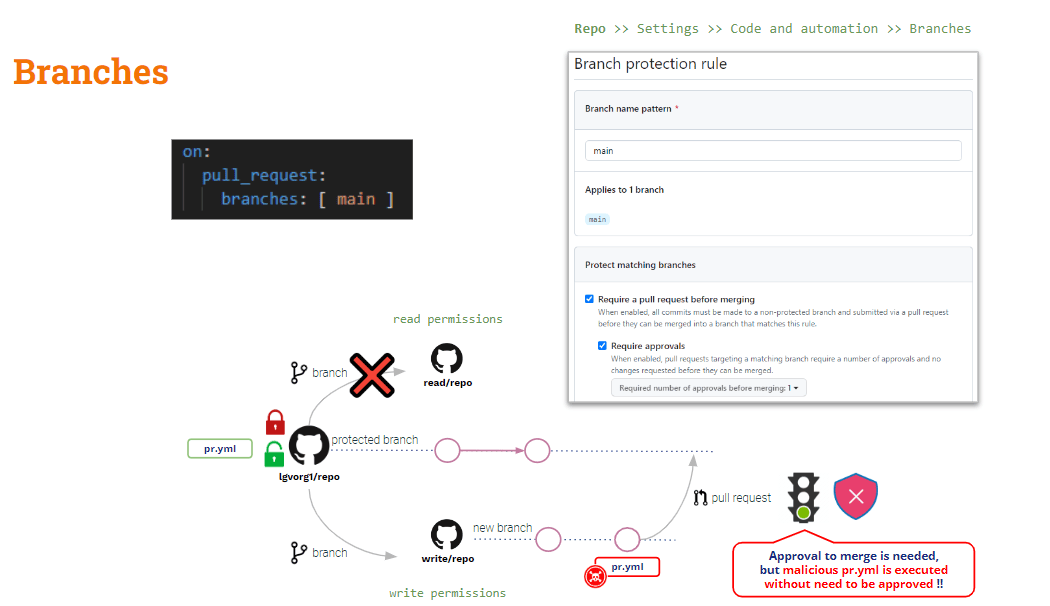
מה לגבי הרעלה עקיפה Pipeline הוצאה לפועל
כפי שראינו לעיל, ניתן למתן את ההשפעות של D-PPE באמצעות שימוש יעד_בקשה_משיכה, אבל זה לא חל על ציוד מגן אישי (I-PPE).
אם תשתמשו ב-pull_request_target, קוד הבדיקה המוגדר כברירת מחדל יהיה קוד הבסיס. אבל אם תרצו לאמת בדיקות מסוימות על הקוד שנתרם (קוד PR), עליכם לבצע בדיקה מפורשת של קוד ה-PR. לכן, אם קוד ה-PR שינה סקריפט מעטפת כלשהו שהופעל על ידי pipeline, ה"בסיס" (בטוח) pipeline יפעיל את סקריפט המעטפת "המוגדר" → PPE עקיף!!
הפתרון לכך קצת יותר מסובך (אין פתרון פלא כמו pull_request_target).
את העתיד pipeline כעת בטוח לשימוש ב-D-PPE מכיוון שאנו משתמשים ב-pull_request_target. אך הוא עדיין פגיע ל-I-PPE.
בדוגמת הבדיקה שלנו, עלינו לבדוק את קוד ה-PR בעיקרון כדי לבצע את ה-build, אך הבדיקות מבוצעות על הארטיפקט שנוצר על ידי ה-build.
כך .. למה לא לבדוק את שני בסיסי הקוד?
- קוד PR של Checkout מכיוון שזהו הקוד שנתרם שאנחנו רוצים לבנות ולבדוק
- קוד בסיס של Checkout להפעלת הגרסה המקורית של pipeline וסקריפטי הבנייה/בדיקות
זה עשוי להיעשות על ידי בדיקת בסיסי הקוד הללו לתיקיות שונותייתכן שקוד הבסיס יועבר לתיקיית השורש, ואת ה-PR לתיקייה אחרת. במקרה זה נבצע את הבנייה ואת סקריפט הבדיקה מתיקיית השורש כנגד הקוד שהוכנס לתיקייה החדשה.
זהו פתרון קל, כמובן!! אבל, למטרות למידה אני רוצה להציג גרסה די מעניינת (...)
GitHub workflow_run אירוע טריגר
חוץ מזה יעד_בקשה_משיכה, GitHub מספק אירוע טריגר נוסף: workflow_runאירוע זה מאפשר ביצוע של pipeline מותנה לאחר pipelineהוצאה להורג של.
workflow_run ו יעד_בקשה_משיכה טריגרים דומים בהיבט אחד: שניהם יבוצעו במצב פריבילגי ו-, למרות שינויי יחסי הציבור, הבסיס pipeline יוצא להורג!!
בואו נראה את הנוכחי שלנו pipeline:
					name: PR TARGET CI


on:
  pull_request_target:
    branches: [ main ]


env:
  MY_SECRET: ${{ secrets.MY_SECRET }}

jobs:
  prt_build_test_and_merge:
    runs-on: ubuntu-latest


    steps:
      # checkout PR code
      - name: Checkout repository
        uses: actions/checkout@v4
        with:


          # This is to get the PR code instead of the repo code
          ref: ${{ github.event.pull_request.head.sha }}


      # Simulation of a compilation
      - name: Building ...
        run: |
          mkdir ./bin
          touch ./bin/mybin.exe
          ls -lR

      # Simulation of running tests
      - name: Running tests ...
        id : run_tests
        run: |
          echo Running tests..
          chmod +x runtests.sh
          ./runtests.sh
          echo Tests executed.

      #
      # Let’s omit the check conditions at this moment …
      #
      - name: pr_check_conditions_to_merge
        [...]
מקטע הבנייה בטוח ל-D-PPE, אך מקטע הבדיקה עדיין פגיע ל-I-PPE.
השמיים pipeline עצמו בטוח לשימוש ב-D-PPE עקב יעד_בקשה_משיכה טריגר. אבל שלב הבדיקה עדיין פגיע ל-I-PPE עקב קריאה לסקריפט מעטפת חיצוני.
הימנעות משימוש בציוד מגן אישי (I-PPE)
מטרת האמור לעיל pipeline הוא לבנות ולבדוק את הקוד שנתרם, תוך הבטחת בטיחות להגנה אישית (PPE).
כך .. למה לא לפצל את pipeline לשניים? אחד לבנייה ואחר לבדיקות..
- 1st pipeline (בניית CI) היה בדוק את קוד ה-PR (כדי לבנות אותו), ליצור את הבנייה וליצור חפץ.
- 2nd pipeline (בדיקת CI) היה בדוק את קוד הבסיס (כדי להימנע משינוי בסקריפט המעטפת) ולהפעיל את הסקריפטים המקוריים כנגד החפץ.
- כדי לסנכרן את CI הבדיקה pipeline לרוץ אחרי Build CI pipeline, נשתמש ב- workflow_run הדק.
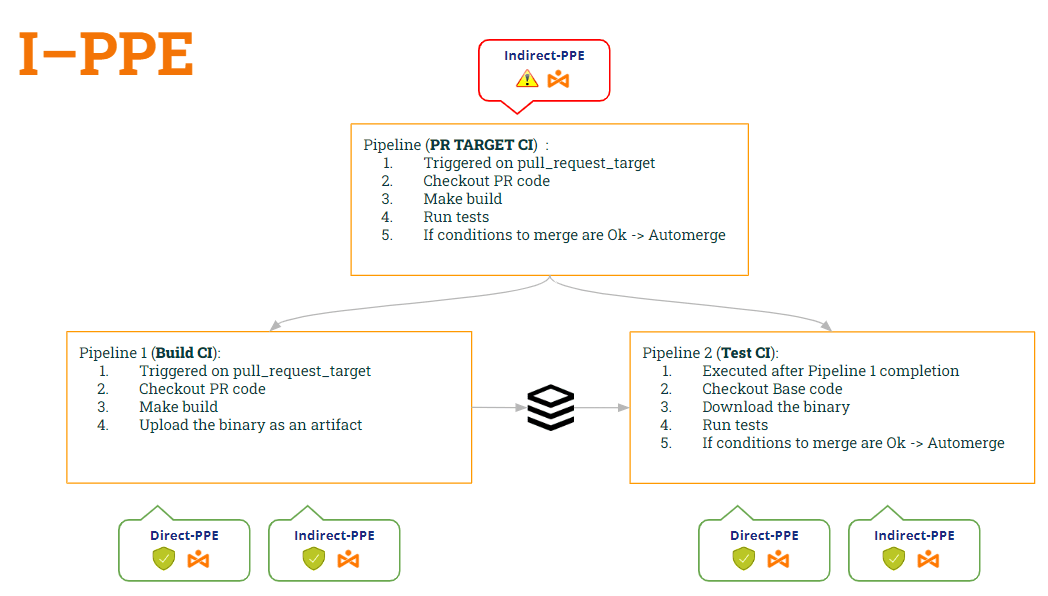
בדרך זו:
- pipeline בניית CI is בטוח לשניהם ציוד מגן אישי (D-PPE) (עקב יעד_בקשה_משיכה) ו ציוד מגן אישי (כי הוא כבר לא מבצע את סקריפט המעטפת).
- pipeline בדיקת CI גם בטוח לשניהם ציוד מגן אישי (D-PPE) (עקב workflow_run) ו ציוד מגן אישי (כי זה בודק את קוד הבסיס כדי לקבל את סקריפט המעטפת המקורי)
בואו נראה את הקוד של שניהם pipelineבהתאם לשינויים אלה ...
1st pipeline (בניית CI):
					name: Build CI


on:
  pull_request_target:
    branches: [ main ]


env:
  MY_SECRET: ${{ secrets.MY_SECRET }}
  GITHUB_PAT: ${{ secrets.GH_PAT }}

jobs:

  prt_build_and_upload:
    runs-on: ubuntu-latest
    steps:
      - name: Checking out PR code
        uses: actions/checkout@v4
        if: ${{ github.event_name == 'pull_request_target' }}
        with:
          # This is to get the PR code instead of the repo code
          ref: ${{ github.event.pull_request.head.sha }}


      - name: Building ...
        run: |
          mkdir ./bin
          touch ./bin/mybin.exe
	    # Save some PR info for later use by the 2nd pipeline
          echo "${{github.event.pull_request.title}}" > ./bin/PR_TITLE.txt
          echo "${{github.event.number}}" > ./bin/PR_ID.txt

	# Upload the binary as a pipeline artifact
      - name: Archive building artifacts
        uses: actions/upload-artifact@v3
        with:
          name: archive-bin
          path: |
            bin
2nd pipeline (CI בדיקה):
					ame: Test CI


on:
  workflow_run:
    workflows: [ 'PR TARGET CI' ]
    types: [completed]

env:
  MY_SECRET: ${{ secrets.MY_SECRET }}
  GITHUB_PAT: ${{ secrets.GH_PAT }}


jobs:
  deploy:
    runs-on: ubuntu-latest
    if: ${{ github.event.workflow_run.conclusion == 'success' }}
    steps:


      # By default, checks out base code (not PR code)
      - name: Checkout repository
        uses: actions/checkout@v4


	# Download the artifact
      - name: 'Download artifact'
        uses: actions/github-script@v6
        with:
          script: |
            let allArtifacts = await github.rest.actions.listWorkflowRunArtifacts({
               owner: context.repo.owner,
               repo: context.repo.repo,
               run_id: context.payload.workflow_run.id,
            });
            let matchArtifact = allArtifacts.data.artifacts.filter((artifact) => {
              return artifact.name == "archive-bin"
            })[0];
            let download = await github.rest.actions.downloadArtifact({
               owner: context.repo.owner,
               repo: context.repo.repo,
               artifact_id: matchArtifact.id,
               archive_format: 'zip',
            });
            let fs = require('fs');
            fs.writeFileSync(`${process.env.GITHUB_WORKSPACE}/myartifact.zip`, Buffer.from(download.data));


	# Unzip the artifact
      - name: 'Unzip artifact'
        run: |
          unzip -o myartifact.zip


      # Runs tests
      - name: Running tests ...
        id : run_tests
        run: |
          echo Running tests..
          chmod +x runtests.sh
          ./runtests.sh
          echo Tests executed.


#
      # Let’s omit the check conditions at this moment …
      #
      - name: pr_check_conditions_to_merge
        [...]
וואו... פתרון נחמד!! אבל... האם אנחנו בטוחים? אני חושש שלא 😭
אכן, הצגנו פגיעות חדשה!! איזו מהן? זה יהיה נושא הפוסט הבא שלנו 🙂 … הישארו מעודכנים!!
נ.ב.: סליחה, אני לא יכולה לשתוק 🤐 .. שמעתם על הרעלת חפצים ? 😂