이전 게시물에서는 we saw how to detect and protect against Direct Poisoned Pipeline Execution (D-PPE). We also saw how to detect that vulnerability using Xygeni Scanner, as well as some protection mechanisms.
중독 Pipeline 실행 (PPE) is produced when the attacker can modify the pipeline logic in either of two ways:
- By modifying the CI config file (the pipeline) -> Direct PPE (D-PPE)
- By modifying files referenced by the pipeline (for example: scripts referenced from within the pipeline configuration file) -> Indirect PPE (I-PPE)
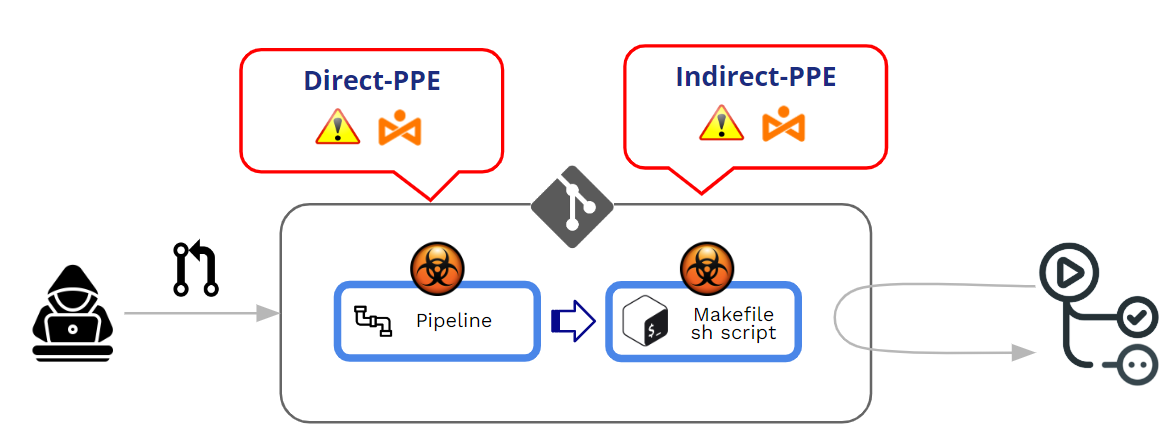
In this post, we will deep dive into Indirect PPE . But, before that, and as a complement to my previous post, let’s see first how GitHub manages the execution of pipelines and what are the protection mechanisms against D-PPE.
How does GitHub protect the execution of pipelines coming from PRs?
How does GitHub work regarding the execution of modified pipelines?
수정 pipelines can come from Pushes or Pull Requests (홍보). As a major best practice, it’s strongly recommended to avoid any direct “push” to a protected branch and use Pull Requests as a mechanism to enforce some review before accepting any contributed code.
Pull Requests may arrive from two different sources:
- PRs coming from 포크
- PRs coming from 가지
PRs from 포크 can come either from 공개 or 사설 리포지토리.
As we are dealing with PPE (Poisoned Pipeline Execution), our main point is not the “acceptance” of a PR but the execution of a modified pipeline during the PR’s acceptance/approval process. At the core of a PPE attack, there is an unintended execution of a “malicious” modified pipeline.
In a few words, Poisoned Pipeline Execution (PPE) is produced when the attacker can modify the pipeline 논리.
두 가지가있다 변종:
- Direct PPE (D-PPE): In a D-PPE scenario, the attacker modifies the CI config file in a repository they have access to, either by pushing the change directly to an unprotected remote branch on the repo, or by submitting a PR with the change from a branch or a fork. Since the CI pipeline execution is defined by the commands in the modified CI configuration file, the attacker’s malicious commands ultimately run in the build node once the build pipeline 트리거됩니다.
- Indirect PPE (I-PPE): In certain cases, the possibility of D-PPE is not available to an adversary with access to an SCM repository (e.g. if the pipeline is configured to pull the CI configuration file from a separate, protected branch in the same repository). In such a scenario, rather than poisoning the pipeline itself, an attacker injects malicious code into files referenced by the pipeline (for example: scripts referenced from within the pipeline configuration file)
두 경우 모두 GitHub will execute the modified pipeline with no need for a previous review or approbation.
PRs from forks on 공개 repos
GitHub allows configuring the behaviour when processing PRs coming from forks in public repos.
When a PR is coming from a fork, GitHub always forces some level of “approval” before executing the pipeline associated with the PR. This level of approval trades off from a weak to a strict approval.
At Org level (Org>>Settings>>Actions>>General), you can decide among several “approval” options:
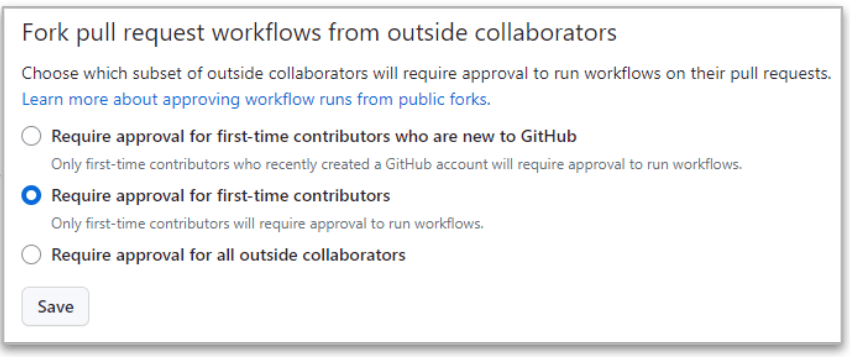
The strictest is the last one (“Require approval from all outside collaborators”) because GitHub will always require approval when the PR is coming from forks from outside collaborators.
But even in this strict case, there are differences between collaborators with read and write permissions.
- When the PR comes from a 읽기 사용자는 의 실행 pipeline is STOPPED until there is an approval of changes. If the approval is ok, then the modified pipeline 실행됩니다.
- When the PR comes from a 쓰다 사용자는 approval is not needed and the modified pipeline is always executed !!
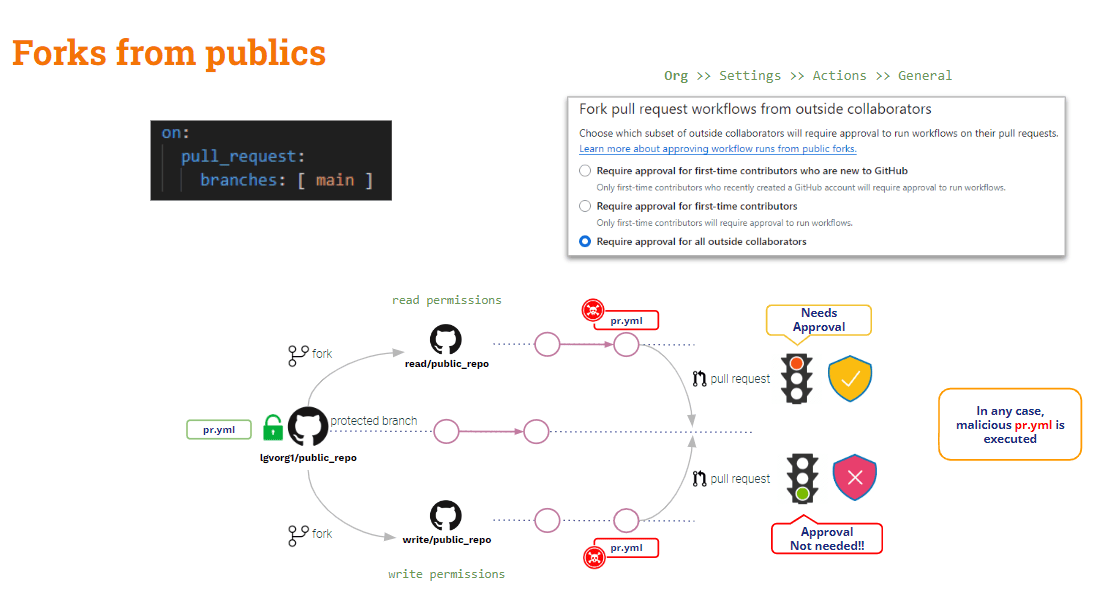
As a conclusion, PRs coming from forks on public repositories are lightly protected against PPE. There is some protection against external (read) users, but nothing related to internal (write) users.
는 어때 PRs coming from forks from private repos?
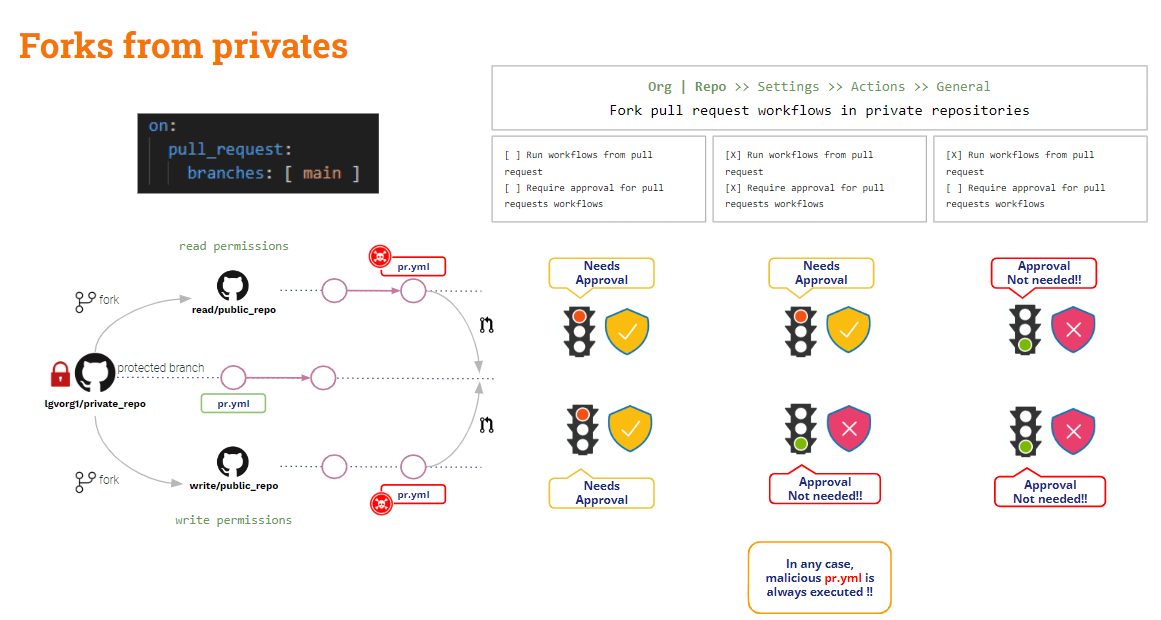
PRs from forks on 사설 repos
In this scenario, GitHub provides some useful configuration settings.
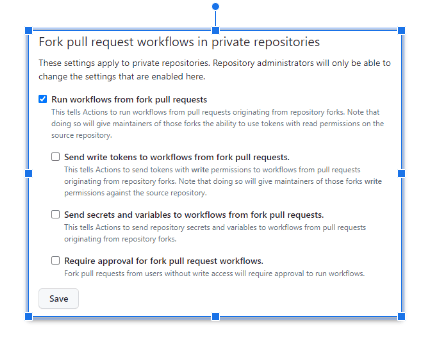
Above settings can be configured either at 기관 또는에서 레포 수평.
인셀덤 공식 판매점인 no option is checked, GitHub will ask for approval it will not execute the modified pipeline. This is the safest configuration!!
The unsafest configuration 때입니다 "Run workflows from fork pull request” is checked. In this case, same for both read and write users, Github will automatically execute the modified pipeline!! And this situation can be even 악화되는 만약에 "Send write tokens to workflows from fork pull requests"및"Send secrets and variables to workflows from fork pull requests” are checked. Do not do this unless clearly justified!!
만약 "Require approval for fork pull request 워크 플로우” is checked, the above situation is somewhat enhanced: GitHub will ask for approval and not execute the modified pipeline for the read user, but it will still execute it for a write user.
Forks seen, what about PRs coming from branches?
PRs from 가지
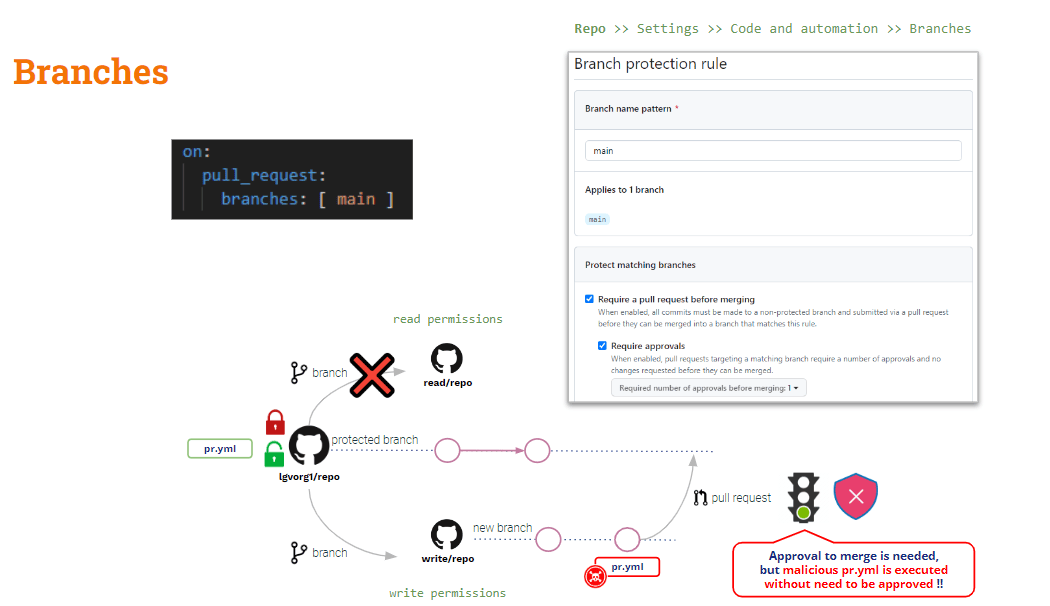
To protect this scenario you must rely on 지점 보호 규칙.
At repo level, you can create branch protection rules for any branch. These rules add some constraints to modification of protected branches.
Although you configure a rule to “요구 pull request 병합하기 전에"및"Require approvals" 수정된 pipeline will be automatically executed upon PR creation.The “approval” will only apply to the merge action.
What about Indirect Poisoned Pipeline 실행
As we saw above, D-PPE can be mitigated by using 풀 리퀘스트 타겟, 그러나 그것 does not apply to I-PPE.
If you use pull_request_target, the default checkout will be the base code. But if you want to validate some checks on the contributed code (PR code) you need to explicitly checkout the PR code. Therefore, if the PR code has modified any shell script invoked by the pipeline, the “base” (safe) pipeline will invoke the “modified” shell script → Indirect PPE!!
The solution to this is a bit more complicated (there is not a magic bullet like pull_request_target).
pipeline is now safe to D-PPE because we are using pull_request_target. But it is still vulnerable to I-PPE.
In our test example, we need to checkout the PR code basically to make the build, but the tests are executed on the artifact generated by the build.
그래서 .. why don’t check out both codebases?
- Checkout PR code because is the contributed code what we want to build and test
- Checkout Base code to run the original version of the pipeline and the build/tests scripts
This might be done by checking out those codebases to different folders: the base code might be checked out to the root folder, and the PR to a different folder. In this case we would execute the build and the test script from the root folder against the code placed into the new folder.
This is an easy solution, of course!! But, for learning purposes I would like to introduce a quite interesting variant (…)
GitHub의 워크플로우 실행 트리거 이벤트
게다가 풀 리퀘스트 타겟, GitHub provides another trigger event: 워크플로우 실행. This event allows execution of a pipeline conditioned to another pipeline’s execution.
워크플로우 실행 풀 리퀘스트 타겟 triggers are similar in one aspect : both will be executed in privileged mode and, despite the PR modifications, the base pipeline will be executed !!
Let’s see our current pipeline:
name: PR TARGET CI on: pull_request_target: branches: [ main ] env: MY_SECRET: ${{ secrets.MY_SECRET }} jobs: prt_build_test_and_merge: runs-on: ubuntu-latest steps: # checkout PR code - name: Checkout repository uses: actions/checkout@v4 with: # This is to get the PR code instead of the repo code ref: ${{ github.event.pull_request.head.sha }} # Simulation of a compilation - name: Building ... run: | mkdir ./bin touch ./bin/mybin.exe ls -lR # Simulation of running tests - name: Running tests ... id : run_tests run: | echo Running tests.. chmod +x runtests.sh ./runtests.sh echo Tests executed. # # Let’s omit the check conditions at this moment … # - name: pr_check_conditions_to_merge [...]The build section is safe to D-PPE, but the test section is still vulnerable to I-PPE.
The pipeline itself is safe to D-PPE due to the 풀 리퀘스트 타겟 trigger. But the test step is still vulnerable to I-PPE due to invoking an external shell script.
Avoiding I-PPE
The purpose of the above pipeline is to build and test the contributed code, being safe to PPE.
그래서 .. Why don’t split the pipeline into two ? One for building and another for testing..
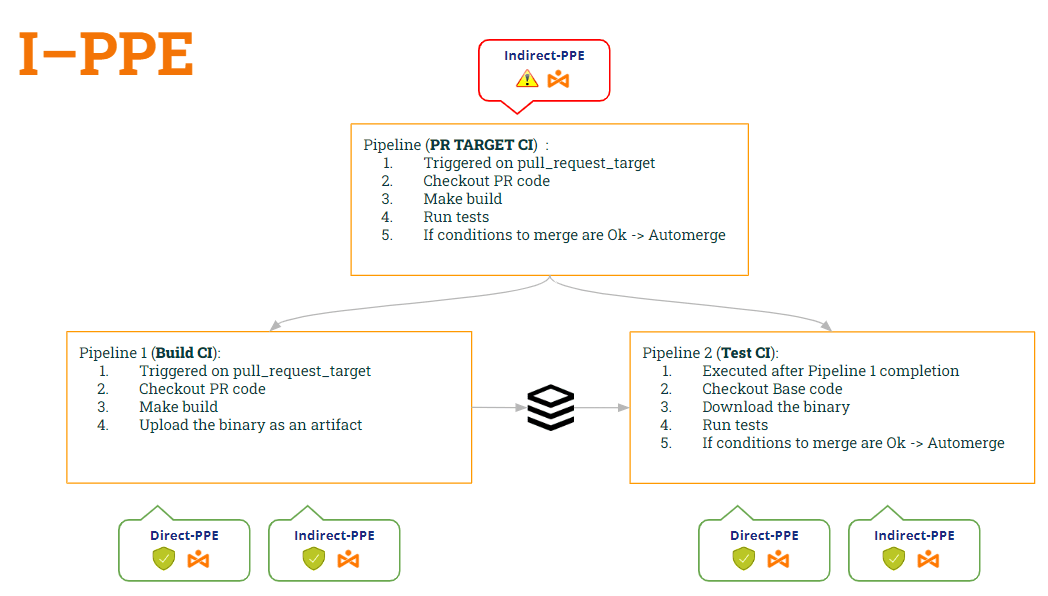
- 1st pipeline (Build CI) 일 것이다 checkout the PR code (to build it), make the build and generate an artifact.
- 2nd pipeline (Test CI) 일 것이다 checkout the Base code (to avoid shell script modification) and execute the original scripts against the artifact.
- 테스트 CI를 동기화하려면 pipeline CI 빌드 후에 실행 pipeline, 우리는 워크플로우 실행 방아쇠.
In this way:
- pipeline Build CI is 가장 안전한 따뜻함 두 사람에게 D-PPE (때문에 풀 리퀘스트 타겟) and I-PPE (because it no longer executes the shell script).
- pipeline Test CI 또한 가장 안전한 따뜻함 두 사람에게 D-PPE (때문에 워크플로우 실행) and I-PPE (because it checkout the base code to get the original shell script)
Let’s see the code of both pipelines according to these modifications …
1st pipeline (Build CI):
name: Build CI on: pull_request_target: branches: [ main ] env: MY_SECRET: ${{ secrets.MY_SECRET }} GITHUB_PAT: ${{ secrets.GH_PAT }} jobs: prt_build_and_upload: runs-on: ubuntu-latest steps: - name: Checking out PR code uses: actions/checkout@v4 if: ${{ github.event_name == 'pull_request_target' }} with: # This is to get the PR code instead of the repo code ref: ${{ github.event.pull_request.head.sha }} - name: Building ... run: | mkdir ./bin touch ./bin/mybin.exe # Save some PR info for later use by the 2nd pipeline echo "${{github.event.pull_request.title}}" > ./bin/PR_TITLE.txt echo "${{github.event.number}}" > ./bin/PR_ID.txt # Upload the binary as a pipeline artifact - name: Archive building artifacts uses: actions/upload-artifact@v3 with: name: archive-bin path: | bin2nd pipeline (Test CI):
ame: Test CI on: workflow_run: workflows: [ 'PR TARGET CI' ] types: [completed] env: MY_SECRET: ${{ secrets.MY_SECRET }} GITHUB_PAT: ${{ secrets.GH_PAT }} jobs: deploy: runs-on: ubuntu-latest if: ${{ github.event.workflow_run.conclusion == 'success' }} steps: # By default, checks out base code (not PR code) - name: Checkout repository uses: actions/checkout@v4 # Download the artifact - name: 'Download artifact' uses: actions/github-script@v6 with: script: | let allArtifacts = await github.rest.actions.listWorkflowRunArtifacts({ owner: context.repo.owner, repo: context.repo.repo, run_id: context.payload.workflow_run.id, }); let matchArtifact = allArtifacts.data.artifacts.filter((artifact) => { return artifact.name == "archive-bin" })[0]; let download = await github.rest.actions.downloadArtifact({ owner: context.repo.owner, repo: context.repo.repo, artifact_id: matchArtifact.id, archive_format: 'zip', }); let fs = require('fs'); fs.writeFileSync(`${process.env.GITHUB_WORKSPACE}/myartifact.zip`, Buffer.from(download.data)); # Unzip the artifact - name: 'Unzip artifact' run: | unzip -o myartifact.zip # Runs tests - name: Running tests ... id : run_tests run: | echo Running tests.. chmod +x runtests.sh ./runtests.sh echo Tests executed. # # Let’s omit the check conditions at this moment … # - name: pr_check_conditions_to_merge [...] Wow… nice solution!! But ….. Are we safe? I’m afraid that no 😭
Indeed, we have introduced a new vulnerability!! Which one? This will be the subject of our next post 🙂 … Stay tuned!!
추신: Sorry, I can’t keep quiet 🤐 ..Have you heard about 유물 중독 ? 😂