





ჩვენს წინა პოსტში, ჩვენ ვნახეთ, თუ როგორ ამოვიცნოთ და დავიცვათ პირდაპირი მოწამვლისგან Pipeline შესრულება (D-PPE). ჩვენ ასევე ვნახეთ, თუ როგორ აღმოვაჩინოთ ეს დაუცველობა Xygeni სკანერი, ასევე გარკვეული დამცავი მექანიზმები.
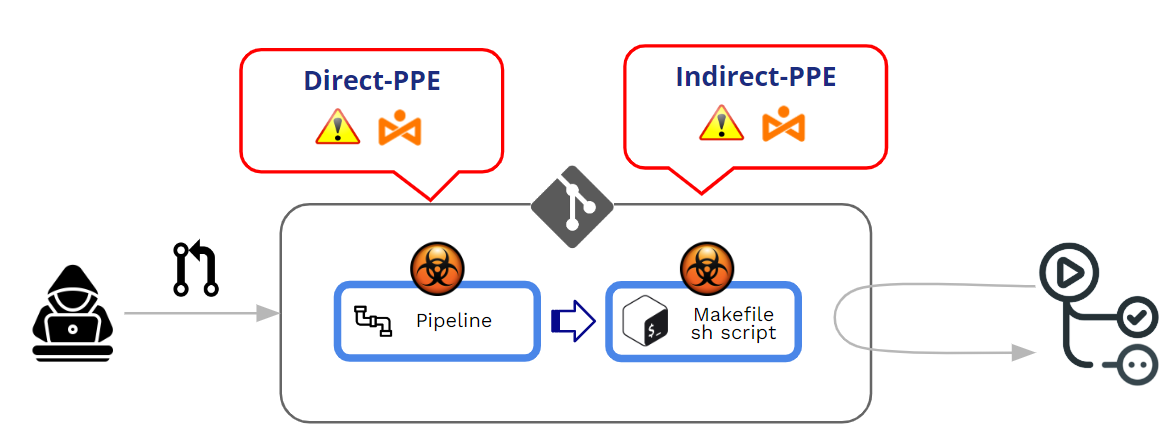
მოწამლული Pipeline შესრულება (PPE) წარმოიქმნება, როდესაც თავდამსხმელს შეუძლია შეცვალოს pipeline ლოგიკა ორი გზით:
- CI კონფიგურაციის ფაილის შეცვლით (the pipeline) -> პირდაპირი ინდივიდუალური დამცავი აღჭურვილობა (D-PPE)
- მიერ მითითებული ფაილების შეცვლით pipeline (მაგალითად: სკრიპტები, რომლებზეც მითითებულია შიგნიდან pipeline კონფიგურაციის ფაილი) -> არაპირდაპირი ინდივიდუალური დამცავი აღჭურვილობა (I-PPE)
ამ პოსტში ჩვენ დეტალურად განვიხილავთ არაპირდაპირი PPE-ს. თუმცა, მანამდე და ჩემი წინა პოსტის შესავსებად, ჯერ ვნახოთ, თუ როგორ მართავს GitHub-ი შესრულებას. pipelineდა რა არის D-PPE-სგან დაცვის მექანიზმები.
როგორ იცავს GitHub შესრულებას? pipelinePR-ებიდან მოდის?
როგორ მუშაობს GitHub მოდიფიცირებული ფუნქციების შესრულებასთან დაკავშირებით? pipelines?
განახლდა pipelines შეიძლება მოდიოდეს Pushes-დან ან Pull Requests (PR). როგორც ძირითადი საუკეთესო პრაქტიკა, მკაცრად რეკომენდებულია დაცულ ტოტზე პირდაპირი „მიმართვის“ თავიდან აცილება და გამოყენება Pull Requests როგორც მექანიზმი, რომელიც უზრუნველყოფს გარკვეული განხილვის აღსრულებას ნებისმიერი შეთავაზებული კოდის მიღებამდე.
Pull Requests შეიძლება მოვიდეს ორი განსხვავებული წყაროდან:
- PR-ები, რომლებიც მოდის ჩანგლები
- PR-ები, რომლებიც მოდის ფილიალები
PR-ები ჩანგლები შეიძლება მოვიდეს ან საჯარო or კერძო საცავებში.
რადგან საქმე გვაქვს პირადი დამცავი საშუალებების (მოწამლული) გამოყენებასთან Pipeline შესრულება), ჩვენი მთავარი სათქმელი არ არის PR-ის „მიღება“, არამედ შეცვლილი ხელშეკრულების შესრულება. pipeline PR-ის მიღების/დამტკიცების პროცესის დროს. PPE შეტევის ბირთვს წარმოადგენს „მავნე“ მოდიფიცირებული შეცვლილი ფაილის გაუთვალისწინებელი შესრულება. pipeline.
რამდენიმე სიტყვით, მოწამლული Pipeline შესრულება (PPE) ხორციელდება, როდესაც თავდამსხმელს შეუძლია შეცვალოს pipeline ლოგიკა.
არსებობს ორი ვარიანტები:
- პირდაპირი ინდივიდუალური დაცვის საშუალებები (D-PPE): D-PPE სცენარში, თავდამსხმელი ცვლის CI კონფიგურაციის ფაილს საცავში მათ აქვთ წვდომა ცვლილების პირდაპირ რეპოში დაუცველ დისტანციურ ფილიალში გადაგზავნით, ან ტოტიდან ან ფორკიდან ცვლილებასთან ერთად PR-ის გაგზავნით. CI-დან მოყოლებული pipeline შესრულება განისაზღვრება შეცვლილი CI კონფიგურაციის ფაილში არსებული ბრძანებებით, თავდამსხმელის მავნე ბრძანებები საბოლოოდ ამოქმედდება build კვანძში, როგორც კი build pipeline გააქტიურებულია.
- არაპირდაპირი ინდივიდუალური დაცვის საშუალებები (I-PPE): გარკვეულ შემთხვევებში, D-PPE-ს შესაძლებლობა არ არის ხელმისაწვდომი მოწინააღმდეგისთვის, რომელსაც აქვს წვდომა SCM საცავი (მაგ., თუ pipeline კონფიგურირებულია ისე, რომ CI კონფიგურაციის ფაილი იმავე საცავში არსებული ცალკეული, დაცული ფილიალიდან მიიღოს). ასეთ სცენარში, მოწამვლის ნაცვლად pipeline თავად თავდამსხმელი მავნე კოდს შეჰყავს ფაილებში, რომლებზეც მიუთითებს pipeline (მაგალითად: სკრიპტები, რომლებზეც მითითებულია შიგნიდან pipeline კონფიგურაციის ფაილი)
Ორივე შემთხვევაში, GitHub შეასრულებს შეცვლილ ვერსიას. pipeline წინასწარი განხილვის ან დამტკიცების გარეშე.
PR-ები ჩანგლებიდან საჯარო repos
GitHub საშუალებას გაძლევთ დააკონფიგურიროთ ქცევა დამუშავების დროს საჯარო რეპოზიტორებში არსებული ფორკებიდან მიღებული PR-ები.
როდესაც PR მოდის ფორკიდან, GitHub ყოველთვის აიძულებს გარკვეული დონის „დამტკიცებას“ შესრულებამდე. pipeline PR-თან დაკავშირებულიმოწონების ეს დონე სუსტიდან მკაცრ მოწონებამდე იცვლება.
At ორგანიზაციის დონე (Org>>პარამეტრები>>მოქმედებები>>ზოგადი), შეგიძლიათ აირჩიოთ „დამტკიცების“ რამდენიმე ვარიანტიდან ერთ-ერთი:
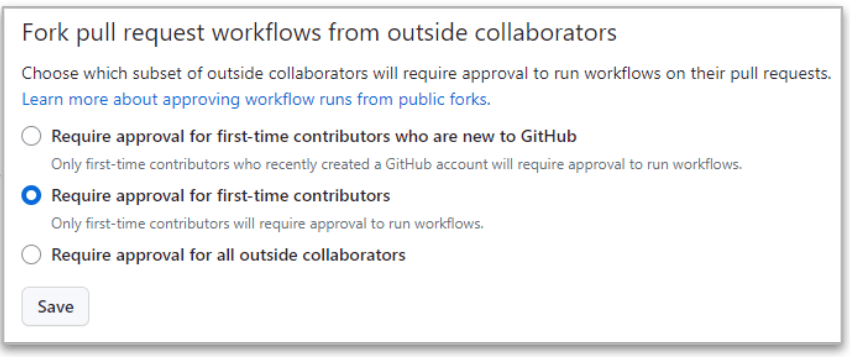
ყველაზე მკაცრი უკანასკნელია („ყველა გარე კოლაბორატორისგან დამტკიცების მოთხოვნა„) რადგან GitHub-ს ყოველთვის დასჭირდება დამტკიცება, როდესაც PR მოდის გარე კოლაბორატორების ფორკებიდან.
მაგრამ ამ მკაცრ შემთხვევაშიც კი არსებობს განსხვავებები კოლაბორატორებს შორის, რომლებსაც აქვთ წაკითხვისა და ჩაწერის ნებართვები.
- როდესაც PR მოდის წაკითხული მომხმარებელი, ის შესრულება pipeline გაჩერებულია ცვლილებების დამტკიცებამდე. თუ დამტკიცება დადებითია, მაშინ შეცვლილი pipeline სიკვდილით არის აღსრულებული.
- როდესაც PR მოდის დაწერა მომხმარებელი, ის დამტკიცება საჭირო არ არის და შეცვლილია pipeline ყოველთვის შესრულებულია!!
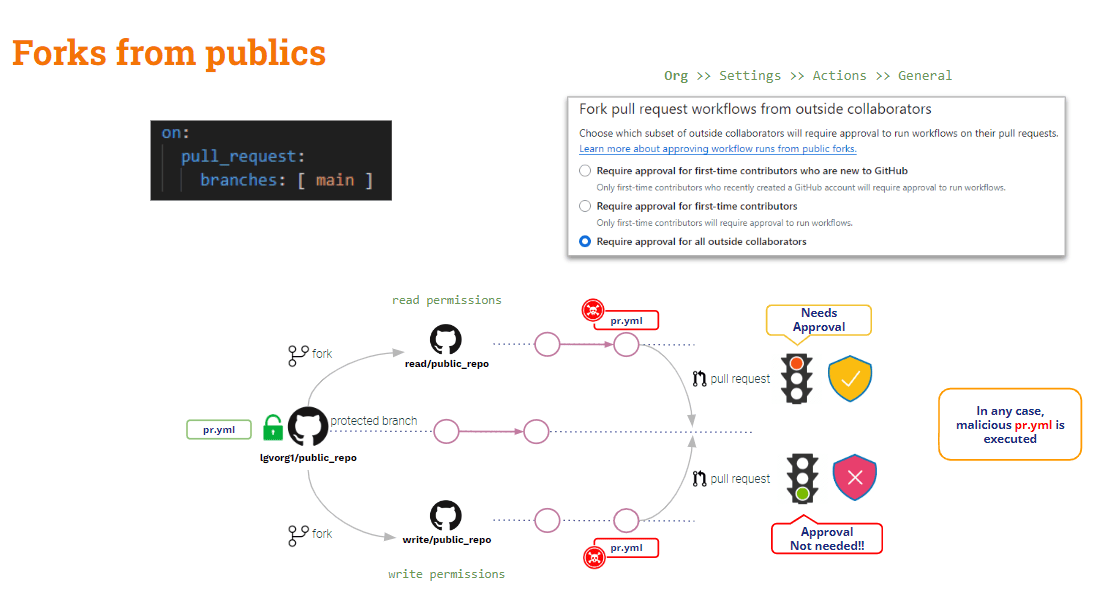
დასკვნის სახით, საჯარო საცავების ფორკებიდან მომავალი PR-ები მსუბუქად არის დაცული ინდივიდუალური დამცავი საშუალებებისგან. არსებობს გარკვეული დაცვა გარე (წაკითხვის) მომხმარებლებისგან, მაგრამ არაფერია დაკავშირებული შიდა (ჩაწერის) მომხმარებლებთან.
რაც შეეხება კერძო რეპოზიტორების ფორკებიდან მიღებული PR-ები?
PR-ები ჩანგლებიდან კერძო repos
ამ სცენარში, GitHub გთავაზობთ რამდენიმე სასარგებლო კონფიგურაციის პარამეტრს.
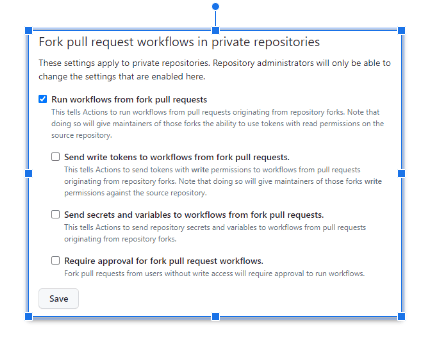
ზემოთ მოცემული პარამეტრების კონფიგურაცია შესაძლებელია როგორც ორგ ან რეპო დონეზე.
როდესაც არცერთი ვარიანტი არ არის მონიშნული, GitHub-ი დამტკიცების მოთხოვნა მდე ის არ შეასრულებს შეცვლილ ვერსიას pipelineეს ყველაზე უსაფრთხო კონფიგურაციაა!!
ის ყველაზე სახიფათო კონფიგურაცია როდის არის "სამუშაო პროცესების გაშვება ჩანგლიდან pull request„შემოწმებულია“ამ შემთხვევაში, როგორც წამკითხველი, ასევე ჩამწერი მომხმარებლებისთვის, Github ავტომატურად შეასრულებს შეცვლილ ფუნქციას. pipeline!! და ეს სიტუაცია შეიძლება იყოს კიდეც უარესი თუ „ჩაწერის ტოკენების გაგზავნა სამუშაო პროცესებზე ჩანგლიდან pull requests"და"საიდუმლოებებისა და ცვლადების გაგზავნა სამუშაო პროცესებზე ჩანგლიდან pull requests„შემოწმებულია. არ გააკეთოთ ეს, თუ ეს აშკარად არ არის გამართლებული!!“
თუ ”ჩანგლის დამტკიცების მოთხოვნა pull request სამუშაოებითუ "შემოწმებულია", ზემოთ მოცემული სიტუაცია გარკვეულწილად გაუმჯობესებულია: GitHub მოითხოვს დამტკიცებას და არ შეასრულებს შეცვლილ ვერსიას. pipeline წაკითხვის მომხმარებლისთვის, მაგრამ ის მაინც შეასრულებს მას ჩაწერის მომხმარებლისთვის.
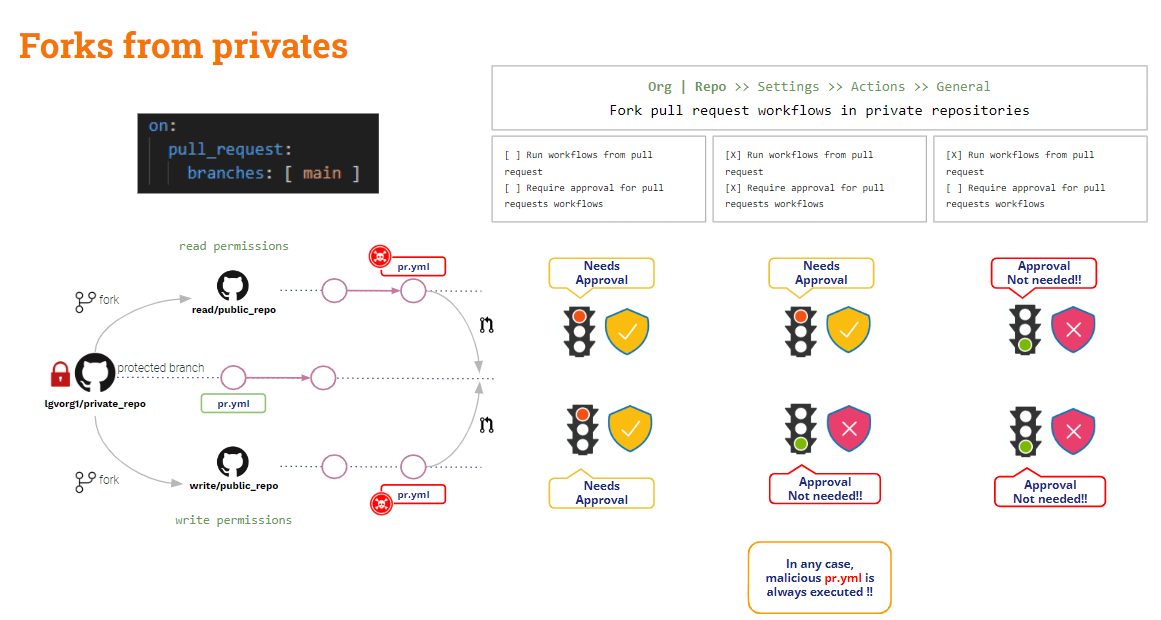
ჩანგლები ნანახია, რას იტყვით ფილიალებიდან მომავალი PR-ები?
PR-ები ფილიალები
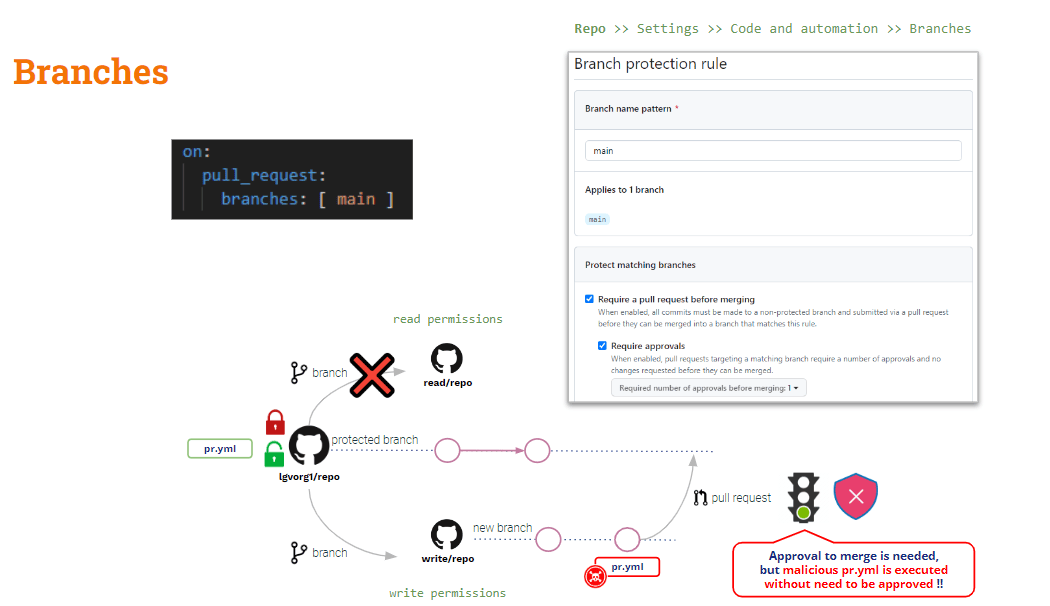
ამ სცენარისგან თავის დასაცავად, თქვენ უნდა დაეყრდნოთ ფილიალის დაცვის წესები.
რეპო დონეზე, თქვენ შეგიძლიათ შექმნათ ფილიალის დაცვის წესები ნებისმიერი ფილიალისთვის. ეს წესები გარკვეულწილად ამატებს დაცული ტოტების მოდიფიკაციის შეზღუდვები.
მიუხედავად იმისა, რომ თქვენ წესს აკონფიგურირებთ „მოითხოვს ა pull request შერწყმამდე"და"დამტკიცებების მოთხოვნა" მოდიფიცირებული pipeline ავტომატურად შესრულდება PR-ის შექმნისთანავე„დამტკიცება“ მხოლოდ შერწყმის მოქმედებას შეეხება.
რაც შეეხება არაპირდაპირ მოწამვლას? Pipeline შესრულების
როგორც ზემოთ ვნახეთ, D-PPE-ს შემცირება შესაძლებელია გამოყენებით pull_request_target, მაგრამ ეს არ ვრცელდება I-PPE-ზე.
თუ იყენებთ pull_request_target-ს, ნაგულისხმევი შემოწმება იქნება საბაზისო კოდი. თუმცა, თუ გსურთ შეტანილი კოდის (PR კოდის) ზოგიერთი შემოწმების დადასტურება, საჭიროა PR კოდის ცალსახად შემოწმება. ამიტომ, თუ PR კოდმა შეცვალა ნებისმიერი shell სკრიპტი, რომელიც გამოიძახა pipeline, „ბაზა“ (უსაფრთხო) pipeline გამოიძახებს „მოდიფიცირებულ“ shell სკრიპტს → არაპირდაპირი PPE!!
ამ პრობლემის გადაწყვეტა ცოტა უფრო რთულია (არ არსებობს ჯადოსნური ტყვია, როგორიცაა pull_request_target).
ჩვენი pipeline ახლა უსაფრთხოა D-PPE-სთვის, რადგან ჩვენ ვიყენებთ pull_request_target-ს. თუმცა, ის კვლავ დაუცველია I-PPE-ს მიმართ.
ჩვენს სატესტო მაგალითში, აწყობის შესაქმნელად ძირითადად PR კოდის შემოწმება გვჭირდება, მაგრამ ტესტები აწყობის შედეგად გენერირებულ არტეფაქტზე სრულდება.
Ისე .. რატომ არ ამოწმებთ ორივე კოდის ბაზას?
- შეამოწმეთ PR კოდი, რადგან ეს არის შეტანილი კოდი, რომლის შექმნა და ტესტირებაც გვსურს.
- გადახდის საბაზისო კოდი ორიგინალი ვერსიის გასაშვებად pipeline და შექმნის/ტესტირების სკრიპტები
ეს შეიძლება გაკეთდეს ამ კოდების ბაზების შემოწმება სხვადასხვა საქაღალდეებშიშესაძლოა, საბაზისო კოდი გადატანილი იყოს root საქაღალდეში, ხოლო PR - სხვა საქაღალდეში. ამ შემთხვევაში, ჩვენ შევასრულებთ აწყობის და სატესტო სკრიპტს root საქაღალდიდან ახალ საქაღალდეში მოთავსებული კოდის წინააღმდეგ.
ეს, რა თქმა უნდა, მარტივი გამოსავალია!! თუმცა, სასწავლო მიზნებისთვის მინდა წარმოგიდგინოთ საკმაოდ საინტერესო ვარიანტი (…)
GitHub სამუშაოს_გაშვება ტრიგერის მოვლენა
გარდა ამისა pull_request_target, GitHub გთავაზობთ კიდევ ერთ ტრიგერ მოვლენას: სამუშაოს_გაშვებაეს ღონისძიება საშუალებას იძლევა შესრულება pipeline სხვისთვის განპირობებული pipelineსიკვდილით დასჯა.
სამუშაოს_გაშვება მდე pull_request_target ტრიგერები ერთი ასპექტით მსგავსია: ორივე შესრულდება პრივილეგირებულ რეჟიმში და, PR მოდიფიკაციების მიუხედავად, ბაზა pipeline სიკვდილით დაისჯება!!
ვნახოთ ჩვენი ამჟამინდელი pipeline:
					name: PR TARGET CI


on:
  pull_request_target:
    branches: [ main ]


env:
  MY_SECRET: ${{ secrets.MY_SECRET }}

jobs:
  prt_build_test_and_merge:
    runs-on: ubuntu-latest


    steps:
      # checkout PR code
      - name: Checkout repository
        uses: actions/checkout@v4
        with:


          # This is to get the PR code instead of the repo code
          ref: ${{ github.event.pull_request.head.sha }}


      # Simulation of a compilation
      - name: Building ...
        run: |
          mkdir ./bin
          touch ./bin/mybin.exe
          ls -lR

      # Simulation of running tests
      - name: Running tests ...
        id : run_tests
        run: |
          echo Running tests..
          chmod +x runtests.sh
          ./runtests.sh
          echo Tests executed.

      #
      # Let’s omit the check conditions at this moment …
      #
      - name: pr_check_conditions_to_merge
        [...]
ასაწყობი სექცია უსაფრთხოა D-PPE-სთვის, მაგრამ სატესტო სექცია კვლავ დაუცველია I-PPE-სთვის.
ის pipeline თავისთავად უსაფრთხოა D-PPE-სთვის, რადგან pull_request_target ტრიგერი. თუმცა, ტესტირების ეტაპი კვლავ დაუცველია I-PPE-ს მიმართ გარე shell სკრიპტის გამოძახების გამო.
I-PPE-ს თავიდან აცილება
ზემოაღნიშნულის მიზანი pipeline არის წარმოდგენილი კოდის შექმნა და ტესტირება, რომელიც უსაფრთხო იქნება პირადი დამცავი აღჭურვილობისთვის.
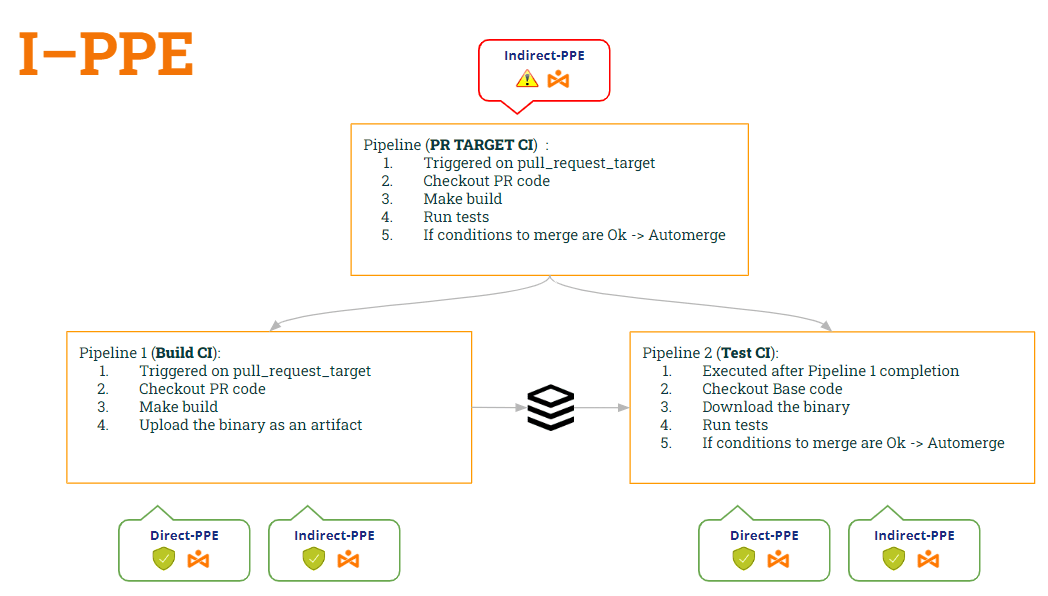
Ისე .. რატომ არ იყოფა? pipeline ორად? ერთი ასაშენებლად და მეორე ტესტირებისთვის..
- 1-ლი pipeline (CI-ის შექმნა) იქნებოდა შეამოწმეთ PR კოდი (მისი ასაშენებლად), შექმენით კონსტრუქცია და გენერირეთ არტეფაქტი.
- 2 pipeline (ტესტი CI) იქნებოდა შეამოწმეთ საბაზისო კოდი (შელის სკრიპტის მოდიფიკაციის თავიდან ასაცილებლად) და შეასრულოთ ორიგინალური სკრიპტები არტეფაქტის წინააღმდეგ.
- ტესტის CI-ის სინქრონიზაციისთვის pipeline გასაშვებად Build CI-ის შემდეგ pipeline, ჩვენ გამოვიყენებთ სამუშაოს_გაშვება ტრიგერი.
ამ გზით:
- pipeline CI-ის შექმნა is უსაფრთხო ორივეს D-PPE (იმის გამო pull_request_target) და I-PPE (რადგან ის აღარ ასრულებს shell სკრიპტს).
- pipeline ტესტი CI ასევე უსაფრთხო ორივეს D-PPE (იმის გამო სამუშაოს_გაშვება) და I-PPE (რადგან ის ამოწმებს საბაზისო კოდს ორიგინალური shell სკრიპტის მისაღებად)
მოდით ვნახოთ ორივეს კოდი pipelineამ ცვლილებების მიხედვით...
1st pipeline (CI-ის აწყობა):
					name: Build CI


on:
  pull_request_target:
    branches: [ main ]


env:
  MY_SECRET: ${{ secrets.MY_SECRET }}
  GITHUB_PAT: ${{ secrets.GH_PAT }}

jobs:

  prt_build_and_upload:
    runs-on: ubuntu-latest
    steps:
      - name: Checking out PR code
        uses: actions/checkout@v4
        if: ${{ github.event_name == 'pull_request_target' }}
        with:
          # This is to get the PR code instead of the repo code
          ref: ${{ github.event.pull_request.head.sha }}


      - name: Building ...
        run: |
          mkdir ./bin
          touch ./bin/mybin.exe
	    # Save some PR info for later use by the 2nd pipeline
          echo "${{github.event.pull_request.title}}" > ./bin/PR_TITLE.txt
          echo "${{github.event.number}}" > ./bin/PR_ID.txt

	# Upload the binary as a pipeline artifact
      - name: Archive building artifacts
        uses: actions/upload-artifact@v3
        with:
          name: archive-bin
          path: |
            bin
2nd pipeline (ტესტი CI):
					ame: Test CI


on:
  workflow_run:
    workflows: [ 'PR TARGET CI' ]
    types: [completed]

env:
  MY_SECRET: ${{ secrets.MY_SECRET }}
  GITHUB_PAT: ${{ secrets.GH_PAT }}


jobs:
  deploy:
    runs-on: ubuntu-latest
    if: ${{ github.event.workflow_run.conclusion == 'success' }}
    steps:


      # By default, checks out base code (not PR code)
      - name: Checkout repository
        uses: actions/checkout@v4


	# Download the artifact
      - name: 'Download artifact'
        uses: actions/github-script@v6
        with:
          script: |
            let allArtifacts = await github.rest.actions.listWorkflowRunArtifacts({
               owner: context.repo.owner,
               repo: context.repo.repo,
               run_id: context.payload.workflow_run.id,
            });
            let matchArtifact = allArtifacts.data.artifacts.filter((artifact) => {
              return artifact.name == "archive-bin"
            })[0];
            let download = await github.rest.actions.downloadArtifact({
               owner: context.repo.owner,
               repo: context.repo.repo,
               artifact_id: matchArtifact.id,
               archive_format: 'zip',
            });
            let fs = require('fs');
            fs.writeFileSync(`${process.env.GITHUB_WORKSPACE}/myartifact.zip`, Buffer.from(download.data));


	# Unzip the artifact
      - name: 'Unzip artifact'
        run: |
          unzip -o myartifact.zip


      # Runs tests
      - name: Running tests ...
        id : run_tests
        run: |
          echo Running tests..
          chmod +x runtests.sh
          ./runtests.sh
          echo Tests executed.


#
      # Let’s omit the check conditions at this moment …
      #
      - name: pr_check_conditions_to_merge
        [...]
ვაუ... კარგი გამოსავალია!! მაგრამ... უსაფრთხოდ ვართ? მეშინია, რომ არა 😭
მართლაც, ჩვენ წარმოგიდგინეთ ახალი დაუცველობა!! რომელი? ეს იქნება ჩვენი შემდეგი პოსტის თემა 🙂 … არ გამოტოვოთ!!
PS: ბოდიში, ვერ გავჩუმდები 🤐 .. გსმენიათ ამის შესახებ? არტეფაქტებით მოწამვლა ? 😂