እያንዳንዱ ገንቢ በመጨረሻ ይጠይቃል ማረም ምንድን ነው? እና በሶፍትዌር ፕሮጄክቶች ውስጥ ለምን በጣም አስፈላጊ እንደሆነ። የስህተት ማረም ፍቺ በኮድ ውስጥ ስህተቶችን የማግኘት እና የማረም ልምድን ያመለክታል። በሌላ አነጋገር፣ ማረም ምን ያደርጋልያልተረጋጉ ፕሮግራሞችን ወደ አስተማማኝ አፕሊኬሽኖች ይለውጣል። ይህ ሂደት፣ ብዙ ጊዜ የሚጠራ የሳንካ ጥገና or የኮድ መላ ፍለጋ, ሶፍትዌሩን አስተማማኝ የሚያደርገው ነው።
የስህተት ማረም ፍቺ፡
ማረም ምንድን ነው?
#የ የስህተት ማረም ፍቺ ቀጥተኛ ነው፡ ጉድለቶችን የማግኘት፣ መንስኤዎቻቸውን የመተንተን እና እርማቶችን የመተግበር የተዋቀረ ሂደት ነው። በተግባር፣ ይህ እንቅስቃሴ የሶፍትዌር ብልሽቶችን ይከላከላል፣ መረጋጋትን ያሻሽላል እና የረጅም ጊዜ አደጋዎችን ይቀንሳል። ገንቢዎች ብዙውን ጊዜ ይህንን ይሉታል። የሳንካ ጥገና or የመላ ፍለጋ ኮድምክንያቱም የተበላሹ ፕሮግራሞችን ወደ አስተማማኝ አፕሊኬሽኖች ስለሚቀይር። በቀላል አነጋገር፣ ማረም አስተማማኝ እና ደህንነቱ የተጠበቀ ሶፍትዌር መሰረት ነው።
ማረም ምን ያደርጋል? #
ገንቢዎች ብዙውን ጊዜ ይጠይቃሉ ማረም ምን ያደርጋል ስህተቶችን ከማስተካከል ባለፈ። መልሱ ኮዱ በታቀደለት መንገድ እንደሚሰራ ያረጋግጣል የሚለው ነው። አንድ ፕሮግራም ሲከሽፍ፣ ይህ የሳንካ ጥገና ሂደት የጠፋ ሴሚኮሎን፣ አላግባብ ጥቅም ላይ የዋለ ኤፒአይ ወይም ጉድለት ያለበት ስልተ ቀመር ይሁን፣ ዋናውን መንስኤ ለማወቅ ይረዳል።
ለኢንጂነሮች፣ መላ መፈለግ ብልሽቶችን ከመከላከል የበለጠ ነገር ያደርጋል።
- ኮዱ እንዴት ማስኬድ እንዳለበት ግምቶችን ያረጋግጣል።
- በአካባቢዎች ሁሉ አስተማማኝነትን ያሻሽላል።
- ችግሮችን በፍጥነት በማግለል የሚባክን ጊዜን ይቀንሳል።
- ከመለቀቁ በፊት በአዳዲስ ባህሪያት ላይ እምነትን ያጠናክራል።
በተግባር፣ ይህ የመላ ፍለጋ ሂደት ከኮድዎ ጋር እንደ ውይይት ነው። አፈፃፀሙን ታልፋለህ፣ ተለዋዋጮችን ትመረምራለህ፣ እና አመክንዮ እንደሚጠበቀው እንደሚፈስ ታረጋግጣለህ። በዚህም ምክንያት፣ ዘዴው ከግምታዊ ስራ ኮድን ወደ ወጥ እና ደህንነቱ የተጠበቀ ውጤት የሚያመጣ ዲሲፕሊን ያለው አቀራረብ ይቀይረዋል።
ማረም ለምን አስፈላጊ ነው? #
ስህተት የሌለበት ኮድ ማረም አስፈላጊ ነው። የአገባብ ስህተቶች፣ የሎጂክ ስህተቶች ወይም የተሰበሩ ውህደቶች በሁሉም ፕሮጀክቶች ማለት ይቻላል ይታያሉ። ለምሳሌ፣ የጎደለ ሴሚኮሎን ማጠናቀርን ሊያቆም ይችላል፣ የተሳሳተ ስልተ ቀመር ደግሞ ተግባራዊነትን ሊሰብር ይችላል። በተጨማሪም፣ የስህተት እርማት ገንዘብ ይቆጥባል። በልማት ወቅት ችግሮችን መፍታት ከተለቀቀ በኋላ ከመላ ፍለጋ ይልቅ ርካሽ ነው። በዚህም ምክንያት ቡድኖች በእሳት አደጋ መከላከያ ሁነታ ላይ የሚያሳልፉት ጊዜ አነስተኛ ሲሆን ባህሪያትን ለመገንባት የበለጠ ጊዜ ያሳልፋሉ።
ቁልፍ ባህሪያት #
- ስልታዊ ሂደት - የሳንካውን መፈጠር፣ መንስኤውን መለየት፣ ማስተካከል እና እንደገና መሞከር።
- የመሳሪያ ድጋፍ - የ IDE አራሚዎች፣ ምዝግብ ማስታወሻዎች እና የክትትል መገልገያዎች።
- ተደጋጋሚ ተፈጥሮ - አንዳንድ ችግሮች እንደገና ይታያሉ፣ ይህም ብዙ ዑደቶችን ይፈልጋል።
- በአስተማማኝነት ላይ ያተኩሩ - የረጅም ጊዜ መረጋጋትን እና የተጠቃሚዎችን በራስ መተማመን ማረጋገጥ።
- ከሙከራ ጋር ውህደት - ማረም ብዙውን ጊዜ የዩኒት እና የውህደት ሙከራን ይከተላል።
የተለመዱ የአጠቃቀም ጉዳዮች #
ማረም በእያንዳንዱ የእድገት ደረጃ ላይ ይታያል። ለምሳሌ፣ በኮድ ጊዜ ገንቢዎች የአገባብ ወይም የሎጂክ ስህተቶችን ወዲያውኑ ያስተካክላሉ። በሙከራ ጊዜ፣ የQA ቡድኖች በራስ-ሰር ቼኮች የተጠቁ ችግሮችን ይፈታሉ። በምርት ውስጥ፣ ሎጎች እና የክትትል ስርዓቶች የእውነተኛ ዓለም ውድቀቶችን ያሳያሉ። እና በDevOps ውስጥ፣ pipeline ችግርመፍቻ ወይም የኮንቴይነር ውቅሮችን ማስተካከል ማድረስን ለስላሳ ያደርገዋል።
የማረም ዓይነቶች #
ገንቢዎች ሲጠይቁ ማረም ምንድን ነው?ብዙውን ጊዜ የተለያዩ አቀራረቦች እንዳሉ ይገነዘባሉ። በጣም የተለመዱት ዓይነቶች የሚከተሉትን ያካትታሉ፡
- መምሪያ መጽሐፍ፦ ኮድ በእጅ መመርመር፣ የፍሬን ነጥቦችን ወይም የህትመት መግለጫዎችን በመጠቀም።
- አውቶሜትድ: ችግሮችን በፍጥነት ለመለየት በመሳሪያዎች ወይም ስክሪፕቶች ላይ መተማመን።
- አይለወጤ: ያለ አፈፃፀም ኮድን መተንተን፣ ልክ እንደ ሊንቲንግ።
- ተለዋዋጭ፦ ባህሪን ለመከታተል እና ውድቀቶችን ለመለየት ፕሮግራሙን ማስኬድ።
እያንዳንዱ አቀራረብ ጠንካራ ጎኖች አሉት። ለምሳሌ፣ አውቶማቲክ እና ተለዋዋጭ ማረም ጊዜን ሊቆጥቡ ይችላሉ፣ በእጅ የሚደረግ ምርመራ ደግሞ ስውር የሎጂክ ጉድለቶችን ለመያዝ ይረዳል። ስለዚህ፣ የተሟላ የስህተት ማረም ፍቺ እነዚህን ሁሉ ልዩነቶች ማካተት አለበት።
በዘመናዊ ዴቭኦፕስ ውስጥ ማረም #
አሁንም ልታስብ ትችላለህ፣ ማረም ምን ያደርጋል በDevOps የስራ ፍሰት ውስጥ? መልሱ ይቀጥላል የሚለው ነው። pipelines እና የተረጋጋ ይለቀቃል። የዛሬው ማረም በኮድ ብቻ የተወሰነ አይደለም - ሙሉውን የህይወት ዑደት ይሸፍናል፡
- CI/CD pipelines: የግንባታ ስህተቶችን ወይም የሙከራ ውድቀቶችን መፍታት።
- መሠረተ ልማት እንደ ኮድ (IaC): ከማሰማራትዎ በፊት የተሳሳቱ ውቅሮችን መለየት።
- ክትትል እና መዝገብ፦ በእውነተኛ ጊዜ ስህተቶችን ለመመርመር የእይታ ችሎታን በመጠቀም።
- የደህንነት ማረም: ጥገኝነቶችን ማስተካከል ወይም pipeline ከሚከተሉት ጋር በቅርበት የተያያዙ ቅንብሮች OWASP ቶፕ 10።
በዚህም የተነሣ የስህተት ማረም ፍቺ አሁን ተግባራዊ፣ ኦፕሬሽን እና የደህንነት ገጽታዎችን ይሸፍናል። በ DevOps ውስጥ ውጤታማ የሳንካ ጥገና የእረፍት ጊዜን ይከላከላል፣ ልቀቶችን ያፋጥናል እና በራስ-ሰር ላይ እምነት ይገነባል።
Xygeni ደህንነቱ በተጠበቀ ልማት ውስጥ ስህተትን ለማስተካከል እንዴት እንደሚረዳ #
ማረም ብዙውን ጊዜ በተግባራዊነት ላይ ያተኩራል፣ ነገር ግን የደህንነት ጉዳዮች እንዲሁ ወሳኝ ናቸው። ተጋላጭ የሆነ ጥገኝነት ወይም የተሳሳተ ውቅር pipeline እንደ ሳንካ ሆኖ መስራት ይችላል ነገር ግን ስርዓቶችን ለጥቃት ሊያጋልጥ ይችላል። Xygeni በማካተት ይረዳል ደህንነቱ የተጠበቀ የኮድ ትንተና ወደ DevSecOps የስራ ፍሰቶች።
እንደ ሁሉን-በአንድ-አፕሴክ መድረክ፣ የሚከተሉትን ያዋህዳል፦
- SAST ደህንነታቸው ያልተጠበቀ የኮድ ቅጦችን ለመለየት።
- SCA አደገኛ ጥገኝነቶችን ለመለየት።
- ምስጢሮች እና IaC ስካን የተጋለጡ ምስክርነቶችን ለማገድ።
- Anomaly ማወቂያ ያልተለመደውን ለማጉላት pipeline ባህሪይ።
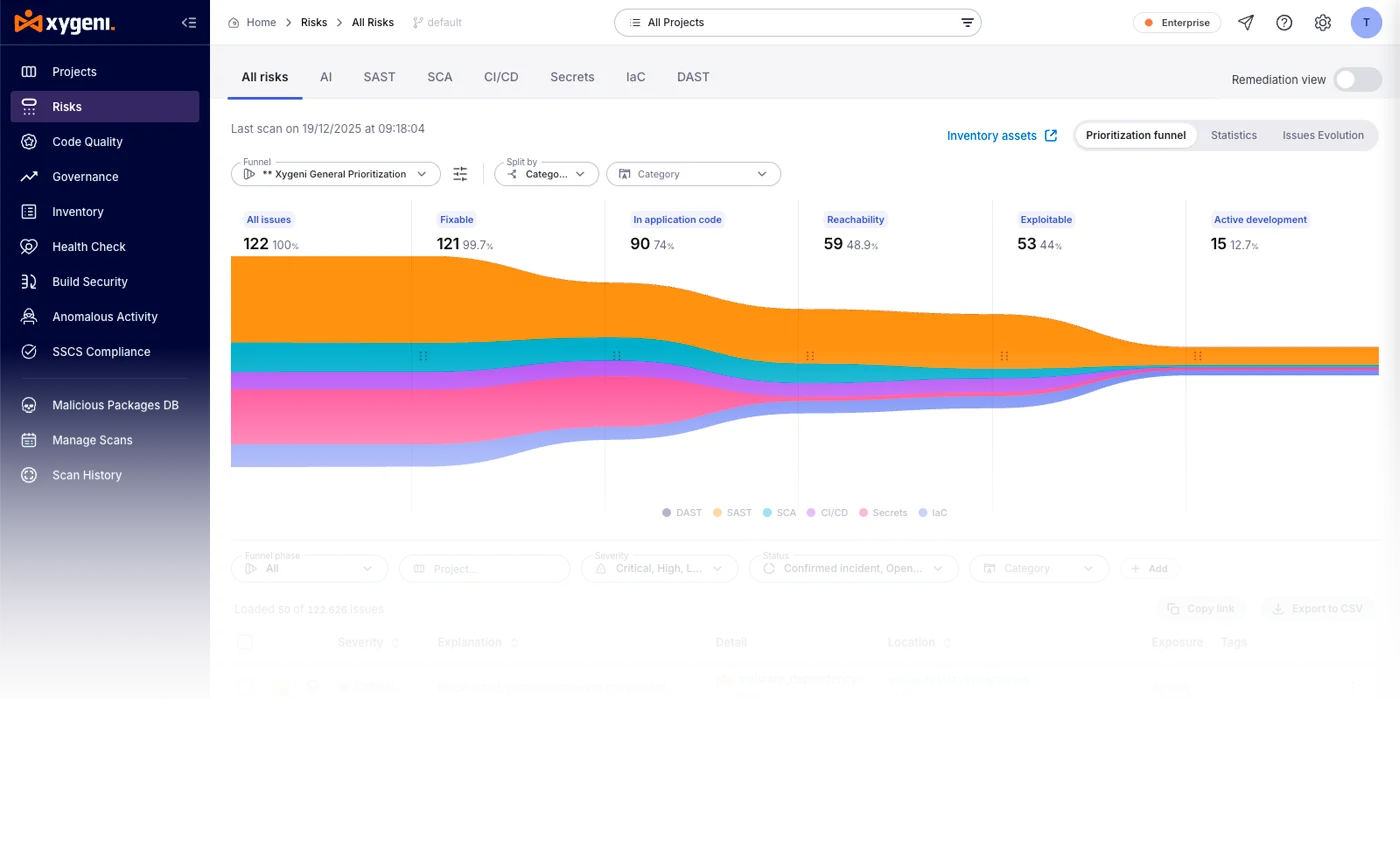
በተጨማሪም፣ Xygeni ቅድሚያ የሚሰጣቸውን ፈንገሎች እና የብዝበዛ ግንዛቤዎችን ስለሚተገብር ቡድኖች በጣም አስፈላጊ የሆነውን ነገር ያስተካክላሉ። በዚህም ምክንያት ገንቢዎች ተግባራዊ ሳንካዎችን ከመፍታትዎ በፊት የደህንነት ጉድለቶችን ይከላከላሉ። በብሎጋችን ላይ የበለጠ ይወቁ 10 መሳሪያዎችን ወደ አንድ ማዋሃድ.