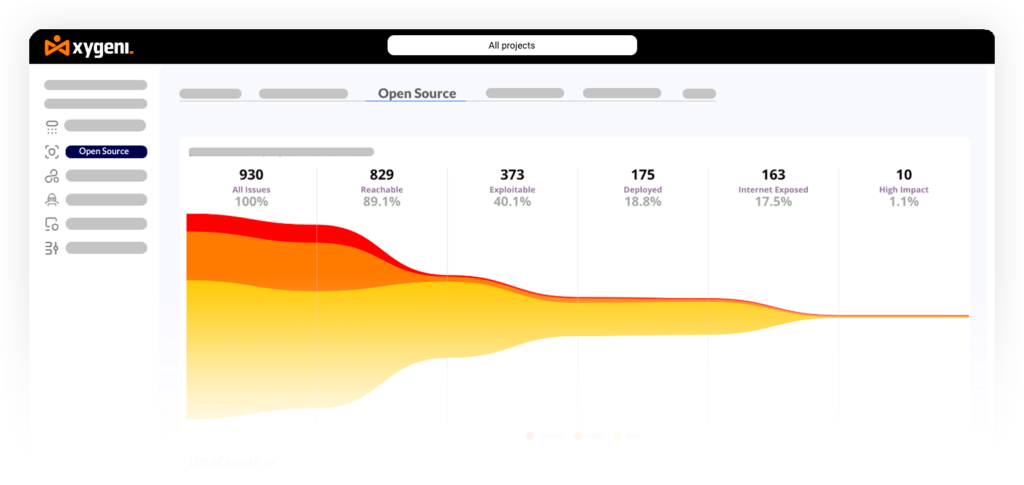





An AI coding assistant is transforming how modern teams build software, and this shift is changing how DevSecOps approaches security. Today, the challenge is no longer detection. Most teams already use scanners for code, dependencies, secrets, infrastructure, and CI/CD pipelines. However, detection alone does not reduce risk.
The hard part is deciding:
- What to fix first
- How to fix it safely
- Which issues can wait
- How to avoid slowing delivery
Security teams are not short on alerts. Instead, they lack time, context, and reliable ways to act on what actually matters. As a result, vulnerabilities remain open longer than expected.
That is exactly where AI remediation creates value.
For a broader look at how AI changes the threat landscape, see our guide to AI cybersecurity.
What Is an AI Coding Assistant (and Why Security Is a Problem Now)
An AI coding assistant is a tool that generates code suggestions using large language models. It analyzes context from your repository and predicts what code should come next. Popular examples include GitHub Copilot, Cursor, and other AI-powered IDE extensions.
However, these systems optimize for speed and correctness, not security. For example:
- They replicate patterns found in training data
- They suggest outdated or vulnerable dependencies
- They ignore security constraints specific to your environment
As a result, AI-generated code may introduce risks without any warning. Moreover, developers often trust these suggestions because they appear correct at first glance.
An AI coding assistant is a tool that generates code suggestions using large language models. It helps developers write code faster, but it does not guarantee that the output is secure, context-aware, or safe for production.
Common AI Coding Assistant Security Risks in AI-Generated Code
AI-generated code introduces several predictable risks. Below are the most common ones observed in real development workflows.
Insecure Code Patterns
AI coding assistants may generate unsafe implementations. For example:
- SQL injection vulnerabilities
- Weak authentication logic
- Missing input validation
These issues often look functional but fail under real-world attack scenarios.
An AI coding assistant is a tool that generates code suggestions using large language models. It helps developers write code faster, but it does not guarantee that the output is secure, context-aware, or safe for production.
| Risk | What Happens | Potential Impact | Recommended Control |
|---|---|---|---|
| Insecure Code Patterns | The AI coding assistant suggests unsafe logic such as weak validation or insecure queries. | Application vulnerabilities, exploitable flaws, broken security controls. | Real-time SAST in the IDE and pipeline. |
| Vulnerable Dependencies | The assistant recommends outdated or risky packages. | Supply chain exposure, known CVEs, unstable builds. | SCA validation and dependency policy enforcement. |
| Hardcoded Secrets | Keys, tokens, or credentials appear in generated code. | Credential leaks, account compromise, lateral movement. | Secrets detection before commit and in CI. |
| Obfuscated or Suspicious Code | The assistant outputs code that is hard to review or behaves unexpectedly. | Malicious logic, hidden payloads, review bypass. | Code review plus automated policy checks. |
| Lack of Context Awareness | The AI code assistant ignores existing security architecture or business logic. | Broken controls, regressions, unsafe integrations. | Context-aware scanning and guarded remediation workflows. |
Vulnerable Dependencies
AI tools frequently suggest external libraries. However:
- Suggested packages may contain known vulnerabilities
- Versions may be outdated or unsafe
- Dependencies may not be verified
Consequently, supply chain risks increase significantly.
Hardcoded Secrets and Tokens
In some cases, AI-generated code includes:
- API keys
- Credentials
- Tokens embedded directly in code
This happens because training data often contains insecure examples. As a result, sensitive data can leak into repositories.
Malicious or Obfuscated Code Suggestions
Although rare, some suggestions may include:
- Suspicious logic
- Obfuscated code patterns
- Hidden behaviors
This creates potential supply chain risks, especially when developers accept suggestions without review.
Lack of Context Awareness
AI coding assistants do not fully understand your application’s architecture. Therefore:
- Security controls may be bypassed
- Existing logic may be broken
- Policies may not be enforced
In other words, AI-generated code may conflict with your security model.
Why Traditional Security Tools Are Not Enough
Traditional security tools operate too late in the development process. For example, most scans happen after code is committed or deployed.
However, AI-generated code is introduced earlier, inside the IDE. As a result:
- Issues are detected too late
- Developers must rework code
- Security teams face alert fatigue
Moreover, traditional tools lack execution context. They cannot always determine if a vulnerability is exploitable.
AI-assisted development requires real-time, context-aware security.
An AI coding assistant is a tool that generates code suggestions using large language models. It helps developers write code faster, but it does not guarantee that the output is secure, context-aware, or safe for production.
| Area | AI Coding Assistant Alone | AI Coding Assistant with Security Layer |
|---|---|---|
| Code Suggestions | Fast, but not validated for security. | Fast and checked in real time for insecure patterns. |
| Dependencies | May suggest risky packages or outdated versions. | Packages are validated and blocked when unsafe. |
| Secrets | May insert tokens or credentials into code. | Secrets are detected before they reach Git. |
| Fixes | No guarantee that fixes are safe or complete. | Fixes are validated, prioritized, and reviewed in context. |
| Developer Workflow | More speed, but more hidden risk. | More speed with security built into IDE and pipelines. |
How to Secure AI Coding Assistant Output in Practice
To reduce risk, teams must integrate security directly into the development workflow.
1. Scan Code in Real Time (Shift Left)
Security must start in the IDE. For example:
- Run SAST scans while coding
- Provide immediate feedback
- Block unsafe patterns early
As a result, developers fix issues before they reach the pipeline.
2. Validate Dependencies Automatically
Dependency risks must be controlled continuously. Therefore:
- Use SCA to analyze libraries
- Block malicious or vulnerable packages
- Monitor updates automatically
This reduces supply chain exposure.
3. Detect Secrets Before They Reach Git
Secrets should never enter version control. In practice:
- Scan code before commit
- Detect tokens and credentials
- Block commits when needed
This prevents leaks early.
4. Prioritize Exploitable Risks Only
Not all vulnerabilities matter equally. Therefore:
- Use reachability analysis
- Apply EPSS scoring
- Focus on real attack paths
As a result, teams reduce noise and act faster.
5. Automate Secure Fixes Without Breaking Code
Fixing vulnerabilities manually does not scale. Instead:
- Use automated remediation
- Generate pull requests with fixes
- Validate changes before merge
This improves speed while maintaining stability.
In addition, teams can strengthen this workflow with application security posture management to connect findings across IDEs, repositories, and pipelines.
To secure AI-generated code, teams need real-time scanning, automated dependency validation, secrets detection, contextual prioritization, and safe remediation workflows. Security must run inside the IDE and across CI/CD.
| Stage | Security Goal | What Teams Should Do |
|---|---|---|
| IDE | Catch unsafe AI-generated code early | Run SAST, secrets detection, and dependency checks in real time. |
| Pre-Commit | Stop risky changes before Git | Validate secrets, packages, and policy violations before code is committed. |
| Pull Request | Review and validate generated changes | Use automated scans, contextual prioritization, and policy guardrails. |
| CI/CD | Block unsafe code from progressing | Enforce SAST, SCA, and supply chain checks in pipelines. |
| Remediation | Fix issues at scale without regressions | Use automated remediation, PR-based fixes, and breaking-change validation. |
AI Coding Assistant in CI/CD: Hidden Risks in Pipelines
AI-generated code does not stop at the IDE. It moves into CI/CD pipelines, where risks increase.
For example:
- Build poisoning through unsafe scripts
- Dependency injection attacks
- Malicious packages introduced during builds
Moreover, AI-generated changes may bypass traditional controls if not validated properly.
Therefore, CI/CD security and software supply chain protection become essential.
AI-generated code can create hidden risks in CI/CD pipelines, especially when it introduces unsafe scripts, malicious packages, or vulnerable dependencies. As a result, supply chain security becomes essential.
AI Coding Assistant Security Best Practices for DevSecOps Teams
To use AI coding assistants safely, teams should follow these practices:
- Define guardrails for AI-generated code
- Enforce policies in CI/CD pipelines
- Scan code continuously across the SDLC
- Monitor dependencies and updates
- Integrate security into IDE and pipelines
Together, these steps reduce risk while keeping development fast.
AI coding assistants generate code, but they do not validate it. A security layer is required to scan, prioritize, and fix issues before they reach production.
From AI Coding Assistant to Secure Code: Adding a Security Layer
AI coding assistants generate code, but they do not validate it. Therefore, a security layer is required.
This layer should operate across:
- IDE environments
- CI/CD pipelines
- Build and deployment workflows
For example, platforms like Xygeni integrate:
- SAST for code analysis
- SCA for dependency security
- Secrets detection
- AI Auto-Fix for remediation
- Xygeni Bot for automated pull requests
As a result, security becomes part of the development process instead of a separate step.
For example, combining AI SAST with AI automated vulnerability remediation helps teams fix issues earlier and with less friction.
AI Coding Assistant Security: Key Takeaways
- AI coding assistants accelerate development
- However, they introduce new security risks
- AI-generated code must be validated continuously
- Security must be real-time and context-aware
- Automation is required to scale safely
FAQ
What is an AI coding assistant?
An AI coding assistant is a tool that generates code suggestions using machine learning models.
Is AI-generated code secure?
No, AI-generated code is not secure by default and must be validated.
What are the risks of AI code assistants?
Risks include insecure code, vulnerable dependencies, exposed secrets, and supply chain threats.
How can you secure AI-generated code?
Use real-time scanning, dependency validation, secrets detection, and automated remediation.
Can AI fix vulnerabilities automatically?
Yes, AI can generate fixes, but they must be validated before deployment.
About the Author
Fátima Said specializes in developer-first content for AppSec, DevSecOps, and software supply chain security. She turns complex security signals into clear, actionable guidance that helps teams prioritize faster, reduce noise, and ship safer code.