
Cloud security tips are only useful when they address the real gaps attackers exploit: a public S3 bucket nobody noticed, a CI runner with wildcard AWS permissions, a leaked secret in a build log, or a malicious dependency that installed quietly during a pipeline run. Most cloud security incidents are not caused by unknown threats. They are caused by known weaknesses that were never enforced, prioritized, or fixed.
This guide covers 20 practical cloud security tips organized by layer: identity, data, infrastructure, software supply chain, CI/CD pipelines, detection, and incident response. Whether you are hardening a single cloud account or securing a multi-team DevSecOps pipeline, these controls help prevent the breaches that actually happen.
Why Cloud Security Keeps Failing Despite So Many Cloud Security Tips
Cloud security is the set of controls, policies, and tools that protect data, applications, and infrastructure running in cloud environments. It spans identity, network, data, application code, dependencies, infrastructure configuration, and build pipelines.
The reason it keeps failing for even mature teams isn’t lack of knowledge. It’s three structural problems:
- Speed vs. security. Pipelines move fast. Controls that add friction get disabled. The teams that get cloud security right don’t add gates, they automate enforcement directly into the workflow.
- Tool fragmentation. Secrets scanning in one tool, SCA in another, IaC in a third. No unified view means gaps fall between coverage layers, and findings never get correlated into real risk.
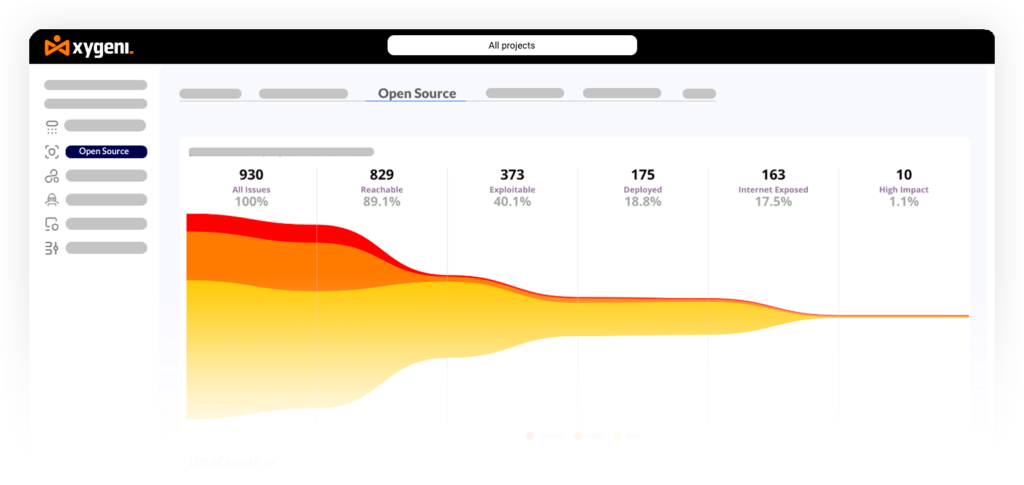
- Alert fatigue. Scanners that surface hundreds of CVEs per day train engineers to ignore findings , including the critical ones. Prioritization isn’t optional; it’s what determines whether security actually works.
The cloud security tips below are designed to close those gaps in a practical way. Instead of treating cloud security as a runtime-only problem, they cover the full delivery path from code to cloud.
20 Cloud Security Tips:
Identity and Access Management Cloud Security Tips
1. Enable Multi-Factor Authentication Everywhere
MFA remains the single highest-ROI control in cloud security. It stops credential theft attacks cold, and attackers know it. Any account without MFA is a soft target.
Enforce MFA for every human identity in your cloud environments: developer accounts, admin consoles, cloud provider portals, CI/CD dashboards. Use phishing-resistant MFA (hardware keys, passkeys) for privileged accounts. Time-based codes via authenticator app are the minimum bar.
2. Apply Least Privilege , Especially to Non-Human Identities
The Principle of Least Privilege is well understood for humans. The part teams consistently miss is non-human identities: CI/CD service accounts, Lambda functions, container workloads, GitHub Actions runners.
These identities accumulate wildcard permissions because they’re configured once and never revisited. They’re also exactly what attackers target in supply chain attacks , because they have access to secrets, repositories, production resources, and downstream systems.
// Bad: wildcard S3 permissions on a Lambda function { "Action": "s3:*", "Resource": "*" } // Good: scoped to exactly what the function needs { "Action": ["s3:GetObject", "s3:PutObject"], "Resource": "arn:aws:s3:::my-app-bucket/uploads/*" } Audit service account permissions quarterly. Remove anything that hasn’t been used in 90 days.
3. Replace Long-Lived Credentials with Short-Lived Tokens
Static API keys and long-lived tokens are one of the most common root causes in cloud breaches. They get committed to repos, leaked in CI logs, copied into Slack, and forgotten in .env files , then sit valid for months or years.
Replace them with short-lived credentials wherever possible: AWS STS assume-role, GCP Workload Identity Federation, GitHub Actions OIDC. When static credentials are unavoidable, store them in a secrets manager (Vault, AWS Secrets Manager, Azure Key Vault) and rotate automatically.
4. Implement Just-in-Time Access for Elevated Privileges
Standing admin access is standing risk. Permanent elevated permissions mean one compromised identity is enough to reach production.
JIT access systems (AWS IAM Identity Center, GCP Privileged Access Manager, Okta Access Requests) grant elevated access on-demand, time-limited, and with full audit logs. Developers get what they need when they need it. Attackers find no standing target.
5. Enforce Zero Trust Across Service-to-Service Communication
Traditional perimeter models assume everything inside the network is trusted. Cloud-native environments with microservices, containers, and dynamic workloads make that assumption dangerous.
Zero Trust means every request is authenticated and authorized, regardless of where it originates. Implement service-to-service authentication (mTLS, service mesh identity), enforce network policies at the workload level, and treat internal traffic as untrusted by default.
Data Protection Cloud Security Tips
6. Encrypt Everything , Including Internal Traffic
Encryption at rest (AES-256, managed KMS) is now standard practice. The gap most teams have is encryption in transit for internal traffic.
In a VPC with microservices and container-to-container communication, traffic that stays “inside” is not inherently safe. Implement mutual TLS (mTLS) for internal service communication. Use a service mesh (Istio, Linkerd) or a zero-trust networking layer to enforce this automatically rather than relying on each team to configure it correctly.
7. Detect and Remediate Exposed Secrets Before They Spread
A secret committed to a repository doesn’t stay secret. GitHub indexes public repos within seconds. Internal repos are not immune , once a secret is in git history, it’s accessible to anyone with repo access, now or in the future.
Prevention layers matter (pre-commit hooks, IDE plugins) but are not sufficient. You need continuous scanning across all repositories including historical commits, CI/CD logs, IaC files, and container images. When a secret is detected, response must be immediate: revoke, rotate, and assess whether it was accessed between exposure and detection.
8. Classify Data and Apply Controls Based on Sensitivity
Not all data in your cloud environment carries the same risk if exposed. Treating everything the same means over-investing controls in low-risk data and under-protecting the data that actually matters.
Classify data by sensitivity (public, internal, confidential, restricted). Apply access controls, encryption standards, and audit logging requirements to each tier. Automate classification where possible , manual tagging doesn’t scale.
Infrastructure and Configuration Security
9. Scan IaC on Every Commit, Not Just Before Deployment
Infrastructure as Code is where misconfigurations are created , not in production. A public S3 bucket, an open security group, or an IAM role with *:* permissions doesn’t appear by accident. It starts as a line in a Terraform file or Kubernetes manifest that nobody flagged.
IaC scanning must run on every pull request, with findings surfaced in the code review workflow. Scan Terraform, Kubernetes manifests, CloudFormation, Helm charts, Dockerfiles, and CI/CD configs.
# This fails immediately in Xygeni IaC scanning: resource "aws_s3_bucket" "data" { bucket = "company-data" acl = "public-read" # ← flagged: public access enabled } Xygeni IaC Security scans every supported format on every commit, maps findings to specific resources, and integrates with your PR workflow so developers get feedback where they work , not in a separate dashboard they never open. Start a free trial →
10. Treat Security Policy as Code
Manual security reviews don’t scale. Policy-as-code does.
Use tools like OPA (Open Policy Agent) or Kyverno to express security rules as versioned, testable code. Enforce them at pipeline level so a Kubernetes deployment with privileged: true or a container running as root fails the build , automatically, every time. When policies live in code, they get reviewed and improved like any engineering artifact. When they live in documentation, they drift.
11. Enforce Secure Configuration Baselines and Monitor for Drift
Default configurations are optimized for convenience, not security. Cloud services, container runtimes, and managed Kubernetes clusters ship with settings that are easy to use , and easy to exploit.
Start from CIS Benchmarks for your cloud provider, container runtime, and OS. Encode them as policy-as-code so they’re automatically enforced. Monitor continuously for drift, configuration compliant last week may not be compliant today after a quick change pushed under pressure.
12. Segment Networks and Restrict Lateral Movement
Flat network architectures mean that once an attacker compromises one workload, they can reach everything else. Network segmentation contains the blast radius.
Use VPCs, subnets, and security groups to create isolation zones by function and sensitivity. Restrict east-west traffic between services to only what’s needed. Implement egress filtering, most compromised workloads need to reach an attacker-controlled server, and egress controls are one of your best opportunities to detect or prevent that.
Software Supply Chain Cloud Security Tips
Some of the most important cloud security tips no longer start inside the cloud provider console. They start earlier, inside the software supply chain. Dependencies, CI/CD workflows, secrets, build scripts, and artifacts can all introduce cloud risk before deployment.
13. Scan Every Dependency Before It Enters Your Build
Open-source packages are the most common initial access vector in modern supply chain attacks. The 2024 Shai-Hulud campaign compromised 830+ npm packages. The XZ Utils backdoor nearly compromised SSH authentication across millions of Linux systems. In both cases, malicious code arrived through the normal dependency installation process.
Basic SCA (Software Composition Analysis), raw CVE lists, is not enough. What you actually need:
- Reachability analysis: is the vulnerable function actually called in your code?
- Malware detection: does this package exhibit malicious behavior , obfuscated scripts, unexpected network calls, lifecycle hooks that install external runtimes?
- EPSS scoring: what’s the probability this CVE is actively exploited in the wild right now, not just theoretically?
14. Lock Down CI/CD Pipelines
CI/CD systems have access to secrets, cloud credentials, and production environments. They’re also typically less hardened than the production systems they deploy to.
Controls to enforce:
- Require code review for any changes to pipeline configuration files (.github/workflows/, Jenkinsfile, etc.)
- Restrict self-hosted runners to approved repositories , unreviewed runner access is a direct path to credential theft
- Never pass secrets as plaintext environment variables; use a secrets manager integration
- Audit pipeline logs for unexpected commands, unusual network calls, or executions at unexpected hours
Xygeni CI/CD Security enforces guardrails directly in your pipeline , blocking unsafe builds, detecting injected workflows, and ensuring pipeline integrity at every stage. Book a demo →
15. Validate Build Integrity and Sign Artifacts
If an attacker can inject code into a build script, modify an artifact after compilation, or compromise a CI runner, they own your software supply chain, regardless of how clean your source code is.
Enforce build integrity controls:
- Pin all dependency versions and base images to exact digests, not tags
- Sign build artifacts and verify signatures before deployment
- Monitor for unexpected changes to CI/CD workflow files , injected workflows were the key indicator in attacks like Shai-Hulud
- Implement SLSA attestations to cryptographically prove what was built, from what source, and by what pipeline
Threat Detection and Incident Response
16. Centralize Logging and Build Visibility Across the Entire Stack
You can’t detect what you can’t see. Most cloud security monitoring focuses on runtime , CloudTrail, VPC flow logs, GuardDuty. That’s necessary but not sufficient.
Attacks like Shai-Hulud and SolarWinds succeeded partly because the compromise happened in the build pipeline, long before anything reached production monitoring. Complete visibility requires coverage across source code changes, build and artifact layers, cloud runtime, and API activity.
17. Prioritize Findings by Exploitability, Not Just Severity
A scanner producing 500 findings per week trains teams to ignore findings, including the critical ones. Prioritization is what separates security programs that work from those that exist on paper.
Effective prioritization combines: reachability (is the vulnerable code actually executed?), exposure (is the service internet-facing?), EPSS score (probability of active exploitation), and business context (production vs. dev environment).
Xygeni ASPM brings all findings across SAST, SCA, IaC, secrets, and pipeline security into a unified risk view, with contextual prioritization that tells your team exactly what to fix first. Book a demo →
18. Establish Behavioral Baselines and Alert on Deviations
Known-bad signatures catch known threats. Behavioral anomaly detection catches the unknown ones, zero-days, novel attack patterns, insider threats.
For your CI/CD environment specifically, establish baselines for typical build duration, normal package installation patterns, expected network destinations during builds, and standard secrets access patterns. Deviations from these baselines are your earliest warning signal, and the layer most teams have zero visibility into.
19. Define Runbooks for Cloud-Specific Incident Scenarios
Generic incident response plans don’t account for cloud-specific scenarios: a compromised package already installed across 40 services, a CI runner with credentials stolen by a malicious preinstall script, a build artifact that may have been tampered with in the last 72 hours.
Build specific runbooks for: compromised dependency, pipeline credential theft, misconfiguration-triggered data exposure, and malicious CI workflow injection. Each runbook should define who owns the response, what’s revoked immediately, and what forensics are needed to determine blast radius.
20. Run Tabletop Exercises, Twice a Year Minimum
A runbook that hasn’t been tested is a hypothesis. Tabletop exercises expose the gaps in your response plan before an attacker does. The goal isn’t to follow the playbook perfectly , it’s to discover what’s missing.
Run at minimum two exercises per year, simulating different scenario types: a supply chain compromise, a misconfiguration-driven data breach, a compromised CI runner. Include the teams that will actually respond , security, DevOps, and on-call developers.
Cloud Security Tips Checklist: Quick Reference
| Layer | Key Controls |
|---|---|
| Identity | MFA everywhere, least privilege, short-lived credentials, JIT access |
| Data | Encrypt at rest and in transit, secrets scanning and auto-revocation, data classification |
| Infrastructure | IaC scanning on commit, policy-as-code, CIS baseline enforcement, network segmentation |
| Supply chain | SCA with reachability and malware detection, CI/CD hardening, build integrity and SLSA |
| Detection | Centralized logging, EPSS-based prioritization, behavioral anomaly detection |
| Response | Cloud-specific runbooks, tabletop exercises, documented blast-radius assessment |
How Xygeni Helps Apply Cloud Security Tips Across the Full Stack
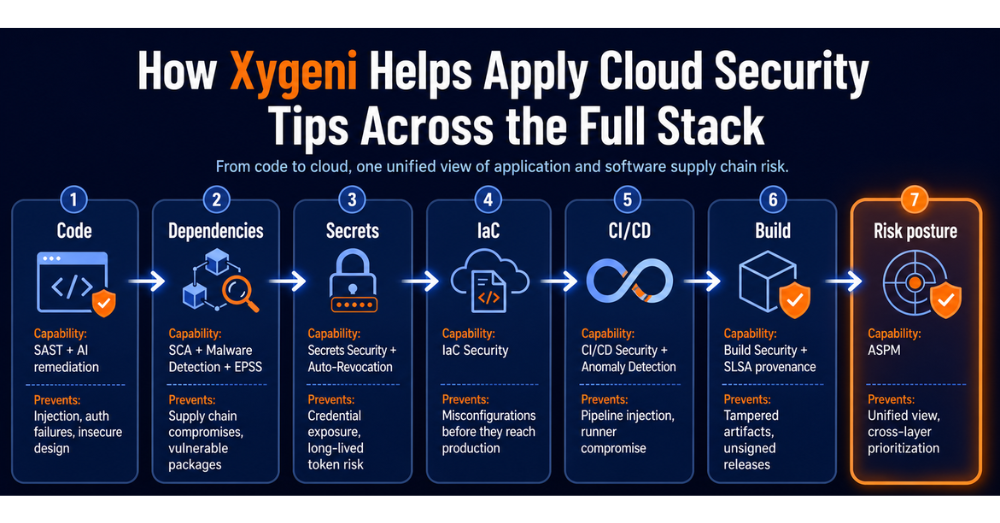
Cloud security tips only work when teams can enforce them consistently across the full software delivery lifecycle. Most tools cover one layer: runtime, code, dependencies, secrets, or CI/CD. But real attacks move across layers.
Xygeni connects these layers with integrated detection, prioritization, and remediation from the first git push to production.
| Layer | Xygeni Capability | What It Prevents |
|---|---|---|
| Source code | SAST + AI remediation | Injection, auth failures, insecure design |
| Dependencies | SCA + Malware Detection + EPSS | Supply chain compromises, vulnerable packages |
| Secrets | Secrets Security + Auto-Revocation | Credential exposure, long-lived token risk |
| IaC & Config | IaC Security | Misconfigurations before they reach production |
| CI/CD Pipeline | CI/CD Security + Anomaly Detection | Pipeline injection, runner compromise |
| Build artifacts | Build Security + SLSA provenance | Tampered artifacts, unsigned releases |
| Risk posture | ASPM | Unified view, cross-layer prioritization |
The result: security teams get signal instead of noise. Developers get feedback where they work, not in a separate tool they never open. And security becomes part of the delivery process , not a gate that slows it down.
Final Thoughts
Cloud security tips are easy to list but harder to enforce. The teams that reduce real cloud risk do not rely on manual reviews, scattered tools, or severity-only prioritization. Instead, they automate security controls inside pipelines, prioritize by exploitability, and treat the full software supply chain as part of the cloud attack surface.
That means securing more than runtime infrastructure. It means protecting source code, dependencies, secrets, IaC, CI/CD workflows, build artifacts, and application risk posture together.
If your current tools leave gaps between those layers, Xygeni helps close them with integrated detection, prioritization, and remediation across the full path from code to cloud.
👉 Start your 7-day free trial , no credit card required, scan results in minutes
👉 Book a demo and see how Xygeni maps to your specific cloud and pipeline setup
About the Author
Co-Founder & CTO
Fátima Said specializes in developer-first content for AppSec, DevSecOps, and software supply chain security. She turns complex security signals into clear, actionable guidance that helps teams prioritize faster, reduce noise, and ship safer code.