

Your SAST scanner flagged 847 issues this sprint. Your SCA tool added 312 more. Your secrets scanner found 43 potential exposures across four repositories. And somewhere in that pile of 1,200+ findings is a critical vulnerability that’s actively being exploited in the wild right now. This is AppSec alert fatigue. And it’s not a detection problem.
Most teams don’t have a detection problem. They have a prioritization problem. Without context, every alert looks equally urgent, so none of them feel urgent enough to act on immediately.
That gap between detection and prioritization is where real threats slip through.
This guide breaks down why alert fatigue happens, what it costs, and the concrete techniques that reduce it without reducing security coverage.
What Is AppSec Alert Fatigue (and Why Is It Getting Worse)?
AppSec alert fatigue is the state where security and development teams are so overwhelmed by the volume of security findings that their ability to respond effectively degrades. When everything is marked “critical,” nothing feels urgent. Real threats get buried under noise.
The scale of the problem is significant. According to the 2025 State of Application Security report from Cypress Data Defense, 62% of security leaders have knowingly shipped vulnerable applications to meet deadlines, not because they didn’t know about the vulnerabilities, but because they couldn’t triage fast enough to act. The AI SOC Market Landscape 2025 report puts the average alert volume at 960 per day for mid-sized organizations, rising to 3,000+ in enterprises over 20,000 employees.
AppSec specifically compounds the problem because of three structural factors:
Tool sprawl. Security teams operating multiple point tools have no shared context between them. A “critical” in your SCA tool and a “critical” in your IaC scanner land in the same backlog with no correlation. According to Devo’s 2025 “Evolution to an Alertless SOC” report, 83% of SOC professionals are overwhelmed by alert volume, false positives, and lack of alert context, and 84% of organizations report that analysts unknowingly investigate the same incidents multiple times per month.
CVSS-first prioritization. CVSS scores measure vulnerability severity, not likelihood of exploitation. A CVE rated 9.8 (critical) may have near-zero chance of being targeted in the next 30 days. Remediating it ahead of a CVE rated 6.5 that’s actively weaponized in the wild wastes engineering time and creates a false sense of progress.
No runtime context. A vulnerability in a dependency is a very different risk if that dependency is internet-facing vs. running in an internal dev tool, if the vulnerable function is actually called vs. imported but unused, or if compensating controls already exist in the environment. Tools that don’t incorporate this context produce the same “critical” alert regardless.
The result: up to 53% of security alerts are false positives, according to the 2024 Devo SOC Performance Report. Engineering teams learn to ignore the noise, and real threats slip through.
The Real Cost of Alert Fatigue
Alert fatigue isn’t an inconvenience. It’s a direct line to breach.
When analysts are overwhelmed, they develop coping mechanisms: triaging based on tool severity instead of actual risk, deferring findings to the next sprint indefinitely, closing alerts as “won’t fix” to clear the backlog, or simply stopping to look at the queue. The same Devo report confirms that 84% of organizations’ analysts are unknowingly duplicating investigation effort, a direct consequence of fragmented tooling with no correlation layer.
The downstream consequences:
- Security debt accumulates. Every deferred finding is a vulnerability that stays open while attackers actively scan for it.
- Developers distrust the tooling. When security tools consistently surface false positives, developers stop treating findings as actionable. “Security crying wolf” becomes a cultural problem that’s hard to reverse.
- Mean time to remediation increases. IBM’s 2025 Cost of a Data Breach Report puts the global average cost of a data breach at $4.4M, with a 9% decrease over the prior year attributed specifically to faster identification and containment driven by AI. Teams slowed by alert fatigue forgo exactly that advantage.
- Team burnout. The 2025 ISC2 Cybersecurity Workforce Study, based on 16,029 cybersecurity professionals globally, found that 48% feel exhausted from trying to stay current on threats and emerging technologies, and 47% report feeling overwhelmed by workload.
What Changes When You Add Context
Most AppSec programs fail at the same point: between detection and prioritization. Scanners detect everything. Nothing tells you what to fix first.
This is exactly where Xygeni focuses its design, and it’s the difference between a team drowning in alerts and a team working from a queue where every finding is worth acting on.
| Without Context | With Xygeni | |
|---|---|---|
| Alert volume | Thousands per week | Reduced to what’s actionable |
| Prioritization | CVSS severity only | EPSS + reachability + business impact |
| Triage | Manual, per tool | Automated, unified across tools |
| False positives | Up to 52% of findings | Filtered before they reach the queue |
| Outcome | Noise engineers ignore | Signal engineers act on |
The AppSec Alert Fatigue Pipeline: Where Teams Break
Most teams break at the same stage. Not at detection, their tools detect plenty. At the gap between detection and a decision a developer can act on.
Detect → Correlate → Prioritize → Fix → Monitor
Every stage to the left of “Prioritize” is well-served by existing tooling. Every stage to the right is where findings either become fixes or become backlog. The bottleneck is always in the middle: correlation and prioritization without context is just reordering noise.
The five techniques below address each stage of that pipeline directly.
Five Techniques to Reduce AppSec Alert Fatigue
1. Replace CVSS-Only Prioritization with EPSS + Reachability
CVSS tells you how severe a vulnerability is in theory. It doesn’t tell you whether anyone is actually exploiting it, or whether your application is even exposed.
EPSS (Exploit Prediction Scoring System), maintained by FIRST, gives you a daily probability score for every CVE, how likely is this vulnerability to be exploited in the wild in the next 30 days? The data is publicly available via API and updated daily based on real-world threat intelligence.
The impact on alert volume is substantial. According to FIRST’s own model data, a CVSS 7+ remediation strategy requires effort on 57.4% of all CVEs to capture 82% of exploited vulnerabilities. An EPSS-based strategy (threshold 0.1) achieves 63% coverage with only 2.7% effort, because it focuses on the CVEs attackers are actually targeting.
Reachability analysis compounds the effect further. By analyzing whether the vulnerable function in a dependency is actually called in your code’s execution path, reachability filtering alone can reduce SCA findings by up to 80% without dropping a single real risk.
Combined, EPSS + reachability means your queue surfaces the 1-2% of findings that genuinely need immediate action, not the theoretical 57%.
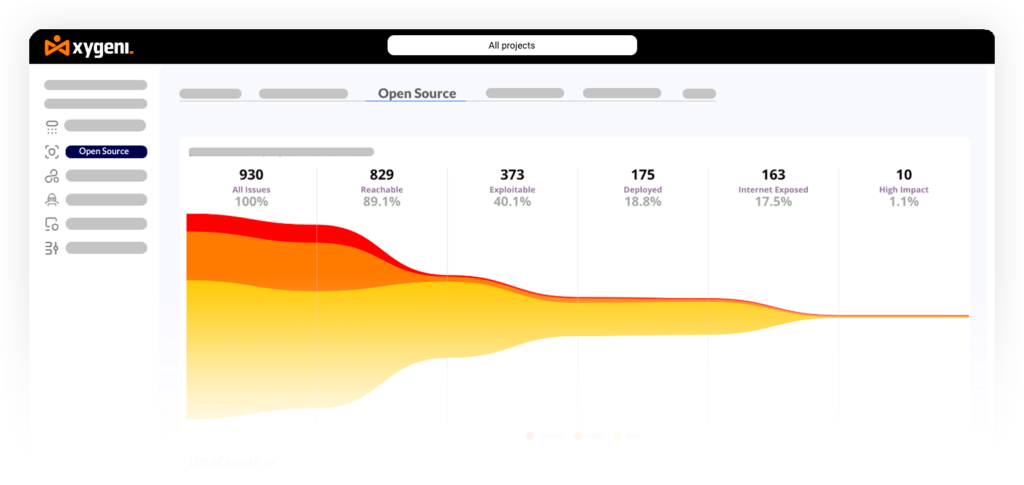
Xygeni SCA combines function-level reachability analysis with live EPSS scoring to automatically deprioritize findings that are unreachable in your codebase or have near-zero exploitation probability. The OSS Prioritization Funnels apply a progressive filter, vulnerability severity, exploitability, reachability, business impact, so the queue your team sees contains only findings worth a human decision. See how it works →
2. Unify Findings Across Tools into a Single Risk View
Fragmented tooling is one of the root causes of AppSec alert fatigue. When SAST findings live in one dashboard, SCA in another, and IaC misconfigurations in a third, there’s no way to correlate them, no shared severity model, and no unified sense of what your actual exposure is.
Application Security Posture Management (ASPM) addresses this by acting as a correlation and prioritization layer across all your security tools. ASPM ingests findings from your SAST, SCA, secrets scanners, IaC tools, and DAST, then deduplicates findings that multiple tools reported about the same underlying issue, correlates findings across tools to identify compound risks (a vulnerable dependency plus an exposed secret in the same service), and applies unified business context, which service is internet-facing, which handles sensitive data, what’s in production vs. staging.
Contextual prioritization through ASPM reduces unnecessary noise by up to 90%, leaving teams with a prioritized, actionable queue instead of a list.
Xygeni ASPM also ingests findings from third-party tools. If you already have results from OWASP ZAP, Acunetix, TruffleHog, or Trivy, Xygeni normalizes and correlates them into the same risk view alongside its own scan results. You don’t have to replace your existing toolchain to get unified visibility, you start getting correlation value on day one. The full list of supported external scanners is documented here.
3. Add Business Context to Every Finding
A critical vulnerability in an internal staging environment and a critical vulnerability in an internet-facing payment service are not the same risk. CVSS doesn’t know the difference. Your prioritization engine needs to.
Business context dimensions that should inform every finding’s priority:
- Internet exposure: Is the affected service reachable from the public internet? An internet-facing vulnerability has a materially higher blast radius.
- Data sensitivity: Does this service handle PII, financial data, or credentials? Higher data sensitivity increases the cost of a breach.
- Production vs. non-production: Vulnerabilities in production systems need faster remediation SLAs than those in dev or staging.
- Asset criticality: Is this a core payment service or a peripheral internal tool? Business value context changes urgency.
- Compensating controls: Do existing controls (WAF rules, network segmentation, access restrictions) already reduce the exploitability of this finding in practice?
When these dimensions are embedded into your prioritization model, “critical” stops meaning “this scanner gave it a 9.8” and starts meaning “this is exploitable, reachable, internet-facing, in production, and handling customer data.”
4. Shift Feedback Left: Give Developers Findings at the Right Moment
A significant portion of appsec alert fatigue is caused by context-switching. A developer who shipped code three weeks ago and now receives a security finding in a ticket has lost the mental context for that code. Triage takes longer, false positive rates go up, and fixes are lower quality.
Shifting security feedback left, into the IDE and the PR review, addresses this at the source. Developers see findings while the code is still in their working memory. False positive rates drop because developers can immediately assess whether the flagged pattern is actually a problem in their code. Fix quality improves because the developer understands the context. Mean time to remediation decreases because there’s no handoff to a separate security queue.
The practical implementation: IDE plugins that surface SAST findings inline as code is written, PR checks that gate merge on new critical findings, and pipeline policies that block deployment of secrets or vulnerable dependencies before they reach production.
Xygeni DevAI surfaces security findings directly in the developer’s IDE, with AI-generated fix suggestions validated against your organization’s policies, so developers fix issues before they hit the pipeline, not after they hit production. Learn more →
5. Automate Triage for Low-Risk Findings
Not every finding needs human review. A vulnerability in a test dependency that’s never deployed to production, a secret in a repository that was rotated six months ago, a misconfiguration in a development environment with no external access, these are findings that consume triage time without generating meaningful risk reduction.
Define clear auto-triage rules: automatically suppress findings in test/dev environments below a configurable severity threshold, auto-close secrets that have already been revoked or rotated, deprioritize (not ignore) findings in dependencies where reachability analysis confirms the vulnerable code path is not called, and suppress known false positives with documented rationale.
The key discipline: auto-triage rules need to be auditable and regularly reviewed. “We suppressed it” is only acceptable if you can show what you suppressed, why, and when the decision was last reviewed. Blanket suppression to clear the queue is how real vulnerabilities get missed.
Measuring AppSec Alert Fatigue: Three Metrics Worth Tracking
You can’t reduce what you don’t measure. These three metrics give you a baseline and a way to track improvement:
Signal-to-noise ratio: what percentage of your alerts are actionable (result in a fix) vs. closed as false positive, won’t fix, or duplicate? A healthy AppSec program targets 40%+ actionable. If you’re below 20%, your tooling is generating more noise than signal.
Mean time to triage (MTTT): how long does it take from a finding being generated to a human making a disposition decision? Long MTTT often indicates either too much volume or insufficient context in the alert itself.
Mean time to remediation (MTTR) for critical findings: specifically for findings your team agrees are high-priority, how long from detection to fix? This is the metric that directly correlates to breach risk.
How Xygeni Addresses AppSec Alert Fatigue End-to-End
This is exactly where most AppSec programs fail. And it is where Xygeni focuses its design.
AppSec Alert Fatigue is a platform problem. Point tools generate noise because they lack context. Context requires correlation across tools, runtime signals, business impact data, and exploitability intelligence, and that requires a unified platform.
| Problem | Xygeni Capability | Impact |
|---|---|---|
| CVSS-driven over-prioritization | SCA with EPSS scoring + reachability | Reduces SCA queue by up to 80% |
| Fragmented findings across tools | ASPM with cross-layer correlation | Up to 90% noise reduction |
| No business context | Asset inventory + criticality mapping | Findings ranked by real business impact |
| Developer context-switching | DevAI IDE integration | Fixes at write-time, not ticket-time |
| Manual triage of low-risk findings | Automated policies + auto-triage rules | Engineers focus only on decisions that matter |
| False positives from SAST | AI-powered SAST with 16.7% FPR | Industry-leading signal precision |
Xygeni’s SAST was benchmarked against the OWASP Benchmark and achieved a 100% true positive rate across all major vulnerability categories with a 16.7% false positive rate. Fewer false positives at the source means less noise throughout the entire pipeline.
Final Thoughts
Alert fatigue isn’t a sign that your team is failing. It’s a sign that your tooling is generating more noise than signal, which is a solvable problem.
The teams that get out of it don’t do it by triaging harder. They do it by upgrading their prioritization model: adding EPSS and reachability to SCA, unifying findings through ASPM, embedding context into every alert, and shifting feedback left so developers fix issues before they accumulate into backlogs.
The goal isn’t fewer alerts. It’s a queue where every alert that survives represents a real risk worth a human decision.
👉 Start your free trial and focus only on the risks that matter, scan results in minutes, no credit card required.
👉 Book a demo and see how ASPM maps to your specific tool stack and team structure.
About the Author
Co-Founder & CTO
Fátima Said specializes in developer-first content for AppSec, DevSecOps, and software supply chain security. She turns complex security signals into clear, actionable guidance that helps teams prioritize faster, reduce noise, and ship safer code.