Speed without security creates real risk. Development teams shipping multiple releases per day across complex cloud environments need DevOps security tools that integrate into every phase of the pipeline automatically, not as a checkpoint at the end. This guide covers the top 10 DevOps security tools for 2026, comparing what each one actually protects, where its coverage ends, and how to choose the right combination for your team’s stack, size, and compliance requirements.
Top 10 DevOps Security Tools for 2026
Comparative Table: DevOps Security Tools
| Tool | Coverage | AI Remediation | CI/CD Integration | Best For |
|---|---|---|---|---|
| Xygeni | SAST, SCA, DAST, IaC, Secrets, CI/CD, ASPM, Malware, Containers | Yes, AI AutoFix with Remediation Risk | Native with guardrails | Teams needing full-stack DevSecOps in a single platform |
| Jit | SAST, SCA, Secrets via integrations | No | GitHub, GitLab, Jenkins | Teams starting their DevSecOps journey with modular adoption |
| Cycode | SCM, pipelines, SCA, containers, cloud | No | Native supply chain coverage | Enterprise teams needing end-to-end pipeline and SCM visibility |
| Apiiro | ASPM, SAST, SCA, IaC, cloud posture | No | GitHub, GitLab, Bitbucket | Teams prioritizing contextual risk and ASPM governance |
| Aikido | SAST, SCA, IaC, containers, cloud posture | Partial auto-fix | IDE plugins and CI/CD gates | Developer-first teams wanting quick broad AppSec coverage |
| Anchore | Container images, SBOM, policy enforcement | No | Jenkins, GitLab, GitHub Actions | Teams securing containerized applications with policy enforcement |
| Snyk | SCA, SAST, IaC, containers | Partial, fix PRs | IDE, Git, CI/CD | Developers already in the Snyk ecosystem |
| Wiz | Cloud posture, containers, IaC, identities | No | API-based integration | Enterprise cloud security teams managing multi-cloud environments |
| GitHub Advanced Security | SAST, CodeQL, dependency scanning, secrets | No | GitHub Actions native | GitHub-native teams wanting built-in security without extra tools |
| Chainguard | Hardened container images, supply chain provenance | No | Registry and CI/CD integration | Teams replacing vulnerable base images with zero-CVE alternatives |

1. Xygeni
Overview: Xygeni is a unified, AI-powered DevOps security platform that covers every layer of the software development lifecycle in a single workflow. Where most DevOps security tools specialize in one or two layers, Xygeni combines SAST, SCA, DAST, IaC scanning, secrets detection, CI/CD security, malware defense, container scanning, and ASPM without requiring teams to maintain separate tools or reconcile findings across disconnected dashboards.
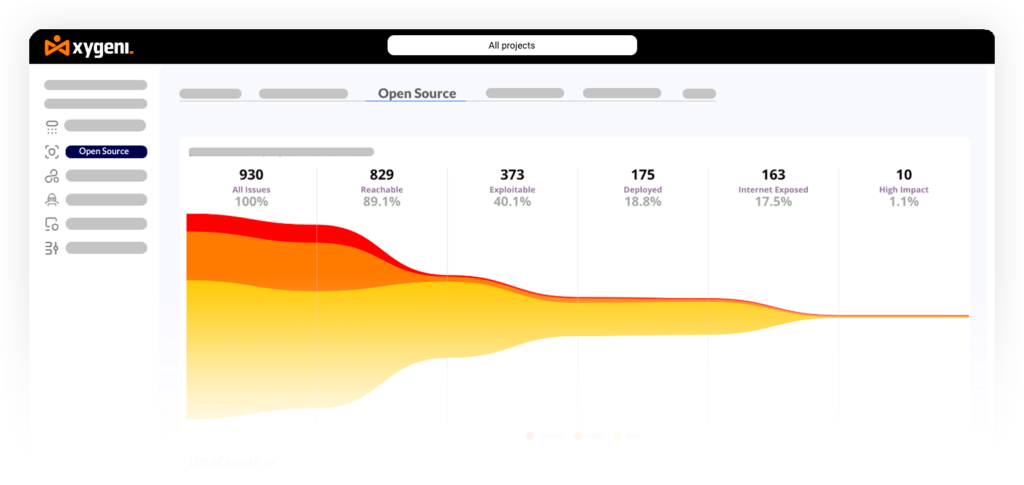
Its ASPM layer automatically discovers and catalogs all software assets, correlates findings from every scanner, and uses a prioritization funnel to surface the critical risks that actually require attention, reducing alert volume by up to 90 percent. Agentic AI through DevAI provides continuous vulnerability detection inside the IDE as developers write code, while CoreAI translates security posture into business impact for security leaders. For context on DevSecOps best practices and the top DevSecOps tools, those links provide broader landscape context.
Key Features:
- Full-stack coverage: SAST, SCA, DAST, IaC scanning, secrets detection, CI/CD security, malware defense, container scanning, build security, and anomaly detection in one platform
- ASPM with automatic asset discovery, risk correlation across all scanners, and prioritization by exploitability, reachability, business context, and internet exposure
- AI AutoFix with Remediation Risk analysis generating safe, context-aware code fixes validated for breaking-change impact before application
- Agentic AI through DevAI for real-time IDE-level scanning and fix suggestions, and CoreAI for executive risk reporting and governance
- CI/CD security guardrails enforcing Policy-as-Code rules across GitHub Actions, GitLab CI, Jenkins, Bitbucket Pipelines, and Azure DevOps
- Real-time malware detection across open source registries, blocking zero-day supply chain threats before they enter the SDLC
- Secrets detection across Git history, pipelines, containers, and repositories with Git hook integration to halt commits
- IaC security scanning for Terraform, Kubernetes, Helm, Ansible, and CloudFormation
- Compliance mapping to NIST 800-53, ISO 27001, CIS Benchmarks, SOC 2, OWASP, and OpenSSF
- Unlimited repositories and contributors with no per-seat pricing
Best for: Engineering, DevSecOps, and security leadership teams that need a single AI-powered platform covering every layer of the SDLC without managing a fragmented set of DevOps security tools.
Pricing: Starts at $33/month for the complete all-in-one platform. Includes SAST, SCA, DAST, CI/CD Security, Secrets Detection, IaC Security, and Container Scanning. Unlimited repositories and contributors with no per-seat pricing.
2. Jit
Overview: Jit positions itself as a security-as-code platform that embeds DevOps security directly into developer workflows without acting as a centralized gatekeeper. It allows teams to define security policies as code in their repositories and enforce them automatically in CI/CD pipelines and pull requests. Its modular architecture lets teams start with basic checks for secrets, dependencies, and misconfigurations, then expand coverage as their security maturity grows.
Jit’s strength is its low adoption friction for teams beginning their DevSecOps journey. Its limitation is that it relies on integrations with third-party scanners to achieve coverage, which means the breadth and depth of protection depends on how well those integrations are configured and maintained. For teams that need comprehensive built-in scanning rather than an orchestration layer, the patchwork coverage model can create gaps. For context on DevSecOps fundamentals, that link covers the shift-left approach Jit is designed to support.
Key Features:
- Policy-as-Code enforcement defining and applying security rules directly in repositories for automatic PR enforcement
- CI/CD integration with GitHub Actions, GitLab CI, Bitbucket, and Jenkins
- Secrets and vulnerability scanning checking for exposed credentials, outdated dependencies, and known CVEs
- Modular setup allowing teams to start with core checks and expand coverage incrementally
- Lightweight adoption with minimal overhead for teams starting their DevOps security program
Cons:
- Coverage depends on third-party integrations, which can be uneven without careful setup and maintenance
- No deep contextual analysis for exploitability or reachability; focuses on presence of risks rather than actual impact
- Limited built-in remediation with fewer direct fix suggestions or automated PR generation than dedicated platforms
- Not a unified ASPM platform; findings are not correlated across scanning layers into a single risk view
Best for: Development teams starting their DevSecOps journey who want security-as-code enforcement in their CI/CD pipelines with minimal initial overhead.
Pricing: Free tier available for basic scanning. Paid plans vary depending on integrations and usage. Pricing details provided on request.
3. Cycode

Overview: Cycode is an application security posture management platform focused on end-to-end software supply chain protection. It monitors source code management systems, CI/CD pipelines, artifact registries, and cloud deployments to give teams visibility into where risks originate and how they propagate through the pipeline. Its supply chain security approach covers pipeline misconfigurations, access key exposure, and SCA alongside traditional code scanning.
Cycode provides strong enterprise-grade coverage but demands more setup and configuration than developer-first DevOps security tools. Smaller teams or those without dedicated security staff may find the platform’s breadth more operational overhead than value. Its modular licensing model can also add cost as coverage expands. For context on CI/CD pipeline security, that link covers relevant concepts.
Key Features:
- Full pipeline coverage monitoring SCMs, CI/CD pipelines, artifact registries, and cloud environments
- Secrets and access key detection spotting exposed credentials in code, logs, and configuration files
- SCA and container scanning with CVE tracking, exploitability data, and prioritization
- Policy-as-Code for customizable SCM and pipeline security rule enforcement
- Compliance alignment with NIST, SOC 2, and ISO 27001 standards
Cons:
- Complex setup and maintenance requiring dedicated security staff in most enterprise deployments
- Modular licensing means additional capabilities may require extra licensing costs
- Steep learning curve for teams without prior experience with supply chain security platforms
- Custom enterprise pricing with no public self-serve option
Best for: Enterprise teams that need end-to-end software supply chain visibility from code repositories through cloud deployment, with dedicated security resources to operate and maintain the platform.
Pricing: Custom enterprise pricing model based on integrations, repository count, and enabled features.
4. Apiiro
Overview: Apiiro is best known for its Application Security Posture Management capabilities and the depth of its contextual risk analysis. It provides a unified risk view across code, infrastructure, and cloud environments, connecting vulnerability findings to their business context and showing how risks relate to other components. Its approach emphasizes understanding the full blast radius of a finding rather than simply flagging its presence.
Apiiro’s contextual depth is its primary differentiator among DevOps security tools, but its enterprise-grade design makes it more complex to operate than lighter alternatives. Teams without dedicated AppSec resources may find the configuration and governance features more demanding than their maturity level requires. For teams evaluating ASPM platforms specifically, the top ASPM tools overview provides useful comparative context.
Key Features:
- Unified risk visibility integrating data from SAST, SCA, IaC, and cloud scans into a single risk dashboard
- Context-aware prioritization identifying vulnerabilities with the highest actual impact on specific applications
- Policy-as-Code enforcement across repositories and CI/CD pipelines
- Developer workflow integration with GitHub, GitLab, Bitbucket, and common CI/CD platforms
- Compliance and governance mapping to NIST, ISO 27001, and SOC 2 frameworks
Cons:
- Enterprise-focused feature set may exceed the needs of smaller or early-stage teams
- Pricing is custom and not publicly listed, requiring sales engagement to evaluate
- Configuration for complex, multi-environment deployments requires dedicated expertise
- No native AI AutoFix or automated remediation built into the platform
Best for: Enterprise security teams that prioritize deep contextual risk understanding and ASPM governance across complex, multi-environment software portfolios.
Pricing: Custom enterprise pricing based on integrations, users, and coverage areas.
5. Aikido
Overview: Aikido Security is a developer-focused DevOps security platform combining SAST, SCA, IaC scanning, container security, and cloud posture management in a single interface. Its design emphasizes speed of adoption and low friction, allowing teams to connect GitHub or GitLab repositories and begin scanning within minutes. Its noise reduction approach highlights only the most relevant risks in pull requests, keeping developer focus on what matters.
Aikido covers a broad range of DevOps security categories for its price point, making it practical for smaller teams. Its prioritization relies on severity scoring without the deeper exploitability or reachability context that more mature platforms provide, and its policy customization is limited compared to enterprise-grade DevOps security tools. For context on application security testing approaches, that link covers the broader landscape.
Key Features:
- Multi-surface scanning covering application code, open source dependencies, IaC templates, and containers
- Quick setup connecting GitHub or GitLab repositories for scanning within minutes
- Noise reduction highlighting critical issues and filtering lower-impact findings
- Developer-friendly alerts integrating results into pull requests for faster fixes
- Cloud posture management identifying misconfigurations in AWS, GCP, and Azure environments
Cons:
- Prioritization based on severity scores without exploitability or reachability context
- Limited Policy-as-Code customization compared to enterprise DevOps security tools
- Scalability depth may be insufficient for large, complex enterprise DevOps environments
- Fewer integrations with enterprise security and SIEM platforms
Best for: Small to mid-size development teams wanting broad DevOps security coverage in a developer-friendly platform without requiring dedicated security operations resources.
Pricing: Starts at approximately $300/month for 10 users. Per-user pricing scales with team size. Custom enterprise plans available.
6. Anchore

Overview: Anchore focuses specifically on container image security and SBOM generation for DevOps environments. It identifies vulnerabilities, misconfigurations, and license risks in container images before they reach production, enforces custom policies as code, and integrates into CI/CD pipelines to make container security a standard part of build workflows. Its SBOM support for SPDX and CycloneDX formats makes it a practical choice for teams with compliance requirements around software transparency.
Anchore’s scope is container-centric by design. It does not provide SAST, secrets detection, or CI/CD pipeline behavior security at the depth that full-stack DevOps security tools offer. Teams with containerized workloads that need policy-based enforcement and SBOM generation will find it a focused, capable solution, though it typically needs complementary tools for complete DevOps security coverage. For related context on IaC security and container security, those links cover relevant areas.
Key Features:
- Container image scanning for vulnerabilities, outdated packages, and insecure configurations
- SBOM generation in SPDX and CycloneDX formats for supply chain visibility and compliance
- Policy-as-Code enforcement with custom rules that can block builds or deployments
- CI/CD integration with GitHub Actions, GitLab CI, and Jenkins
- Compliance reporting mapped to NIST, CIS Benchmarks, and SOC 2
Cons:
- Container-centric scope with limited coverage for application code, secrets, or pipeline behavior
- Writing and maintaining custom policies requires security expertise and ongoing effort
- No automated remediation; focuses on detection and enforcement rather than fix generation
- Requires complementary DevOps security tools for complete SDLC coverage
Best for: Teams building containerized applications that need policy-based SBOM generation and container security enforcement as part of their DevOps pipeline.
Pricing: Open source edition (Anchore Engine) available free. Commercial enterprise platform with advanced policy management, reporting, and support available via custom pricing.
7. Snyk
Overview: Snyk is one of the most widely adopted DevOps security tools, recognized for its developer-first approach and strong ecosystem integrations. It covers open source dependency scanning, container security, IaC scanning, and basic SAST, integrating into IDEs, Git workflows, and CI/CD pipelines to surface security findings where developers already work. Its automated fix pull requests reduce the friction between finding and fixing dependency vulnerabilities.
Snyk’s modular pricing model means that full DevOps security coverage requires purchasing separate plan modules for each scanning category, which increases cost as coverage expands. Its exploitability and reachability context is more limited than unified ASPM platforms, and CI/CD pipeline behavior security is outside its scope. For context on Snyk’s SCA capabilities in comparison, that link provides a detailed breakdown.
Key Features:
- SCA detecting CVEs in open source dependencies with upgrade recommendations and automated fix PRs
- Container and IaC scanning checking Docker images and Terraform templates for misconfigurations
- IDE and SCM integration with VS Code, IntelliJ, GitHub, GitLab, and Bitbucket
- Developer-friendly fix suggestions and pull requests for dependency remediation
- Compliance alignment mapped to ISO 27001 and SOC 2
Cons:
- Each module (SAST, SCA, IaC, Container) billed separately, increasing cost with coverage breadth
- Limited exploitability and reachability context for accurate vulnerability prioritization
- No CI/CD pipeline behavior security or supply chain anomaly detection
- Some advanced governance features locked to higher-tier enterprise plans
Best for: Development teams already in the Snyk ecosystem that want to extend open source security coverage across code, containers, and IaC within a familiar developer workflow.
Pricing: Free tier with limited scans. Paid plans billed per developer and per module. Costs scale with coverage breadth and team size. Enterprise plans require custom quotes.
8. Wiz

Overview: GitHub Advanced Security (GHAS) integrates DevOps security scanning directly into the GitHub platform, providing CodeQL-based SAST, dependency scanning via Dependabot, and secret detection as native features of the GitHub workflow. For teams fully standardized on GitHub, it adds security enforcement without requiring developers to leave their primary workspace. Its tight integration with GitHub Actions makes security checks a natural part of every pull request and CI/CD run.
GHAS is GitHub-exclusive and does not extend to GitLab, Bitbucket, or other platforms. It does not include IaC scanning, container security, DAST, or supply chain malware detection. For teams needing coverage beyond what the GitHub platform provides natively, it requires complementary DevOps security tools. For context on automated security scans in CI/CD, that link covers related integration patterns.
Key Features:
- CodeQL SAST performing deep semantic code analysis to find complex vulnerability patterns
- Dependabot detecting outdated or vulnerable packages with automated update pull requests
- Secret scanning identifying exposed credentials across repositories before code is merged
- GitHub Actions integration for automated security checks on every pull request and push
- Centralized security dashboards aggregating findings across repositories for compliance tracking
Cons:
- GitHub-exclusive platform with no support for GitLab, Bitbucket, or Azure DevOps repositories
- No IaC scanning, container security, DAST, or supply chain malware detection
- Enterprise features and advanced governance require higher-tier GitHub Enterprise plans
- No automated fix generation beyond Dependabot’s dependency update PRs
Best for: Teams fully standardized on GitHub that want native, low-friction DevOps security scanning integrated into their existing workflow without adding external tools.
Pricing: Licensed per active committer under GitHub Enterprise. Pricing scales with team size and usage.
9. GitHub Advanced Security
Overview:
GitHub Advanced Security (GHAS) integrates security scanning directly into GitHub repositories. It offers SAST with CodeQL, dependency scanning via Dependabot, and secret detection. Additionally, it integrates with GitHub Actions, making security checks part of the developer workflow.
GHAS improves security inside GitHub’s ecosystem. Nevertheless, it is tied to GitHub repositories and lacks CI/CD security beyond Actions. As a result, teams using multiple source control systems or broader supply chain tools may find it restrictive.
Key Features:
- Code Scanning → Uses GitHub CodeQL for SAST directly in pull requests.
- Dependency Scanning → For instance, alerts you to known vulnerabilities in open source packages via Dependabot.
- Secrets Detection → Flags hardcoded credentials in code and config files.
- GitHub Actions Integration → Automates scanning and policy checks in your pipelines.
- Security Overview Dashboard → Tracks risks across all GitHub repositories in your organization.
Cons:
- Feature Gaps → GHAS lacks malware detection, advanced AutoFix, and pipeline security, so coverage is narrower than all-in-one DevOps security tools.
- GitHub-Only → It doesn’t cover repositories hosted on GitLab, Bitbucket, or self-managed Git.
- Limited Policy-as-Code → Compared to specialized platforms, customization is more restricted.
- Pricing Tier Dependency → Requires GitHub Enterprise for full functionality.
💲 Pricing:
GitHub Advanced Security is licensed per active committer and is available only with GitHub Enterprise Cloud or Server.
10. Chainguard
Overview: Chainguard takes a fundamentally different approach to DevOps security than the other tools in this list. Rather than scanning existing container images for vulnerabilities, it provides a catalog of over 1,700 minimal, hardened container images built from source daily, with zero known CVEs at the time of publication. Teams replace their existing base images (Ubuntu, Alpine, Python, Node, and others) with Chainguard equivalents, eliminating vulnerability backlogs rather than continuously patching them.
Each Chainguard image ships with a signed SBOM and SLSA Level 2 provenance attestation, and comes with an industry-leading CVE remediation SLA of 7 days for critical severity and 14 days for high, medium, and low. Its Chainguard Libraries product extends the same secure-by-default approach to language-level dependencies in Python, Java, and JavaScript. The platform is not a traditional scanning tool: it is a supply chain security product that reduces the attack surface by construction rather than by detection. For context on build security and artifact integrity and SBOM generation, those links cover related concepts.
Key Features:
- Catalog of 1,700+ minimal, hardened container images rebuilt daily from source with zero known CVEs
- Industry-leading CVE remediation SLA: 7 days for critical severity, 14 days for high, medium, and low
- Signed SBOMs and SLSA Level 2 provenance attestation included with every image
- Chainguard Libraries providing backported CVE patches for Python, Java, and JavaScript dependencies with VEX advisories
- Chainguard AI Images for machine learning workloads with PyTorch, Conda, and NVIDIA GPU support
- Compliance support for FedRAMP, PCI-DSS, HIPAA, NIS2, CMMC, and DoD Cloud Computing SRG
- CI/CD and registry integration through the Chainguard registry at cgr.dev and standard container tooling
Cons:
- Not a scanning tool; does not detect vulnerabilities in your existing code, dependencies, IaC, or pipeline behavior
- Requires migration from existing base images, which can involve setup effort for complex pipelines
- Pricing can be high for smaller teams and scales by image type and engineering organization size
- Some missing images in the catalog can complicate full migration for teams with specialized requirements
Best for: Engineering organizations that want to eliminate container vulnerability backlogs by switching to hardened, zero-CVE base images rather than continuously patching existing ones, particularly in regulated industries with FedRAMP or CMMC compliance requirements.
Pricing: Free tier for up to 5 starter images. Production images licensed by number and type (Base, Application, AI/ML, FIPS). Libraries licensed by ecosystem and developer count. Custom enterprise pricing available.
What to Look for in DevOps Security Tools
With the tools compared, these are the criteria that matter most for an informed selection decision:
Scanning coverage breadth. The most common gap between DevOps security tools is which SDLC layers they cover. A tool focused only on containers misses code and pipeline risks. A tool focused only on cloud posture misses application-layer vulnerabilities. Understanding which stages each tool covers before evaluating other features prevents false confidence in partial coverage.
CI/CD integration with enforcement. There is a practical difference between a DevOps security tool that reports findings and one that enforces policies by blocking unsafe merges or failing pipeline builds. Policy-as-Code enforcement converts security from advisory to preventive. See security guardrails for CI/CD pipelines for context on what effective enforcement looks like.
Prioritization quality. Raw CVE counts are not actionable. DevOps security tools that filter by exploitability, reachability analysis, EPSS scores, and business context help teams focus on the small percentage of findings that represent genuine risk rather than theoretical exposure.
Remediation quality. DevOps security tools that only detect issues shift all fix work to developers. Tools that provide safe, context-aware fix suggestions, automated PRs, or one-click remediation reduce mean time to remediation significantly. The MTTR in AppSec is the metric that separates tools that improve security posture from those that only improve reporting.
Supply chain coverage. Traditional DevOps security tools scan known CVEs in catalogued packages. Supply chain attacks use malicious packages published before any CVE exists. Tools that include behavioral malware detection or hardened image catalogs address this attack class that scanner-only tools miss entirely.
Total cost of coverage. Modular tools appear cheaper upfront, but full DevOps security coverage typically requires multiple subscriptions. A unified platform with predictable pricing often proves more economical at scale. Compare options using the best application security tools overview for broader context.
DevOps Security Best Practices for 2026
These examples show developers practical ways to apply DevOps security directly in CI/CD workflows, combining DevOps and security without slowing down delivery.
Apply Least Privilege in Jenkins for DevOps Security
In Jenkins pipelines, configure service accounts with the smallest set of permissions needed for each job. Giving admin rights to every build agent means that a stolen credential gives an attacker full pipeline access. Assigning restricted roles to specific jobs limits the blast radius and strengthens your CI/CD security posture.
					// Jenkinsfile
pipeline {
  agent none
  stages {
    stage('Build') {
      agent { label 'build-agent' } // Role with minimal permissions
      steps {
        sh 'mvn clean package'
      }
    }
  }
}
Automate Secrets Scanning in GitHub Actions
A GitHub Actions workflow can run secret scanning on every push, blocking commits containing API keys before they merge. Results appear directly in pull requests so developers fix leaks in context, making secrets protection part of the daily development workflow rather than a separate review step. See how exposed logs leak credentials for real-world context on why early detection matters.
					# .github/workflows/secret-scan.yml
name: Secret Scan
on: [push, pull_request]
jobs:
  scan:
    runs-on: ubuntu-latest
    steps:
      - uses: actions/checkout@v3
      - name: Run Secret Scanner
        uses: xygeni/secret-scan-action@v1
Enforce IaC Security in GitLab CI/CD Pipelines
Integrating IaC scanning into GitLab pipelines catches misconfigurations like overly permissive security groups or containers running in privileged mode before infrastructure is provisioned. Mapping results to CIS Benchmarks ensures compliance requirements are met from the start, not discovered during an audit. See IaC security best practices for detailed guidance.
					# .gitlab-ci.yml
iac_scan:
  image: xygeni/iac-scan:latest
  script:
    - xygeni iac scan ./terraform
  only:
    - merge_requests
Use Guardrails to Strengthen CI/CD Security
Guardrails enforce policies that break builds when high-risk issues appear: a critical vulnerability left open, an unsigned container image entering the pipeline, or a policy threshold exceeded. Because guardrails run automatically, developers focus on coding while pipelines enforce security by design. See security guardrails for CI/CD pipelines for implementation patterns.
					# Example GitHub workflow for SAST + SCA
name: Code Security
on: [pull_request]
jobs:
  sast_sca:
    runs-on: ubuntu-latest
    steps:
      - uses: actions/checkout@v3
      - name: Run SAST
        uses: xygeni/sast-action@v1
      - name: Run SCA
        uses: xygeni/sca-action@v1
Use Guardrails to Strengthen CI/CD Security in DevOps Workflows
Guardrails enforce policies that break builds when high-risk issues appear. For instance, block a deployment if a critical vulnerability remains open or if an unsigned container image enters the pipeline. Furthermore, because guardrails run automatically, developers focus on coding while pipelines enforce security by design.
					# Guardrail policy in Xygeni
policy:
  break_build_on:
    - severity: critical
    - unsigned_images: true
Combining these DevOps and security practices with the right DevOps security tools helps teams ship faster, stay compliant, and maintain a strong security posture without slowing innovation.
Final Thoughts
DevOps security tools range from lightweight CI/CD integrations to full-stack AppSec platforms. The right combination depends on which SDLC layers your team currently has gaps in, your team’s security maturity, and whether you need a single unified platform or a best-of-breed stack.
For teams that need comprehensive DevOps security coverage across every layer of the software development lifecycle, with AI-powered remediation, zero-noise prioritization, and no per-seat pricing, Xygeni provides the most complete approach in 2026 as part of its unified AI-powered AppSec platform.
FAQ
What are DevOps security tools?
DevOps security tools are platforms that integrate vulnerability detection, policy enforcement, and compliance checks into the software development and delivery pipeline. They scan code, dependencies, infrastructure, containers, and CI/CD pipeline configurations automatically as part of the development workflow, helping teams identify and fix security issues before they reach production.
What is the difference between DevOps security tools and DevSecOps tools?
The terms are used interchangeably in practice. DevSecOps describes the practice of integrating security into every stage of the DevOps lifecycle rather than treating it as a separate phase. DevOps security tools and DevSecOps tools both refer to platforms that enable this integration, with security checks running automatically in CI/CD pipelines, pull requests, and development environments.
Which DevOps security tools cover the most SDLC layers?
Xygeni covers the broadest range in a single platform: SAST, SCA, DAST, IaC scanning, secrets detection, CI/CD security, malware defense, container scanning, build security, anomaly detection, and ASPM, without requiring separate subscriptions or tool integrations. Most other DevOps security tools in this list specialize in one or two layers.
How do DevOps security tools integrate with CI/CD pipelines?
Most DevOps security tools provide native integrations or YAML configurations for GitHub Actions, GitLab CI, Jenkins, and similar platforms that trigger security scans automatically on every pull request or push event. The most effective tools go beyond reporting to enforce policies, blocking merges or failing builds when critical security issues are detected.
What is the role of AI in modern DevOps security tools?
AI is being applied in DevOps security tools primarily in three areas: detection accuracy (reducing false positives through contextual code understanding), remediation (generating safe, context-aware fix suggestions as automated pull requests), and prioritization (ranking findings by actual exploitability and business impact rather than raw CVSS scores). Platforms like Xygeni combine all three through DevAI for developer-level guidance and CoreAI for security leadership intelligence.