Top 7 IaC Tools for Security to Consider in 2026
Infrastructure as code has become the default way teams provision and manage cloud environments. That shift also means that a misconfigured Terraform file, an overly permissive Kubernetes manifest, or an exposed secret in a Helm chart can reach production just as quickly as working code. IaC security tools exist to catch those risks before they do. This guide compares the seven best IaC security tools in 2026, covering scanning depth, CI/CD integration, policy enforcement, remediation capability, and pricing, so you can choose the right fit for your team’s stack and maturity level.
Top 7 IaC Security Tools in 2026
| Tool | Core Feature | Best For | Highlight |
|---|---|---|---|
| Xygeni | IaC scanning with ASPM, guardrails, AutoFix, and supply chain correlation | DevSecOps teams needing full-stack coverage beyond IaC | Policy-as-Code enforcement with AI AutoFix and risk correlation |
| Trivy | Lightweight open-source multi-target scanner | Small teams adding basic IaC scanning quickly | Single binary for IaC, containers, and dependencies |
| Terrascan | OPA-based static IaC scanning | Cloud-native teams using Terraform and Kubernetes | CIS and PCI-DSS preloaded policies |
| Checkmarx KICS | Query-based IaC misconfiguration detection | Teams in the Checkmarx ecosystem | 1,000+ built-in security queries |
| Snyk IaC | Developer-first IaC and SCA scanning | Developer-centric teams wanting IDE and Git integration | Automated fix PRs for IaC issues |
| Bridgecrew | IaC security with drift detection and runtime correlation | Teams wanting Terraform-native security with Prisma Cloud | Codified cloud security policies |
| Checkov | Open-source Python-based IaC scanner | Teams wanting a scriptable, extensible open-source option | Large built-in policy library with custom check support |
1. Xygeni Secret Scanning Tools
The Most Complete IaC Security Tool for DevSecOps
Overview:
Xygeni is more than just an IaC scanning tool, it’s a complete platform for IaC cybersecurity across your development pipeline. While many IaC tools focus only on static analysis, Xygeni goes deeper by adding runtime context, custom policy enforcement, and CI/CD-native guardrails that block insecure infrastructure changes before deployment.
Built natively for modern DevSecOps teams, it supports multi-language scanning for Terraform, Kubernetes YAML, Helm charts, Dockerfiles, and CloudFormation, among others. Furthermore, it integrates seamlessly into your existing Git-based workflows and CI/CD platforms.
Whether you need real-time IaC issue detection or custom compliance checks mapped to NIST, CIS, or ISO standards, Xygeni provides full lifecycle coverage from commit to deployment.
Key Features:
- Multi-language support →First, it scans Terraform, Helm, Kubernetes manifests, Dockerfiles, and more.
- Context-aware misconfiguration detection → Identifies insecure IAM roles, public resources, missing encryption, and exposed secrets with full contextual analysis.
- CI/CD Guardrails → Moreover, automatically enforce Policy-as-Code on pull requests and pipeline runs. Supports GitHub Actions, GitLab CI, Jenkins, Bitbucket Pipelines, and Azure DevOps.
- Audit Analysis → Server-side IaC policy enforcement using Xygeni’s Guardrail language to block risky code from reaching production.
- Custom Policy-as-Code → Also, create and enforce security rules mapped to frameworks like NIST 800-53, OWASP, CIS Benchmarks, ISO 27001, and OpenSSF.
- AutoFix support → Moreover, generates pull request suggestions to remediate insecure infrastructure patterns automatically.
- Dashboard and Risk Correlation → Finally, combines IaC issues with vulnerabilities, secrets, and supply chain risks for full context.
Why Choose Xygeni?
If you’re looking for IaC security tools that do more than static scans, Xygeni is the ideal choice. Not only does it find misconfigurations early, but it also blocks them before they reach production. Moreover, it provides real-time Git and CI/CD feedback that developers actually use.
Furthermore, Xygeni gives you full control over your security posture through custom policy engines, server-side enforcement, and automated remediation. In addition, all these capabilities come in a single platform with SAST, SCA, secrets scanning, container protection, and CI/CD monitoring, without per-feature pricing.
Therefore, Xygeni helps you shift IaC security left while keeping your pipeline moving fast.
- Starts at $33/month for the COMPLETE ALL-IN-ONE PLATFORM—no extra fees for essential security features.
- Includes: SAST, SCA, CI/CD Security, Secrets Detection, IaC Security, and Container Scanning, everything in one plan!
- Unlimited repositories, unlimited contributors, no per-seat pricing, no limits, no surprises!
2. Trivy IaC Scanning Tools
Overview:
Trivy is a popular open-source scanner developed by Aqua Security that offers lightweight IaC scanning tools alongside vulnerability detection in containers, source code, and open-source dependencies. Moreover, it’s designed for fast, early detection with minimal setup, making it ideal for teams that need to add basic infrastructure as code security into their workflows quickly.
However, Trivy focuses primarily on static scanning and does not provide full lifecycle protection or deep DevSecOps enforcement. It works best as a first layer of defense but lacks advanced features like contextual remediation, pipeline enforcement, or automated policy-based blocking. As such, it’s a great fit for small teams, but may require pairing with additional tools to cover complex enterprise use cases.
Therefore, teams often use Doppler alongside detection-focused secrets management tools to cover both prevention and discovery.
Key Features
- Multi-Target Scanning → Scans IaC templates, containers, source code, and dependencies with one binary.
- Fast Startup → Additionally, minimal configuration and fast scan times make it easy to adopt.
- IDE Plugins → Includes support for VS Code and JetBrains for in-editor feedback.
- Multiple Output Formats → Supports JSON, SARIF, CycloneDX, and human-readable views.
- Policy Integration → Connects to OPA/Rego and Aqua Platform for custom policy enforcement.
Cons:
- No Runtime or CI/CD Context → First, does not monitor pipelines or enforce security gates dynamically.
- Manual Fixes → Lacks auto-remediation or guided fix suggestions in PRs.
- Noise Without Tuning → Broad scans can produce false positives without custom rules.
- Enterprise Governance Requires Upgrade → Moreover, centralized dashboards and compliance mapping are only in Aqua’s commercial tier.
Pricing:
- Free Tier → Fully open source, ideal for individual developers and basic scans.
- Enterprise Platform → Advanced policy management, dashboards, and governance available via Aqua’s commercial offerings.
- Pay-as-You-Grow Model → Teams start with Trivy and can scale by upgrading into the Aqua Cloud Native Security Platform.
3. Terrascan IaC Scanning Tools
Overview:
Terrascan is an open-source IaC security tool developed by Tenable, designed to detect misconfigurations across popular infrastructure as code frameworks. Furthermore, it supports Terraform, Kubernetes, CloudFormation, and Helm, making it a flexible option for cloud-native teams. Moreover, Terrascan’s lightweight design ensures quick scans without heavy resource demands.
Terrascan uses static analysis and policy-as-code to catch security risks such as public S3 buckets, overly permissive IAM roles, and missing encryption settings. It integrates into CI/CD pipelines and version control systems, helping teams shift security left without disrupting developer workflows.
While it offers a solid foundation for scanning IaC files, its open-source nature means that enterprise-grade features like role-based access, remediation workflows, and compliance dashboards may require additional tooling or commercial add-ons.
Key Features:
- Multi-framework support → Scans Terraform, Kubernetes, CloudFormation, Helm, Docker, and more for security misconfigurations.
- OPA-based policy engine → Uses Open Policy Agent (OPA) to define and enforce custom security rules as code.
- CI/CD integration → Also, works with GitHub Actions, GitLab CI, Jenkins, Bitbucket Pipelines, and others.
- Built-in rule sets → Includes preloaded policies aligned with security benchmarks such as CIS, PCI-DSS, and SOC 2.
- JSON, JUnit, and SARIF output → Supports multiple output formats for easy integration into DevSecOps reporting workflows.
Cons:
- No native remediation → Terrascan highlights issues but does not offer auto-fix suggestions or guided remediation steps.
- Limited visibility → Lacks a centralized dashboard or governance layer for managing issues across multiple projects.
- Requires manual setup → Consequently, configuration and policy tuning require developer effort, especially in large environments.
- No secrets scanning → Unlike full-stack solutions, Terrascan does not detect secrets, malware, or vulnerabilities in code or containers.
Pricing:
- Open-Source Model → Terrascan is free to use and maintained under an Apache 2.0 license.
- No Official Enterprise Plan → Enterprise-grade features like SSO, audit logs, or commercial support must be implemented separately or added through third-party solutions.
- Low Barrier to Entry → Ideal for teams looking to experiment with IaC scanning but not ready for a fully managed platform.
4. Checkmarx’ KICS IaC Scanning Tools
Overview:
KICS (Keeping Infrastructure as Code Secure) is an open-source IaC scanning tool created by Checkmarx. It is built to help developers and security teams detect misconfigurations, insecure defaults, and compliance issues in their infrastructure-as-code files, before deployment.
It supports a wide range of IaC formats, including Terraform, Kubernetes, CloudFormation, Docker, and Ansible. KICS uses a query-based engine and comes with hundreds of built-in security checks aligned to standards like CIS Benchmarks and PCI-DSS.
Because KICS is part of the broader Checkmarx ecosystem, it can serve as a useful addition to existing AppSec programs. However, for teams seeking advanced remediation, enterprise dashboards, or secrets and malware detection, KICS may need to be combined with other IaC security tools.
Key Features:
- Broad language support → Compatible with Terraform, CloudFormation, Kubernetes, Dockerfile, ARM, Ansible, and more.
- Predefined security queries → Furthermore, offers over 1,000 queries for common security and compliance misconfigurations.
- Extensible rule engine → Teams can write custom queries using a declarative format to meet internal policies.
- CI/CD integration ready → Easily integrates with GitHub Actions, GitLab CI, Jenkins, Bitbucket Pipelines, and Azure DevOps.
- Multiple output formats → Exports results in JSON, JUnit, HTML, and SARIF for integration into broader DevSecOps pipelines.
Cons:
- No remediation suggestions → First, KICS shows you what’s wrong, but it doesn’t guide how to fix it.
- Lacks runtime or pipeline analysis → Focuses only on static files; does not monitor pipeline behavior or runtime infrastructure.
- No secrets or malware detection →Consequently, KICS is not a full-stack security tool—it requires additional scanners for secrets, containers, or custom code.
- Steeper learning curve for rules → Writing and tuning custom queries may require extra effort for security teams unfamiliar with the syntax.
Pricing:
- Free and Open Source → KICS is fully open source and free to use under the Apache 2.0 license.
- Optional Checkmarx Integration → Teams using other Checkmarx products can integrate KICS into a more complete AppSec workflow.
- No Paid Tier → Finally, there is no dedicated enterprise tier for KICS alone; premium features come only via broader Checkmarx offerings.
5. Snyk IaC Scanning Tools
Overview:
Snyk IaC is part of Snyk’s broader developer-first security platform, offering static analysis for infrastructure-as-code files. It focuses on detecting misconfigurations in Terraform, Kubernetes, CloudFormation, ARM, and other IaC templates before they reach production.
It integrates into Git workflows and CI/CD pipelines, providing automated pull request scanning and policy enforcement. Additionally, Snyk IaC maps findings to compliance frameworks such as CIS Benchmarks, NIST, and SOC 2, helping teams stay audit-ready.
While Snyk IaC is developer-friendly and easy to adopt, some advanced IaC cybersecurity features, like custom rules, reachability context, and secrets scanning, are only available in higher plans or through other Snyk modules.
Key Features:
- Multi-IaC language support → Covers Terraform, Kubernetes, CloudFormation, ARM, and more.
- Git and CI/CD integration → Automatically scans repositories and pipelines for misconfigurations during pull requests and builds.
- Compliance mappings → Aligns findings to industry standards like NIST, ISO 27001, and CIS Benchmarks.
- Drift detection → Compares live infrastructure state with the IaC plan to catch unmanaged changes.
- Developer-focused UX → Clean CLI and UI with inline fix suggestions for many misconfigurations.
Cons:
- No container or secret scanning → Snyk IaC must be combined with other Snyk modules to cover secrets, containers, or runtime protection.
- Remediation is limited → Offers basic recommendations but lacks deep auto-remediation for complex policies.
- Custom policies require enterprise plans → Defining organization-wide security rules is gated behind premium tiers.
- Pricing grows with usage → Usage-based pricing may escalate quickly for teams with multiple projects or large pipelines.
Pricing:
- Team Plan Starts at $57/month per developer → Includes limited IaC scanning, basic Git integration, and alerting.
- Business and Enterprise Plans → Unlock policy-as-code enforcement, compliance mapping, audit logging, and SSO support.
- Modular Add-Ons → Full IaC protection requires combining with Snyk Container, Snyk Code, and Snyk Open Source—each priced separately.
- Usage Caps → Scanning capacity and CI integrations are capped unless upgraded to higher tiers.
6. Bridgecrew IaC Scanning Tools
Overview:
by Prisma Cloud (Palo Alto Networks), is a cloud-native security platform that includes IaC scanning tools to help developers find and fix misconfigurations early. Moreover, it supports multiple IaC frameworks and connects directly with version control systems to automate policy checks and compliance validation. In addition, Bridgecrew integrates seamlessly into pull request workflows and CI pipelines, ensuring continuous enforcement of your security standards.
Although Bridgecrew provides strong visibility into IaC risks, much of its functionality centers on policy-as-code enforcement rather than full developer-side integration or secrets management. Additionally, its more advanced governance and CI/CD security features are gated behind the broader Prisma Cloud ecosystem.
Key Features:
- Multi-Framework IaC Security → Supports Terraform, CloudFormation, Kubernetes, and more.
- Git Integration → Scans IaC directly in GitHub, GitLab, Bitbucket, and Azure Repos.
- Policy-as-Code with Custom Rules → Also, uses Rego/OPA for defining and enforcing security policies.
- Pre-Built Compliance Checks → Includes mappings to CIS, NIST, ISO 27001, SOC 2, and other frameworks.
- Fix Suggestions in PRs →Moreover, annotates pull requests with recommended remediations for common misconfigurations.
Cons:
- Heavily Tied to Prisma Cloud → Advanced features like CI/CD runtime protection, drift detection, and unified dashboards require onboarding into the full Prisma Cloud platform.
- Limited Secrets or Malware Detection → Bridgecrew does not provide deep coverage for secrets management or embedded malware threats in templates.
- No Auto-Fix or Reachability Scoring → Consequently, requires manual triage and prioritization.
- Complex Pricing Model → Enterprise-focused, with modular packaging based on cloud workload coverage.
Pricing:
- Free Developer Plan → Includes basic IaC scanning for public and private repositories.
- Business Tier → Adds custom policies, integrations, and support for private registries.
- Enterprise Pricing → Bundled within Prisma Cloud; includes broader CSPM, CI/CD, and runtime security. Requires contact with sales for exact quotes.
7. Checkov IaC Scanning Tools
Overview:
Checkov is a popular open-source IaC security tool that focuses on early-stage detection of misconfigurations across multiple frameworks. Unlike basic linters, Checkov uses rich policy-as-code and graph-based analysis to identify security issues before deployment. It integrates smoothly into developer workflows and CI/CD pipelines, making it a trusted choice for teams building secure infrastructure with Terraform, CloudFormation, and more.
Key Features:
- Extensive IaC Framework Support → Supports Terraform, CloudFormation, Kubernetes, Helm, ARM templates, Docker, Serverless, and more
- Policy-as-Code Engine → Offers hundreds of built-in checks and allows custom policies in Python/YAML, including attribute and graph-based analysis
- CI/CD & Developer Integration → Seamless integration with GitHub Actions, GitLab CI, Bitbucket, and Jenkins. Also available as CLI, pre-commit hook, and VS Code extension.
- Compliance Coverage → Ships with policies aligned to standards such as CIS Benchmarks, PCI, and HIPAA.
- Prisma Cloud Extensions → When used with Prisma Cloud, enables pull request annotations, drift detection, and runtime visibility.
Cons:
- Limited Context Awareness → Some scans rely on static analysis and may produce false positives without cloud context or runtime visibility.
- Enterprise Features Behind Premium Layer → Advanced dashboards, threat insights, and team-level management require the paid Prisma Cloud tier.
- Self-managed Doors Only → Being mostly CLI-based, teams may need additional tooling for centralized enforcement and audit capabilities.
Pricing:
- Open Source Core → Checkov is free to use as a CLI-based IaC scanning tool with community support. Ideal for individual developers or small teams.
- Prisma Cloud Integration → Available as part of Palo Alto Networks’ Prisma Cloud. Pricing is not public and requires direct sales contact.
What to Look for in IaC Security Tools
With the tool landscape covered, these are the criteria that matter most when making a selection decision:
Multi-framework support. Your IaC stack likely spans more than one technology. A tool that only covers Terraform will miss risks in Kubernetes manifests, Helm charts, or CloudFormation templates. Verify coverage against every framework your team actively uses before evaluating other features.
Static analysis depth beyond syntax checking. The most common misconfigurations, such as overly permissive IAM roles, unencrypted storage, and publicly exposed services, require contextual analysis that understands resource relationships, not just individual file syntax. Tools that only check syntax produce a false sense of coverage.
CI/CD integration with enforcement capability. There is a meaningful difference between a scanner that reports findings and a tool that can block a pull request or fail a pipeline build when a critical misconfiguration is detected. Policy-as-Code enforcement, as described in the security guardrails for CI/CD pipelines guide, converts findings into real gates.
Remediation guidance, not just detection. Tools that only list what is wrong leave the fix work entirely to the developer. Platforms that provide fix suggestions, automated PRs, or in-context guidance significantly reduce the time between detection and resolution, which is the metric that actually matters for security posture.
Compliance mapping. For teams operating under regulatory requirements, having findings mapped directly to CIS Benchmarks, NIST 800-53, ISO 27001, SOC 2, or PCI-DSS eliminates a manual translation step and keeps audit preparation manageable.
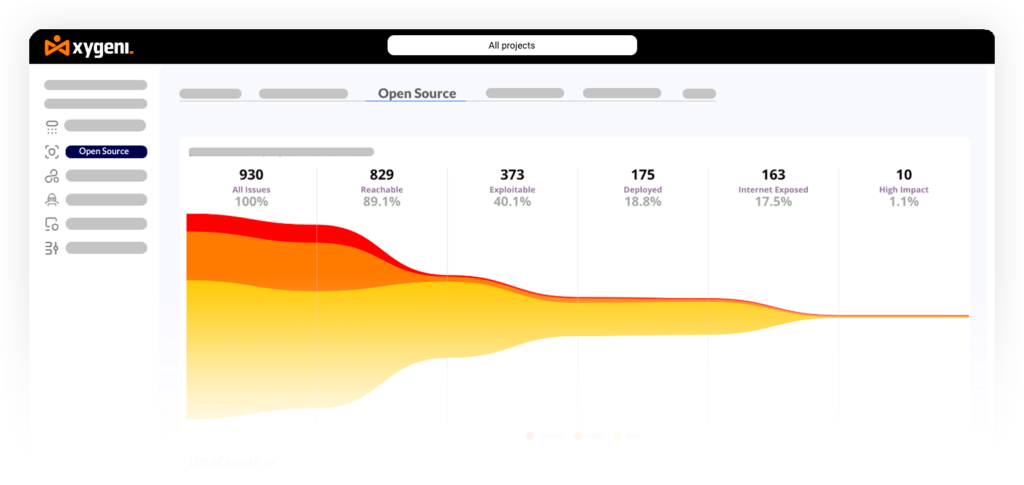
Integration with the broader security picture. IaC misconfigurations rarely exist in isolation. A public S3 bucket defined in Terraform is much more critical when the application code also has a path traversal vulnerability. Tools that correlate IaC findings with code, dependency, and pipeline risks, as Xygeni does through ASPM, provide a materially more accurate view of actual risk than standalone scanners.
How to Choose the Right IaC Security Tool
If you are starting from zero and need quick coverage: Trivy or Checkov are the fastest ways to add IaC scanning to a pipeline. Both are free, require minimal setup, and cover the most common frameworks. Accept that you will need to add remediation and governance tooling later.
If you are already using Snyk for SCA: Snyk IaC is the path of least resistance. It extends the same developer workflow to IaC files without adding a separate tool, though the cost increases with each product module added.
If you are in the Checkmarx or Prisma Cloud ecosystem: KICS and Bridgecrew respectively are the natural IaC layers within those platforms. Their value is maximized when used as part of the broader product suite rather than standalone.
If you need IaC security as part of a complete DevSecOps program: A unified platform like Xygeni removes the need to manage multiple single-purpose tools. IaC findings are correlated with SAST, SCA, secrets, CI/CD, and runtime data, prioritized through ASPM Dynamic Funnels, and addressed through AI AutoFix, all without per-seat pricing or separate scanner maintenance.
Final Thoughts
IaC security tools range from lightweight open-source scanners that take minutes to set up to full-stack platforms that connect infrastructure risks to application-level context and business impact. The right choice depends on where your team is today and where your security program needs to go.
For teams that are just getting started, Trivy and Checkov offer a practical entry point at no cost. For teams that have outgrown detection-only tools and need enforcement, remediation, and correlated risk visibility across their entire SDLC, Xygeni provides the most comprehensive IaC security coverage in 2026 as part of its unified AI-powered AppSec platform.
Start your free 7-day trial of Xygeni, no credit card required.
FAQ
What is an IaC security tool?
An IaC security tool scans infrastructure-as-code files such as Terraform, Kubernetes manifests, Helm charts, and CloudFormation templates for misconfigurations, insecure defaults, and policy violations before they are deployed to production environments.
What is the difference between IaC scanning and IaC security?
IaC scanning refers to the act of analyzing IaC files for known issues. IaC security is a broader concept that includes scanning, policy enforcement, remediation guidance, compliance mapping, drift detection, and integration with the rest of the application security program. Most open-source tools cover scanning. Fewer cover the full security picture.
Which IaC frameworks do these tools support?
Most tools in this list support Terraform, Kubernetes, CloudFormation, and Helm as a baseline. Xygeni, KICS, and Checkov offer the broadest coverage, also supporting ARM, Ansible, Bicep, Dockerfiles, and others. Always verify coverage against your specific stack before selecting a tool.
Can IaC security tools block deployments automatically?
Yes, but only tools that support Policy-as-Code enforcement in CI/CD pipelines can do this. Xygeni, Snyk IaC, and KICS can be configured to fail builds or block pull requests when critical misconfigurations are detected. Detection-only tools like Trivy and base Checkov report findings but do not enforce gates unless you build that logic yourself.
How does IaC security relate to ASPM?
Application Security Posture Management (ASPM) platforms ingest findings from IaC scanners alongside code, dependency, and runtime data to produce a unified, prioritized view of risk. Rather than treating IaC findings in isolation, ASPM correlates them with other vulnerabilities to identify which misconfigurations represent the highest actual risk in context. Xygeni combines IaC scanning and ASPM in a single platform.