
AI Coding Tools: The Best Artificial Intelligence for Coding Safely in 2026
Developers work fast, but security often slows them down. Every sprint adds new code, dependencies, and risk. The best artificial intelligence for coding helps teams stay secure without losing speed. Modern AI coding tools bring smart analysis into the workflow, finding real vulnerabilities early and fixing them automatically. They make coding safely part of how developers write, test, and ship software.
Instead of generating noise, the best AI tool for coding focuses on what matters. It learns from past scans, understands context, and filters exploitable risks from harmless code. As a result, teams save time, reduce false positives, and gain confidence in every commit.
According to the Gartner Hype Cycle for Application Security, AI-powered assistants in AppSec, called AI Code Security Assistants (ACSAs), and automated remediation are transforming how developers protect their code. These solutions think like engineers, not scanners. They deliver instant feedback, actionable fixes, and visibility that fits the rhythm of modern DevSecOps.
Choosing the right AI coding tools is now critical for any team that wants to move fast and stay secure. The next sections highlight the leading platforms that combine analysis, prioritization, and remediation into one seamless flow. Together, they represent the future of how developers code safely with confidence.
How AI Coding Tools Are Transforming Secure Development
Faster Detection with the Best Artificial Intelligence for Coding
The best artificial intelligence for coding helps developers find vulnerabilities early. AI models scan massive codebases in seconds, spot insecure patterns, and predict weak points long before release. As a result, teams identify risks faster and code safely from the start.
Smarter Prioritization and Fewer False Positives
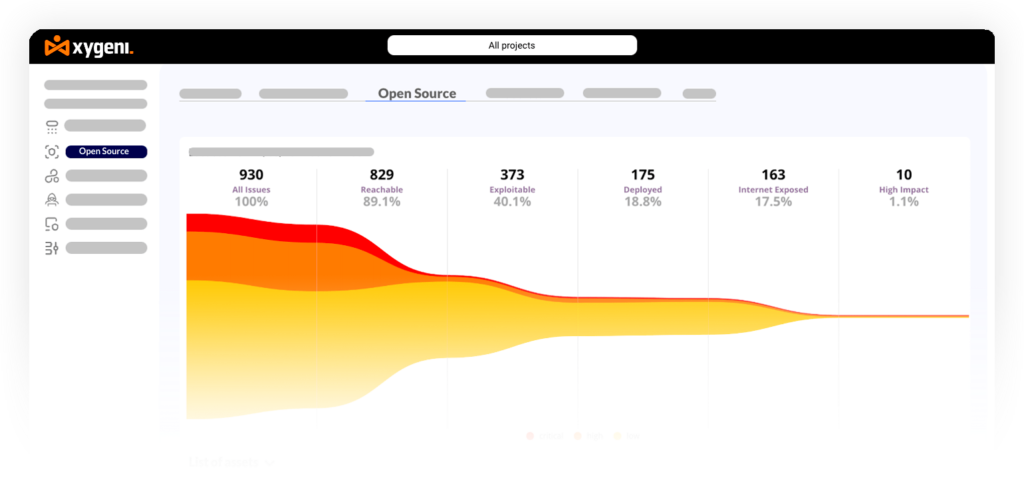
Modern AI coding tools understand context. Instead of sending endless alerts, they rank issues by exploitability and reachability. This lets developers fix what matters most and spend more time shipping features, not reviewing noise.
Continuous Security Inside the Pipeline
Today’s AI coding tools integrate directly into CI and CD workflows. They automate remediation, perform predictive modeling, and watch code continuously as it changes. With new trends like AI runtime defense and Application Security Posture Management, security now moves as fast as development.
In the end, the best AI tool for coding becomes part of daily work, not an afterthought. Developers gain faster feedback, cleaner builds, and stronger protection without slowing delivery.
| Tool | AI Capability | Core Function | Ideal For | Highlight Feature |
|---|---|---|---|---|
| Xygeni AI SAST | Generative AI AutoFix | SAST and Code Security | DevSecOps pipelines focused on secure coding | AI remediation and breaking change detection |
| Checkmarx One AI | Predictive Machine Learning | Unified Application Security Platform | Enterprise teams seeking the best AI tool for coding accuracy | ML-based vulnerability prioritization |
| Veracode Fix | Generative AI Patches | SAST Remediation | CI and CD pipelines that need AI-driven secure code suggestions | Instant AI code fixes inside IDE |
| Qwiet AI | Contextual Machine Learning | SAST and Unified AppSec | Cloud native and fast-moving DevSecOps teams | Context-aware vulnerability triage |
| Mend.io AI | AI Assistant | SCA and SAST | Open source risk management and license compliance | AI-driven remediation with EPSS prioritization |
| Fortify Audit Assistant | Machine Learning | SAST Auditing | Large organizations reducing false positives | ML auditing engine for faster triage |
| GitHub Advanced Security (CodeQL + AI) | Query Intelligence | SAST and Code Scanning | Teams already using GitHub workflows | AI query generation with auto fix suggestions |
| Sonar AI | AI Enhanced Analysis | Code Quality and SAST | Developers focused on clean and secure code | Automated secure refactors for AI-generated code |
Best Artificial Intelligence for Coding Safe in 2026

Overview
Xygeni AI SAST brings smart security directly into the developer workflow. It fits naturally into daily coding, helping teams code safely without losing speed. The platform combines advanced static analysis with real-time context and AI-driven remediation. It learns from each scan, highlights exploitable risks, and fixes what matters most through intelligent automation.
Because it covers every step of the SDLC, Xygeni protects source code, open-source libraries, and CI/CD pipelines from a single, unified view. This focus on visibility and precision makes it one of the best artificial intelligence tools for coding safely in 2026. As a result, DevSecOps teams can detect, prioritize, and remediate risks early while keeping development fast and secure.
Key Features of Xygeni’s Open-Source Security Tool
- AI AutoFix: generates context-aware, secure patches instantly for vulnerabilities in code and dependencies.
- Remediation Risk Analysis: uses AI diff comparison to predict breaking changes before merging updates.
- Xygeni Bot: automates pull-request fixes and triage across GitHub, GitLab, and Azure DevOps.
- Reachability & Exploitability Scoring: correlates findings with EPSS and runtime data to focus only on exploitable flaws.
- Multi-Layer Protection: unifies SAST, SCA, Secrets Detection, IaC Scanning, and Malware Detection for complete coverage.
- Developer-First UX: It integrates natively with VS Code, GitHub, GitLab, Bitbucket, Azure DevOps, and Jenkins, bringing friction-free security directly into every CI/CD workflow.
💲 Pricing
- Starts at $33/month for the COMPLETE ALL-IN-ONE PLATFORM—no extra fees for essential security features.
- Includes: SAST, SCA, CI/CD Security, Secrets Detection, IaC Security, and Container Scanning, everything in one plan!
- Unlimited repositories, unlimited contributors, no per-seat pricing, no limits, no surprises!
2. Checkmarx One AI

Overview
Checkmarx One AI delivers enterprise application security that uses predictive machine learning to help developers find and fix issues faster. The platform unifies SAST, SCA, IaC, and DAST, giving full visibility across every stage of development. Its AI engine connects thousands of results, removes noise, and shows developers which problems need attention first.
Because it combines strong coverage with smart automation, Checkmarx One AI helps DevSecOps teams code safely and manage risk efficiently. It stands among the best AI coding tools for large organizations that want to reduce vulnerability backlogs and keep modern pipelines secure from build to release.
Key Features
- Predictive ML Analysis: automatically identifies exploit-prone code patterns before deployment.
- AI Secure Coding Assistant: gives real-time guidance inside IDEs to help developers code safely.
- Unified AppSec Coverage: includes source, dependencies, containers, and cloud environments.
- Centralized Dashboard: merges results from multiple scanners for clearer risk context.
- Flexible Integrations: connects easily to Jenkins, GitHub Actions, and major CI/CD tools.
Cons
- Setup can be complex for smaller teams or multi-module repositories.
- Pricing transparency is limited; enterprise quotes are required.
💲 Pricing
Checkmarx One AI offers custom enterprise plans based on usage and repository volume, with annual contracts commonly starting around $30 000 USD.
3. Veracode Fix

Overview
Veracode Fix adds generative AI remediation to the Veracode security platform. It reviews SAST results, creates secure code snippets, and offers clear fixes that developers can apply directly in their IDE. The model learns from Veracode’s extensive vulnerability database, so every recommendation follows real secure-coding practices.
Because it connects scanning and fixing in one flow, Veracode Fix helps teams code safely with less manual work. It works especially well for organizations already using Veracode that want to strengthen automation with the best artificial intelligence for coding and simplify how developers manage security in daily work.
Key Features
- AI-Generated Patches: creates safe code replacements for issues such as injection and XSS.
- Integrated Workflow: runs inside the Veracode pipeline for continuous scanning and fixing.
- Explainable AI: includes reasoning to help developers understand each suggested change.
- IDE Support: available for Visual Studio Code and IntelliJ environments.
Cons
- Limited to Veracode’s ecosystem; less flexibility for hybrid stacks.
- Remediation still requires developer review before merge approval.
💲 Pricing
Veracode Fix is an add-on to enterprise subscriptions, priced per developer or application scan volume. Specific costs are shared upon request.
4. Qwiet AI

Overview
Qwiet AI combines SAST, SCA, IaC, and secrets detection under a unified interface. It uses contextual machine learning to detect real risks faster and automatically suggests fixes through its AI-driven AutoFix feature. By learning from millions of real-world commits, it tailors results to each project’s behavior and eliminates repetitive false positives.
Its speed and precision make it a favorite among teams that want the best artificial intelligence for coding safely across cloud-native and microservice environments.
Key Features
- Contextual ML Engine: understands code flow to distinguish harmless patterns from exploitable ones.
- AutoFix Pull Requests: generates and submits secure fixes automatically.
- Unified Security Stack: scans source, dependencies, and containers in a single pass.
- Fast Scans: runs up to 10× faster than many legacy SAST tools.
- CI/CD Integration: connects easily with GitHub Actions, GitLab CI, and Jenkins pipelines.
Cons
- Newer product with a smaller user base than older AppSec suites.
- Some advanced modules are still evolving.
💲 Pricing
Qwiet AI provides a free individual tier, a Personal plan ($175 per month), and Enterprise plans starting near $10 000 per year, depending on team size and project scope.
Reviews:
5. Mend.io AI

Overview
Mend.io AI, previously known as WhiteSource, combines software composition analysis with modern AI features to protect both open-source and private code. Its built-in AI assistant reviews security risks, checks exploitability, and tracks AI-generated code to keep projects compliant. As a result, teams get real visibility into how open-source dependencies affect the safety of their software.
The platform fits perfectly for DevSecOps teams that move fast but still want to code safely and maintain strong open-source hygiene. Because it joins automation with intelligent triage, Mend.io AI stands out among the best AI coding tools for organizations that need to scale security without slowing development.
Key Features
- AI-Powered Risk Assessment: prioritizes findings using reachability and EPSS scoring.
- Comprehensive Inventory: maps all dependencies, containers, and IaC assets.
- AI-BOM Visibility: extends SBOM concepts to track AI-generated assets.
- Continuous Monitoring: scans every build and dependency update automatically.
- Policy Automation: enforces license and security rules across repositories.
Cons
- Configuration can take time for complex multi-language projects.
- Pricing is enterprise-oriented; may exceed startup budgets.
💲 Pricing
Mend.io offers per-developer pricing, starting around $20 000 USD per year for 20 developers, with full enterprise customization through AWS Marketplace or direct contract.
Reviews:
6. Fortify Audit Assistant
Overview
Fortify Audit Assistant from OpenText Fortify uses machine learning to make vulnerability reviews faster and more accurate. It learns from previous scans and audit results so security teams can clearly see which findings matter and which ones do not. This helps them focus on exploitable risks and reduce time spent on safe code.
By improving precision, the tool helps developers and auditors code safely with the support of AI. It works best for enterprises that run large and continuous SAST programs and need consistent results with fewer false positives. In this way, it remains one of the best AI coding tools for teams that handle complex environments and want to strengthen security through automation.
Key Features
- ML-Driven Audit: automatically classifies findings as likely true or false positives based on prior audits.
- Faster Triage: shortens review cycles by highlighting high-confidence vulnerabilities first.
- Integrations with Fortify SCA: works seamlessly with Fortify Static Code Analyzer and Fortify Software Security Center.
- Adaptive Learning: models continuously evolve to match new project patterns.
- Flexible Deployment: available for on-premise or hybrid environments.
Cons
- Requires the Fortify ecosystem; not a standalone SAST product.
- AI accuracy depends on the volume and quality of historical scan data.
💲 Pricing
Fortify Audit Assistant is included in enterprise Fortify SCA licenses. Pricing is customized per deployment size, typically negotiated annually through OpenText sales channels.
7. GitHub Advanced Security (CodeQL + AI)

Overview
GitHub Advanced Security adds native code scanning and secret protection directly to the GitHub platform. It uses CodeQL to read code as data and run smart semantic queries that find hidden vulnerabilities. In addition, the new AI-assisted autofix feature suggests secure code changes inside pull requests so developers can learn and fix issues on the spot.
Because of its deep integration, GitHub Advanced Security feels like a natural part of the workflow. Development teams that already work in GitHub can scan, review, and secure code without extra tools. As a result, it stands out as one of the best AI coding tools for teams that want to code safely and keep security continuous from commit to merge.
.
Key Features
- AI-Powered Autofix: automatically recommends secure fixes for CodeQL alerts in pull requests.
- Query Intelligence: runs prebuilt and custom CodeQL queries to find complex flaws.
- Native Integration: built directly into GitHub’s workflow, no external setup required.
- Security Dashboard: tracks code scanning, secret exposure, and dependency health in one place.
- Compliance Support: helps teams align with frameworks like NIST SSDF and OWASP.
Cons
- Full AI features are available only to GitHub Enterprise customers.
- CodeQL query customization has a learning curve for new users.
💲 Pricing
GitHub Advanced Security is offered as a paid add-on:
- GitHub Secret Protection: ≈ $19 USD / month per active committer.
- GitHub Code Security package: ≈ $30 USD / month per committer.
Enterprise discounts and volume pricing are available through GitHub Sales.
8. Sonar AI

Overview
Sonar AI, part of the SonarSource ecosystem (SonarQube and SonarCloud), extends traditional code-quality checks with AI-enhanced security analysis. It helps developers validate AI-generated code and detect hidden vulnerabilities before they reach production. By focusing on secure refactoring and continuous feedback, it enables teams to code safely and confidently.
Key Features
AI Code Assurance: reviews code generated by AI assistants to ensure compliance with secure-coding standards.
Security Detection: spots injection flaws, XSS, and deserialization issues early.
Continuous Feedback: integrates into CI/CD to block risky merges automatically.
Clean Code Principles: promotes maintainability and security together.
Cross-Language Support: compatible with Java, Python, C#, JavaScript, and more.
Cons
More focused on code quality than comprehensive AppSec coverage.
Advanced AI features may vary by plan or SonarCloud region.
💲 Pricing
Sonar AI’s pricing is usage-based, following the same model as SonarCloud (SonarSource’s SaaS offering). Costs depend on lines of code analyzed, starting around $10 USD per 100 K LOC per month, with enterprise packages available on request.
How to Choose the Best AI Coding Tool for Coding Safely
Choosing the best AI tool for coding depends on how your team builds and secures software. Every project works differently, so it helps to pick tools that match your workflow instead of adding friction. In short, the best artificial intelligence for coding safely feels natural for developers, not forced.
Here are a few practical points to guide your choice:
- Evaluate the type of AI. Predictive AI learns from previous scans. Generative AI writes secure code suggestions in real time. Contextual AI adapts to the way your team works. Because each type adds value in a different way, start by deciding how much automation your process really needs.
- Check CI and CD integration. Good AI coding tools connect to GitHub Actions, GitLab, or Azure DevOps. This connection lets every build run a security scan automatically. As a result, developers can find and fix problems without leaving their flow.
- Look for AutoFix, reachability, or EPSS support. These features help teams see which issues attackers could really exploit. Consequently, engineers spend less time reviewing noise and more time coding safely.
- Prefer unified visibility. Choose tools that group SAST, SCA, secrets, IaC, and pipeline checks in one place. A single view helps teams stay aligned and improves response time. In addition, it simplifies compliance and keeps alerts clear.
The best AI coding tools make security simple. When scanning and fixing run quietly in the background, your team writes secure code faster and with more confidence.
Final Thoughts on the Best Artificial Intelligence for Coding Safely
AI supports developers instead of replacing them. When you mix static analysis, smart prioritization, and automatic remediation, coding becomes safer and faster at the same time.
Modern teams want tools that think along with them. The best artificial intelligence for coding now focuses on understanding context, not just finding issues. As a result, security fits naturally into development, without blocking delivery.
Many AI coding tools still detect problems, but the new generation goes further. They learn patterns, suggest clear fixes, and let developers act in seconds. This shift creates cleaner pipelines and stronger applications.
Xygeni leads this movement with AI SAST and AutoFix. The platform helps teams code safely, fix faster, and ship with confidence.
👉 Start Free Trial! Secure Code with Xygeni AI SAST