

GitHub is the backbone of modern software development, with over 150 million developers and 420 million repositories, with 92% of Fortune 100 companies now using GitHub Enterprise. But scale creates risk. Third-party involvement in breaches doubled to 30% in 2025, and supply chain attacks increasingly enter through trusted repositories, compromised GitHub Actions, and over-privileged apps. Over 454,600 malicious open-source packages were identified in 2025 alone, a 75% year-over-year increase. The question isn’t whether GitHub is safe as a platform. The question is whether what’s running inside your repositories is safe.
To help you protect your projects and secure your CI/CD pipeline, this guide walks you through practical steps to evaluate the safety of GitHub apps and repositories.
| What to Check | Manual Approach | Automated Approach |
|---|---|---|
| App permissions | Review during installation, audit regularly | Real-time permission monitoring with alerts |
| Dependencies | Review package files manually | SCA scanning with malware and typosquat detection |
| Secrets in code | Search for hardcoded values | Secrets scanning across repo and Git history |
| Pipeline security | Review workflow YAML files | CI/CD misconfiguration scanning and guardrails |
| Malicious code | Manual code review | SAST + malware detection on every commit |
| Anomalous activity | Check audit logs periodically | Real-time anomaly detection and instant alerts |
How to Know if a GitHub App or Repository Is Safe
1. How Do I Check a GitHub App’s Permissions?
Permissions dictate what an app can access, and evaluating them is a crucial first step when assessing the overall security of your environment. If you’re wondering how to know if a GitHub repo is safe, reviewing the apps connected to it (and the permissions they’re granted) is essential and key. Here’s how to do it:
- Check During Installation: Review access requests for repositories, personal data, and organization settings.
- Minimize Permissions: Only grant the access necessary for the app’s stated purpose.
- Be Wary of Admin-Level Requests: Apps asking for global or admin access should be carefully scrutinized.
🔧 Pro Tip: Regularly audit app permissions across your repositories to identify and remove unnecessary or excessive access.
2. How to Evaluate a Developer’s Reputation
A developer’s credibility often indicates whether their app or repo is trustworthy. To evaluate this:
- Review Their Contribution History: Developers with consistent contributions to respected projects are more reliable.
- Check Responsiveness: Do they resolve issues quickly?
- Look for Open Communication: Transparent developers usually provide clear changelogs and issue documentation.
🔧 Pro Tip: Use a tool to visualize contributor activity and analyze their engagement trends over time for deeper insights into their reliability.
3. What to Look for in User Reviews and Feedback
User feedback often reveals critical issues. To evaluate an app:
- Examine the Issues Tab: Look for reported vulnerabilities or bugs.
- Search Forums and Discussions: Platforms like Reddit or Stack Overflow are great for candid feedback.
4. How Do I Inspect an App’s Update History?
Frequent updates show a commitment to security and usability. To evaluate an app:
- Check for Recent Updates: Apps updated in the last six months are generally safer.
- Review Changelogs: Look for mentions of resolved vulnerabilities and security patches.
🔧 Pro Tip: Track repository activity using tools that highlight the frequency of commits and responsiveness to user-reported issues.
5. What Are Red Flags in Open Source Code?
When reviewing open-source code, watch out for these risks:
- Obfuscated Code: Hidden or overly complex scripts may signal malicious intent.
- Suspicious Dependencies: Check for outdated or vulnerable libraries.
- Incomplete Documentation: Poorly documented projects are often less secure.
- AI-generated packages with no history: In 2026, attackers are using AI tools to generate convincing but malicious packages, complete with README files and fake changelogs. A new package with no contributor history, no issues, and no community activity warrants extra scrutiny regardless of how polished it looks.
🔧 Pro Tip: Integrate a code scanning tool into your CI/CD pipeline to flag suspicious patterns, vulnerable dependencies, and hidden scripts automatically.
6. Keep Everything Updated
Outdated apps and dependencies increase your exposure to risks. To stay secure:
- Automate Updates: Use tools to monitor and apply updates as they become available.
- Track Patch Notes: Pay attention to updates addressing specific vulnerabilities.
🔧 Pro Tip: Implement automated dependency resolution tools in your CI/CD pipeline to minimize delays in addressing vulnerabilities.
7. Secure Your Development Pipeline
Your CI/CD pipeline is a critical part of your software supply chain. To secure it:
- Isolate Environments: Separate development and production environments.
- Monitor Build Integrity: Use attestation frameworks to ensure build consistency.
- Automate Security Checks: Embed scans into every stage of the pipeline.
🔧 Pro Tip: Use real-time anomaly detection to catch suspicious changes to pipeline configurations, dependency files, and GitHub Actions workflows. Pay particular attention to third-party Actions, supply chain attacks via compromised GitHub Actions surged in early 2026, with nation-state actors hiding malware in packages pulled millions of times per week.
8. Create a Comprehensive Security Baseline
Finally, ensure your overall environment is secure by:
- Standardizing Policies: Create templates for consistent security configurations.
- Using Secure Defaults: Limit access to the least-privileged level.
- Documenting and Monitoring: Maintain up-to-date security policies.
🔧 Pro Tip: Leverage tools that generate and maintain an SBOM (Software Bill of Materials) to improve visibility and compliance across your software supply chain.
How safe is GitHub? – Streamline its Security with Xygeni
Manually checking GitHub apps and repositories can be exhausting. Permissions, vulnerabilities, dependencies, and pipeline security all need attention—and missing even one can compromise your entire software supply chain. That’s where Xygeni makes all the difference.
Xygeni automates the security processes you rely on, integrating seamlessly into your CI/CD pipeline to protect every part of your development workflow. Here’s how Xygeni helps you secure your GitHub environment while staying fast and efficient:
Monitor Permissions Without the Hassle
Xygeni’s Anomaly Detection module monitors repository events, permission changes, and CI/CD activity in real time, alerting on unusual access patterns before they escalate.
Catch Critical Vulnerabilities Early
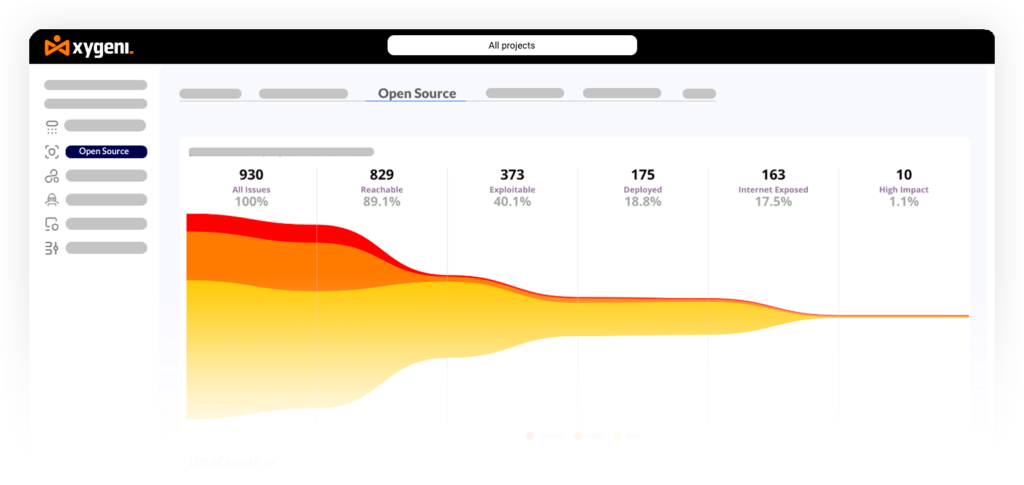
Xygeni’s ASPM platform combines SAST, SCA, and DAST findings into a single prioritized risk view. Its Prioritization Funnel filters by reachability, exploitability, internet exposure, and business impact, so your team fixes the vulnerabilities that matter, not just the ones with the highest CVSS score.
Secure Dependencies Across Your Supply Chain
Xygeni’s SCA module actively scans dependencies for malware, typosquatting, and outdated components. The Malicious Code Digest tracks newly discovered malicious packages across npm, PyPI, Maven, and other registries every week — giving teams early warning before threats appear in public CVE databases.
Protect Your CI/CD Pipeline
Your CI/CD pipeline is critical to delivering software quickly and securely. Xygeni embeds security checks at every stage, blocking insecure configurations, ensuring encrypted data handling, and stopping vulnerabilities from reaching production.
Act Fast on Anomalies
Whether through the Xygeni Sensor for GitHub or webhook integrations, Xygeni raises instant alerts for unusual activity, giving you the tools to trace issues, mitigate risks, and prevent further damage—all from one dashboard.
Automate Vulnerability Fixes
Xygeni’s DevAI generates safe, context-aware fix pull requests directly inside your IDE and CI/CD pipeline, with remediation risk scoring to ensure fixes don’t introduce breaking changes.
Gain Full Supply Chain Visibility
Xygeni simplifies compliance and risk management with detailed SBOMs and vulnerability reports. This gives you full transparency over your software supply chain, making it easier to meet security requirements.
With Xygeni, you don’t have to choose between speed and security. It automates the tedious parts of GitHub security, answering the question “How do I know if Git Hub app is safe?” by providing real-time monitoring, vulnerability detection, and automated fixes. This allows you to focus on coding while knowing your software supply chain is protected.
So, How Safe is GitHub?
Securing GitHub manually- permissions, dependencies, pipeline configs, secrets, anomalous activity- is a full-time job. Xygeni automates all of it in one platform, giving your team real-time protection without slowing down development.
Frequently Asked Questions
Is GitHub safe to use in 2026?
GitHub as a platform is secure and backed by Microsoft’s security infrastructure. The risk comes from what runs inside repositories, malicious packages, over-privileged apps, exposed secrets, and compromised CI/CD workflows. With the right scanning and monitoring in place, GitHub is safe. Without it, every repository integration is a potential attack surface.
How do I know if a GitHub app is safe?
Check what permissions it requests during installation; legitimate apps request only what they need. Review the developer’s contribution history, responsiveness to issues, and changelog activity. Be especially cautious of apps requesting admin-level or organization-wide access.
How do I know if a GitHub repository is safe?
Look for active maintenance, recent commits, a clear license, responsive contributors, and a populated issues tab. Run the repository through an SCA scanner to check for known vulnerabilities and malicious dependencies. Avoid repos with obfuscated code, no documentation, or suspiciously fast release histories.
What are the biggest GitHub security risks in 2026?
The top risks are: malicious or compromised open-source dependencies, secrets accidentally committed to repositories, over-privileged GitHub Apps, compromised GitHub Actions in CI/CD pipelines, and supply chain attacks via typosquatted packages. All five require a combination of scanning, monitoring, and pipeline hardening to address.
How do I secure my GitHub CI/CD pipeline?
Scan all workflow YAML files for misconfigurations. Enforce least-privilege permissions on runners and secrets. Pin GitHub Actions to specific commit SHAs rather than mutable tags. Use anomaly detection to flag unexpected pipeline changes. Implement quality gates that block builds when security thresholds are exceeded.
Can Xygeni secure my GitHub environment automatically?
Yes. Xygeni integrates natively with GitHub via webhook and GitHub Actions to provide real-time permission monitoring, SCA and malware scanning, secrets detection with auto-revocation, CI/CD misconfiguration detection, anomaly alerting, and AI-powered fix PRs — all from a single platform.