






Application security has never been more important, and it has never covered more ground. Cyber threats are getting smarter and more frequent, and a growing share of them now target a layer traditional AppSec tools weren’t built to see: AI-generated code, AI coding assistants, and the dependencies they introduce. Organizations must protect their applications to keep sensitive data safe, maintain customer trust, and ensure business runs smoothly. With the right application security tools, teams can identify, fix, and manage risks at every stage of development and deployment, whether that risk was written by a human or suggested by an AI. In addition, application security testing tools make it possible to detect vulnerabilities early, prevent breaches, and keep security present throughout the entire software development lifecycle.
What Is Application Security?
Application security (AppSec) is the practice of protecting applications from design to deployment, ensuring they remain safe against security vulnerabilities that attackers can exploit. It covers all development processes, from writing the first line of code to running applications in production.
At its core, application security focuses on preventing risks such as data breaches, unauthorized access, and service disruptions. This includes web application security, mobile security, and cloud-native security.
Modern application security tools bring together several key features, such as code analysis to detect insecure patterns, dependency scanning to catch flaws in third-party libraries, and runtime monitoring to block suspicious behavior. These tools allow development and security teams to work together, reducing risk while keeping software delivery fast and reliable.
Common Application Security Threats
Applications face a wide range of security vulnerabilities that attackers can exploit. Some of the most common risks appear not only in code but also in configurations and external dependencies. According to the OWASP Top 10, these are among the most critical threats in web application security:
- SQL Injection → Attackers inject malicious queries into input fields to access or modify databases.
- Cross-Site Scripting (XSS) → Insecure handling of user input lets attackers run scripts in a user’s browser.
- Broken Authentication → Weak session management or poor password handling allows unauthorized access.
- Secrets Leaks → API keys, tokens, or credentials exposed in code or repositories can give direct system access.
- Misconfigurations → Incorrect cloud or server settings leave applications open to exploitation.
- Insecure Dependencies → Vulnerable open-source libraries compromise applications through the supply chain.
- AI-Generated and AI-Suggested Risk → AI coding assistants can hallucinate package names that attackers then register with malware (slopsquatting), or introduce vulnerable patterns in AI-generated code that pass a quick review.
These threats affect all stages of development processes, from writing code to deploying cloud-native applications. Therefore, protecting against them requires both secure coding practices and the use of specialized application security tools.
What Are Application Security Tools?
Application security tools are solutions that protect applications across the entire software development lifecycle. Their goal is to identify vulnerabilities, enforce secure configurations, and monitor for suspicious activity. Unlike general-purpose security software, these tools are specifically designed to safeguard application code, configurations, and third-party dependencies.
They work hand in hand with security frameworks such as OWASP and NIST, making sure that applications are built and deployed following industry best practices. By integrating directly into developer workflows and CI/CD pipelines, application security tools help teams detect risks early and maintain continuous protection from development to production.
Key Features of Application Security Tools
Modern application security tools share a set of key features that make them effective in protecting applications across the entire development lifecycle. These features ensure that teams can address security vulnerabilities quickly without slowing down delivery:
- Code Analysis → Scans source code and binaries to detect insecure coding patterns early in the development process.
- Vulnerability Detection → Identifies flaws in custom code, open-source dependencies, and configurations before attackers can exploit them.
- Secrets Management → Prevents the accidental exposure of credentials, API keys, and tokens in repositories or pipelines.
- Runtime Monitoring → Observes applications while they run to block suspicious actions such as unauthorized access attempts.
- CI/CD Integration → Embeds security checks directly into development processes, ensuring vulnerabilities are caught before reaching production.
- Compliance Support → Aligns with frameworks such as OWASP Top 10, NIST SSDF, and CIS benchmarks, helping teams meet regulatory and industry requirements.
- AI-Driven Triage → Applies AI-driven analysis to security findings, producing a verdict, urgency, and remediation complexity for each issue, so teams focus on genuinely exploitable risk instead of manually reviewing every alert.
Together, these key features make application security tools essential for web application security, mobile security, and cloud-native environments. They allow development and security teams to collaborate effectively, balancing fast delivery with strong protection.
Application Security Best Practices
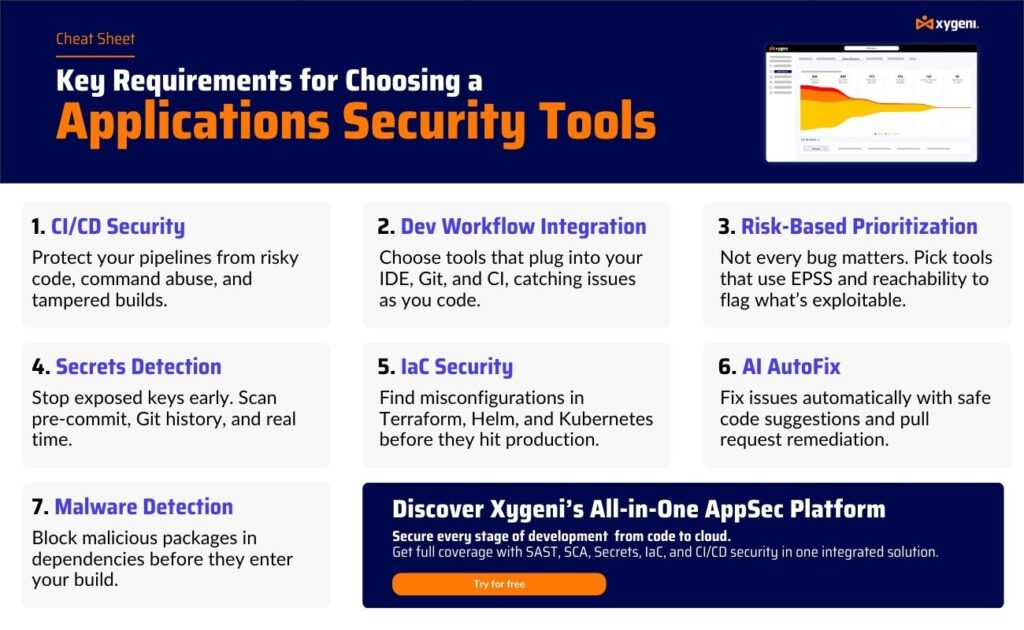
Knowing the risks and tools is important, but strong security also depends on following consistent best practices throughout all development processes. These practices reduce exposure to security vulnerabilities and strengthen both web application security and cloud-native environments.
- Shift Left Security → Apply testing and code analysis early in the development cycle to detect issues before they become costly.
- Secure Coding Standards → Train developers to follow safe patterns and avoid common pitfalls such as SQL injection or improper input handling.
- Regular Dependency Scans → Continuously monitor open-source libraries with software composition analysis (SCA) to prevent supply chain attacks.
- Secrets Protection → Use secrets detection tools and centralized vaults to avoid exposing credentials in repositories or CI/CD pipelines.
- CI/CD Guardrails → Automate checks in pipelines to block risky builds, enforce signed configurations, and stop deployments with critical vulnerabilities.
- Continuous Monitoring → Combine runtime protection with anomaly detection to catch suspicious activity once applications are in production.
- Compliance Alignment → Follow frameworks like OWASP Top 10, NIST SSDF, and CIS benchmarks to meet industry and regulatory requirements.
- AI Asset Visibility → Inventory the AI models, agents, and MCP connections running across your SDLC, and apply the same review to AI-generated code and AI-introduced dependencies as to human-written code.
By combining these best practices with the right mix of application security tools, organizations can prevent breaches, protect sensitive data, and keep development fast without sacrificing security.
Key Types of Application Security Tools
Runtime Application Self-Protection (RASP)
RASP tools are embedded in applications and monitor them during live use. They analyze inputs, outputs, and runtime behavior to detect malicious activity.
- How it works: RASP intercepts requests and inspects execution paths. If it sees unauthorized data access or abnormal behavior, it blocks the action immediately.
- Benefits: Provides real-time defense against zero-day vulnerabilities, insider threats, and injection attacks. It also helps meet compliance frameworks such as DORA.
- Limitations: RASP protects running applications but does not prevent insecure code from being written in the first place.
Secrets Detection and Management
Secrets detection tools scan repositories, pipelines, and build artifacts for exposed credentials such as API keys, database passwords, or tokens.
- How it works: They flag hardcoded secrets or accidental leaks in Git history and alert developers to remove or rotate them.
- Benefits: Reduce the risk of credential theft, prevent unauthorized access, and support compliance with CIS benchmarks.
- Limitations: Focus only on sensitive data exposure and cannot address broader code or dependency flaws.
Cloud Security Posture Management (CSPM)
CSPM tools focus on securing cloud-native applications by detecting misconfigurations and enforcing policies.
- How it works: They scan infrastructure and cloud resources, checking permissions, storage settings, and network rules.
- Benefits: Helps teams avoid common risks such as open S3 buckets or overly permissive IAM roles, while aligning with OWASP Top 10 cloud risks.
- Limitations: They secure infrastructure configurations but cannot analyze application code.
AI Security Posture Management (AI-SPM)
AI-SPM tools focus specifically on the AI layer of modern applications: the models, agents, and MCP connections that traditional AppSec tools don’t inventory.
- How it works: Continuously discovers AI assets across the SDLC and correlates them with the risk they introduce, from AI-generated code to AI-suggested dependencies.
- Benefits: Closes the exact blind spot exploited by AI-specific supply chain attacks, such as slopsquatting, and gives teams a living inventory (AI-BOM) of what AI is actually running.
- Limitations: AI-SPM secures the AI layer specifically and works best alongside traditional SAST, DAST, and SCA rather than replacing them.
What Are Application Security Testing Tools?
Application security testing tools (ASTTs) evaluate applications for vulnerabilities during development and testing. Unlike ongoing protection tools, they focus on catching issues before deployment, reducing the chance of risk in production environments.
Key Types of Application Security Testing Tools
Static Application Security Testing (SAST)
SAST tools analyze source code, bytecode, or binaries without executing them.
- How it works: Scans code for insecure patterns, such as SQL injection or hardcoded credentials, while developers are still coding.
- Benefits: Detects vulnerabilities early, reduces fix costs, and supports OWASP secure coding practices.
- Limitations: May generate false positives and cannot detect runtime vulnerabilities.
For more details, see our comparison of SAST vs SCA.
Dynamic Application Security Testing (DAST)
DAST tools simulate real-world attacks on a running application, without needing access to the source code.
- How it works: Interacts with the application externally, probing endpoints and analyzing responses.
- Benefits: Detects runtime flaws such as misconfigurations, authentication issues, or injection risks. Recommended by NIST as part of a robust security process.
- Limitations: Does not map findings directly to code lines, which may slow remediation.
For more details, see our comparison of SAST vs DAST.
Software Composition Analysis (SCA)
SCA tools address risks in open-source components, which power most applications today.
- How it works: Scans dependencies and manifests (e.g.,
package.json,requirements.txt) to detect known vulnerabilities and license issues. - Benefits: Protects against supply chain threats, ensures license compliance, and supports frameworks such as NIST SSDF.
- Limitations: Focuses only on third-party libraries and does not analyze custom application code.
Interactive Application Security Testing (IAST)
IAST tools combine the strengths of SAST and DAST during runtime in a test environment.
- How it works: Instruments the application, tracks how data flows, and validates vulnerabilities in context.
- Benefits: Offers more accurate results, fewer false positives, and faster feedback for developers.
- Limitations: Requires a test environment and can introduce runtime overhead during testing.
Comparison of Application Security Tools and Testing Tools
| Tool | Purpose | Key Benefits | Limitations |
|---|---|---|---|
| RASP | Monitors applications in real time during execution. | Blocks zero-day attacks and suspicious actions, adds runtime defense. | Only protects at runtime, does not prevent coding flaws earlier. |
| Secrets Detection | Finds sensitive data like API keys and passwords in codebases. | Prevents credential leaks, ensures compliance with CIS benchmarks. | Focused on secrets only, does not fix broader code vulnerabilities. |
| CSPM | Scans and manages cloud configurations. | Detects misconfigurations, enforces OWASP Top 10 standards. | Limited to cloud resources, does not cover application logic. |
| SAST | Analyzes source code or binaries without executing them. | Detects issues early in development, supports secure coding practices. | May generate false positives, no visibility into runtime issues. |
| DAST | Simulates attacks on running applications. | Finds runtime vulnerabilities, works without source code. | Does not map directly to code lines, less useful for fixing at source. |
| SCA | Scans open-source dependencies for vulnerabilities and risks. | Protects supply chain, ensures license and compliance management. | Limited to third-party components, not custom application code. |
| IAST | Combines static and dynamic testing in test environments. | Validates vulnerabilities in context, reduces false positives. | Requires runtime test setup, may impact performance during testing. |
| AI-SPM | Discovers and secures AI models, agents, and MCP connections. | Closes AI-specific blind spots (slopsquatting, hallucinated dependencies), produces an AI-BOM. | Focused on the AI layer; works best combined with SAST/DAST/SCA. |
Bringing It All Together: Selecting the Right Application Security Tools
Each of the application security tools and application security testing tools listed above plays a specific role. For example, SAST helps developers find coding flaws early, while DAST simulates attacks on running applications. SCA focuses on open-source risks, and RASP provides live protection in production. Secrets detection protects credentials, and CSPM secures cloud environments.
However, these application security testing tools and runtime protection tools also come with limitations. Some generate too many false positives, others focus only on runtime, and many operate in silos without integration into modern development processes. This fragmentation makes it difficult for teams to maintain visibility, prioritize issues, and keep pace with fast release cycles.
Therefore, building a strong security posture requires combining multiple solutions into a cohesive strategy. Organizations that integrate application security testing tools with runtime protection, secrets management, and cloud security achieve a more complete defense against security vulnerabilities across the software development lifecycle.
At the same time, managing a patchwork of tools increases complexity and cost. This is why many teams are moving toward all-in-one platforms that unify these capabilities, provide consistent reporting, and fit directly into CI/CD pipelines.
Why Choose Xygeni for Your Application Security Needs?
Xygeni goes beyond point solutions by offering an all-in-one Application Security Platform that unifies every tool teams need to secure their applications from development to production. Instead of managing fragmented solutions, Xygeni brings them together in one place:
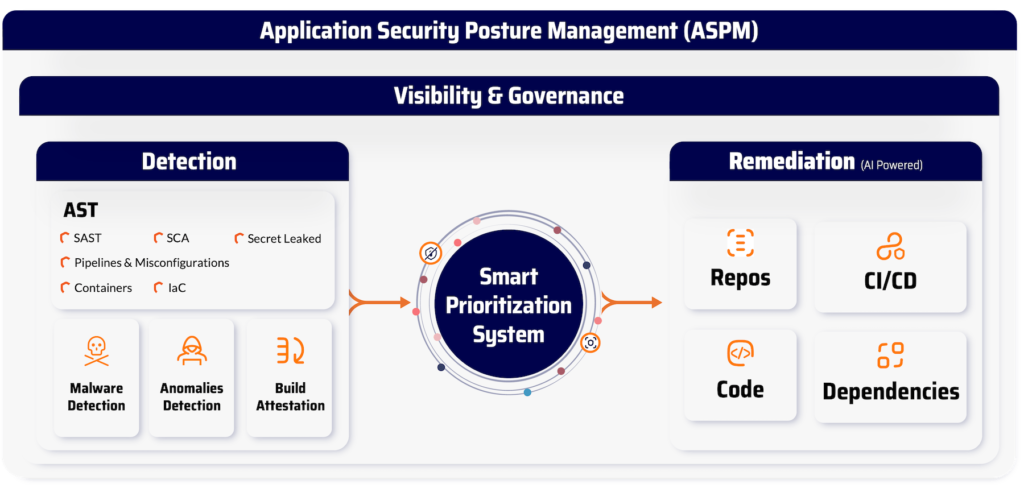
- Static and Dynamic Scans → Native SAST, DAST, and IAST scanning built into development workflows.
- Software Supply Chain Protection → Continuous SCA for open-source dependencies, with exploitability insights and reachability analysis.
- Secrets Security → Advanced detection and management of credentials across repositories and pipelines.
- Runtime Protection → RASP and anomaly detection to stop suspicious behavior in real time.
- Cloud Security → CSPM to identify misconfigurations and secure cloud-native environments.
- AI Security → AI Inventory and AI Triage map every AI model, agent, and MCP connection across the SDLC, and apply AI-driven verdict, urgency, and complexity scoring to findings, so AI-generated code gets the same scrutiny as anything else in the pipeline.
What makes Xygeni stand out is not just coverage, but also how it works:
- Native Scanning → Built directly into developer workflows and CI/CD pipelines, no patchwork integrations required.
- Prioritization Funnel → Focuses teams on the risks that truly matter by filtering vulnerabilities based on reachability and exploitability.
- Guardrails → Automatically enforce security policies, breaking risky builds before they reach production.
- Unified Dashboard → Provides a single source of truth for vulnerabilities, misconfigurations, and threats across the software development lifecycle.
With Xygeni, development and security teams gain the power to identify, prioritize, and remediate security vulnerabilities quickly while keeping productivity high. It is not just a collection of tools, but a platform designed to protect modern applications end to end.
Frequently Asked Questions (FAQ)
What is application security testing tools?
Application security testing tools (ASTTs) are software solutions that analyze applications to detect security vulnerabilities before deployment. They include SAST, DAST, SCA, and IAST, each focusing on different stages of development. Their goal is to help developers and security teams find and fix weaknesses early in the lifecycle.
What tool is recommended for application security testing?
The right tool depends on your environment and needs. SAST is recommended for catching insecure code during development, while DAST is ideal for runtime testing. Many organizations combine both with SCA for supply chain security to achieve complete coverage.
Is a web application assessment a security tool?
A web application assessment is not a tool itself but a process that uses application security testing tools to evaluate risks. It usually involves running SAST, DAST, and manual reviews to uncover vulnerabilities in web applications. The goal is to strengthen web application security by finding flaws before attackers do.
What’s the best dynamic application security testing tool for cloud?
The best DAST tool for cloud-native environments is one that integrates seamlessly into CI/CD pipelines and scales with containerized deployments. Modern DAST solutions can scan APIs, microservices, and serverless applications in real time. The key is choosing a tool that provides actionable insights without slowing cloud development processes.
What tool is recommended for enterprise application security testing?
Enterprises usually adopt a mix of application security testing tools (SAST, DAST, SCA, and IAST) to cover different stages of the lifecycle. The recommended approach is to select solutions that integrate into CI/CD pipelines, provide accurate results with low false positives, and scale across multiple applications.
Does application security cover AI-generated code and AI coding tools?
Increasingly, yes. AI-SPM tools discover and secure the AI models, agents, and MCP connections now running across the SDLC, while AI Triage applies AI-driven analysis to findings so both AI-generated code and traditional application code get evaluated with the same rigor.

