
AI agent security is no longer about what a model says. It’s about what an agent does: the tools it calls, the data it reads, the credentials it holds, and the packages it installs on its own.
And most teams can’t answer the first question: which agents are we actually running? They live in repositories as LangChain graphs, MCP servers, SKILL.md files, and AI coding tools that individual developers configured on a Friday afternoon. Nobody reviewed them, and a malicious skill is just plain text
TL;DR
AI agent security in four steps: see it, score it, secure the loop, guard the installs
You can't secure agents you can't see. AI agent security starts with an inventory of every agent, MCP server, skill, model and AI coding tool in your code.
- Risk in how agents are built: prompts that concatenate user input, tool-calling agents with no guardrails, over-privileged credentials and skills with hidden instructions. Most of it is visible in code, before deploy, and maps to the OWASP Top 10 for Agentic Applications.
- Security inside the loop: coding agents need security inside their loop, so they scan and fix what they write before it's committed, not weeks later in a ticket.
- Guard the installs: agents install dependencies too. Malware detection that works before a signature exists covers malicious packages whoever installs them, a developer or an agent.
- One workflow: AI findings go through the same triage, tickets and reports as the rest of your AppSec findings.
The first step: build an inventory of the AI in your repositories, export it as an AI-BOM, then gate new agent code in CI.
Why AI agent security is a different problem
An LLM feature returns text, and a human decides what to do with it. An agent closes that loop on its own: it plans, calls tools, reads web pages, emails and documents, writes files, and runs commands. Every capability you give an agent is a capability an attacker can borrow.
OWASP made the same distinction. The OWASP Top 10 for Agentic Applications 2026 (ASI01 to ASI10) builds on the OWASP Top 10 for LLM Applications: the LLM list covers what a model says; the agentic list covers what an agent does.
Most organizations now run two kinds of agents:
- Agents you build into your applications: support assistants, internal copilots and workflows built with frameworks like LangChain, LangGraph, CrewAI, AutoGen, Semantic Kernel or LlamaIndex, often connected to tools through MCP servers.
- AI coding agents your developers use: Claude Code, Cursor, GitHub Copilot, Windsurf, and others, which write code, edit configuration, and add dependencies.
AI agent security has to cover both, because both act with your permissions.
Step 1: inventory every agent, MCP server, and skill
AI agent security starts with a question board, and auditors now ask: what AI are we running? Xygeni AI Security answers it from the source: code, configuration, manifests, and dependencies.
It discovers models, agents and agent servers, AI frameworks, MCP servers and their tools, skills (SKILL.md, AGENTS.md), prompts, guardrails, vector stores, datasets, inference endpoints and the AI coding tools configured in your repositories. It also maps how they connect: which agent uses which model, executes which tools, and invokes which MCP servers.
The result is a living AI inventory, exportable as an AI-BOM in CycloneDX format, with a governance record per asset that includes an EU AI Act risk category field.
Want to see what AI is already in your code? Book a session with an engineer, and we’ll build the AI inventory of one of your repositories.
Step 2: catch the risks in how agents are built
Most agent vulnerabilities aren’t exotic. They’re a prompt built by string concatenation, a tool-calling agent with no input guardrail or a credential with far more scope than the agent needs. All of them leave fingerprints in code, so you can catch them in CI, before deployment.
AI agent risks you can catch in code
Each risk maps to the OWASP Top 10 for LLM Applications or its agentic companions, so findings speak the same language as your auditors.
| Risk | What it looks like in code | OWASP mapping |
|---|---|---|
| Prompt injection | System prompts that concatenate user content without role separation, delimiters or guardrails | LLM01 |
| Indirect injection | Tool-calling agents with no input guardrails, or agents that ingest web pages, emails or retrieved documents unsanitized | LLM01 |
| Unsafe output handling | Model output reaching eval or other dangerous sinks, traced across functions and files | LLM05 |
| Over-privileged agent identitiesNon-human identity abuse | Static long-lived credentials, shared credentials without scope narrowing, MCP or tool servers running with elevated privileges | ASI03 |
| Malicious or typosquatted skillsAgent skill supply chain | Hidden malicious directives in SKILL.md or AGENTS.md, skill names that impersonate known skills or integrations | Agentic Skills Top 10 |
| Secrets in prompts | Credentials stored inside prompt files | LLM07 |
Every finding carries its OWASP LLM Top 10 category, plus OWASP Agentic Applications and Agentic Skills tags where they apply, and the red-team attack vectors involved.
Skills deserve special attention because a malicious instruction in a skill file is prose, not code, and no signature can see it. An opt-in AI review judges the intent of flagged skill and agent instruction files with a versioned, deterministic setup, so the same file always gets the same verdict. It can run on your own self-hosted model, so code and prompts don’t have to leave your environment. A skill-level score then fuses those signals into one answer: safe, caution or do not install.
Go deeper: watch our session Blast Radius: When the Agent Touches What You Didn’t Ask For, on what happens when an agent’s permissions reach further than its task.
Step 3: put security inside the coding agent’s loop
AI coding agents write and commit code faster than anyone can review it. A finding that arrives in a ticket two weeks later rarely gets fixed. The fix has to happen while the agent is still working.
The Xygeni MCP Server runs locally and works with any AI coding agent that supports MCP, whatever model it runs on. The agent can scan the code it just wrote, list the new issues, get AI Triage verdicts and request fixes for SAST and SCA findings. It iterates until the change is clean, before anything is committed, with the approvals your team sets.
It uses the same engines, policies and mute rules as your pipeline, so the agent and your CI never disagree. For the developers working alongside the agent, the IDE plugins bring the same findings and fixes into the editor.
Step 4: guard what agents install
An AI coding agent can add a dependency on its own, and it won’t stop to check whether a brand-new package with a familiar name is legitimate. Attackers know this, and the open-source registries are where they wait.
Malware Defense flags malicious packages before a signature exists, whoever installs them, a developer or an agent. On the developer’s machine, Shield enforces policy before anything runs: a minimum age for new packages, coverage for IDE extensions and plugins, blocking of malicious indicators and risky geographies, and endpoint isolation when a machine needs to be contained.
Want to go deeper?
A flaw in the handler and the exposed endpoint that reaches it are one problem, with one owner. And if you already run another DAST tool, Xygeni imports its results into the same risk view, without asking you to replace it.
Want to see both layers working together? Watch our session From Code to Runtime: Why SAST + DAST Are Both Essential for Modern AppSec, where we walk through how code findings and runtime tests confirm each other.
One workflow, not another console
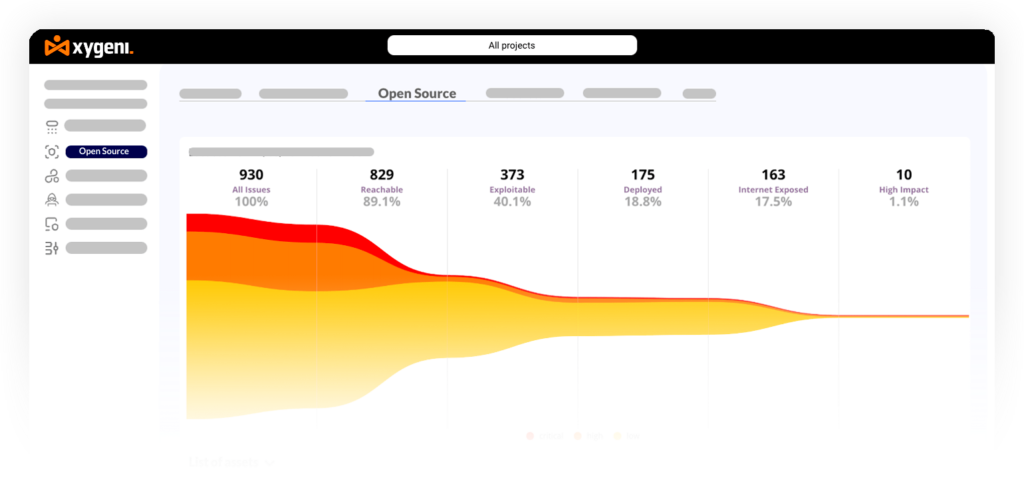
AI agent security fails when it becomes a separate tool with its own queue. In Xygeni, AI findings go through the same funnel, AI Triage, tickets and reports as the rest of your findings. AI Remediation gives context-aware fix guidance for all ten OWASP LLM categories, and ASPM puts AI risk next to code, dependency and pipeline risk in one view.
AI agent security and compliance
Regulators, auditors and customers increasingly ask for an inventory of the AI you run and how its risk is classified. The EU AI Act and ISO/IEC 42001 both push in that direction, and an AI-BOM is becoming a standard item in procurement questionnaires.
An AI inventory with a risk category field per asset gives your governance team the evidence base for that work. It supports EU AI Act readiness; it is not a conformity assessment, and it doesn’t replace your legal review.
or mid-sized teams is simple:
- On every pull request: API Security in CI on the changed code, plus incremental DAST scans.
- Before commit: as a pre-commit gate on staged files.
- Nightly or on merge: a full DAST scan.
- Before each major release: AI Pentesting against staging to validate the backlog and confirm each fix closed the hole.
The API Security scanner runs anywhere, including air-gapped environments, and reports to Xygeni SaaS or your on-premises platform. Results come out as JSON, SARIF 2.1.0, CSV, and Markdown for pull request comments.
API security testing and compliance
For teams in banking, insurance, or the public sector, API security testing is also evidence. Every finding carries compliance tags for GDPR Article 32, PCI DSS 4.0 (requirements 3.4, 6.4.3, 7.1, 7.2 and 8) and NIST SP 800-53 (AC-3, AC-6, IA-2, IA-5), visible in the platform and in JSON and SARIF output.
If your organization falls under DORA or NIS2, runtime testing gives you continuous evidence between the manual pentests your regulators still require.
How to implement AI agent security in 7 steps
Here is the practical checklist, in the order that gets AI agent security working fastest in a real development team.
- Discover
Inventory every AI asset in your repositories
Scan all repositories for agents, MCP servers, skills, models, prompts and AI coding tools, and export the result as an AI-BOM. This is your baseline, and the list every other step works from.
- Classify
Give each agent an owner and a risk level
For every agent, record who owns it, which data and tools it can reach, and its EU AI Act risk category. An agent nobody owns is an agent nobody will fix.
- Detect
Scan agent code in CI on every pull request
Run AI risk detection next to your other scans. Start in non-blocking mode to see the baseline, then block merges on Critical findings once teams have cleaned up.
- Review
Review skills before anyone installs them
Scan skill and agent instruction files such as
SKILL.mdandAGENTS.md, turn on AI intent review, and treat a "do not install" verdict as a hard stop. - Restrict
Shrink agent permissions
Replace static long-lived credentials with scoped ones, stop sharing credentials between agents, and never run MCP or tool servers with elevated privileges they don't need.
- Fix in the loop
Put security inside the coding agent's loop
Connect your AI coding agents to a security MCP server so they scan and fix their own code before it's committed, with the same policies as your pipeline.
- Protect
Guard what lands on developer machines
Enforce a minimum age for new packages, detect malicious packages before a signature exists, and cover IDE extensions and plugins, whoever installs them, a developer or an agent.
Then: route every finding into the same triage, ticketing and reporting workflow as the rest of your AppSec, so AI risk doesn't end up in a queue of its own.
You can’t secure an agent you’ve never met
AI agent security isn’t one more scanner. It’s knowing which agents you run, catching the risk in how they’re built, putting security inside the coding agent’s loop, and guarding what agents install. Start with the inventory: everything else depends on it.
Want to see every agent, MCP server, and skill in your code? Book a session with an engineer to build the AI inventory of your repositories and review its findings. Or start free with AI SAST, SCA, secrets detection, the IDE plugins and malware detection on open-source packages. No credit card.
AI agent security FAQs
How is AI agent security different from LLM security?
LLM security is about what a model says: leaked data, manipulated answers, unsafe output. AI agent security is about what an agent does with tools, memory, credentials, and other agents. That’s why OWASP publishes a separate Top 10 for Agentic Applications (ASI01 to ASI10) on top of the LLM Top 10.
How do I find the AI agents and MCP servers in my organization?
Start from the code. Xygeni AI Security discovers the agents, MCP servers, skills, models, prompts, and AI coding tools in your repositories, maps how they connect, and exports the result as an AI-BOM in CycloneDX format. It runs in CI next to your other scans.
Can a malicious skill or MCP server compromise my developers?
Yes: a skill’s instructions are plain text, and an agent will follow them with the developer’s permissions. Xygeni flags hidden malicious directives and impersonating skill names, can judge a skill’s intent with an opt-in AI review, and scores each skill as safe, caution, or do not install. Malware Defense and Shield cover the packages and extensions agents bring in.